当前位置:网站首页>flutter系列之:UI layout简介
flutter系列之:UI layout简介
2022-06-10 17:43:00 【InfoQ】
简介
flutter中layout的分类
- Align -- 用来对其包含在其中的组件进行对其操作。
- AspectRatio -- 对其中的组件进行比例缩放。
- Baseline -- 通过使用子组件的baseline来进行定位。
- Center -- 自组件位于中间。
- ConstrainedBox -- 类似于IOS中的constrain,表示子组件的限制条件。
- Container -- 一个常用的widget,可以用来包含多个其他的widget。
- CustomSingleChildLayout -- 将其单个子项的布局推迟。
- Expanded -- 将Row, Column 或者 Flex的child进行扩展。
- FittedBox -- 根据fit来缩放和定位其child。
- FractionallySizedBox -- 将child按照总可用空间进行调整。
- IntrinsicHeight -- 一个将其child调整为child固有高度的小部件。
- IntrinsicWidth -- 一个将其child调整为child固有宽度的小部件。
- LimitedBox -- 限制一个box的size。
- Offstage -- 将child放入render tree中,但是却并不触发任何重绘。
- OverflowBox -- 允许child覆盖父组件的限制。
- Padding -- 为child提供padding。
- SizedBox -- 给定size的box。
- SizedOverflowBox -- 可以覆盖父组件限制的box。
- Transform -- 子组件可以变换。
- Column -- 表示一列child。
- CustomMultiChildLayout -- 使用代理来定位和缩放子组件。
- Flow -- 流式布局。
- GridView -- 网格布局。
- IndexedStack -- 从一系列的child中展示其中的一个child。
- LayoutBuilder -- 可以依赖父组件大小的widget tree。
- ListBody -- 根据给定的axis来布局child。
- ListView -- 可滚动的列表。
- Row -- 表示一行child。
- Stack -- 栈式布局的组件。
- Table -- 表格形式的组件。
- Wrap -- 可以对子child进行动态调整的widget。
- CupertinoSliverNavigationBar -- 是一种IOS风格的导航bar。
- CustomScrollView -- 可以自定义scroll效果的ScrollView。
- SliverAppBar -- material风格的app bar,其中包含了CustomScrollView。
- SliverChildBuilderDelegate -- 使用builder callback为slivers提供child的委托。
- SliverChildListDelegate -- 使用list来为livers提供child的委托。
- SliverFixedExtentList -- 固定axis extent的sliver。
- SliverGrid -- child是二维分布的sliver。
- SliverList -- child是线性布局的sliver。
- SliverPadding -- 提供padding的sliver。
- SliverPersistentHeader -- 可变size的sliver。
- SliverToBoxAdapter -- 包含单个box widget的Sliver。
常用layout举例
class Row extends Flex {
 Row({
 Key? key,
 MainAxisAlignment mainAxisAlignment = MainAxisAlignment.start,
 MainAxisSize mainAxisSize = MainAxisSize.max,
 CrossAxisAlignment crossAxisAlignment = CrossAxisAlignment.center,
 TextDirection? textDirection,
 VerticalDirection verticalDirection = VerticalDirection.down,
 TextBaseline? textBaseline, // NO DEFAULT: we don't know what the text's baseline should be
 List<Widget> children = const <Widget>[],
 }) : super(
 children: children,
 key: key,
 direction: Axis.horizontal,
 mainAxisAlignment: mainAxisAlignment,
 mainAxisSize: mainAxisSize,
 crossAxisAlignment: crossAxisAlignment,
 textDirection: textDirection,
 verticalDirection: verticalDirection,
 textBaseline: textBaseline,
 );
}
class Column extends Flex {
 Column({
 Key? key,
 MainAxisAlignment mainAxisAlignment = MainAxisAlignment.start,
 MainAxisSize mainAxisSize = MainAxisSize.max,
 CrossAxisAlignment crossAxisAlignment = CrossAxisAlignment.center,
 TextDirection? textDirection,
 VerticalDirection verticalDirection = VerticalDirection.down,
 TextBaseline? textBaseline,
 List<Widget> children = const <Widget>[],
 }) : super(
 children: children,
 key: key,
 direction: Axis.vertical,
 mainAxisAlignment: mainAxisAlignment,
 mainAxisSize: mainAxisSize,
 crossAxisAlignment: crossAxisAlignment,
 textDirection: textDirection,
 verticalDirection: verticalDirection,
 textBaseline: textBaseline,
 );
}
class RowWidget extends StatelessWidget {
 @override
 Widget build(BuildContext context) {
 return Row(
 textDirection: TextDirection.ltr,
 children: [
 YellowBox(),
 YellowBox(),
 YellowBox(),
 ],
 );
 }
}
class YellowBox extends StatelessWidget {
 @override
 Widget build(BuildContext context) {
 return Container(
 width: 50,
 height: 50,
 decoration: BoxDecoration(
 color: Colors.yellow,
 border: Border.all(),
 ),
 );
 }
}
 Widget build(BuildContext context) {
 return Scaffold(
 appBar: AppBar(
 title: Text(widget.title),
 ),
 body: RowWidget()
 );
 }
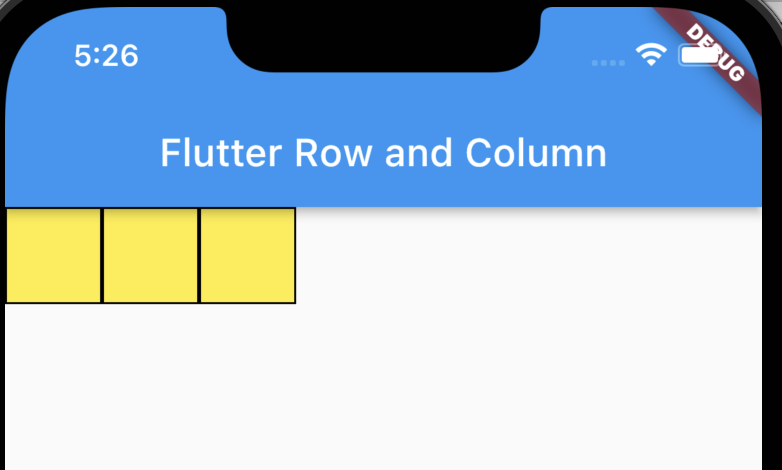
mainAxisAlignment: MainAxisAlignment.spaceEvenly

 return Row(
 textDirection: TextDirection.ltr,
 mainAxisAlignment: MainAxisAlignment.spaceEvenly,
 children: [
 YellowBox(),
 YellowBox(),
 Expanded(
 child: YellowBox(),
 )
 ],
 );

 const Expanded({
 Key? key,
 int flex = 1,
 required Widget child,
 }) : super(key: key, flex: flex, fit: FlexFit.tight, child: child);
children: [
 YellowBox(),
 YellowBox(),
 Expanded(
 flex:2,
 child: YellowBox(),
 )
 ],
 children: [
 Expanded(
 child: YellowBox(),
 ),
 Expanded(
 child: YellowBox(),
 ),
 Expanded(
 flex: 2,
 child: YellowBox(),
 )
 ],

children: [
 Expanded(
 child: YellowBox(),
 ),
 SizedBox(
 width: 100,
 ),
 Expanded(
 child: YellowBox(),
 ),
 Expanded(
 flex: 2,
 child: YellowBox(),
 )
 ],

 children: [
 Expanded(
 child: YellowBox(),
 ),
 Spacer(flex: 2),
 Expanded(
 child: YellowBox(),
 ),
 Expanded(
 flex: 2,
 child: YellowBox(),
 )
 ],

总结
边栏推荐
猜你喜欢

搭建在线帮助中心,轻松帮助客户解决问题

Win7系统下无法正常安装JLINK CDC UART驱动的问题解决

Canvas fire burning H5 animation JS special effects

将同一文件夹下的大量文件根据设定分至多组

LeetCode树经典题目(一)

Flutter在数字生活的发展与天翼云盘落地实践

How to locate the hot problem of the game

ZigBee模块无线传输星形拓扑组网结构简介

AOE network critical path
YML file configuration parameter definition dictionary and list
随机推荐
聊聊远程办公那些事儿,参与征文领稿费拿大奖!
AI 加持实时互动|ZegoAvatar 面部表情随动技术解析
盛最多水得容器
使用IdentityServer出现过SameSite Cookie这个问题吗?
Summary of all contents of cloud computing setup to ensure that a complete cloud computing server can be built, including node installation, instance allocation, network configuration, etc
正斜杠“/”、反斜杠“\、”转义字符“\”、文件路径分割符傻傻记不清楚
Detailed explanation of MySQL windowing function
Red vertical left side menu navigation code
LeetCode 255. 验证前序遍历序列二叉搜索树*
关于cmake和gcc的安装的记录
c语言---7 初识操作符
LeetCode树经典题目(一)
线性移动棋
Library for adding progress bar during training --tqdm
内存池原理一(基于整块)
Wireshark学习笔记(一)常用功能案例和技巧
CUDA realizes efficient search - failed audit?
Can the "no password era" that apple is looking forward to really come true?
Memory pool principle I (based on the whole block)
Abbexa丙烯酰胺-PEG-NHS说明书