当前位置:网站首页>Application practice | Apache Doris integrates iceberg + Flink CDC to build a real-time federated query and analysis architecture integrating lake and warehouse
Application practice | Apache Doris integrates iceberg + Flink CDC to build a real-time federated query and analysis architecture integrating lake and warehouse
2022-06-24 04:09:00 【SelectDB】
Application practice | Apache Doris Integrate Iceberg + Flink CDC Build a real-time federated query and analysis architecture integrating lake and warehouse
Reading guide : This is a very complete and comprehensive application of technology dry goods , Hands teach you how to use Doris+Iceberg+Flink CDC Build a real-time federated query and analysis architecture integrating lake and warehouse . Follow the steps in this article step by step , Fully experience the whole process of building operation .
author |Apache Doris PMC member Zhangjiafeng
1. overview
This tutorial will show you how to use Doris+Iceberg+Flink CDC Build a real-time federated query analysis of Lake warehouse integration ,Doris 1.1 Version provides Iceberg Support for , This article mainly shows Doris and Iceberg How do you use it? , At the same time, the entire environment of this tutorial is built based on the pseudo distributed environment , You can complete it step by step . Fully experience the whole process of building operation .
1.1 Software environment
The demonstration environment for this tutorial is as follows :
- Centos7
- Apahce doris 1.1
- Hadoop 3.3.3
- hive 3.1.3
- Fink 1.14.4
- flink-sql-connector-mysql-cdc-2.2.1
- Apache Iceberg 0.13.2
- JDK 1.8.0_311
- MySQL 8.0.29
wget https://archive.apache.org/dist/hadoop/core/hadoop-3.3.3/hadoop-3.3.3.tar.gzwget https://archive.apache.org/dist/hive/hive-3.1.3/apache-hive-3.1.3-bin.tar.gzwget https://dlcdn.apache.org/flink/flink-1.14.4/flink-1.14.4-bin-scala_2.12.tgzwget https://search.maven.org/remotecontent?filepath=org/apache/iceberg/iceberg-flink-runtime-1.14/0.13.2/iceberg-flink-runtime-1.14-0.13.2.jarwget https://repository.cloudera.com/artifactory/cloudera-repos/org/apache/flink/flink-shaded-hadoop-3-uber/3.1.1.7.2.9.0-173-9.0/flink-shaded-hadoop-3-uber-3.1.1.7.2.9.0-173-9.0.jar1.2 System architecture
We sort out the structure diagram as follows

- First we start with Mysql Use in data Flink adopt Binlog Complete real-time data collection
- And then again Flink Created in Iceberg surface ,Iceberg The metadata of is stored in hive in
- Finally, we Doris Created in Iceberg appearance
- Through Doris The unified query entry completes the query of Iceberg Query and analyze the data in , For front-end applications to call , here iceberg The data of appearance can be compared with Doris Internal data or Doris Data from other external data sources are analyzed by association query
Doris The federated query architecture of Lake warehouse integration is as follows :

- Doris adopt ODBC Mode support :MySQL,Postgresql,Oracle ,SQLServer
- Support at the same time Elasticsearch appearance
- 1.0 Versioning support Hive appearance
- 1.1 Versioning support Iceberg appearance
- 1.2 Versioning support Hudi appearance
2. Environment installation deployment
2.1 install Hadoop、Hive
tar zxvf hadoop-3.3.3.tar.gztar zxvf apache-hive-3.1.3-bin.tar.gzConfigure system environment variables
export HADOOP_HOME=/data/hadoop-3.3.3export HADOOP_CONF_DIR=$HADOOP_HOME/etc/hadoopexport HADOOP_HDFS_HOME=$HADOOP_HOMEexport HIVE_HOME=/data/hive-3.1.3export PATH=$PATH:$HADOOP_HOME/bin:$HIVE_HOME/bin:$HIVE_HOME/conf2.2 To configure hdfs
2.2.1 core-site.xml
vi etc/hadoop/core-site.xml
<configuration> <property> <name>fs.defaultFS</name> <value>hdfs://localhost:9000</value> </property></configuration>2.2.2 hdfs-site.xml
vi etc/hadoop/hdfs-site.xml
<configuration> <property> <name>dfs.replication</name> <value>1</value> </property> <property> <name>dfs.namenode.name.dir</name> <value>/data/hdfs/namenode</value> </property> <property> <name>dfs.datanode.data.dir</name> <value>/data/hdfs/datanode</value> </property> </configuration>2.2.3 modify Hadoop The startup script
sbin/start-dfs.sh
sbin/stop-dfs.sh
Add the following at the beginning of the file
HDFS_DATANODE_USER=rootHADOOP_SECURE_DN_USER=hdfsHDFS_NAMENODE_USER=rootHDFS_SECONDARYNAMENODE_USER=rootsbin/start-yarn.sh
sbin/stop-yarn.sh
Add the following at the beginning of the file
YARN_RESOURCEMANAGER_USER=rootHADOOP_SECURE_DN_USER=yarnYARN_NODEMANAGER_USER=root2.3 To configure yarn
Here I changed Yarn Some of the ports , Because I am a stand-alone environment and Doris Some port conflicts of . You can not start yarn
vi etc/hadoop/yarn-site.xml
<property> <name>yarn.resourcemanager.address</name> <value>jiafeng-test:50056</value> </property> <property> <name>yarn.resourcemanager.scheduler.address</name> <value>jiafeng-test:50057</value> </property> <property> <name>yarn.resourcemanager.resource-tracker.address</name> <value>jiafeng-test:50058</value> </property> <property> <name>yarn.resourcemanager.admin.address</name> <value>jiafeng-test:50059</value> </property> <property> <name>yarn.resourcemanager.webapp.address</name> <value>jiafeng-test:9090</value> </property> <property> <name>yarn.nodemanager.localizer.address</name> <value>0.0.0.0:50060</value> </property> <property> <name>yarn.nodemanager.webapp.address</name> <value>0.0.0.0:50062</value> </property>vi etc/hadoop/mapred-site.xm
<property> <name>mapreduce.jobhistory.address</name> <value>0.0.0.0:10020</value> </property> <property> <name>mapreduce.jobhistory.webapp.address</name> <value>0.0.0.0:19888</value> </property> <property> <name>mapreduce.shuffle.port</name> <value>50061</value> </property>2.2.4 start-up hadoop
sbin/start-all.sh2.4 To configure Hive
2.4.1 establish hdfs Catalog
hdfs dfs -mkdir -p /user/hive/warehousehdfs dfs -mkdir /tmphdfs dfs -chmod g+w /user/hive/warehousehdfs dfs -chmod g+w /tmp2.4.2 To configure hive-site.xml
<?xml version="1.0"?><?xml-stylesheet type="text/xsl" href="configuration.xsl"?><configuration> <property> <name>javax.jdo.option.ConnectionURL</name> <value>jdbc:mysql://localhost:3306/hive?createDatabaseIfNotExist=true</value> </property> <property> <name>javax.jdo.option.ConnectionDriverName</name> <value>com.mysql.jdbc.Driver</value> </property> <property> <name>javax.jdo.option.ConnectionUserName</name> <value>root</value> </property> <property> <name>javax.jdo.option.ConnectionPassword</name> <value>MyNewPass4!</value> </property> <property> <name>hive.metastore.warehouse.dir</name> <value>/user/hive/warehouse</value> <description>location of default database for the warehouse</description> </property> <property> <name>hive.metastore.uris</name> <value/> <description>Thrift URI for the remote metastore. Used by metastore client to connect to remote metastore.</description> </property> <property> <name>javax.jdo.PersistenceManagerFactoryClass</name> <value>org.datanucleus.api.jdo.JDOPersistenceManagerFactory</value> </property> <property> <name>hive.metastore.schema.verification</name> <value>false</value> </property> <property> <name>datanucleus.schema.autoCreateAll</name> <value>true</value> </property></configuration>2.4.3 To configure hive-env.sh
Add something
HADOOP_HOME=/data/hadoop-3.3.32.4.4 hive Metadata initialization
schematool -initSchema -dbType mysql2.4.5 start-up hive metaservice
Background operation
nohup bin/hive --service metaservice 1>/dev/null 2>&1 &verification
lsof -i:9083COMMAND PID USER FD TYPE DEVICE SIZE/OFF NODE NAMEjava 20700 root 567u IPv6 54605348 0t0 TCP *:emc-pp-mgmtsvc (LISTEN)2.5 install MySQL
Please refer to here for details :
Use Flink CDC Realization MySQL Data is entered in real time Apache Doris
2.5.1 establish MySQL Database tables and initialize data
CREATE DATABASE demo;USE demo;CREATE TABLE userinfo ( id int NOT NULL AUTO_INCREMENT, name VARCHAR(255) NOT NULL DEFAULT 'flink', address VARCHAR(1024), phone_number VARCHAR(512), email VARCHAR(255), PRIMARY KEY (`id`))ENGINE=InnoDB ;INSERT INTO userinfo VALUES (10001,'user_110','Shanghai','13347420870', NULL);INSERT INTO userinfo VALUES (10002,'user_111','xian','13347420870', NULL);INSERT INTO userinfo VALUES (10003,'user_112','beijing','13347420870', NULL);INSERT INTO userinfo VALUES (10004,'user_113','shenzheng','13347420870', NULL);INSERT INTO userinfo VALUES (10005,'user_114','hangzhou','13347420870', NULL);INSERT INTO userinfo VALUES (10006,'user_115','guizhou','13347420870', NULL);INSERT INTO userinfo VALUES (10007,'user_116','chengdu','13347420870', NULL);INSERT INTO userinfo VALUES (10008,'user_117','guangzhou','13347420870', NULL);INSERT INTO userinfo VALUES (10009,'user_118','xian','13347420870', NULL);2.6 install Flink
tar zxvf flink-1.14.4-bin-scala_2.12.tgzThen you need to copy the following dependencies to Flink Install under directory lib Under the table of contents , Specifically dependent on lib The documents are as follows :
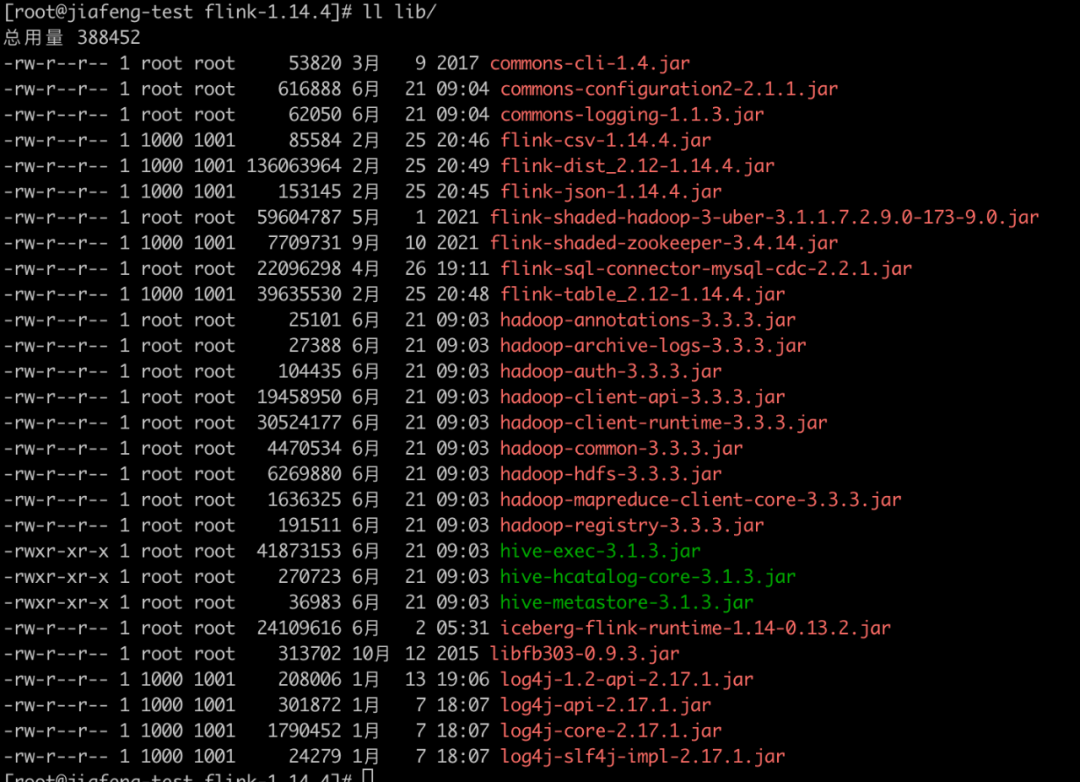
Here are a few Hadoop and Flink The dependent download addresses that are not available in the are listed below
wget https://repo1.maven.org/maven2/com/ververica/flink-sql-connector-mysql-cdc/2.2.1/flink-sql-connector-mysql-cdc-2.2.1.jarwget https://repo1.maven.org/maven2/org/apache/thrift/libfb303/0.9.3/libfb303-0.9.3.jarwget https://search.maven.org/remotecontent?filepath=org/apache/iceberg/iceberg-flink-runtime-1.14/0.13.2/iceberg-flink-runtime-1.14-0.13.2.jarwget https://repository.cloudera.com/artifactory/cloudera-repos/org/apache/flink/flink-shaded-hadoop-3-uber/3.1.1.7.2.9.0-173-9.0/flink-shaded-hadoop-3-uber-3.1.1.7.2.9.0-173-9.0.jarOther :
hadoop-3.3.3/share/hadoop/common/lib/commons-configuration2-2.1.1.jarhadoop-3.3.3/share/hadoop/common/lib/commons-logging-1.1.3.jarhadoop-3.3.3/share/hadoop/tools/lib/hadoop-archive-logs-3.3.3.jarhadoop-3.3.3/share/hadoop/common/lib/hadoop-auth-3.3.3.jarhadoop-3.3.3/share/hadoop/common/lib/hadoop-annotations-3.3.3.jarhadoop-3.3.3/share/hadoop/common/hadoop-common-3.3.3.jaradoop-3.3.3/share/hadoop/hdfs/hadoop-hdfs-3.3.3.jarhadoop-3.3.3/share/hadoop/client/hadoop-client-api-3.3.3.jarhive-3.1.3/lib/hive-exec-3.1.3.jarhive-3.1.3/lib/hive-metastore-3.1.3.jarhive-3.1.3/lib/hive-hcatalog-core-3.1.3.jar2.6.1 start-up Flink
bin/start-cluster.shThe interface after startup is as follows :

2.6.2 Get into Flink SQL Client
bin/sql-client.sh embedded 
Turn on checkpoint, every other 3 Do it every second checkpoint
Checkpoint Not on by default , We need to turn on Checkpoint To make the Iceberg You can commit a transaction . also ,mysql-cdc stay binlog Before the start of the reading phase , Need to wait for a complete checkpoint To avoid binlog Record the disorder .
Be careful :
Here is the demo environment ,checkpoint The interval setting of is relatively short , Use... Online , Recommended setting is 3-5 Minutes at a time checkpoint.
Flink SQL> SET execution.checkpointing.interval = 3s;[INFO] Session property has been set.2.6.3 establish Iceberg Catalog
CREATE CATALOG hive_catalog WITH ( 'type'='iceberg', 'catalog-type'='hive', 'uri'='thrift://localhost:9083', 'clients'='5', 'property-version'='1', 'warehouse'='hdfs://localhost:8020/user/hive/warehouse');see catalog
Flink SQL> show catalogs;+-----------------+| catalog name |+-----------------+| default_catalog || hive_catalog |+-----------------+2 rows in set2.6.4 establish Mysql CDC surface
CREATE TABLE user_source ( database_name STRING METADATA VIRTUAL, table_name STRING METADATA VIRTUAL, `id` DECIMAL(20, 0) NOT NULL, name STRING, address STRING, phone_number STRING, email STRING, PRIMARY KEY (`id`) NOT ENFORCED ) WITH ( 'connector' = 'mysql-cdc', 'hostname' = 'localhost', 'port' = '3306', 'username' = 'root', 'password' = 'MyNewPass4!', 'database-name' = 'demo', 'table-name' = 'userinfo' );Inquire about CDC surface :
select * from user_source;
2.6.5 establish Iceberg surface
--- see catalogshow catalogs;--- Use cataloguse catalog hive_catalog;-- Create database CREATE DATABASE iceberg_hive; -- Using a database use iceberg_hive;2.6.5.1 Create table
CREATE TABLE all_users_info ( database_name STRING, table_name STRING, `id` DECIMAL(20, 0) NOT NULL, name STRING, address STRING, phone_number STRING, email STRING, PRIMARY KEY (database_name, table_name, `id`) NOT ENFORCED ) WITH ( 'catalog-type'='hive' );from CDC Insert data into the table Iceberg table
use catalog default_catalog;insert into hive_catalog.iceberg_hive.all_users_info select * from user_source;stay web The running status of the task can be seen in the interface

Then stop the task , Let's check iceberg surface
select * from hive_catalog.iceberg_hive.all_users_infoYou can see the following results

Let's go to the hdfs You can see up here hive The data under the directory and the corresponding metadata
We can also pass Hive finish building Iceberg surface , And then through Flink Insert data into table
download Iceberg Hive Operational dependency
wget https://repo1.maven.org/maven2/org/apache/iceberg/iceberg-hive-runtime/0.13.2/iceberg-hive-runtime-0.13.2.jarstay hive shell perform :
SET engine.hive.enabled=true; SET iceberg.engine.hive.enabled=true; SET iceberg.mr.catalog=hive; add jar /path/to/iiceberg-hive-runtime-0.13.2.jar;Create table
CREATE EXTERNAL TABLE iceberg_hive( `id` int, `name` string)STORED BY 'org.apache.iceberg.mr.hive.HiveIcebergStorageHandler' LOCATION 'hdfs://localhost:8020/user/hive/warehouse/iceber_db/iceberg_hive'TBLPROPERTIES ( 'iceberg.mr.catalog'='hadoop', 'iceberg.mr.catalog.hadoop.warehouse.location'='hdfs://localhost:8020/user/hive/warehouse/iceber_db/iceberg_hive' ); And then again Flink SQL Client Next, execute the following statement to insert data into Iceber table
INSERT INTO hive_catalog.iceberg_hive.iceberg_hive values(2, 'c');INSERT INTO hive_catalog.iceberg_hive.iceberg_hive values(3, 'zhangfeng');Query this table
select * from hive_catalog.iceberg_hive.iceberg_hiveYou can see the following results

3. Doris Inquire about Iceberg
Apache Doris Provides Doris Direct access Iceberg The ability of external tables , The external table eliminates the tedious data import work , With the help of Doris Of itself OLAP The ability to solve Iceberg Table data analysis problem :
- Support Iceberg Data source access Doris
- Support Doris And Iceberg Table union query in data source , Perform more complex analysis operations
3.1 install Doris
Here we will not explain in detail Doris Installation , If you don't know how to install Doris Please refer to the official documents : Quick start
3.2 establish Iceberg appearance
CREATE TABLE `all_users_info` ENGINE = ICEBERGPROPERTIES ("iceberg.database" = "iceberg_hive","iceberg.table" = "all_users_info","iceberg.hive.metastore.uris" = "thrift://localhost:9083","iceberg.catalog.type" = "HIVE_CATALOG");Parameter description :
ENGINE It needs to be specified as ICEBERG
PROPERTIES attribute :
iceberg.hive.metastore.uris:Hive Metastore Service addressiceberg.database: mount Iceberg Corresponding database nameiceberg.table: mount Iceberg Corresponding table name , mount Iceberg database No need to specify when .iceberg.catalog.type:Iceberg Used in catalog The way , The default isHIVE_CATALOG, Currently, only this method is supported , More... Will be supported in the future Iceberg catalog Access mode .
mysql> CREATE TABLE `all_users_info` -> ENGINE = ICEBERG -> PROPERTIES ( -> "iceberg.database" = "iceberg_hive", -> "iceberg.table" = "all_users_info", -> "iceberg.hive.metastore.uris" = "thrift://localhost:9083", -> "iceberg.catalog.type" = "HIVE_CATALOG" -> );Query OK, 0 rows affected (0.23 sec)mysql> select * from all_users_info;+---------------+------------+-------+----------+-----------+--------------+-------+| database_name | table_name | id | name | address | phone_number | email |+---------------+------------+-------+----------+-----------+--------------+-------+| demo | userinfo | 10004 | user_113 | shenzheng | 13347420870 | NULL || demo | userinfo | 10005 | user_114 | hangzhou | 13347420870 | NULL || demo | userinfo | 10002 | user_111 | xian | 13347420870 | NULL || demo | userinfo | 10003 | user_112 | beijing | 13347420870 | NULL || demo | userinfo | 10001 | user_110 | Shanghai | 13347420870 | NULL || demo | userinfo | 10008 | user_117 | guangzhou | 13347420870 | NULL || demo | userinfo | 10009 | user_118 | xian | 13347420870 | NULL || demo | userinfo | 10006 | user_115 | guizhou | 13347420870 | NULL || demo | userinfo | 10007 | user_116 | chengdu | 13347420870 | NULL |+---------------+------------+-------+----------+-----------+--------------+-------+9 rows in set (0.18 sec)3.3 Synchronous mount
When Iceberg surface Schema When there is a change , Can pass REFRESH Command manual synchronization , The order will Doris Medium Iceberg Appearance delete rebuild .
-- Sync Iceberg surface REFRESH TABLE t_iceberg;-- Sync Iceberg database REFRESH DATABASE iceberg_test_db;3.4 Doris and Iceberg Data type correspondence
Supported by Iceberg The column type is the same as Doris The corresponding relationship is as follows :
| ICEBERG | DORIS | describe |
|---|---|---|
| BOOLEAN | BOOLEAN | |
| INTEGER | INT | |
| LONG | BIGINT | |
| FLOAT | FLOAT | |
| DOUBLE | DOUBLE | |
| DATE | DATE | |
| TIMESTAMP | DATETIME | Timestamp Turn into Datetime Loss of accuracy |
| STRING | STRING | |
| UUID | VARCHAR | Use VARCHAR Instead of |
| DECIMAL | DECIMAL | |
| TIME | - | I won't support it |
| FIXED | - | I won't support it |
| BINARY | - | I won't support it |
| STRUCT | - | I won't support it |
| LIST | - | I won't support it |
| MAP | - | I won't support it |
3.5 matters needing attention
- Iceberg surface Schema change It won't automatically synchronize , Need to be in Doris Pass through
REFRESHCommand synchronization Iceberg Appearance or database . - Currently supported by default Iceberg Version is 0.12.0,0.13.x, Not tested in other versions . More versions are supported in the future .
3.6 Doris FE To configure
The following configurations belong to Iceberg External system level configuration , It can be modified by fe.conf To configure the , It can also be done through ADMIN SET CONFIG To configure the .
iceberg_table_creation_strict_modeestablish Iceberg The table is enabled by default strict mode. strict mode It means right Iceberg The column types of the table are strictly filtered , If there is Doris Currently unsupported data types , Failed to create the appearance .
iceberg_table_creation_interval_secondAutomatically create Iceberg The background task execution interval of the table , The default is 10s.
max_iceberg_table_creation_record_sizeIceberg Maximum value of table creation record retention , The default is 2000. Only for creating Iceberg Database records .
4. summary
here Doris On Iceberg We only demonstrated Iceberg Single table query , You can also associate Doris Table of , Or something ODBC appearance ,Hive appearance ,ES Conduct joint query and analysis for appearance, etc , adopt Doris Provide a unified query and analysis portal for external users .
Since then, we have completely built Hadoop,hive、flink 、Mysql、Doris And Doris On Iceberg The introduction to the use of ,Doris Towards the architecture of data warehouse and data fusion , Support the federated query of Lake warehouse integration , Bring more convenience to our development , More efficient development , It saves a lot of tedious work of data synchronization , Come and experience it . Last , Welcome more open source technology enthusiasts to join us Apache Doris Community , Grow up hand in hand , Build community ecology .



SelectDB Is an open source technology company , Committed to Apache Doris The community provides a full-time engineer 、 A team of product managers and support engineers , Prosper the open source community ecology , Create an international industry standard in the field of real-time analytical databases . be based on Apache Doris R & D of a new generation of cloud native real-time data warehouse SelectDB, Running on multiple clouds , Provide users and customers with out of the box capability .
Related links :
SelectDB Official website :
https://selectdb.com (We Are Coming Soon)
Apache Doris Official website :
Apache Doris Github:
https://github.com/apache/doris
Apache Doris Developer mail group :

边栏推荐
- From virtual to real, digital technology makes rural funds "live"
- 15+城市道路要素分割应用,用这一个分割模型就够了
- Web penetration test - 5. Brute force cracking vulnerability - (3) FTP password cracking
- Koom of memory leak
- What should I pay attention to when choosing a data center?
- Brief ideas and simple cases of JVM tuning - how to tune
- Getlocationinwindow source code
- Black hat SEO practice: General 301 weight PR hijacking
- How to monitor the operation of easygbs service in real time?
- 多任务视频推荐方案,百度工程师实战经验分享
猜你喜欢

黑帽SEO实战搜索引擎快照劫持

mysql - sql执行过程

On game safety (I)

openEuler社区理事长江大勇:共推欧拉开源新模式 共建开源新体系

一次 MySQL 误操作导致的事故,「高可用」都顶不住了!

Common content of pine script script

ModStartCMS 企业内容建站系统(支持 Laravel9)v4.2.0
An accident caused by a MySQL misoperation, and the "high availability" cannot withstand it!
![[Numpy] Numpy对于NaN值的判断](/img/aa/dc75a86bbb9f5a235b1baf5f3495ff.png)
[Numpy] Numpy对于NaN值的判断

openGauss 3.0版本源码编译安装指南
随机推荐
LeetCode 1281. Difference of sum of bit product of integer
Prometheus pushgateway
Can the video streams of devices connected to easygbs from the intranet and the public network go through their respective networks?
Hprof information in koom shark with memory leak
Troubleshoot the high memory consumption of Go program
黑帽实战SEO之永不被发现的劫持
Black hat actual combat SEO: never be found hijacking
[new light weight first purchase special] 1-core 2g5m light weight application server costs 50 yuan in the first year. It is cost-effective and helps you get on the cloud easily!
Installation of pytorch in pycharm
What is FTP? How does the ECS open the FTP protocol?
well! Do you want to have a romantic date with the shining "China Star"?
Go operation mongodb
C language - number of bytes occupied by structure
flutter系列之:flutter中的offstage
What is pseudo static? How to configure the pseudo static server?
Web penetration test - 5. Brute force cracking vulnerability - (4) telnet password cracking
Several good books for learning data
Psexec right raising
Student information management system user manual
Go language Chanel memory model