当前位置:网站首页>Kubeadm create kubernetes cluster
Kubeadm create kubernetes cluster
2022-06-27 00:01:00 【Jiangxiaonan】
kubeadm Create clusters
We use “ Public cloud - Qingyun ” The server provided as today's demo operation . Prepare three machines , One master node , Two work nodes , The security group and VPC Set up .
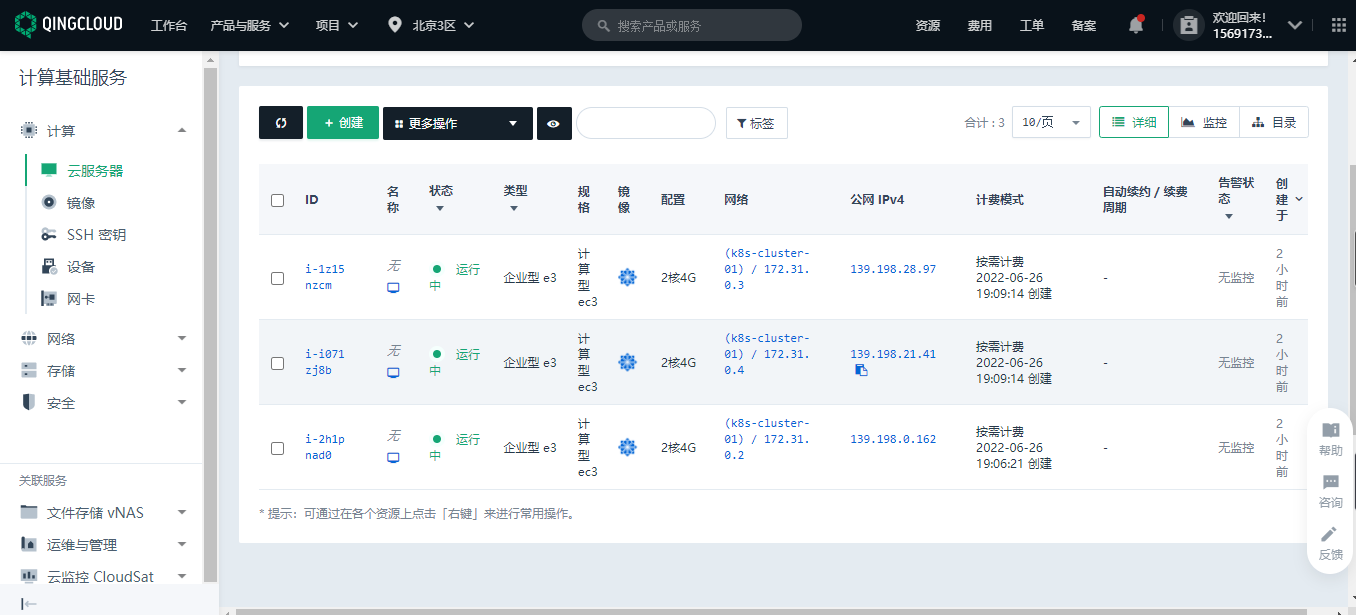
Prerequisite
Kubernetes The installation of the cluster depends on the containerized running environment , So we must first install on each node docker. Methods refer to my previous article .
1、 Based on the environment
All machines perform the following operations .
Each machine sets its own domain name
hostnamectl set-hostname xxxx
Ban SELinux
sudo setenforce 0
sudo sed -i 's/^SELINUX=enforcing$/SELINUX=permissive/' /etc/selinux/config
close swap Partition
swapoff -a
sed -ri 's/.*swap.*/#&/' /etc/fstab
allow iptables Check bridge flow
cat <<EOF | sudo tee /etc/modules-load.d/k8s.conf
br_netfilter
EOF

cat <<EOF | sudo tee /etc/sysctl.d/k8s.conf
net.bridge.bridge-nf-call-ip6tables = 1
net.bridge.bridge-nf-call-iptables = 1
EOF
sudo sysctl --system
2、 install kubelet、kubeadm、kubectl
#  Configure the mirror warehouse address
cat <<EOF | sudo tee /etc/yum.repos.d/kubernetes.repo
[kubernetes]
name=Kubernetes
baseurl=http://mirrors.aliyun.com/kubernetes/yum/repos/kubernetes-el7-x86_64
enabled=1
gpgcheck=0
repo_gpgcheck=0
gpgkey=http://mirrors.aliyun.com/kubernetes/yum/doc/yum-key.gpg
   http://mirrors.aliyun.com/kubernetes/yum/doc/rpm-package-key.gpg
exclude=kubelet kubeadm kubectl
EOF
#  Download the specified version
sudo yum install -y kubelet-1.20.9 kubeadm-1.20.9 kubectl-1.20.9 --disableexcludes=kubernetes
#  immediately / Boot up
sudo systemctl enable --now kubelet
This is done ,kubelet Now it will restart every few seconds , Because it fell into a wait kubeadm Dead loop of instructions
3. Use kubeadm Leading the cluster
Download the images required by each machine
#  Write a script , Specify the required version of each component
sudo tee ./images.sh <<-'EOF'
#!/bin/bash
images=(
kube-apiserver:v1.20.9
kube-proxy:v1.20.9
kube-controller-manager:v1.20.9
kube-scheduler:v1.20.9
coredns:1.7.0
etcd:3.4.13-0
pause:3.2
)
for imageName in ${images[@]} ; do
docker pull registry.cn-hangzhou.aliyuncs.com/lfy_k8s_images/$imageName
done
EOF
#  Add executable permissions and execute scripts to download .
chmod +x ./images.sh && ./images.sh
Through this step, you can download the components needed to create the cluster . The work node only needs to download kube-proxy that will do , It doesn't matter if you download them all .
4. Initialize the master node
# Add... To all machines master Domain mapping
echo "172.31.0.2  cluster-endpoint" >> /etc/hosts
The purpose of this step is to tell each node which node i will use as the master node ( Cluster entrance ). Here you need to change it to your own ip, I use the intranet of the public cloud ip.
# Master initialization , Run this command only on the primary node
kubeadm init \
--apiserver-advertise-address=172.31.0.2 \
--control-plane-endpoint=cluster-endpoint \
--image-repository registry.cn-hangzhou.aliyuncs.com/lfy_k8s_images \
--kubernetes-version v1.20.9 \
--service-cidr=10.96.0.0/16 \
--pod-network-cidr=192.168.0.0/16
This actually defines what I will create in the future service and pod The network segment used when . We need to pay attention to apiserver-advertise-address For your own master node ip, And ensure that all network ranges do not overlap .pod-network-cidr If there is any modification, we need to modify the network range of the network components .
The following shows the cluster master Node initialization succeeded .
Your Kubernetes control-plane has initialized successfully!

To start using your cluster, you need to run the following as a regular user:

  mkdir -p $HOME/.kube
  sudo cp -i /etc/kubernetes/admin.conf $HOME/.kube/config
  sudo chown $(id -u):$(id -g) $HOME/.kube/config

Alternatively, if you are the root user, you can run:

  export KUBECONFIG=/etc/kubernetes/admin.conf

You should now deploy a pod network to the cluster.
Run "kubectl apply -f [podnetwork].yaml" with one of the options listed at:
  https://kubernetes.io/docs/concepts/cluster-administration/addons/

You can now join any number of control-plane nodes by copying certificate authorities
and service account keys on each node and then running the following as root:

  kubeadm join cluster-endpoint:6443 --token xsmvuy.43k3verg00x4s5gs \
    --discovery-token-ca-cert-hash sha256:2d4a06dfe981eb1274831a027690fdfa3a6c89d0968af331d6d26c16f35e7bdb \
    --control-plane

Then you can join any number of worker nodes by running the following on each as root:

kubeadm join cluster-endpoint:6443 --token xsmvuy.43k3verg00x4s5gs \
    --discovery-token-ca-cert-hash sha256:2d4a06dfe981eb1274831a027690fdfa3a6c89d0968af331d6d26c16f35e7bdb
We can execute the corresponding commands according to the prompts .
5. Install network components
#  Run this command only on the primary node
curl https://docs.projectcalico.org/manifests/calico.yaml -O

kubectl apply -f calico.yaml
6. Join in worker node
#  Run this command only on the work node
kubeadm join cluster-endpoint:6443 --token xsmvuy.43k3verg00x4s5gs \
    --discovery-token-ca-cert-hash sha256:2d4a06dfe981eb1274831a027690fdfa3a6c89d0968af331d6d26c16f35e7bdb
These contents are still done according to the prompt information .
Add : above token The effective time is 24 Hours , After expiration, use the following command to regenerate on the primary node .
kubeadm token create --print-join-command
High availability deployment , Also at this step , Use the command to add a master node .
7. Verification cluster
[[email protected] ~]# kubectl get nodes
NAME          STATUS   ROLES                  AGE   VERSION
k8s-master    Ready    control-plane,master   89m   v1.20.9
k8s-worker1   Ready    <none>                 68m   v1.20.9
k8s-worker2   Ready    <none>                 68m   v1.20.9
[[email protected] ~]#
thus , One kubernetes The cluster has been set up .
边栏推荐
- 新型冠状病毒变异Delta毒株的模拟(MindSPONGE应用)
- [try to hack] forward shell and reverse shell
- typora设置标题自动编号
- xshell的安装、xftp的安装
- Is it safe to open an account on the mobile phone to buy stocks? Is it safe to open an account on the Internet to speculate in stocks
- 买基金在哪里开户买比较安全
- 复杂数据没头绪?
- Big guys talk about the experience sharing of the operation of the cutting-edge mindspore open source community. Come up with a small notebook!
- 让敏捷回归本源——读《敏捷整洁之道》有感
- go语言的爬虫和中间件
猜你喜欢




![[微服务]Eureka](/img/60/e5fa18d004190d4dadebfb16b93550.png)

随机推荐
Which securities dealers recommend? Is it safe to open an account online now?
CVE-2022-30190 Follina Office RCE分析【附自定义word模板POC】
[try to hack] forward shell and reverse shell
12 color ring three primary colors
Thesis study -- Analysis of the influence of rainfall field division method on rainfall control rate
泰国安全又划算的支付方式
Is it reliable to open an account for stock trading on the mobile phone? Is it safe to open an account for stock trading on the Internet
Understanding of "the eigenvectors corresponding to different eigenvalues cannot be orthogonalized"
300 questions lesson 3 vector group
Serial port debugging tool mobaxtermdownload
Common techniques of email attachment phishing
【Try to Hack】正向shell和反向shell
[微服务]Nacos
1+1<2 ?! Interpretation of hesic papers
What are the preferential activities for stock account opening? Is it safe to open a mobile account?
“message“:“Bad capabilities. Specify either app or appTopLevelWindow to create a session“
Operations research says that in issue 66, Behrman also has "speech phobia"?
6.24 learning content
在手机开户买股票安全吗 网上开户炒股安全吗
Is it reliable to open an account on a stock trading mobile phone? Is it safe to open an account online and speculate in stocks