当前位置:网站首页>JS component
JS component
2022-06-25 14:17:00 【Rabbit^-^】
form :
ECMAscript Interpreter No compatibility issues ES6 To ES10 There will be compatibility issues
BOM Browser object model Almost all incompatible
DOM Document object model Partial compatibility DOM1 DOM2 DOM3
BOM
Window Form object
attribute
- innerheight Returns the height of the document display area of the window .( Width and height of visible area )
- innerwidth Returns the width of the document display area of the window .
- outerheight Returns the external height of the window . ( Without menu bar and console , Overall width and height )
- outerwidth Returns the external width of the window .
- pageXOffset Sets or returns the X Location .
- pageYOffset Sets or returns the Y Location .
- self Returns a reference to the current window .
- screenLeft The upper left corner is on the screen x coordinate (IE)
- screenTop The upper left corner is on the screen y coordinate (IE)
- screenX The upper left corner is on the screen x coordinate
- screenY The upper left corner is on the screen y coordinate
Method
- alert() Display a warning box with a message and a confirm button .
- clearInterval() Cancel from setInterval() Set up timeout.
- clearTimeout() Cancel from setTimeout() Method set timeout.
- close() Close the browser window .
- confirm() Displays a dialog box with a message and a confirm and Cancel buttons .
- moveBy() Moves the window to the specified pixel relative to its current coordinates .
- moveTo() Move the upper left corner of the window to a specified coordinate .
- open() Open a new browser window or find a named window .
- print() Print the contents of the current window .
- prompt() Displays a dialog box that prompts for user input .
- resizeBy() Resize the window to the specified pixel .
- resizeTo() Resize the window to the specified width and height .
- scrollBy() Scrolls content according to the specified pixel value .
- scrollTo() Scroll content to specified coordinates .
- setInterval() According to the specified period ( In milliseconds ) To call a function or evaluate an expression .
- setTimeout() Call the function or computing expression after the specified millisecond count. .
open Method parameters
open( Address , name , style ”width=200,height=200”)
attribute
- width Width
- height Height
- Top The offset above
- left Left offset
- location Show address bar yes/no
- menubal Show menu bar or not yes/no
- resizable Whether you can drag to change the size yes/no
- srcollbar Show scroll bar or not yes/no
Navigator Contains information for the client browser .
Screen Contains information for the client display .
Location Address bar object
attribute
- hash Set or return from well number (#) At the beginning URL( anchor ).
- host Set or return the host name and current URL Port number .
- hostname Set or return to current URL The host name .
- href Set or return to full URL.
- pathname Set or return to current URL The path part of .
- port Set or return to current URL Port number .
- protocol Set or return to current URL The agreement .
- search Set or return from question mark (?) At the beginning URL( Inquiry section ).
History Historical record object
- back() load history The previous one in the list URL.
- forward() load history Next... In the list URL.
- go() load history A specific page in the list .
DOM object
- body Provide right <body> Direct access to elements .
- cookie Set or return all... Related to the current document cookie.
- lastModified Returns the date and time when the document was last modified .
- title Returns the title of the current document .
- URL Returns the URL.
- getElementById() Return to have specified id Reference to the first object of .
- getElementsByName() Return with Specify a name Object collection for . ( Array )
- getElementsByTagName() Return with Specify label name Object collection for . ( Array )
- getElementsByClassName() Return with Appoint class name Object collection for ( compatible IE8 above )( Array )
- write() Write... To the document HTML expression or JavaScript Code .
- writeln() Equate to write() Method , The difference is to write a new line character after each expression .
label . attribute Set or return the properties under the tag ( Look at the properties )
label .style.fontSize=”20px” Set or return style
label .innerHTML=”” Set or return text or labels
for example :
var p=document.getElementsByTagName("p")
p[0].innerHTML="<a href ='#'> Hyperlinks </a>"
var input=document.getElementsByName("user")
input[0].value=" The text box "
Forms
Form name . The text box name Get form tags
Form name . The text box name.value Modify the value with value
Form name .submit() Execute commit event
event
onclick Mouse click onchange Choose Events
onmouseover() Move the mouse closer onmouseout() Mouse removal
onblur() Lose focus onfocus() Focus of attention
onload() load
Event operation mode
The way 1
var btn=document.getElementById("btn")
btn.οnclick=function(){
// Execute the statement to be operated
}
The way 2
<button οnclick="fun()"> Click on </button>
function fun(){
alert(" Button operation ")
}
node type
nodeType Get the node type
1 Label type 2 attribute 3 Text 8 notes 9 object
nodeName The name of the node #text Text node
tagName The element name ( Excluding text ) Determine whether it is a label
appendChild() Add children to the tail The page is added or cut
removeChild() Delete child element //div[0].removeChild(p1)
CloneNode(true/false) Copy elements
replaceChild( new , used ) Replacement elements ( Contains child elements )
insertBefore( new , used ) Insert child element ( Will not cover , There will be a new )
Document.createElement() Create a label
Document.createTextNode() Create text
getAttribute() Get attributes
removeAttribute() Delete attribute
setAttribute() Modify properties
var a=document.getElementsByTagName("a")
console.log(a[0].href) new
console.log(a[0].getAttribute("href")) used
picture
var img=new Image()
img.src=””
document.body.appendChild=img
form
cells[] Returns a collection of all cells in a table
rows[] Returns the set of all rows in the table
insertRow() Add a row to the table
deleteRow() Delete a row in the table
rowIndex() Returns the position of the row in the table
insertCell() Add a cell
deleteCell Delete a cell
colSpan() Cross column
rowSpan() enjambment
tab.rows[2].deleteCell(2)
tab.rows[2].cells[1].colSpan=2
DOM Expand
Tag filtering
1.firstchild Get the first child ( Contains text nodes )
firstElementchild Get the first child
2.lastchild Get the last child ( Contains text nodes )
lastElementchild Get the last child
3.chaildNodes Get a collection of all child nodes ( Contains text nodes )
children Get a collection of all child nodes
4.previousSibling Get the last brother ( Contains text nodes )
previousElementSibling Get the last brother
5.nextSibling Get the next brother ( Contains text nodes )
nextElementSibling Get the next brother
6.parentNode() Get the parent node
Get elements
querySelector() adopt Selectors Get a tag
querySelectorAll() adopt Selectors Get the tag set
MatchesSelector() Determine whether a selector belongs to a tag Only judge class
If the compatibility is not good, you can write prefixes , for example :webkitMatchesSelector()
li[0].webkitMatchesSelector(".txt")
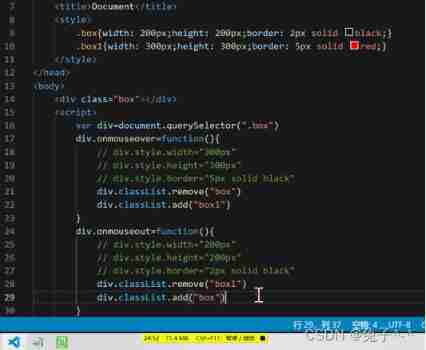
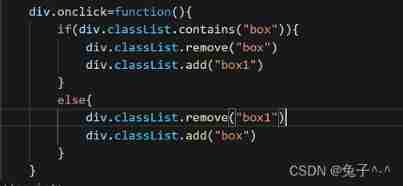
class operation
classList object
add() add to class attribute
remove() Delete class attribute
contains() Judge class Whether there is
toggle() Add delete switch class

Custom properties
Html5 The syntax can customize the attribute content for the tag , But the attribute definition must be in the form of “data-” start , Can pass js Call custom attribute values
for example :
<p data-aa=”23”></p>
Insert text and labels
innerHTML() Add a label or text inside
outerHTML() Add a label or text
innerText() Add text
outerText() Add text outside
innerAdiaceHTML( Location , Elements ) Insert the specified element
beforebegin Add a brother before
afterbegin Add a brother before
beforeend Add children after
afterend Add children after
Document mode
<meta http-equiv="X-UA-Compatible" content="IE=edge">
edge Render in the latest document mode
EmulateIE9 If there is a document type declaration , Then use IE9 Otherwise, use IE5
EmulateIE8 If there is a document type declaration , Then use IE8 Otherwise, use IE5
EmulateIE7 If there is a document type declaration , Then use IE7 Otherwise, use IE5
9: Compulsory use IE9 Rendering 8: Compulsory use IE8 Rendering
7: Compulsory use IE7 Rendering 5: Compulsory use IE5 Rendering
DOM2 and DOM3
style
object .style.color=”” Set or return style ( inline )
object .currentStyle[“color”] Get style (IE)
getComputedStyle( object , Whatever )[“color”] Get style Google Firefox
Element size and offset
document.body.clientWidth Sets or returns the width of the scrollbar
document.body.clientHeight Set or return the height with scroll bar
document.documentElement.clientWidth Sets or returns the width with visualization +”px”
document.documentElement.clientHeight Sets or returns the height with visualization +”px”
Can only get but not modify :
offsetWidth The width of the element label ( Including borders and margins )
offsetHeight The height of the element label ( Including borders and margins )
offsetTop The offset above the label
offsetLeft The offset of the left side of the label
offsetParent Returns the parent object of the tag
Scroll bar position
srcollWidth Total width of elements with scroll bars
srcollHeight The total height of the elements with scroll bars
srcollTop The offset above the scroll bar
srcollLeft The offset to the left of the scroll bar
Compatibility
document.compatMode Determine whether the browser is in hybrid mode
BackCompat Hybrid mode Css1Compat The standard model
边栏推荐
- 程序員為什麼要軟一點?
- Today in history: Netease was founded; The first consumer electronics exhibition was held; The first webcast in the world
- Installation and removal of MySQL under Windows
- 作为一名软件测试工程师你认为怎么样才能保证软件质量?
- Where can the brightness of win7 display screen be adjusted
- 权益NFT开创者Hash Eagle如何重新定义NFT,用权益赋能长续价值?
- 对白:推荐系统快速入门路线及各知识点总结
- Realization of neural networks with numpy
- Win7显示屏幕亮度在哪里可以调节
- Discriminative v.s.Generative
猜你喜欢

Realization of neural networks with numpy

oracle数据库常用的函数总结

阻止深度神经网络过拟合(Mysteries of Neural Networks Part II)

Suanli & NFT trading platform f3 The exclusive NFT project of XYZ, hash eagle, will be grandly launched
对白:推荐系统快速入门路线及各知识点总结
多台云服务器的 Kubernetes 集群搭建

Rust, le meilleur choix pour un programmeur de démarrer une entreprise?

shell 运算符
Installation and removal of MySQL under Windows

测一测你的挣钱能力有多强?未来的你将从事什么职业?
随机推荐
K-line diagram 24 classic diagrams (shadow)
laravel8实现图片验证码
Where can the brightness of win7 display screen be adjusted
电脑必须打开的设置
shell 运算符
Reading the "clean" series for the first time, I didn't think it was a good book
关于STM32使用LAN8720A插拔网线重连
SSH secret free function for # scripting
分享自己平时使用的socket多客户端通信的代码技术点和软件使用
Is qiniu regular? Is it safe to open a stock account?
楼宇自动化专用BACnet网关BL103
Preventing overfitting of deep neural networks (mysteries of neural networks Part II)
mysql数据库压缩备份_Mysql备份压缩及恢复数据库方法总结
112页机器学习-数学基础回顾.pptx
Websocket -- reverse proxy to solve cross domain problems
Asp. Net webform exporting excel using npoi
golang项目依赖管理工具go vendor,go mod
用NumPy实现神经网络(Mysteries of Neural Networks Part III)
Shell operator
'NVIDIA SMI' is not an internal or external command, nor is it a runnable program or batch file