当前位置:网站首页>Section 30 high availability (HA) configuration case of Tianrongxin topgate firewall
Section 30 high availability (HA) configuration case of Tianrongxin topgate firewall
2022-06-23 22:46:00 【dare to try @】
Catalog
Back up the firewall , Also known as firewall HA, Realize the high availability of the company's total export .
1 Experimental requirements and network topology
(1) The following network topology is used in this experiment .
(2) The roles and functions of the network equipment of each host are as follows :
Real machine : Do not participate in the experiment , Just for remote management firewall , Manage the firewall by opening a web page .
winxp: As the intranet host of the company , You can access servers in the isolation zone and the extranet zone .
win2003: a , One is in the external network area PC.
A firewall : This experiment uses the firewall of Tianrongxin topgate, Two firewalls ,topgate1 To be active ,topgate2 For backup .
(3) The main content of this experiment is collocation high availability HA A firewall ,inside Regional employees can access the Internet normally , When the active firewall fails , It still does not affect the employees' access to the Internet . Be careful , There are some differences between backing up the firewall and configuring hot backup for the previous routers and core switches . The interface configuration of the two firewalls is in addition to the heartbeat line IP The address is inconsistent , The rest are the same . The principle of hot backup routing protocol and hot backup experiment demonstration of routers and core switches are shown in 《HSRP- Principle and experimental demonstration of hot backup routing protocol — be based on Cisco Packet Tracer》 and 《 Core switch configuration hot backup details and experimental demonstration — be based on Cisco Packet Tracer》. When one of the firewalls is active , Another firewall and PC Your interface will be logical down fall , The connectors at both ends of the core jumper are open .
(4) heartbeat : Complete the communication between the two firewalls : Judge whether the other party crashes 、 Synchronous data ( It is divided into static synchronization and dynamic synchronization )、 Complete hot backup VRRP. Optical fiber is generally used .
(5)VRRP: An active / A backup mode 、 Both active modes .
2 Experimental demonstration process — Build high availability HA
Configure the firewall HA when , Do not configure the firewall , First, let the two firewalls establish an active / standby relationship , Once the master-slave relationship is established , The configuration on the active firewall can be synchronized to the backup firewall through the heartbeat line . If the configuration on the active firewall is manually configured ( Such as strategy 、IP), Engineers are required to manually synchronize the configuration on the active firewall to the backup firewall ; If the configuration on the active firewall is dynamically generated ( Such as PAT And the session state in the state detection table ), The data can be dynamically synchronized between the two firewalls .
2.1 Build a network structure
(1) Build the network structure according to the above topology , Will each PC Bridge to respective VMnet in , And configuration IP And gateway (win2003-outside Does not refer to gateway ). The virtual machine IP Configuration details refer to 《 IP Address details and related concepts 》
(2) Connect two firewall bridges to VMnet And open . There is... On the equipment 5 Block NIC , Corresponding to interfaces respectively eth0~4, The first three pieces are needed for this experiment , Bridge to VMnet1 to VMnet3 On .
(3) The real machine VMnet1 Enable and configure IP( The real machine does not need to be configured with a gateway )→ With a real machine ping A firewall IP, can ping through .
2.2 Firewall configuration
Because there are two firewalls , When the real machine browser enters https://192.168.1.254:8080/ When you open the firewall management page , I don't know which firewall is open . At this time, you can unplug the network cable of one of the firewalls ( In reality console The firewall to be plugged in is the firewall to be configured ).
(1) by topgate1 The firewall is configured with a heartbeat line interface IP. This is because the two firewalls need to establish an active / standby relationship first , Then you have to do it first topgate1 Firewall core jumper interface IP Match well , First of all, will topgate2 Unplug the network cable ( About to network card 1 close ), Then the real machine browser inputs https://192.168.1.254:8080/, For the first topgate1 The firewall is provided with a heartbeat line IP Address . Be careful , The configuration of the two firewalls is different from that of the heartbeat line IP The address is inconsistent , The rest are the same , Therefore, the heartbeat line needs to check the asynchronous address , Other interfaces are not checked .
(2) by topgate1 Firewall configuration hot backup ( Here is the high availability configuration ). High availability → Set this machine and the opposite end IP、 Set the tracking interface → Enable . When enabled , The working status will be updated to “ Work ”
(3) by topgate2 The firewall is configured with a heartbeat line interface IP And configuring hot backup ( Here is the high availability configuration ). Close the original firewall configuration page → Pull out topgate1 The Internet cable ( About to network card 1 close )→ take topgate2 Network card of 1 Reconnect the → open topgate2 Firewall configuration web page → Set the heartbeat line IP Address → Set high availability as follows and enable , You can see that the firewall is active ( Because the first firewall now has ports disconnected ).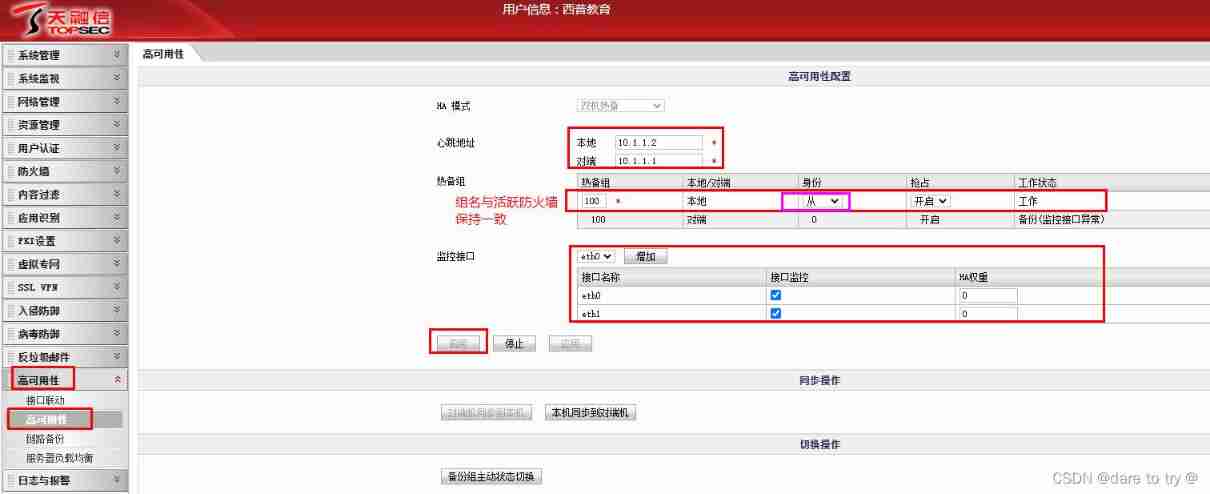
(4) by topgate1 Create a firewall zone 、 Configure other interfaces IP route 、 Write strategy 、 do DNAT And so on . Close the original firewall configuration page → take topgate1 Network card of 1 Reconnect the → Open the firewall configuration web page with a real computer → After logging in, the active firewall corresponds to the web page ( From the heartbeat line IP The address determines which one it is )→ Create area 、 Configure other interfaces IP、 Write strategy 、 do DNAT And so on . When creating an area , Consider dividing the heartbeat line interface into intranet independent zones 、 Extranet area 、 The heartbeat area outside the isolation area , There is no need to configure policies for this zone . Create area 、 Configure other interfaces IP、 Write strategy 、 do DNAT For details of basic configurations, please refer to 《 Tian Rong Xin Topgate Firewall basic configuration case 》.
(5) Synchronize the configuration of the active firewall to the backup firewall . You will be prompted if the synchronization is successful .

2.3 verification
Give Way winXP always ping Hosts in the extranet zone ,ping -t 100.1.1.1, To break off topgate1 Any interface of firewall , See if you can always ping through . At the moment of disconnection, some bags will be lost , Then switch to the backup firewall in time and resume normal operation . Refresh the web page configuration of the firewall , After re login, it will be automatically updated to topgate2 The page of .

tips:
1) When two core switches are arranged in the intranet 、 Two firewalls , Two core switches are connected to two firewalls 8 All interfaces are set as layer-2 interfaces , It can greatly reduce the difficulty of network configuration and easy to check errors .
3 summary
(1) Understand the working principle and process of firewall .
(2) Understand how dynamic routing hot backup works , And with HA Compare the working principle of .
(3) Master the configuration method of firewall high availability .
Reference article
[1] 《 Firewall deployment experiment (IP、 Strategy 、NAT、HA)—— be based on topgate Web page deployment method of firewall 》
[2] Video gate
边栏推荐
- WordPress preview email for wocomerce 1.6.8 cross site scripting
- Semaphore semaphore details
- The article "essence" introduces you to VMware vSphere network, vswitch and port group!
- Digital transformation solution for raw material industry chain supply chain platform
- 游戏安全丨喊话CALL分析-写代码
- Impala port
- How to shut down the server in the fortress machine? What other operations can the fortress machine perform?
- 為什麼你的數據圖譜分析圖上只顯示一個值?
- What if the fortress remote access server fails? What are the reasons why the fortress computer fails to connect to the server?
- 0day1- (cve-2021-44228) log4j2 rce recurrence
猜你喜欢

Application practice | Apache Doris integrates iceberg + Flink CDC to build a real-time federated query and analysis architecture integrating lake and warehouse
应用实践 | Apache Doris 整合 Iceberg + Flink CDC 构建实时湖仓一体的联邦查询分析架构
游戏安全丨喊话CALL分析-写代码

Hackinglab penetration test question 8:key can't find it again

解密抖音春节红包背后的技术设计与实践

Slsa: accelerator for successful SBOM
Game security - call analysis - write code

為什麼你的數據圖譜分析圖上只顯示一個值?

混沌工程,了解一下

SAVE: 软件分析验证和测试平台
随机推荐
Kubecon2021 video collection
How to solve the problem that the GPU VNC has two mice with large deviation
Interviewer: the difference between uselayouteffect and useeffect
Micro API gateway Middleware
Problems and solutions of MacOS installation go SQLite3
2022年性价比高的商业养老保险产品排名
5 minutes to explain what is redis?
2021-12-10: which can represent a 64 bit floating point number or a 64 bit signed integer
In the new easygbs kernel version, the intranet mapping to the public network cannot be played. How to troubleshoot?
[tcapulusdb knowledge base] update data example (TDR table)
How to set the website address for website construction can the website be put on record
Advantages of micro service registry Nacos over Eureka
How does the fortress machine view the account assigned by the server? What are the specific steps?
sql server常用sql
What is the difference between RosettaNet, EDI ANSI X12 and EDIFACT
How to create a virtual server through a fortress machine? What are the functions of the fortress machine?
Pourquoi une seule valeur apparaît - elle sur votre carte de données?
Achieve scoring (Star scoring) effect through native JS
Redis6.x.x build rediscluster cluster
【技术干货】蚂蚁办公零信任的技术建设路线与特点