当前位置:网站首页>The most complete analysis of Flink frame window function
The most complete analysis of Flink frame window function
2022-07-02 14:12:00 【InfoQ】
summary
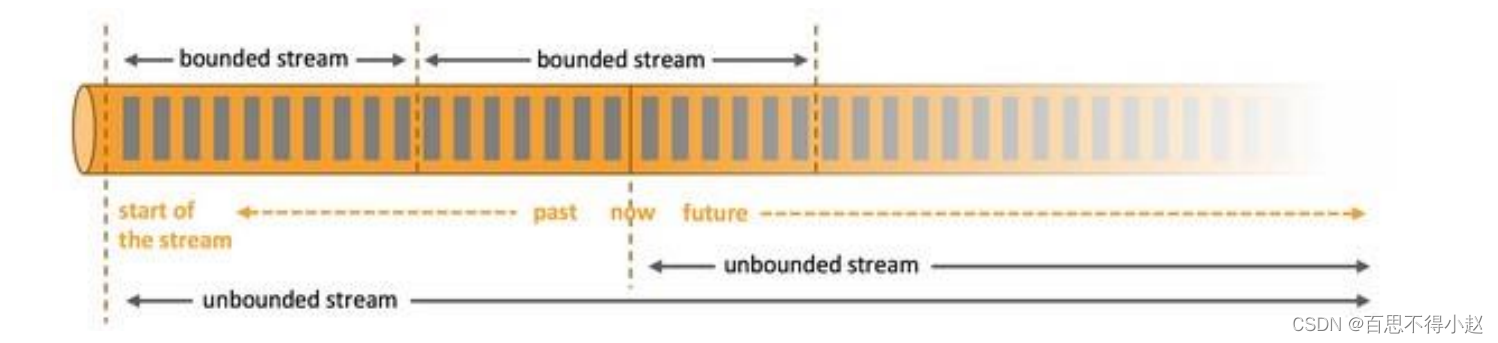
Window type
Time window (Time Window) Count window (Count Window)- Take the time window as an example ( The counting window is similar to ), Scrolling window is to segment data at fixed time intervals .
- The characteristic is that the time is relatively aligned 、 The length of windows is fixed and there is no overlap .

- Take the time window as an example ( The counting window is similar to ), Sliding window is another form of fixed window , Sliding window consists of fixed window length and sliding interval .
- The window length is fixed , Windows can overlap .
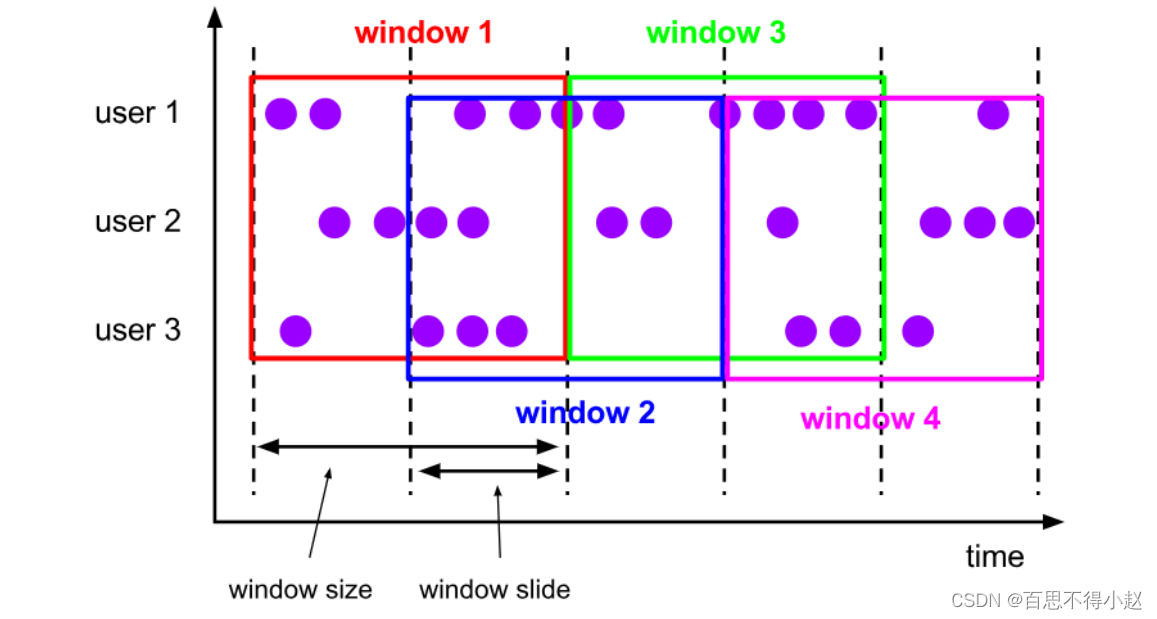
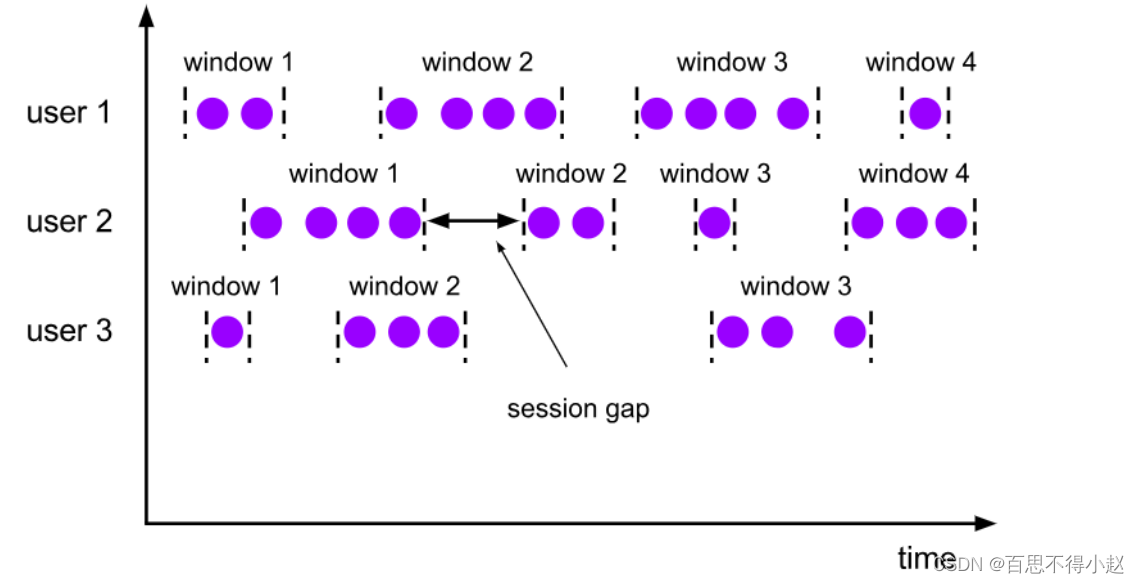
- Session exposure only exists in the time window , Count window no session window .
- It is characterized by no alignment of time
Window API Use
.window()window ()keyBywindow()WindowAssignerWindowAssignerwindowpublic class WindowTest1_TimeWindow {
public static void main(String[] args) throws Exception {
// Build a stream processing environment
StreamExecutionEnvironment env = StreamExecutionEnvironment.getExecutionEnvironment();
// Facility parallelism is 1
env.setParallelism(1);
DataStreamSource<String> inputStream = env.socketTextStream("localhost", 7777);
DataStream<SensorReading> dataStream = inputStream.map(line -> {
String[] fields = line.split(",");
return new SensorReading(fields[0], new Long(fields[1]), new Double(fields[2]));
});
// Windowing test Specify the window allocator
DataStream<Integer> resultStream = dataStream.keyBy("id")
// Set up a 15 A scrolling window in seconds
.window(TumblingProcessingTimeWindows.of(Time.seconds(15)));
// Session window
//.window(ProcessingTimeSessionWindows.withGap(Time.seconds(15)))
// The sliding window
//.window(SlidingProcessingTimeWindows.of(Time.seconds(20),Time.seconds(10)))
env.execute();
}
}
.timeWindow.countWindowTime.milliseconds(x)Time.seconds(x)Time.minutes(x).timeWindow(Time.seconds(15))
.timeWindow(Time.seconds(15),Time.seconds(5))
.window(ProcessingTimeSessionWindows.withGap(Time.seconds(15)))
.countWindow(10)
.countWindow(10,2)
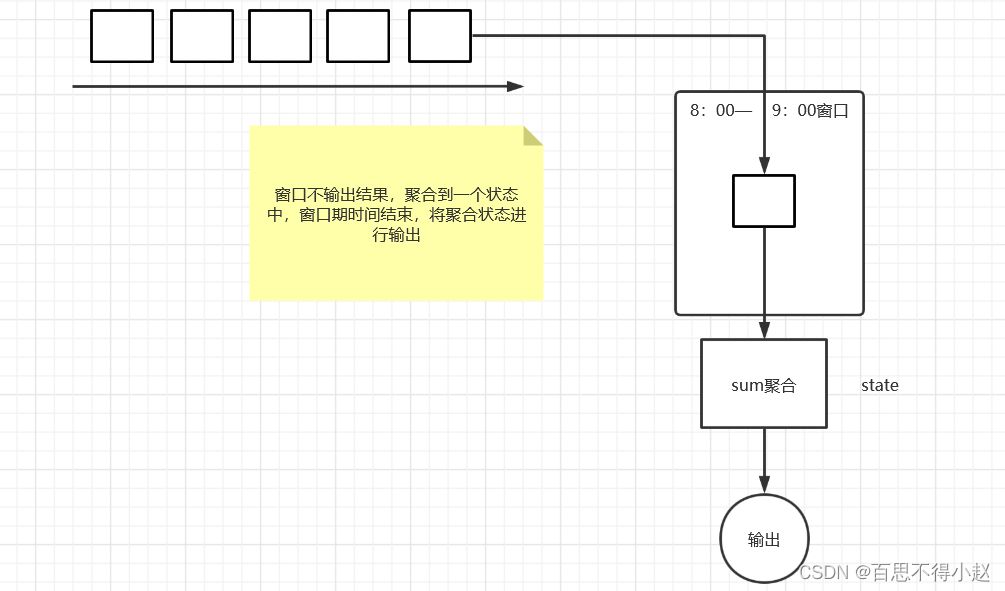
- Incremental aggregate function : Each piece of data comes and is calculated , Keep a state first , Aggregate functions have
ReduceFunctionAggregateFunction.
public class WindowTest1_TimeWindow {
public static void main(String[] args) throws Exception {
// Build a stream processing environment
StreamExecutionEnvironment env = StreamExecutionEnvironment.getExecutionEnvironment();
// Facility parallelism is 1
env.setParallelism(1);
DataStreamSource<String> inputStream = env.socketTextStream("localhost", 7777);
DataStream<SensorReading> dataStream = inputStream.map(line -> {
String[] fields = line.split(",");
return new SensorReading(fields[0], new Long(fields[1]), new Double(fields[2]));
});
// Windowing test Specify the window allocator
DataStream<Integer> resultStream = dataStream.keyBy("id")
// Aggregate the window Incremental window operation
.timeWindow(Time.seconds(15))
.aggregate(new AggregateFunction<SensorReading, Integer, Integer>() {
@Override
// Create accumulators
public Integer createAccumulator() {
return 0;
}
@Override
public Integer add(SensorReading sensorReading, Integer accumulator) {
return accumulator+1;
}
@Override
public Integer getResult(Integer accumulator) {
return accumulator;
}
@Override
public Integer merge(Integer integer, Integer acc1) {
return null;
}
});
resultStream.print();
env.execute();
}
}
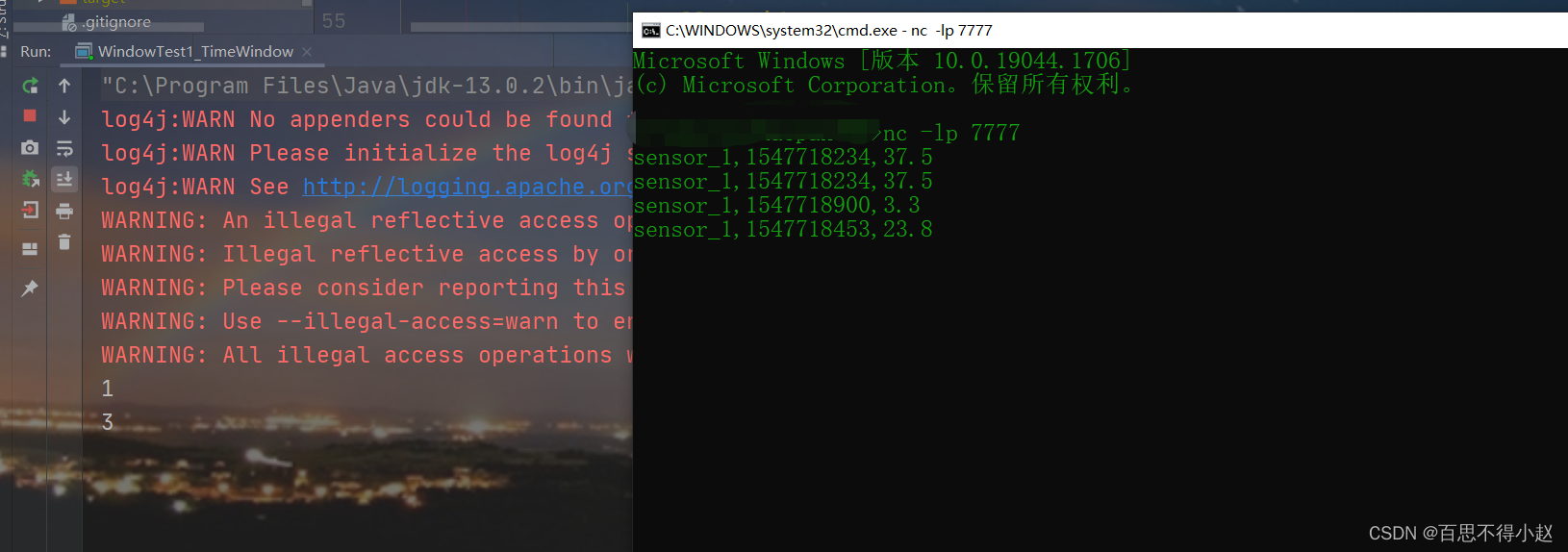
- Full window functions : First collect all the data in the window , When it's time to compute, it's going to traverse all the data . Corresponding function :
ProcessWindowFunction,WindowFunction
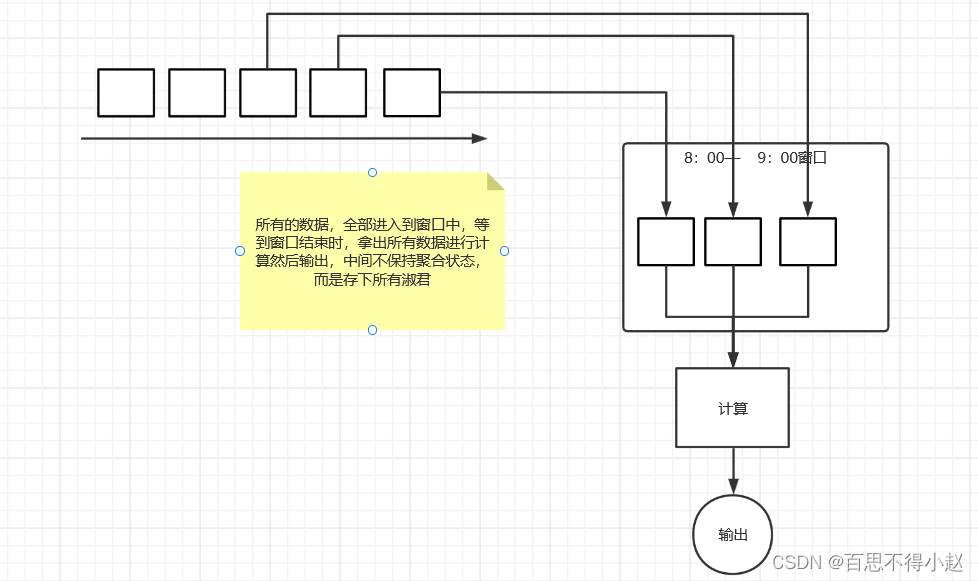
public class WindowTest1_TimeWindow {
public static void main(String[] args) throws Exception {
// Build a stream processing environment
StreamExecutionEnvironment env = StreamExecutionEnvironment.getExecutionEnvironment();
// Facility parallelism is 1
env.setParallelism(1);
DataStreamSource<String> inputStream = env.socketTextStream("localhost", 7777);
DataStream<SensorReading> dataStream = inputStream.map(line -> {
String[] fields = line.split(",");
return new SensorReading(fields[0], new Long(fields[1]), new Double(fields[2]));
});
// Full window function
DataStream<Tuple3<String,Long,Integer>> resultStream = dataStream.keyBy("id")
.timeWindow(Time.seconds(15))
.apply(new WindowFunction<SensorReading, Tuple3<String,Long,Integer>, Tuple, TimeWindow>() {
@Override
public void apply(Tuple tuple, TimeWindow window, Iterable<SensorReading> input, Collector<Tuple3<String,Long,Integer>> out) throws Exception {
String id =tuple.getField(0);
Long windowEnd =window.getEnd();
Integer count = IteratorUtils.toList(input.iterator()).size();
out.collect(new Tuple3<>(id,windowEnd,count));
}
});
resultStream.print();
env.execute();
}
}
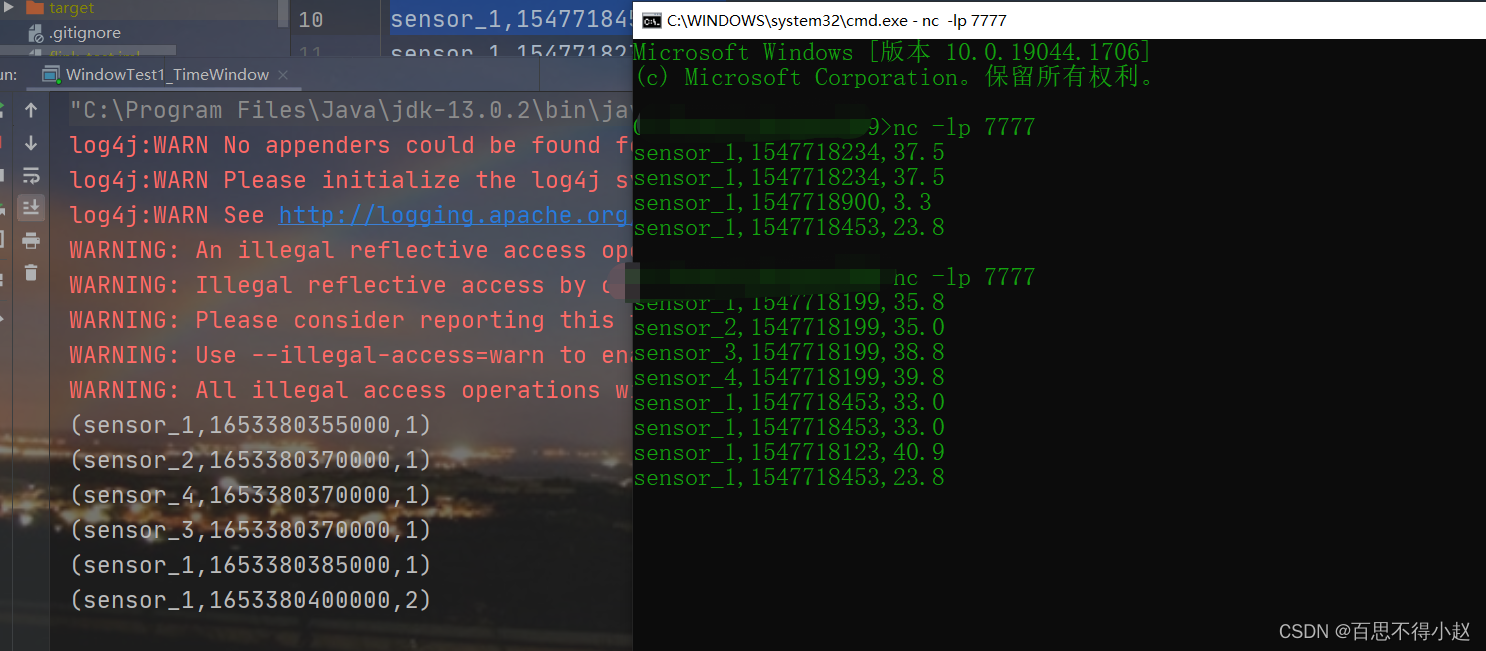
- trigger :
.trigger()Definition window When to close , Trigger the calculation and output the result
- Remover :
.evitor()Define the logic for removing some data
.allowedLateness()Allow processing of late data
.sideOutputLateData()Put the late data into the side output stream
.getSideOutput()Get side output stream
public class WindowTest2_CountWindow {
public static void main(String[] args) throws Exception {
StreamExecutionEnvironment env = StreamExecutionEnvironment.getExecutionEnvironment();
env.setParallelism(1);
DataStreamSource<String> inputStream = env.socketTextStream("localhost", 7777);
DataStream<SensorReading> dataStream = inputStream.map(line -> {
String[] field = line.split(",");
return new SensorReading(field[0], new Long(field[1]), new Double(field[2]));
});
// Open counting window test
DataStream<Double> resultStream = dataStream.keyBy("id")
.countWindow(10, 2)
.aggregate(new MyAvgTemp());
// Other options API Processing method of late data
OutputTag<SensorReading> outputTag = new OutputTag<SensorReading>("iate") {};
SingleOutputStreamOperator<SensorReading> sumStream = dataStream.keyBy("id")
.timeWindow(Time.seconds(15))
//.trigger()
//.evictor()
.allowedLateness(Time.minutes(1))
// Output to flow measurement
.sideOutputLateData(outputTag)
.sum("temperature");
sumStream.getSideOutput(outputTag).print("late");
resultStream.print();
env.execute();
}
public static class MyAvgTemp implements AggregateFunction<SensorReading, Tuple2<Double,Integer>,Double>{
@Override
public Tuple2<Double, Integer> createAccumulator() {
return new Tuple2<>(0.0,0);
}
@Override
public Tuple2<Double, Integer> add(SensorReading sensorReading, Tuple2<Double, Integer> accumulator) {
return new Tuple2<>(accumulator.f0+sensorReading.getTemperature(),accumulator.f1+1);
}
@Override
public Double getResult(Tuple2<Double, Integer> accumulator) {
return accumulator.f0 / accumulator.f1;
}
@Override
public Tuple2<Double, Integer> merge(Tuple2<Double, Integer> a, Tuple2<Double, Integer> b) {
return new Tuple2<>(a.f0+b.f0,a.f1+b.f1);
}
}
}

- stay flink In, we define a window, Must be in keyBy After the operation .
- After the window function, there must be aggregation operation .
边栏推荐
- P1042 [noip2003 popularization group] Table Tennis
- [development environment] 010 editor tool (tool download | binary file analysis template template installation | shortcut key viewing and setting)
- D language, possible 'string plug-ins'
- [template] longest common subsequence ([DP or greedy] board)
- Codeforces Round #803 (Div. 2)(A~D)
- 路由(二)
- Quarkus learning IV - project development to deployment
- Data Lake (11): Iceberg table data organization and query
- 大家信夫一站式信用平台让信用场景“用起来
- Basic knowledge of QT original code
猜你喜欢

Selenium installing selenium in pycharm

无主灯设计:如何让智能照明更加「智能」?
Qt-制作一个简单的计算器-实现四则运算-将结果以对话框的形式弹出来
Systemserver process
Use of swagger
In 2021, the global styrene butadiene styrene (SBS) revenue was about $3722.7 million, and it is expected to reach $5679.6 million in 2028

Subcontracting configuration of uniapp applet subpackages

你的 Sleep 服务会梦到服务网格外的 bookinfo 吗
QT new project
Design of non main lamp: how to make intelligent lighting more "intelligent"?
随机推荐
Sum of the first n terms of Fibonacci (fast power of matrix)
Selenium, element operation and browser operation methods
错误:EACCES:权限被拒绝,访问“/usr/lib/node_modules”
Chaos engineering platform chaosblade box new heavy release
给Android程序员的一些面试建议「建议收藏」
Launcher startup process
P1908 reverse sequence pair
PyQt5_ Qscrollarea content is saved as a picture
kaggle如何使用utility script
Stone merging Board [interval DP] (ordinary stone Merging & Ring Stone merging)
Error: eacces: permission denied, access to "/usr/lib/node_modules"
ensp简单入门
[usaco05jan]watchcow s (Euler loop)
Qt-制作一个简单的计算器-实现四则运算
MySQL 45 lecture - learning the actual battle of MySQL in Geek time 45 Lecture Notes - 05 | easy to understand index (Part 2)
2022家用投影仪首选!当贝F5强悍音画效果带来极致视听体验
全屋Wi-Fi:一个谁也解决不好的痛点?
Qt新项目_MyNotepad++
Use bloc to build a page instance of shutter
QT new project_ MyNotepad++