当前位置:网站首页>常用的cmd指令
常用的cmd指令
2022-07-26 06:52:00 【Favour72】
目录
查看联通 ping +机名ping www,baidu.com
.cmd命令的运行
在电脑键盘上同时按下win 和 R键(在alt键的左边),就会弹出一个窗口

输入cmd,anenter或者是确定进入cmd运行面板中

进入盘
如果想快速进入你电脑中的D盘或者E盘,可以直接输入d: e:(不区分大小写)
(以下示例中系统找不到指定的驱动器是因为我电脑上没有d盘)

目录相关指令
目录代表符合
| / | 代表根目录 |
| ./ | 当前目录 |
| ../ | 上一层目录 |
切换目录
cd指令
cd 目录名称 切换到对应目录
| cd ../ | 切换到上一级目录 |
| cd / | 切换到根目录 |
| cd Users | 切换到Users目录 |
| cd Users\Administrator | 切换到 Users\Administrator目录 |
举个栗子:
红色框中要注意路径问题

提示
如果文件字符过长可以使用以下提示
首字母+tab可以补全对应文件/文件夹名称
创建目录 md目录名
md my创建一个叫my的目录

这时候我们可以看到在C盘下创建了一个名为my的文件夹
我们在文件夹中创建一个叫做my的txt文件,现在来用cmd指令查看他
查看目录文件的内容 dir

关于这个my.txt文件,要知道下面两个指令
type 文本文件 查看文本文件内容
文本中内容如下

查看 文本文件 的内容 (没写内容的时候就会显示为空)

现在删除这个my.txt文件
del 文件 删除 文件

文件夹my中的my.txt文件就被删掉了

del 目录名 删除目录中的所有文件,但不删除目录
(y是yes ,N是no,询问你是否删除)

rd目录名 /s /q 删除有内容的目录
rd /s /q 安静 模式删除目录和内容
要先切换到上一级再进行删除,否则找不到

命令历史记录
键盘上↑下↓键
指令需要重复使用的时候很方便哦
help
help查看所有命令
help命令 查看命令使用
如果你忘记了某个指令怎样使用,那就help

单独查找某个指令
help rd 查看rd命令的使用教程
cls清除屏幕
指令和数据太多,清屏一下
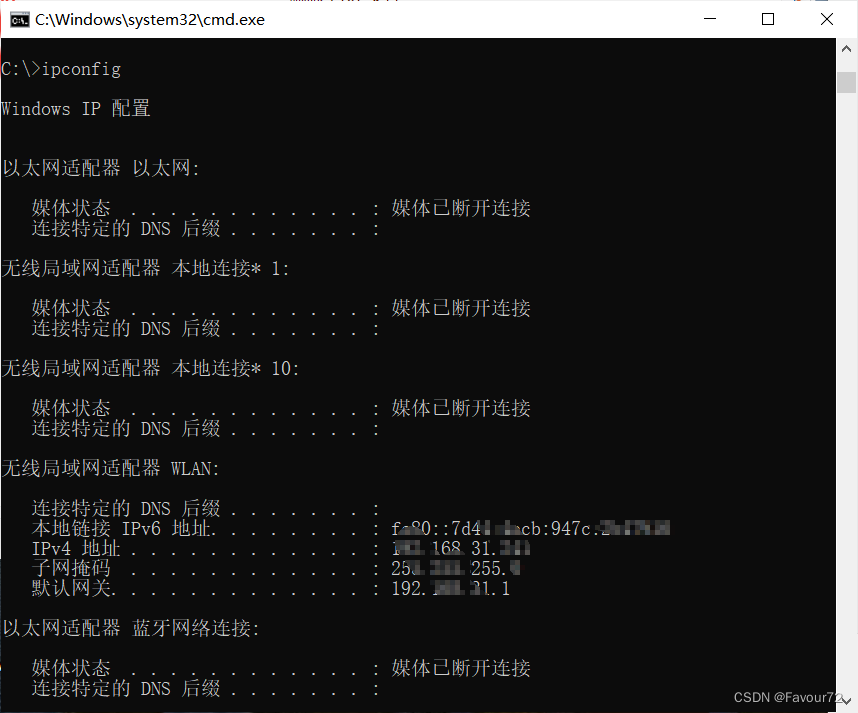
查看本机ip
ipconfig
查看联通
ping +机名
ping www,baidu.com
用来测试网络是否畅通 ping ip(主机名)
calc打开计算器

边栏推荐
- shell编程
- 日志轮转logrotate
- 7. Reverse Integer整数反转
- Proxyman, a native high-performance packet capturing tool, is for you who love learning
- [hardware ten treasures] - 7.1 [dynamic RAM] key points of DDR hardware design
- Kubernetes scheduling concept and workflow
- Open includeexceptiondetailinfaults on the server (from servicebehaviorattribute or from & lt; servicedebug & gt; to configure behavior) to send exception information back
- C# 可以利用反射给只读属性赋值吗?
- On the difference between Eval and assert
- QT监听socket事件,使用QSocketNotifier类
猜你喜欢

Experimental flags: --disable_ admission_ control=false --enable_ rm=false --llama_ callback_ port=28000

曲线曲率展示
![[hard ten treasures] - 7.2 [dynamic RAM] analysis of the difference between DDR4 and DDR3](/img/e0/690809c029346fbd0889c16d610145.png)
[hard ten treasures] - 7.2 [dynamic RAM] analysis of the difference between DDR4 and DDR3
信号处理系统综合设计-求解器函数的设计(连续和离散时间系统)

TCP protocol -- message format, connection establishment, reliable transmission, congestion control
![[today in history] July 18: Intel was founded; The first photo was posted on the world wide web; EBay spins off PayPal](/img/7d/7a01c8c6923077d6c201bf1ae02c8c.png)
[today in history] July 18: Intel was founded; The first photo was posted on the world wide web; EBay spins off PayPal
![[graduation season _ advanced technology Er] farewell to yourself who has been confused for the past two years. Regroup, junior I'm coming](/img/04/3121514fcd8fcf1c939cbca7f4c67a.jpg)
[graduation season _ advanced technology Er] farewell to yourself who has been confused for the past two years. Regroup, junior I'm coming

『HarmonyOS』工程的创建与虚拟机的使用

UIToolkit中显示汉字

怎样在win10家庭版中使用Hyper-V
随机推荐
软考可以查成绩了,2022年上半年软考成绩查询入口已开通
Rectification ideas for the previous article
[graduation season _ advanced technology Er] farewell to yourself who has been confused for the past two years. Regroup, junior I'm coming
Development stage of source code encryption technology
III Actual combat - current time representation and world standard time format
Vim中删除^M
AcWing-每日一题
The real epidemic situation in the United States, do not easily "bottom" 2020-03-23
MySQL table read lock
MySQL self incrementing lock
Ruby on rails Code Execution Vulnerability (cve-2020-8163) technical analysis, research, judgment and protection
Address resolution ARP Protocol
How strong is the working ability of a project manager with a monthly salary of 50000?
Huffman coding principle
UIToolkit工具模板工程
你了解MySQL都包含哪些“零件“吗?
Which "digital currencies" can survive this winter? 2020-03-30
Rust语言- Slice(切片)类型(&[u8])
QT监听socket事件,使用QSocketNotifier类
Quick sort