当前位置:网站首页>User exit and customer exit in SAP ABAP -015
User exit and customer exit in SAP ABAP -015
2022-06-22 16:22:00 【Boating in rainy days】
SAP ABAP User exits and customer exits in -015
What is customer exit ?
The customer export is SAP In many standard procedures 、 Screens and menus “ hook ”, Customers can use these programs 、 On the screen and in the menu “ Hang up ” Customize functions to meet business needs . More on this later …
In this tutorial , You will learn :
- Type of customer exit
- Customer exit example
- Find the customer exit
- Create a customer exit
- What is a user exit ?
Type of customer exit
There are three main types of customer exits :
- Function module exits
- The screen exits
- Menu exit
Function module exits : Allow customers to pass SAP Add code to function modules at specific locations in the application
Syntax: CALL CUSTOMER-FUNCTION '004'
The screen exits : It allows customers to add fields to... Through sub screens SAP Screen in program . The sub screen calls... In the flow logic of the standard screen .
Format: CALL CUSTOMER-SUBSCREEN CUSTSCR2
Menu exit : It allows customers to add items to the standard SAP In the drop-down menu of the program . These items can be used to invoke add in programs or customize screens .
Format: +CUS ( additional item in GUI status )
Customer exit example
Screen exit example :
In trade CAT2 – Schedule input ,HR Want to include an interactive confirmation , That is, deliberately submitting incorrect data is the reason for dismissal .
Menu exit example :
In the transaction SE38 – ABAP Editor , The development team wants to include a pointing transaction SE80 – Menu links for the object navigator , For ease of use .
before

after 
Function module exit example :
The company wants the supplier's bank details to become mandatory during supplier creation . therefore , It must flash an error message ,“ Please enter bank details ”
before

after

Find the customer exit
In trade SMOD in , Check the details -
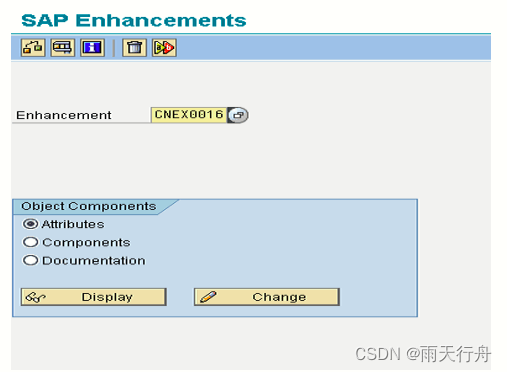
Or in business SE81 in , You can use the corresponding application area

Create a customer exit
To create a customer exit , You need to start with the transaction CMOD Create a project

later , You will “ Customer export ” Items assigned to you .
What is a user exit ?
The purpose of user export is the same as that of customer export , But they only apply to SD modular . Exit is implemented as a call to a function module . The code is written by the developer .
as everyone knows ,SD The user exit in is MV45AFZZ
- USEREXIT_FIELD_MODIFICATION – Modify screen properties
- USEREXIT_SAVE_DOCUMENT – Click... On the user “ preservation ” Perform the operation when
- USEREXIT_SAVE_DOCUMENT_PREPARE
- USEREXIT_MOVE_FIELD_TO_VBAK – When user header changes are moved to the header workspace .
- USEREXIT_MOVE_FIELD_TO_VBAP – When user item changes are moved to SAP Item workspace
边栏推荐
- 数睿数据荣获第二届ISIG中国产业智能大会两项年度大奖
- odoo部署到服务器并配置为服务
- Ironsource Luna offers a limited time discount for Apple search ads and enjoys 3 months of free service upon registration
- Dear students, don't read the textbooks any more. Just read this one for the complexity of time
- 数值类型和字符串之间的转换
- 直播无顶流:董宇辉这么火,还有人看刘畊宏吗?
- 【小程序项目开发-- 京东商城】uni-app开发之分包配置
- 10款超牛Vim插件,爱不释手了
- SAP ABAP data dictionary tutorial se11: tables, locked objects, views, and structures-03
- 【小程序项目开发-- 京东商城】uni-app开发之轮播图
猜你喜欢

SLAM十四讲之第6讲--非线性优化
Research on ICT: domestic databases focus on the ICT market, and Huawei Gauss is expected to become the strongest
![[VTK] model rotation and Translation](/img/4c/76b98797574627a63c385b22637836.png)
[VTK] model rotation and Translation

数睿数据受邀参与南通企业数字化转型研讨会

【小程序项目开发-- 京东商城】uni-app开发之轮播图

Process address space

C语言贪吃蛇

SAP ABAP 数据字典教程 SE11:表、锁定对象、视图和结构 -03

Focus on creating a net red product. The xinjietu x70s is newly launched, starting from 87900

84. (cesium chapter) movement of cesium model on terrain
随机推荐
静态断言 static_assert
Navicat premium connecting to Oracle database (Graphic tutorial)
Basic knowledge of audio and video | analysis of ANS noise suppression principle
SAP ABAP 内部表:创建、读取、填充、复制和删除-06
GD32F4xx MCU 驱动mcp2515扩展CAN接口
Static assertion static_ assert
LeetCode_回溯_动态规划_中等_131.分割回文串
Mr. Du built a domestic non garlic Statistics Platform
什么是 SAP ABAP? 类型、ABAP 完整形式和含义
Ironsource Luna offers a limited time discount for Apple search ads and enjoys 3 months of free service upon registration
[Shanda conference] definitions of some basic tools
nio使用可写事件处理一次性写不完情况
Runtime -- explore the nature of classes, objects, and classifications
6.GUI(图形,填充)
[Shanda conference] project introduces Redux
[Shanda conference] use typescript to reconstruct the project
jmeter关联登录302类型的接口
Modularity in SAP ABAP: macros, subroutines and function modules -04
杜老师自建国内不蒜子统计平台
The odoo system sets priorities for the views independently developed by the original model