当前位置:网站首页>使用OpenVINOTM预处理API进一步提升YOLOv5推理性能
使用OpenVINOTM预处理API进一步提升YOLOv5推理性能
2022-06-23 12:57:00 【英特尔边缘计算社区】
概述
在《基于OpenVINOTM 2022.1实现YOLOv5推理程序》中详述了:
- YOLOv5框架的安装和如何导出YOLOv5.onnx模型
- OpenVINOTM 2022.1的安装以及如何编写YOLOv5模型的推理程序
本文将介绍如何使用OpenVINOTM 2022.1的预处理API,进一步提升YOLOv5模型的推理计算性能
什么是预处理API函数?
OpenVINO 2022.1之前版本不提供OpenVINOTM Runtime原生的用于数据预处理的API函数[1],如图1-1所示,开发者必须通过第三方库(例如:OpenCV)来实现数据预处理。
|

图1-1 OpenVINOTM Runtime预处理API
假设没有预处理API,那么输入数据的预处理操作只能放在CPU上实现,CPU完成数据预处理后,再将预处理后的数据传给iGPU、VPU等AI 加速计算设备进行推理计算。
有了预处理API后,就能将预处理操作集成到在模型执行图中,这样iGPU、VPU 或即将发布的Intel独立显卡都能进行数据预处理,无需依赖CPU,提高了执行效率,如图1-2所示。
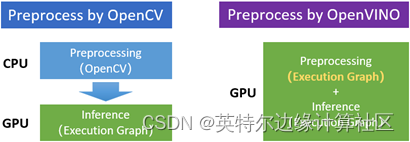
图1-2 预处理OpenCV vs OpenVINO
数据预处理的典型操作
由于输入数据的Shape、Precision等特征,与模型输入张量的要求不一致,所以需要通过预处理,将输入数据按照模型输入张量的要求进行转换,如图1-3所示。

图1-3 输入数据 vs模型输入张量
从图1-3中可见,数据预处理的典型操作有:
- 改变输入数据的形状:[720, 1280,3] → [1, 3, 640, 640]
- 改变输入数据的精度:U8 → f32
- 改变输入数据的颜色通道顺序:BGR → RGB
- 改变输入数据的布局(layout):HWC → NCHW
- 归一化数据:减去均值(mean),除以标准差(std)
- 数据预处理API的使用方法
对应数据预处理的典型操作,OpenVINOTM预处理API提供了相应的类,方便开发者快速使用,其主要流程有6步[2],如图1-4所示,依次是:
- 实例化PrePostProcessor对象;
- 申明输入数据的信息
- 指定模型的数据布局(layout)
- 设置模型输出张量的信息
- 定义预处理的具体步骤
- 将预处理步骤集成到模型
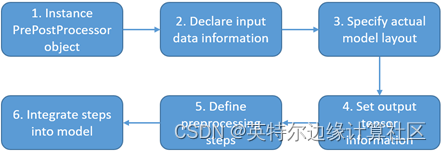
图1-4 使用预处理API的流程
本文将按照上述顺序依次介绍。
实例化PrePostProcessor对象
实例化PrePostProcessor对象的Python代码,如代码清单1-1所示。
代码清单1-1 实例化PrePostProcessor对象
from openvino.runtime import Core, Type, Layout
from openvino.preprocess import PrePostProcessor, ColorFormat
# Please modify the model path
model_path ="yolov5s.onnx"
model = core.read_model(model_path)
# Step1: Instance PrePostProcessor object
ppp = PrePostProcessor(model)
申明输入数据的信息
申明输入数据的信息的Python代码,如代码清单1-2所示。
代码清单1-2 申明输入数据的信息
# Step2: Declare input data information:
ppp.input().tensor() \
.set_color_format(ColorFormat.BGR) \
.set_element_type(Type.u8) \
.set_layout(Layout('NHWC'))
指定模型的数据布局(layout)
指定模型的数据布局(layout) 的Python代码,如代码清单1-3所示。
代码清单1-3 指定模型的数据布局(layout)
# Step3: Specify actual model layout
ppp.input().model().set_layout(Layout('NCHW'))
设置模型输出张量的信息
设置模型输出张量的信息的Python代码,如代码清单1-4所示。
代码清单1-4 设置模型输出张量的信息
# Step4: Set output tensor information:
# - precision of tensor is supposed to be 'f32'
ppp.output().tensor().set_element_type(Type.f32)
定义预处理的具体步骤
定义预处理的具体步骤的Python代码,如代码清单1-5所示。

代码清单1-5 定义预处理的具体步骤
# Step5: Apply preprocessing modifing the original 'model'
# - Precision from u8 to f32
# - color plane from BGR to RGB
# - subtract mean
# - divide by scale factor
# - Layout conversion will be done automatically as last step
ppp.input().preprocess() \
.convert_element_type(Type.f32) \
.convert_color(ColorFormat.RGB) \
.mean([0.0, 0.0, 0.0]) \
.scale([255.0, 255.0, 255.0])
将预处理步骤集成到模型
将预处理步骤集成到模型的Python代码,如代码清单1-6所示。
预处理方式 | CPU/iGPU型号 | 推理设备 | 迭代次数 | 运行时间 |
OpenVINOTM预处理API | i7-1165G7 IntelIrisXe | device=”GPU” | 500 | 12.68s |
OpenCV | i7-1165G7 IntelIrisXe | device=”GPU” | 500 | 13.43s |
代码清单1-6 将预处理步骤集成到模型
# Step6: Integrate preprocessing steps into model
print(f'Build preprocessor: { ppp}')
model = ppp.build()
将集成了预处理步骤的模型导出
使用serialize()函数,可以将集成了预处理步骤的模型导出,方便后续调用,如代码清单1-7所示。
代码清单1-7 导出包含预处理步骤的模型
# Save the Model with preprocess
from openvino.offline_transformations import serialize
serialize(model, 'yolov5s.xml', 'yolov5s.bin')
使用Netron打开导出模型,可以看到预处理步骤已经集成到执行图中,如图1-5所示。
图1-5 预处理集成到执行图中
导出集成预处理模型的完整源代码:https://gitee.com/ppov-nuc/yolov5_infer/blob/main/preprocessing_with_saving_to_IR.py
完整范例代码和测试结果
本文随附使用OpenVINOTM 2022.1预处理API实现YOLOv5s推理程序的完整源代码,参见:infer_with_openvino_preprocess.py · PPOV_NUC/yolov5_infer - Gitee.com。
表1-1使用OpenVINOTM 2022.1预处理API和使用OpenCV实现预处理的性能对比
操作系统:Windows10;Python版本:3.8;OpenVINO版本:2022.1
模型:yolov5s.onnx
预处理方式 | CPU/iGPU型号 | 推理设备 | 迭代次数 | 运行时间 |
OpenVINOTM预处理API | i7-1165G7 IntelIrisXe | device=”GPU” | 500 | 12.68s |
OpenCV | i7-1165G7 IntelIrisXe | device=”GPU” | 500 | 13.43s |
执行命令, 将yolov5s.onnx转换为FP16精度的yolov5s.xml后
mo --input_model yolov5s.onnx --data_type FP16
操作系统:Windows10;Python版本:3.8;OpenVINO版本:2022.1
模型:yolov5s.xml @ FP16
预处理方式 | CPU/iGPU型号 | 推理设备 | 迭代次数 | 运行时间 |
OpenVINOTM预处理API | i7-1165G7 IntelIrisXe | device=”GPU” | 500 | 7.41s |
OpenCV | i7-1165G7 IntelIrisXe | device=”GPU” | 500 | 8.24s |
总结
本文完整介绍了什么是OpenVINO 预处理API和为什么推荐使用预处理API将预处理操作集成到模型执行图中,然后详细介绍了使用步骤并提供了完整范例源代码。
通过运行源代码,可以看到,使用了OpenVINO预处理API,使输入数据预处理操作不再依赖CPU,可以由推理设备(如GPU/VPU)完成,提高了推理计算效率,减少了运行时间。
参考文献:
[1] openvino.preprocess — OpenVINO documentation
[2] Preprocessing API - details — OpenVINO documentation
[3] openvino_notebooks/002-openvino-api.ipynb at main · openvinotoolkit/openvino_notebooks · GitHub
边栏推荐
- How long is the financial product? Is it better for novices to buy long-term or short-term?
- 逆向调试入门-了解PE结构文件
- After the uncommitted transactions in the redo log buffer of MySQL InnoDB are persisted to the redo log, what happens if the transaction rollback occurs?
- [website architecture] the unique skill of 10-year database design, practical design steps and specifications
- Service stability governance
- 美国的国家公园概览
- 首次曝光!唯一全域最高等级背后的阿里云云原生安全全景图
- Germancreditdata of dataset: a detailed introduction to the introduction, download and use of germancreditdata dataset
- In flinksql, the Kafka flow table and MySQL latitude flow table are left joined, and the association is made according to I'd. false
- 16 channel HD-SDI optical transceiver multi channel HD-SDI HD video optical transceiver 16 channel 3g-sdi HD audio video optical transceiver
猜你喜欢

Configure SSH Remote Login for H3C switch

618的省钱技术攻略 来啦 -体验场景 领取10元猫超卡!

在線文本過濾小於指定長度工具

MySQL使用ReplicationConnection導致的連接失效分析與解决

Androd Gradle模块依赖替换如何使用

Germancreditdata of dataset: a detailed introduction to the introduction, download and use of germancreditdata dataset

首次曝光!唯一全域最高等级背后的阿里云云原生安全全景图
Filtre de texte en ligne inférieur à l'outil de longueur spécifiée

64 channel PCM telephone optical transceiver 64 channel telephone +2-channel 100M Ethernet telephone optical transceiver 64 channel telephone PCM voice optical transceiver

Hanyuan hi tech 1-way uncompressed 4k-dvi optical transceiver 4K HD uncompressed DVI to optical fiber 4k-dvi HD video optical transceiver
随机推荐
Js: get the maximum zindex (Z-index) value of the page
Cloud native essay deep understanding of ingress
CRMEB 二开短信功能教程
When did the redo log under InnoDB in mysql start to perform check point disk dropping?
Principle analysis of three methods for exchanging two numbers
Unity small demand - simple realization of imitation King Diamond (single draw)
The redis keys command should be used with caution in the production environment. It is best to shield it
How to enable the SMS function of alicloud for crmeb knowledge payment
R language uses the multinom function of NNET package to build a disordered multi classification logistic regression model, uses regression coefficients and their standard errors to calculate the valu
4E1 PDH optical transceiver 19 inch rack type single fiber transmission 20km E1 interface optical network optical transceiver
何小鹏:如果可以回到创业的时候 不会以自己的名字给产品命名
Analyse et résolution des défaillances de connexion causées par MySQL utilisant replicationconnection
C语言的基本数据类型及其打印输出
After the uncommitted transactions in the redo log buffer of MySQL InnoDB are persisted to the redo log, what happens if the transaction rollback occurs?
How about stock online account opening and account opening process? Is it safe to open a mobile account?
Capacity limited facility location problem
Packaging and unpacking process of ESP message under IPSec transmission mode
KDD 2022 | epileptic wave prediction based on hierarchical graph diffusion learning
Filtre de texte en ligne inférieur à l'outil de longueur spécifiée
HomeKit支持matter协议,这背后将寓意着什么?