当前位置:网站首页>VB. Net class library - 4 screen shots, clipping
VB. Net class library - 4 screen shots, clipping
2022-06-26 21:56:00 【Xiaoyu 163】
VB.net use screen Class to screenshot , In fact, there is no need to call api
In class library myScreen Write the function in
 ''' <summary>
    '''  Get screen pictures
    ''' </summary>
    ''' <returns> screen picture </returns>
    Public Function GetScreen()
        Dim scr As Screen = Screen.PrimaryScreen
        Dim recSc As Rectangle = scr.Bounds
        Image = New Bitmap(recSc.Width, recSc.Height)
        g = Graphics.FromImage(Image)
        g.CopyFromScreen(New Point(0, 0), New Point(0, 0), New Size(recSc.Width, recSc.Height))
        Return Image
    End Function
    ''' <summary>
    '''  This function is mainly used to crop the obtained screen image . Be careful : When calling, the MouseDown To the GDIscr.p1 Pass in the first vertex in .
    '''  And then MouseUp To the GDIscr.p2 Pass in the second vertex , The vertex style is drawn from the upper left corner to the lower right corner .
    ''' </summary>
    ''' <param name="bmp"> Incoming screenshot , But also other pictures </param>
    ''' <returns> Cut out pictures </returns>
    Public Function CutScren(bmp As Bitmap)
        g = Graphics.FromImage(bmp)
        Dim rc As Rectangle = New Rectangle(p1, New Size(p2.X - p1.X, p2.Y - p1.Y))   ' Starting point, length and width
        Image = bmp.Clone(rc, Imaging.PixelFormat.Format32bppArgb)
        Return Image
    End Function
Write... In the class :
 Public p1 As Point
    Public p2 As Point
Expose these two variables : In the main form, you need to call
call :test Create a new form called Cut
Add a picturebox:


FromBorderStyle Change it to none
WindowState Change it to Maximized,
Cut Write code :
'Imports GDI_Make_NET4_5.myScreen
Public Class Cut
    Public GDIscr As New GDI_Make_NET4_5.myScreen
    Private ispick As Boolean
    Public Sub ShowMe(bmp As Bitmap)
        Pic.Location = New Point(0, 0)
        Pic.Width = bmp.Width
        Pic.Height = bmp.Height
        Pic.Image = bmp
        ispick = True
        Me.Show()
    End Sub

    Private Sub Pic_MouseDown(sender As Object, e As MouseEventArgs) Handles Pic.MouseDown
        If ispick = True Then
            GDIscr.p1 = New Point(e.X, e.Y)
        End If
    End Sub

    Private Sub Pic_MouseUp(sender As Object, e As MouseEventArgs) Handles Pic.MouseUp
        If ispick = True Then
            GDIscr.p2 = New Point(e.X, e.Y)
            Pic.Image = GDIscr.CutScren(Pic.Image)
            Clipboard.SetImage(Pic.Image)
            MsgBox(" Copied to clipboard , Double click the picture to exit ")
            ispick = False
        End If
    End Sub

    Private Sub Pic_DoubleClick(sender As Object, e As EventArgs) Handles Pic.DoubleClick
        Close()
    End Sub
End Class
The main form uses MouseDown Get the first point ,MouseUp Get the second point and call the function , Pass in myScreen,
ispick The function of the is to prevent errors in secondary cropping , In code msgbox The segment can be modified by itself 、 Or save the picture .
test :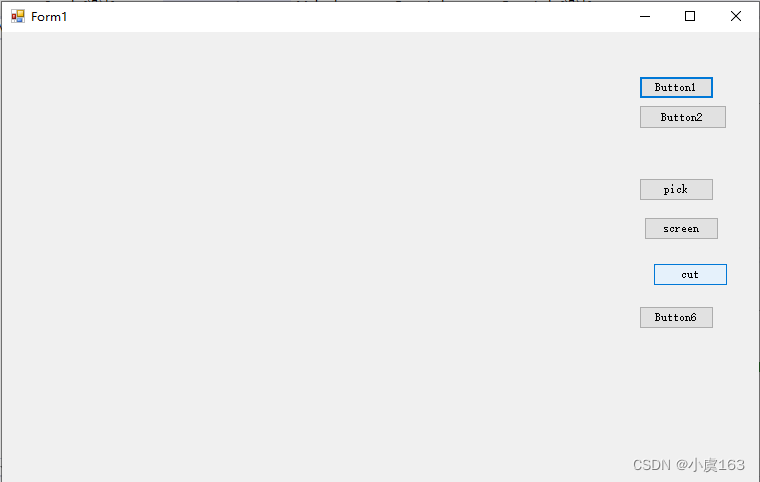
spot screen Get a screenshot of the current screen
Click on cut Show Cut forms , Be careful , Show a form . The first point is the upper left corner of the area you want to select , The second point is the lower right corner of the area you want to select , Just understand the code , If the order of points is reversed, the screenshot , It doesn't show .
边栏推荐
- Fastadmin Aurora push send message registration_ Multiple IDs are invalid after being separated by commas
- Centos7 compiling and installing redis
- fastadmin极光推送发送消息的时候registration_id多个用逗号分割后无效
- About appium trample pit: encountered internal error running command: error: cannot verify the signature of (solved)
- leetcode:1567. 乘积为正数的最长子数组长度【dp[i]表示以i结尾的最大长度】
- 【数学建模】基于matlab GUI随机节点的生成树【含Matlab源码 1919期】
- Y48. Chapter III kubernetes from introduction to mastery -- pod status and probe (21)
- 简析攻防演练中蓝队的自查内容
- Is it safe to buy stocks and open accounts through the account QR code of the CICC securities manager? Want to open an account for stock trading
- 在线协作文档综合评测 :Notion、FlowUs、Wolai、飞书、语雀、微软 Office、谷歌文档、金山文档、腾讯文档、石墨文档、Dropbox Paper、坚果云文档、百度网盘在线文档
猜你喜欢

Yolov6: un cadre de détection de cibles rapide et précis est Open Source

The sharp sword of API management -- eolink

Implementation of collaborative filtering evolution version neuralcf and tensorflow2
YOLOv6:又快又准的目标检测框架开源啦

线性模型LN、单神经网络SNN、深度神经网络DNN与CNN测试对比

【图像处理基础】基于matlab GUI图像曲线调整系统【含Matlab源码 1923期】

Module 5 operation

【数学建模】基于matlab GUI随机节点的生成树【含Matlab源码 1919期】

QT环境下配置Assimp库(MinGW编译器)

leetcode:6107. 不同骰子序列的数目【dp六个状态 + dfs记忆化】
随机推荐
numpy中mgrid的用法
Release of dolphin scheduler video tutorial in Shangsi Valley
Implementation of collaborative filtering evolution version neuralcf and tensorflow2
Common configuration of jupyterlab
Vulnhub's dc9
MATLAB与Mysql数据库连接并数据交换(基于ODBC)
JupyterLab 常用配置
What is the “ How to remove a custom form list?
MacOS環境下使用HomeBrew安裝[email protected]
leetcode:6103. 从树中删除边的最小分数【dfs + 联通分量 + 子图的值记录】
证券注册开户有没有什么风险?安全吗?
QT环境下配置Assimp库(MinGW编译器)
vulnhub之DC9
curl: (35) LibreSSL SSL_ connect: SSL_ ERROR_ SYSCALL in connection
[fundamentals of image processing] GUI image curve adjustment system based on MATLAB [including Matlab source code 1923]
在哪家券商公司开户最方便最安全可靠
random_ normal_ Initializer uses
Is it safe to open a stock account with the QR code given by the CICC securities manager? I want to open an account
Is there any risk in opening a securities registration account? Is it safe?
Pass note 【 dynamic planning 】