当前位置:网站首页>Remove the mosaic, there's a way, attached with the running tutorial
Remove the mosaic, there's a way, attached with the running tutorial
2022-06-25 09:29:00 【Maoningyi】
Eliminate mosaic and turn into high-definition portrait in seconds , Make the blurred picture clear in seconds .
ai Technology is becoming more and more powerful .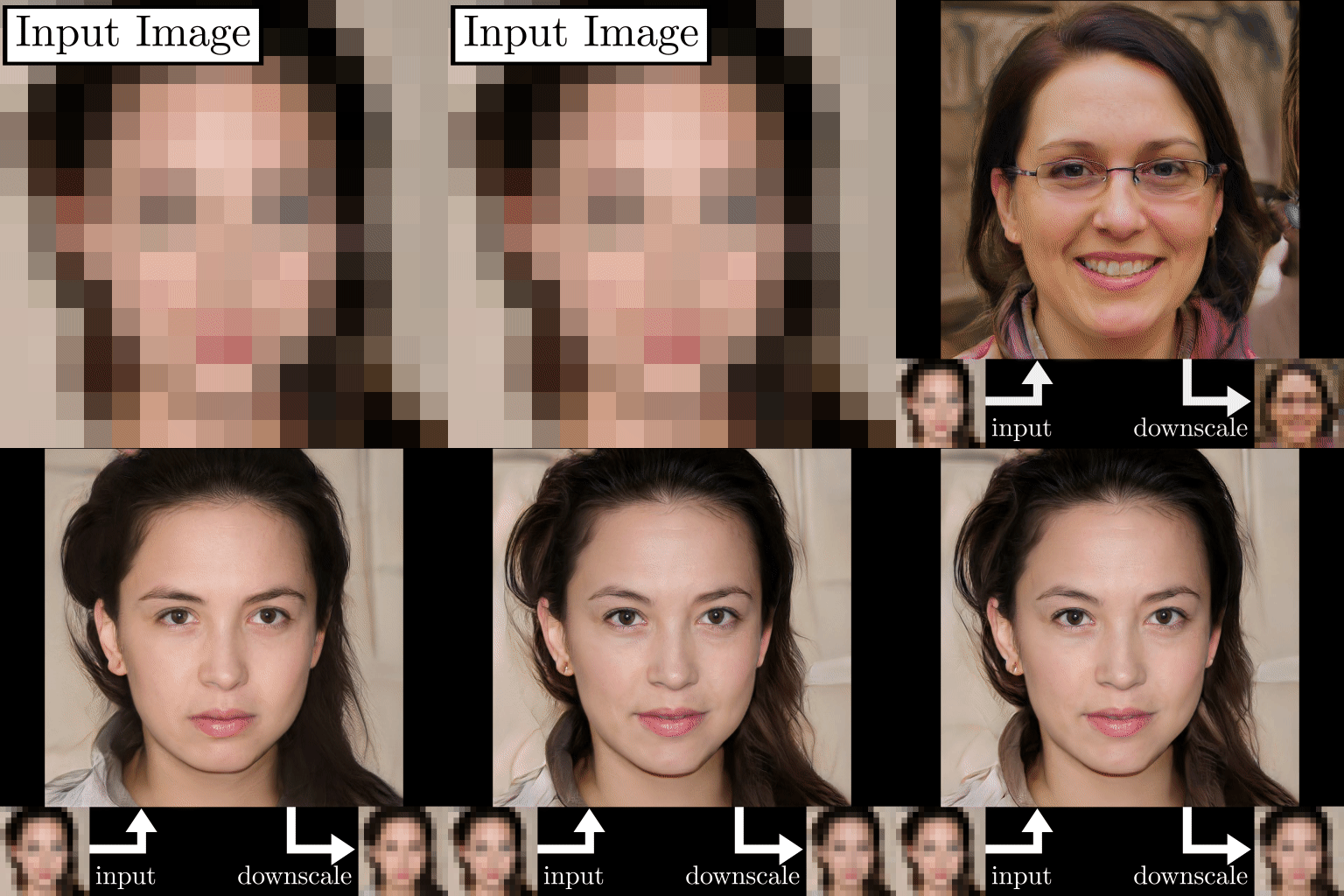
But now ai technology , It can really eliminate mosaic completely , 100% restore photos ?
Actually , Mosaic elimination algorithm PULSE, stay 2 It was released years ago .
Make up the coding place by algorithm , Help us restore photos .
Even the pores on the face 、 Hair can be restored .
Up to now , The technology of eliminating mosaic has matured , Not two weeks ago , Open source a new algorithm MAE.
This is more powerful , Even if the screen is blocked for more than 90%,ai Will also find ways to help us recover .
I tried it out , The following picture is used .
After occlusion , We can roughly see what this is , But I don't know what the eyes look like .
Run it for a while , The effect simulated by the algorithm is as follows :
And the original picture is like this :
It is basically restored .
Let's take a look at the principles of these algorithms .
Mosaic is actually a low pixel image .
A clear picture , It's just the eye area , There may be 100 Pixel , And turn it into mosaic , This area may only be 3 Pixel .
So the picture will be blurred , I can't see what the original picture is .
I want to restore the photos , It is necessary to base on this 3 Pixel , The brain makes up some features , Make up again as 100 Pixel .
This is what the algorithm does , Automatic brain filling some nonexistent features , Like wrinkles 、 Hair, etc .
Can these algorithms really help us 100% restore photos ?
I took my own ID photo and tried it .
The first is the original , The last one is the effect of the final restoration .
that ——
Although they also have nose and eyes .
But compared with the original photo , It's irrelevant .
The photo generated at last is only made up by the algorithm , Maybe it's just a face that looks real .
But I want to reconstruct and restore the portrait through mosaic , So far , It's impossible .
But restore some things that are not obvious in their individual characteristics , Like furniture 、 Animal, etc. , The accuracy is relatively high .
For example, this little fox ,MAE The algorithm restoration is very successful .
So how to run these algorithms ?
We use the first algorithm PULSE give an example .
First step : Download code
Project address :
https://github.com/adamian98/pulse
The second step : Set up the environment
Under the root directory of the code file , There is one pulse.yml file , The environment configuration information is all here .
We can directly run the following code to create a virtual environment , And according to pulse.yml File configuration environment .
conda env create -n pulse -f pulse.yml
But I install it myself , The following error was reported :
Solving environment: failed
ResolvePackageNotFound:***
This is because , The environment configuration file is exported from another computer , Not suitable for our computer configuration , Deleting the specific information of the package can solve the problem , That is, delete the contents after the second equal sign of the package name .
such as :
- blas=1.0=mkl
- ca-certificates=2020.1.1=0
Change to :
- blas=1.0
- ca-certificates=2020.1.1
also dlib The installation of the library also encountered problems , You need to install cmake, Install again dlib.
pip install cmake
pip install dlib
If the installation is still unsuccessful , You can put dlib19.19.0 Download the version , Install... Locally .
I will dlib19.19.0 Version file , Uploaded to my baidu disk .
Download address ( Extraction code :6666):
https://pan.baidu.com/s/16KHEdZ0KD_pQPRRiGuq5Ew
Finally, install the local file .
pip install dlib-19.19.0-cp38-cp38-win_amd64.whl.whl
The third step : Run the model
The project provides us with a pre training model , Need to climb over the wall to download .
I have already downloaded it , Uploaded to my baidu disk .
Download address ( Extraction code :6666):
https://pan.baidu.com/s/16KHEdZ0KD_pQPRRiGuq5Ew
Under the root directory of the code file , Create two folders , Named as :cache、realpics .
Download the above , Pre training model ( Three files ), Put it in cache In the folder .
Then put a portrait photo in realpics In the folder , Let's take the following picture as an example :

Run the following statement first , Reduce the resolution of the picture .
python align_face.py
The generated image will be placed in input In the folder .
Last run run.py file
python run.py
Will be in runs Create brain mapping under folder .
They are all blonde , But not much like ——
If this error is encountered during operation :
Could not find a face that downscales correctly within epsilon
There are two ways to solve :
1. Increase iterations
python run.py -steps=5000
2、 increase eps
This is a problem , Because L2 The loss is greater than eps, We increase by eps Value , You can avoid this mistake
stay run.py Of documents 39 That's ok .
Source code :
parser.add_argument('-eps', type=float, default=2e-3, help='Target for downscaling loss (L2)')
Modified into :
parser.add_argument('-eps', type=float, default=8e-2, help='Target for downscaling loss (L2)')
In this way, there is basically no problem .
I have written down all the problems encountered during the project , I hope you can run smoothly ~
If you want to run the new MAE Algorithm .
The project address is :
https://github.com/facebookresearch/mae
The project provides Colab, To log in Google Account can be run , If you can log in , You can directly experience the algorithm effect online :
https://colab.research.google.com/github/facebookresearch/mae/blob/main/demo/mae_visualize.ipynb
wx Search for 【 Meow Ningyi 】 Read the article for the first time ~
边栏推荐
- Atguigu---17-life cycle
- [buuctf.reverse] 121-125
- [competition -kab micro entrepreneurship competition] KAB National College Students' micro entrepreneurship action participation experience sharing (including the idea of writing the application form)
- 六级易混词整理
- compiling stm32f4xx_ it. c... “.\Objects\BH-F407.axf“ - 42 Error(s), 1 Warning(s).
- Japanese online notes for postgraduate entrance examination (9): composition template
- Notes on key vocabulary of the original English work biography of jobs (I) [introduction]
- TLAB mechanism of JVM object memory allocation and TLAB process in G1
- 使用Navicat对比多环境数据库数据差异和结构差异,以及自动DML和DDL脚本
- Register the jar package as a service to realize automatic startup after startup
猜你喜欢

Jmeter中的断言使用讲解

How to download the school logo, school name and corporate logo on a transparent background without matting

行业春寒回暖,持续承压的酒店企业于何处破局?

浅谈Mysql底层索引原理
Explanation of assertions in JMeter

Matplotlib decision boundary drawing function plot in Matplotlib_ decision_ Boundary and plt Detailed explanation of contour function

使用Navicat对比多环境数据库数据差异和结构差异,以及自动DML和DDL脚本

3大问题!Redis缓存异常及处理方案总结

203 postgraduate entrance examination Japanese self-study postgraduate entrance examination experience post; Can I learn Japanese by myself?

CSV parameterization in JMeter
随机推荐
Notes on key vocabulary of the original English work biography of jobs (I) [introduction]
Is it safe for Huatai Securities to open an account on it? Is it reliable?
[competition - Rural Revitalization] experience sharing of Zhejiang Rural Revitalization creative competition
matplotlib matplotlib中plt.axis()用法
Flutter multilingual intl: ^0.17.0 cannot be imported
Voiceprint Technology (VII): the future of voiceprint Technology
Is it safe to open an account at Huatai Securities?
《乔布斯传》英文原著重点词汇笔记(四)【 chapter two 】
Specific usage of sklearn polynomialfeatures
How to download the school logo, school name and corporate logo on a transparent background without matting
35 websites ICER must know
在指南针上面开户好不好,安不安全?
行业春寒回暖,持续承压的酒店企业于何处破局?
When unity released webgl, jsonconvert Serializeobject() conversion failed
203 postgraduate entrance examination Japanese self-study postgraduate entrance examination experience post; Can I learn Japanese by myself?
sklearn PolynomialFeatures的具体用法
Webgl Google prompt memory out of bounds (runtimeerror:memory access out of bounds, Firefox prompt index out of bounds)
Japanese online notes for postgraduate entrance examination (9): composition template
Compile time annotations for custom annotations (retentionpolicy.class)
Use Navicat to compare data differences and structure differences of multi environment databases, and automatic DML and DDL scripts