当前位置:网站首页>Learning diary - (routing and switching technology) network address translation NAT Technology
Learning diary - (routing and switching technology) network address translation NAT Technology
2022-07-23 12:51:00 【Make money and marry sweet】
One 、 Related knowledge
NAT( Network address translation ) Is the one IP The technology of transferring an address domain to another address domain
NAT The emergence of technology is to solve the decreasing IP Address problem , Multiple internal IP The address is mapped to a few or even one public network address , In this way, the host in the internal network can be realized ( Usually a private address ) Transparent access to external network resources . meanwhile , The host of the external network also selectively accesses the internal network .
NAT It can make the internal and external networks next door , Play a certain safety role
What is private address and public address ?
answer : Private address can only be used inside an organization or institution , Can't be in Internet Use... In scope , Its scope is 10.0.0.0~10.255.255.255、172.16.0.0~172.31.255.255、192.168.0.0~192.168.255.255
Relatively speaking , Other scope IP The address is the public address 、 Routable address or legal address , Must formally report to Internet Registered Organize the application and use according to the assigned address range .
What is internal network ?
answer : Refers to those networks owned by institutions or enterprises , And NAT Defined on the router inside Interface connection .
What is an external network ?
answer : Refers to all networks except the internal network , Often Internet The Internet , And NAT Defined on the router outside Interface connection .
What is the internal local address ?
answer : Used by internal network host IP Address , These addresses are generally private IP Address , They cannot be directly in Internet On route , Therefore, it cannot be directly used for Internet The interview of , Must be through network address translation (NAT), In legal IP Address identity to access Internet.
What is the internal global address ?
answer : The public used by the internal network IP Address , These addresses are directed to ICANN Public ownership that can be obtained only after application IP Address , When using the internal local address, the host should be connected with Internet When communication ,NAT The address used in the conversion
When is the external local address ?
answer : Used by external network hosts IP Address , These addresses are not necessarily public IP Address .
What is the external global address ?
Used by external network hosts IP Address , These addresses are globally routable public IP Address .
NAT Working schematic diagram :

NAT Application environment :
1、 Use NAT Technology is isolated from external networks , There is a certain degree of security
2、 adopt NAT This function enables multiple users to share a legal IP With the outside Internet communicate .
3、 If there are two internal networks that need to be interconnected , When the internal private address ranges they use overlap , You can also use NAT Technology conversion .
NAT Divided into three categories :
1、 Static address translation ;2、 Dynamic address translation ;3、 Address port conversion
Two 、 Example
1、( static state NAT) There are two in the internal network of an enterprise PC machine , They use internal local addresses . Static address translation should be configured correctly , Make these two PC Access to Internet. among PC1 and PC2 The internal global addresses used are 210.68.166.2 and 210.68.166.3, Router internal network interface f0/0 Of IP The address is 192.168.10.1, External network interface s1/2 Of IP The address is 210. 68.166.1.
topology :

Code :
NAT Router :
Router>en
Router#conf t
Enter configuration commands, one per line. End with CNTL/Z.
Router(config)#host
Router(config)#hostname NAT
NAT(config)#int
NAT(config)#interface g
NAT(config)#interface gigabitEthernet 0/1
NAT(config-if)#ip add
NAT(config-if)#ip address 192.168.10.1 255.255.255.0
NAT(config-if)#no sh
NAT(config-if)#no shutdown
NAT(config-if)#
%LINK-5-CHANGED: Interface GigabitEthernet0/1, changed state to up
%LINEPROTO-5-UPDOWN: Line protocol on Interface GigabitEthernet0/1, changed state to up
NAT(config-if)#e
NAT(config-if)#exit
NAT(config)#interface gigabitEthernet 0/0
NAT(config-if)#ip address 210.68.166.1 255.255.255.0
NAT(config-if)#no sh
NAT(config-if)#no shutdown
NAT(config-if)#
%LINK-5-CHANGED: Interface GigabitEthernet0/0, changed state to up
NAT(config-if)#e
NAT(config-if)#exit
NAT(config)#
%LINEPROTO-5-UPDOWN: Line protocol on Interface GigabitEthernet0/0, changed state to up
NAT(config)#ip na
NAT(config)#ip nat
NAT(config)#ip nat i
NAT(config)#ip nat inside s
NAT(config)#ip nat inside source s
Configure static NAT
NAT(config)#ip nat inside source static 192.168.10.2 210.68.166.2
NAT(config)#ip nat inside source static 192.168.10.3 210.68.166.3
NAT(config)#interface gigabitEthernet 0/1
NAT(config-if)#ip nat inside The two interfaces should be set respectively inside and outside
NAT(config-if)#e Connected to the intranet is inside, Connected to the Internet is outside
NAT(config-if)#exit
NAT(config)#interface gigabitEthernet 0/0
NAT(config-if)#ip nat outside
NAT(config-if)#e
NAT(config-if)#exit
NAT(config)#end
NAT#
%SYS-5-CONFIG_I: Configured from console by console
see NAT
NAT#show ip nat translations
Pro Inside global Inside local Outside local Outside global
--- 210.68.166.2 192.168.10.2 --- ---
--- 210.68.166.3 192.168.10.3 --- ---
Internet Router ( As a Internet, Only need to be equipped with interfaces IP Address )
Router>en
Router#conf t
Enter configuration commands, one per line. End with CNTL/Z.
Router(config)#hos
Router(config)#hostname Internet
Internet(config)#in
Internet(config)#interface g
Internet(config)#interface gigabitEthernet 0/0
Internet(config-if)#ip add
Internet(config-if)#ip address 210.68.166.4 255.255.255.0
Internet(config-if)#no sh
Internet(config-if)#no shutdown
Internet(config-if)#
%LINK-5-CHANGED: Interface GigabitEthernet0/0, changed state to up
%LINEPROTO-5-UPDOWN: Line protocol on Interface GigabitEthernet0/0, changed state to u
Internet(config-if)#e
Internet(config-if)#exit
result : Originally with Internet ping no , To configure NAT After that, we can

The host is following Internet ping when ,192.168.10.2 mapping 210.68.166.2

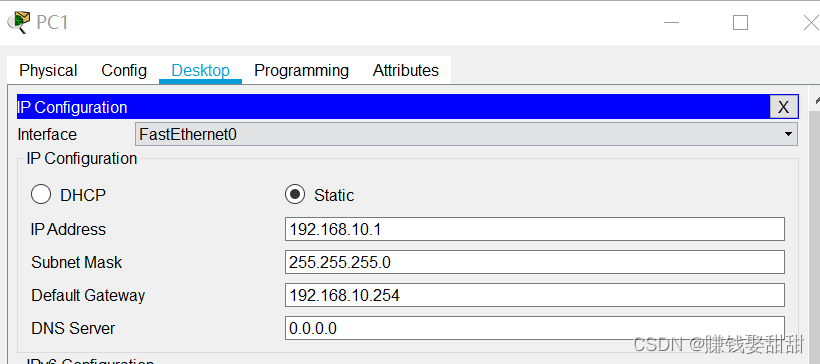
2、( dynamic NAT) Suppose that the internal local address used by an enterprise LAN is 192.168.10.0/24, The internal global address range applied for is 210.68.166.5~210.68.166.16, It is required to correctly configure the dynamic on the border router NAT transformation , To realize LAN and Internet Communication for .
topology :

Host settings
Code :
NAT:
Router>en
Router#conf t
Enter configuration commands, one per line. End with CNTL/Z.
Router(config)#hos
Router(config)#hostname NAT
NAT(config)#in
NAT(config)#interface g
NAT(config)#interface gigabitEthernet 0/1
NAT(config-if)#ip add
NAT(config-if)#ip address 192.168.10.254
NAT(config-if)#ip address 192.168.10.254 255.255.255.0
NAT(config-if)#no sh
NAT(config-if)#no shutdown
NAT(config-if)#
%LINK-5-CHANGED: Interface GigabitEthernet0/1, changed state to up
%LINEPROTO-5-UPDOWN: Line protocol on Interface GigabitEthernet0/1, changed state to up
NAT(config-if)#e
NAT(config-if)#exit
NAT(config)#interface gigabitEthernet 0/0
NAT(config-if)#ip add
NAT(config-if)#ip address 210.68.166.1 255.255.255.0
NAT(config-if)#no sj
NAT(config-if)#no sh
NAT(config-if)#no shutdown
NAT(config-if)#
%LINK-5-CHANGED: Interface GigabitEthernet0/0, changed state to up
NAT(config-if)#e
NAT(config-if)#exit
NAT(config)#
%LINEPROTO-5-UPDOWN: Line protocol on Interface GigabitEthernet0/0, changed state to up
dynamic NAT Set up , The three sentences marked in red are the key
NAT(config)#ip nat pool abc 210.68.166.5 ?
A.B.C.D End IP address
NAT(config)#ip nat pool abc 210.68.166.5 210.68.166.16?
A.B.C.D
NAT(config)#ip nat pool abc 210.68.166.5 210.68.166.16 ne
NAT(config)#ip nat pool abc 210.68.166.5 210.68.166.16 netmask ?
A.B.C.D Network mask
NAT(config)#ip nat pool abc 210.68.166.5 210.68.166.16 netmask 255.255.255.0
( To build a NAT Mapping address pool , Range from 210.68.166.5~210.68.166.16, Finally, the mask )
NAT(config)#ac
NAT(config)#access-list 1 p
NAT(config)#access-list 1 permit 192.168.10.0 0.0.0.255
NAT(config)#ip n
NAT(config)#ip na
NAT(config)#ip nat
NAT(config)#ip nat i
NAT(config)#ip nat inside s
NAT(config)#ip nat inside source l
NAT(config)#ip nat inside source list 1 p
NAT(config)#ip nat inside source list 1 pool abc
NAT(config)#in
NAT(config)#interface g
Set the access of the interface
NAT(config)#interface gigabitEthernet 0/1
NAT(config-if)#ip nat
NAT(config-if)#ip nat i
NAT(config-if)#ip nat inside
NAT(config-if)#interface gigabitEthernet 0/0
NAT(config-if)#ip nat outside
NAT(config-if)#e
NAT(config-if)#exit
NAT(config)#end
NAT#
%SYS-5-CONFIG_I: Configured from console by console
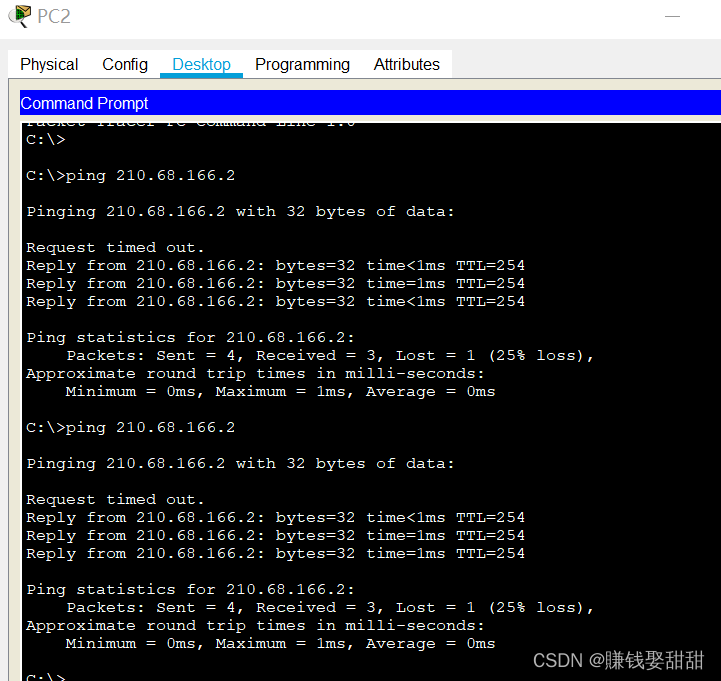
host ping Internet After checking the address translation
NAT#show ip nat translations
Pro Inside global Inside local Outside local Outside global
icmp 210.68.166.7:5 192.168.10.3:5 210.68.166.2:5 210.68.166.2:5
icmp 210.68.166.7:6 192.168.10.3:6 210.68.166.2:6 210.68.166.2:6
icmp 210.68.166.7:7 192.168.10.3:7 210.68.166.2:7 210.68.166.2:7
icmp 210.68.166.7:8 192.168.10.3:8 210.68.166.2:8 210.68.166.2:8
icmp 210.68.166.8:13 192.168.10.1:13 210.68.166.2:13 210.68.166.2:13
icmp 210.68.166.8:14 192.168.10.1:14 210.68.166.2:14 210.68.166.2:14
icmp 210.68.166.8:15 192.168.10.1:15 210.68.166.2:15 210.68.166.2:15
icmp 210.68.166.8:16 192.168.10.1:16 210.68.166.2:16 210.68.166.2:16
icmp 210.68.166.9:5 192.168.10.2:5 210.68.166.2:5 210.68.166.2:5
icmp 210.68.166.9:6 192.168.10.2:6 210.68.166.2:6 210.68.166.2:6
icmp 210.68.166.9:7 192.168.10.2:7 210.68.166.2:7 210.68.166.2:7
icmp 210.68.166.9:8 192.168.10.2:8 210.68.166.2:8 210.68.166.2:8
result : All the hosts are Ping through Internet, Because it is dynamic address translation , So the external address assigned to the host is random .
3、 Port address translation ( It's similar to dynamic address translation , It just needs to be in NAT(config)#ip nat inside source list 1 pool abc Add after overload):
example : Make the above dynamic NAT Change the example of , All internal addresses are mapped to external addresses 210.68.166.5, At this time, we need to use port reuse NAT
topology :

Code and dynamics NAT Mostly the same , The following points out only the differences :
NAT(config)#ip nat pool abc 210.68.166.5 210.68.166.5 n
NAT(config)#ip nat pool abc 210.68.166.5 210.68.166.5 netmask 255.255.255.0 ( The start address is the same as the end address )
NAT(config)#access-list 1 permit 192.168.10.0 0.0.0.255
NAT(config)#ip nat
NAT(config)#ip nat i
NAT(config)#ip nat inside s
NAT(config)#ip nat inside source l
NAT(config)#ip nat inside source list 1 p
NAT(config)#ip nat inside source list 1 pool abc ?
overload Overload an address translation
<cr>
NAT(config)#ip nat inside source list 1 pool abc o
NAT(config)#ip nat inside source list 1 pool abc overload (NAPT Key words of )
result : Three hosts are Ping Internet I use it all the time 210.68.166.5 The address of

This article is written here , You are welcome to point out anything bad , thank you !
边栏推荐
猜你喜欢

unity3d:向量计算,AOE图形相交

HCIP---BGP相关配置(联邦篇)

Unity3D+moba+技能指示器(一)

Unity3d:场景加载 GameObejct上脚本执行顺序

Hcip--- BGP related configuration

Explanation of websocket protocol

Hcip - first experiment

unity3d:Assetbundle模拟加载,同步加载,异步加载,依赖包加载,自动标签,AB浏览器,增量打包
学习日记——(路由与交换技术)网络地址转换 NAT技术

GameFramework:资源热更代码分析,检查版本信息,下载版本文件,校验版本文件,得到更新文件数量,下载文件,TaskPool
随机推荐
HCIP---GRE协议和MGRE环境,以及OSPF协议的相关知识点
Briefly describe the similarities and differences between raft and Paxos in design
读《凤凰架构》- RPC的历史与知识
以go语言为例类比侦探推理来讲解【性能分析】
如何解决if语句太多
第一类错误离我们有多远
LSM-tree(Log Structured-Merge Tree)的理解
PDF Online preview, use of pdf.js
unity3d:UGUI源码EventSystem输入系统常见问题
【读书笔记《凤凰架构》- 构架可靠的大型分布式系统.周志明】(一)
Reading Phoenix Architecture - History and knowledge of RPC
How to solve too many if statements
C custom set
直白理解一文搞定http协议缓存
学习日记——(路由与交换技术)三层交换机
学习日记——(路由与交换技术)ACL访问控制列表
htpasswd作用
HCIP-HCIA知识回顾(二)
C#:stack栈源码,数组栈,链栈
Openssl自行签证流程概述