当前位置:网站首页>Shell arrays and functions
Shell arrays and functions
2022-06-12 19:14:00 【benziwu】
Catalog
3、 ... and 、 Associative array
6、 ... and 、 Function arguments
7、 ... and 、 influence Shell The program's built-in commands
One 、 Concept


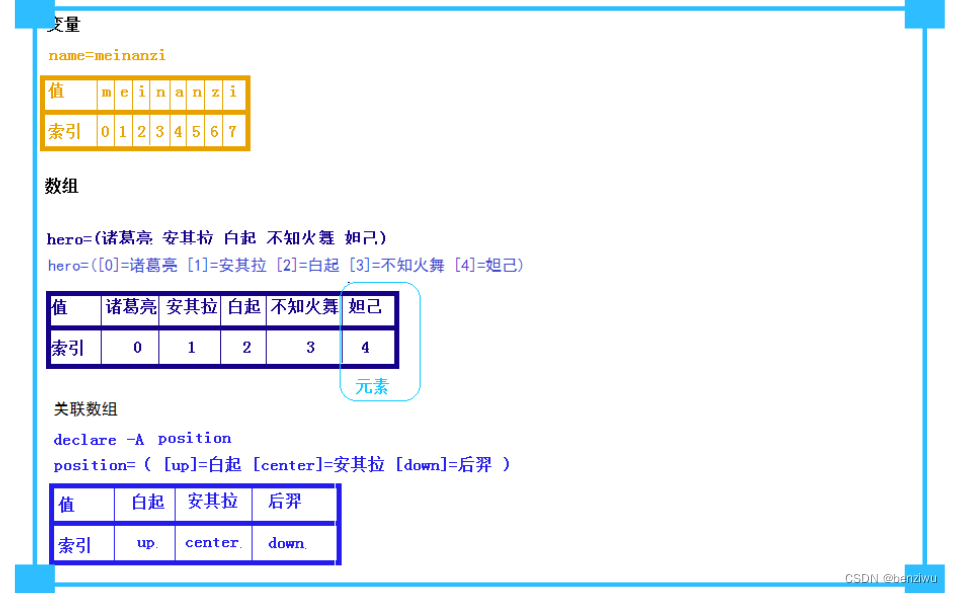
Two 、 Normal array
1-1 Define an array
                array1[1]=appele
[[email protected] ~]# array1[2]=orange
[[email protected] ~]# array1[3]=peach
 array2=(tom jack alice)

# Assign each line of the file to array3
[[email protected] ~]# array3=('cat /etc/passwd')

[[email protected] ~]# array4=('ls /var/ftp/Shell/for*')

[[email protected] ~]# array5=(tom jcak clice "bash shell")

[[email protected] ~]# colors=($red $blue $green $recolor)

[[email protected] ~]# array6=(1 2 3 4 5 6 7 "linux shell" [20]=saltstack)
1-2 Call array method 1
[[email protected] ~]# echo ${array1[*]}
pear appele orange peach
[[email protected] ~]# declare -a | grep array1
declare -a array1='([0]="pear" [1]="appele" [2]="orange" [3]="peach")'
[[email protected] ~]# echo ${array1[@]}
pear appele orange peach
Accessing array elements
 Accessing array elements :
# echo ${array1[0]}  Access the first element in the array
# echo ${array1[@]}  Access all the elements in the array   Equate to  echo ${array1[*]}
# echo ${#array1[@]}  Count the number of array elements
# echo ${!array2[@]}  Get the index of the array element
# echo ${array1[@]:1}  Index from the array 1 Start
# echo ${array1[@]:1:2}  Index from the array 1 Start , Access two elements
3、 ... and 、 Associative array
Array name [ Indexes ]= A variable's value
Associative arrays must be defined first and then assigned
assignment : Assign one value at a time
[[email protected] ~]# declare -A ass_array1   #declare -A  Declare keywords
[[email protected] ~]# ass_array1[index]=pear
[[email protected] ~]# ass_array1[index1]=apple
[[email protected] ~]# ass_array1[index2]=orange
[[email protected] ~]# ass_array1[index3]=orange
[[email protected] ~]# ass_array1[index3]=peach


 see
[[email protected] ~]# echo ${ass_array1[*]}
apple orange peach pear
assignment : Multiple values at a time
declare -A ass_array2
[[email protected] ~]# ass_array2=([index1]=tom [index2]=jack [index3]=alice [index4]="bash shell")

[[email protected] ~]# echo ${ass_array2[index2]}
jack

[[email protected] ~]# echo ${ass_array2[@]}
bash shell tom jack alice

[[email protected] ~]# echo ${#ass_array2[@]}
4
[[email protected] ~]# echo ${!ass_array2[@]}
index4 index1 index2 index3
[[email protected] ~]#
Four 、 Arrays and loops
Case study 1:while Scripts quickly define arrays
#!/bin/bash

# Loop read file , Define an array

while read line
do
        passwd[++i]=$line
done < /etc/passwd

        for i in ${!passwd[*]}
        do
                echo "passwd Index of array $i  An array is ,${passwd[$i]}"
        sleep 1
done
Case study 2: for Scripts quickly define arrays
#!/bin/bash

# Define an array
OLD_IFS=$IFS
IFS=$'\n'
for i in `cat /etc/hosts`
do
hosts[++i]=$i
done

for b in ${!hosts[*]}
do
        echo "hosts  The index of the array is $bb , The value is  ${hosts[$b]}"
done

IFS=$OLD_IFS

#!/bin/bash
# Array statistics gender
declare -A sex  # Declare an associative array sex
#while  Read the file by line ,for Read by space
        while read line
        do
type=`echo $line | awk '{print $2}'` #awk   A cutting charm , Cut the specified output

        let sex[$type]++                # One cycle per household sex  Same sex +1;
        done <sex.txt  # Give each line of file to line

        for i in ${!sex[@]}
        do
                echo "$i,${sex[$i]} "
        done
5、 ... and 、 function
A function is a snippet of code that performs a specific function ( block ) stay shell Function is defined in , You can modularize the code , Easy to reuse code Note that functions must be defined before they can be used .
5-1 Defined function 1:
 Function name () {
     Function to achieve the function code
        }
5-2 Defined function 2:
function  Function name {
     Function to achieve the function code
}
5-3 Call function
 Function name
     Function name   Parameters 1  Parameters 2
read -p "Input choice:" choice
case $choice in
d)
echo "===========dish info============="
df -hT
;;
m)
echo "===========meme info============="
free -m
;;
c)

6、 ... and 、 Function arguments
Case study 1
Let the function define itself and Parameters are passed externally
#!/bin/bash
#jiecheng1.ch

fun1(){
factorial=1
for((i=1;i<=$1;++i))
do
#echo "$i"
factorial=$[$factorial*$i]
done
type=$[i-1]
echo “$type The factorial is :$factorial”
}

fun1 1
fun1 2
fun1 3

 perhaps ——————————————————————————————————————————————————————————————————————————————————————

fun1 $1
fun1 $2
fun1 $3

[[email protected] ~]# bash jiecheng1.sh  3 5 10
“3 The factorial is :6”
“5 The factorial is :120”
“10 The factorial is :3628800”
Case study 2 Function arguments Array parameters
Make a simple factorial script , Pass arguments to a function through an array
#!/bin/bash
#NUM_array.sh

num=(1 2 3 4)

array(){
        fac=1
for i in $*
do
fac=$[$fac*$i]
done
        echo $fac
}

array ${num[*]}


***************************************************************************

#!/bin/bash
#NUM_array.sh
num=(1 2 3 4)

array(){
#local Defining variables is only valid in functions
local j
#fac=1
for i in $*
do

# Define different values *5, Note that the index is used when retrieving values
outarray[j++]=$[$i+5]
done
        echo "${outarray[*]}"
}

array ${num[*]}
7、 ... and 、 influence Shell The program's built-in commands


Case test
#!/bin/bash

        for i in {A..D}
        do
                echo -n  $i     #echo  Default output line breaks   Use -n  No output

                for j in {1..9}
                do
                        if [ $j -eq 5 ];then

10                       continue   # Jump out of this cycle ######*****

fi
                        echo -n  $j     #
                done
                        # External circulation is intermittent
                echo
        done
———————————————————————————————————————————————————————————————————————————
[[email protected] ~]# bash xunhuan.sh
A12346789         Jump out of =5 The cycle of 、 Jump out of the inner loop
B12346789
C12346789
D12346789
10 break # interrupt =5 The inner circle of
——————————————————————————————————————————————————————
[[email protected] ~]# bash xunhuan.sh
A1234
B1234
C1234
D1234
10                         break  2  # interrupt 2 Layer cycle , Inner loop =5 interrupt
——————————————————————————————————————————————————————————————
bash xunhuan.sh
A1234
Shift
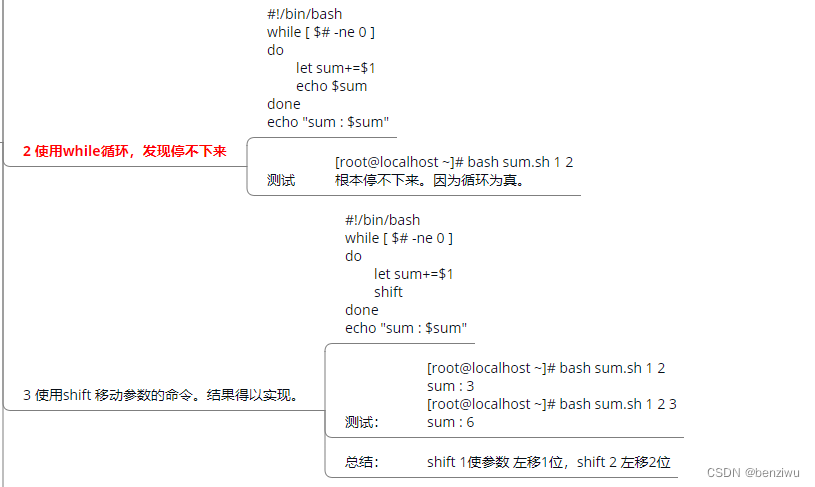
#!/bin/bash

while [ $# -ne 0 ]
do
        let sum+=$1
        shift
#       echo #sum
done
echo "sum:$sum"
————————————————————————————————————————————————————————————————————
[[email protected] ~]# bash sum.sh 1 2
sum : 3

shift 1  Make parameters      Move left 1 position ,shift 2  Make parameters   Move left 2 position
summary : Use while Pass the participants into an infinite cycle Loop in reference shift Equivalent to limiting the number of cycles
边栏推荐
- Hash hash
- Transactions in redis
- Istio 1.14 发布
- [5gc] Introduction to three SSC (session and service continuity) modes
- Embedded development: 6 necessary skills for firmware engineers
- Dumi builds a document blog
- review. JS ppt math formula cannot be displayed
- Research Report on global and Chinese cosmetics industry market sales scale forecast and investment opportunities 2022-2028
- Yoloe target detection notes
- 5G R17标准冻结,主要讲了些啥?
猜你喜欢

Kali implements port forwarding through iptables
![leetcode:5259. Calculate the total tax payable [simple simulation + see which range]](/img/f4/e6329c297dbe668e70f5e37bfc2852.png)
leetcode:5259. Calculate the total tax payable [simple simulation + see which range]

Super heavy! Apache Hudi multimode index optimizes queries up to 30 times
![[5gc] Introduction to three SSC (session and service continuity) modes](/img/98/6e08986269c5dc1f5ce192cdef3e9f.png)
[5gc] Introduction to three SSC (session and service continuity) modes

【历史上的今天】6 月 12 日:美国进入数字化电视时代;Mozilla 的最初开发者出生;3Com 和美国机器人公司合并
[today in history] June 12: the United States entered the era of digital television; Mozilla's original developer was born; 3com merges with American Robotics

3GPP RAN第一次F2F会议,都干了些啥?

kali局域网ARP欺骗(arpspoof)并监听(mitmproxy)局域内其它主机上网记录

Redis中的事务

leetcode:6097. 替换字符后匹配【set记录 + 相同长度逐一查询】
随机推荐
wireshark基本使用命令
leetcode:6095. 强密码检验器 II【简单模拟 + 不符合直接False】
leetcodeSQL:578. Questions with the highest response rate
Yoloe target detection notes
leetcode:5289. Distribute cookies fairly [see data range + DFS pruning]
王学岗room+paging3
Detailed explanation of yolox network structure
leetcode:98. 统计得分小于 K 的子数组数目【双指针 + 计算子集个数 + 去重】
Leetcode 474. One and zero
Istio 1.14 发布
Leetcode 416. 分割等和子集
Research Report on the overall scale, major manufacturers, major regions, products and application segmentation of swimming fins in the global market in 2022
leetcode:6096. 咒语和药水的成功对数【排序 + 二分】
leetcode:6097. Match [set record + query one by one with the same length] after replacing characters
[image denoising] image denoising based on regularization with matlab code
kali2022如何安装w3af
“即服务”,未来已来,始于现在 | IT消费新模式,FOD按需计费
Design of smart home control system (onenet) based on stm32_ two thousand and twenty-two
Mysql database experiment I data definition
Six stone cognition: the apparent and potential speed of the brain