当前位置:网站首页>[activiti] process example
[activiti] process example
2022-07-24 05:53:00 【Why don't you laugh】
Process instance
1. What is a process instance
** Process instance (ProcessInstance)** Represents the execution instance of the process definition .
A process instance contains all the running nodes . We can use this object to understand the progress of the current process instance .
for example : User or program according to Process definition Content initiates a process , It's just one. Process instance
Diagram of process definition and process instance :

2. Start process instance
After the process definition is deployed , You can go through activiti To manage the execution of the process , An execution process represents an execution of a process .
For example, after deploying the travel process , A user who applies for a business trip needs to implement this business trip process , Another user can also execute this business trip process , The two process instances do not affect each other , Each execution is a separate process instance .
When starting a process instance , Appoint businessKey, Will be in act_ru_exection Table storage businessKey
BusinessKey: Business identification , It is usually the primary key of the business table , The business ID corresponds to the process instance . The business ID comes from the business system , The stored business ID is used to query business system data .
such as : Start a business trip process instance , You can send the business trip application form id Save as business ID to activiti in , Future queries activiti Process instance information , You can find out the business identification , So as to query the detailed information of the business trip form in the business system .
2.1 Start the process instance code
    /** *  Boot instance , Add business ID businessKey */
    @Test
    public void addBusinessKey() {

        // obtain processEngine
        ProcessEngine processEngine = ProcessEngines.getDefaultProcessEngine();
        // obtain runtimeService
        RuntimeService runtimeService = processEngine.getRuntimeService();
        /** *  Boot instance , At the same time, specify the business ID businessKey * startProcessInstanceByKey(String processDefinitionKey, String businessKey) * processDefinitionKey: Process defined key * businessKey: Business identification , Input according to business parameters  */
        ProcessInstance processInstance = runtimeService.startProcessInstanceByKey("evection", "1001");
        // Output the business ID in the process instance information
        System.out.println(" Business identification :" + processInstance.getBusinessKey());
    }

2.2 Description of start process instance operation table
Start process instance , The operation table is as follows :
Process instance execution table , Record the execution of the current process instance , A process instance is running , The process instance related records of this table will also be deleted .
There will always be a record's primary key in this table id And process instances id identical .
Task participant table , Record the users or groups currently participating in the task

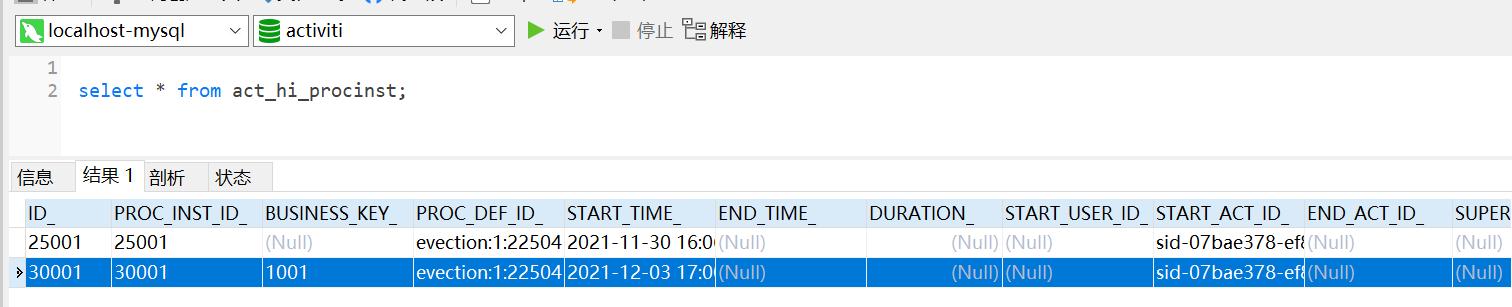
Process instance history table
Process start , A record will be inserted in this table , The process instance will not be deleted after running .
Task history table , Record all tasks
Start a mission , Not only in act_ru_task Table insert record , A record will also be inserted in the historical task table , The primary key of the task history table is the task id, When the task is completed, the record in this table will not be deleted .

Activity history table , Record all activities
Activities include tasks , So this table not only records the tasks , Other activities during the process execution are also recorded , Like the start event 、 End the event .

3. Query process instance
The status of process instances can be queried during process running , Current operation node and other information
    /** *  Query process instance  */
    @Test
    public void queryTaskProcess() {

        // Process definition key
        String processDefinitionKey = "evection";
        // obtain ProcessEngine
        ProcessEngine processEngine = ProcessEngines.getDefaultProcessEngine();
        // obtain runtimeService
        RuntimeService runtimeService = processEngine.getRuntimeService();
        // Get process instance
        List<ProcessInstance> instanceList = runtimeService
                .createProcessInstanceQuery()
                .processDefinitionKey(processDefinitionKey)
                .list();
        instanceList.forEach(instance -> {

            System.out.println("========================");
            System.out.println(" Process instance id:" + instance.getId());
            System.out.println(" Process definition id:" + instance.getProcessDefinitionId());
            System.out.println(" Execution completed :" + instance.isEnded());
            System.out.println(" Whether to suspend :" + instance.isSuspended());
            System.out.println(" Current activity id id:" + instance.getActivityId());
        });
    }
4. relation BusinessKey
demand :
stay activiti In practice , When querying the process instance list, you may want to display some relevant information of the business system , such as : To query the list of currently running travel processes, you need to list the name of the travel form 、 Travel days and other information , The business system defines the business trip days and other information , Exist in the business system , Not in activiti In the database , So I can't get through activiti You can find the travel days .
Realization :
When querying process instances , adopt businessKey( Business identification ) The travel document table of the associated query business system , Query the travel days and other information . But the premise is , When starting a process instance , Need to put businessKey Store in activiti in , Generally, the primary key of the related business operation table id.
add to businessKey The way is :
ProcessInstance processInstance = runtimeService.startProcessInstanceByKey("evection", "1001");
Then you can start from activiti In order to get businessKey, Re pass businessKey Get the data in the corresponding business table .
obtain businessKey The way is :
String businessKey = processInstance.getBusinessKey();
stay activiti Of act_ru_execution In the table , Field BUSINESS_KEY Is to store business KEY Of

5. Hang up / Activate process instances
In some cases , Due to process changes, the currently running process needs to be suspended rather than deleted , You need to pause the process , No more execution .
5.1 All process instances are suspended / Activate
The operation flow is defined as pending status , All process instances under the process definition are suspended .
The process is defined as suspended , The process definition will not allow you to start a new process instance , At the same time, all process instances under the process definition will be suspended and suspended , Completing the process instance under the process definition will throw an exception
    /** *  All process instances are suspended ===》 Directly suspend the corresponding process definition , All process instances under the process definition are suspended  *  All process instances are suspended and activated ===》 Activate the corresponding process definition directly , All process instances under the process definition are activated  */
    @Test
    public void suspendAllProcessInstance() {

        // obtain processEngine
        ProcessEngine processEngine = ProcessEngines.getDefaultProcessEngine();
        // obtain RepositoryService
        RepositoryService repositoryService = processEngine.getRepositoryService();
        // Query the process definition object
        ProcessDefinition processDefinition = repositoryService
                .createProcessDefinitionQuery()
                .processDefinitionKey("evection")
                .singleResult();
        // Get whether the current process definition is in suspended status
        boolean suspended = processDefinition.isSuspended();
        // Process definition id
        String processDefinitionId = processDefinition.getId();
        // Determine whether to suspend
        if (suspended) {

            // If it's suspended , Perform activation
            // Parameters 1: Process definition id  Parameters 2: Whether to activate   Parameters 3: Activation time
            repositoryService.activateProcessDefinitionById(processDefinitionId, true, null);
            System.out.println(" Process definition :" + processDefinitionId + ", Activated ");
        } else {

            // If it's active , Perform pending operation
            // Parameters 1: Process definition id  Parameters 2: Whether to suspend   Parameters 3: Hold time
            repositoryService.suspendProcessDefinitionById(processDefinitionId, true, null);
            System.out.println(" Process definition :" + processDefinitionId + ", Suspended ");
        }
    }
5.2 A single process instance is suspended / Activate
Operation process instance object , Execution is suspended for a single process / Activate operation , When a process instance is suspended, the process will not continue , Completing the process instance will throw an exception .
    /** *  A single process instance is suspended and activated  */
    @Test
    public void suspendSingleProcessInstance() {

        // obtain processEngine
        ProcessEngine processEngine = ProcessEngines.getDefaultProcessEngine();
        // obtain RuntimeService
        RuntimeService runtimeService = processEngine.getRuntimeService();
        // Query the process instance object
        ProcessInstance processInstance = runtimeService
                .createProcessInstanceQuery()
                // Process instance id Fill in according to your own data
                .processInstanceId("30001")
                .singleResult();
        // Get whether the current process instance is in suspended state
        boolean suspended = processInstance.isSuspended();
        // Process instance id
        String processInstanceId = processInstance.getId();
        // Determine whether to suspend
        if (suspended) {

            // If it's suspended , Perform activation
            // Parameters 1: Process instance id
            runtimeService.activateProcessInstanceById(processInstanceId);
            System.out.println(" Process instance :" + processInstanceId + ", Activated ");
        } else {

            // If it's active , Execution pending
            // Parameters 1: Process instance id
            runtimeService.suspendProcessInstanceById(processInstanceId);
            System.out.println(" Process instance :" + processInstanceId + ", Suspended ");
        }
When a process definition or a process instance is suspended , Completing the process instance will throw an exception .

边栏推荐
- 比较好的CV链接收藏(动态更新)
- jestson安装ibus输入法
- ‘Results do not correspond to current coco set‘
- 多商户商城系统功能拆解03讲-平台端商家管理
- 《统计学习方法(第2版)》李航 第15章 奇异值分解 SVD 思维导图笔记 及 课后习题答案(步骤详细)SVD 矩阵奇异值 十五章
- Sqlserver completely deleted
- 《信号与系统》(吴京)部分课后习题答案与解析
- Multi merchant mall system function disassembly lecture 07 - platform side commodity management
- likeshop单商户SAAS商城系统无限多开
- The female colleague of the company asked me to go to her residence to repair the computer at 11 o'clock at night. It turned out that disk C was popular. Look at my move to fix the female colleague's
猜你喜欢

Mysqldump export Chinese garbled code
【深度学习】手写神经网络模型保存

《信号与系统》(吴京)部分课后习题答案与解析

Inventory of well-known source code mall systems at home and abroad

Introduction to PC mall module of e-commerce system

Positional argument after keyword argument

Multi merchant mall system function disassembly lecture 12 - platform side commodity evaluation

Multi merchant mall system function disassembly Lecture 11 - platform side commodity column
多商户商城系统功能拆解12讲-平台端商品评价

Delete the weight of the head part of the classification network pre training weight and modify the weight name
随机推荐
MySQL和Oracle的语法差异
Problems in SSM project configuration, various dependencies, etc. (for personal use)
使用bat命令快速创建系统还原点的方法
Multi merchant mall system function disassembly lecture 05 - main business categories of platform merchants
列表写入txt直接去除中间的逗号
likeshop | 单商户商城系统代码开源无加密-PHP
找数组中出现次数最多的数
Typora 安装包2021年11月最后一次免费版本的安装包下载V13.6.1
Target detection tagged data enhancement code
多商户商城系统功能拆解05讲-平台端商家主营类目
读取csv文件的满足条件的行并写入另一个csv中
找ArrayList<ArrayList<Double>>中出现次数最多的ArrayList<Double>
The method of using bat command to quickly create system restore point
多商户商城系统功能拆解09讲-平台端商品品牌
第五章神经网络
推荐一款完全开源,功能丰富,界面精美的商城系统
Small operation of statistical signal processing -- detection of deterministic DC signal in Rayleigh distributed noise
Help transform traditional games into gamefi, and web3games promote a new direction of game development
synergy局域网实现多主机共享键鼠(amd、arm)
多商户商城系统功能拆解12讲-平台端商品评价