当前位置:网站首页>R-score reproduction R-Precision evaluation index quantitative text generation image r-score quantitative experiment whole process reproduction (R-Precision) quantitative evaluation experiment step on
R-score reproduction R-Precision evaluation index quantitative text generation image r-score quantitative experiment whole process reproduction (R-Precision) quantitative evaluation experiment step on
2022-07-27 04:55:00 【Medium coke with ice】
One 、R-precision Introduction to scores
R-precision, Also called R fraction , Its By sorting the retrieval results between the extracted image and text features , To measure the visual semantic similarity between the text description and the generated image . In addition to the real text description of the generated image , Other texts are also randomly extracted from the data set . then , Calculate the image features and each text description text embedding Cosine similarity between , And sort the text descriptions in descending order of similarity . If the real text description of the generated image comes first r Within a , Then related .
Just a quick example : hypothesis r by 3, There are 100 texts , It includes a real corresponding text and 99 Randomly selected text , Turn them into text embedding, Then calculate cosine similarity with the generated image , Then sort , If the real text is generated embedding In front 3 position , It is considered that the image is related to the text .
R-precision It means that the real text appears in front after sorting r A probability of , The larger the size, the more relevant the image is to the real text description ,R-precision The bigger the better .
Two 、 R-precision-CUB Quantitative experiment steps
Here we have DF-GAN stay CUB Take the quantitative model above as an example :
2.1、 download R-precision Code
Github:https://github.com/maincarry/R-Precision
CSDN download :R Score recurrence R-precision Evaluation index quantitative experiment code
2.2、 analysis
After downloading, I found that the code project includes build_RPdata.py、config.py、encoder.py、eval_Rprecision.py、all_texts.txt.
all_text.txt: Include birds All description text of
build_RPdata.py: The function is to create an image based on the generated image - Data pair of text
config.py: Some parameter settings , Not need , Can be either
encoder.py: Image encoder and text encoder
eval_Rprecision.py: The function is based on the image - Text data pairs evaluate the alignment of image text 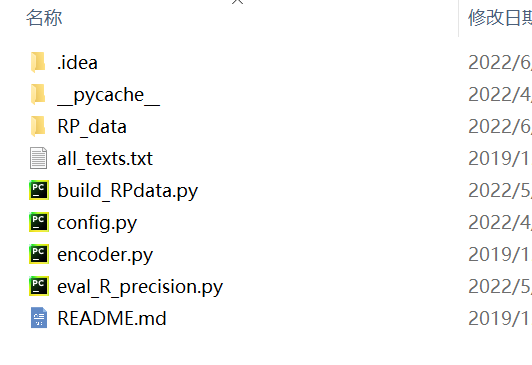
2.3、 Configure files

With DF-GAN For example :
Put the file in the position specified by the arrow above ( This is just for convenience , You can also make a folder by yourself , As long as you can configure the file path at the back, you can put it at will )
2.4、 Change path parameters
open build_RPdata.py, find 160~180 That's ok , as follows :
if __name__ == '__main__':
    parser = argparse.ArgumentParser(description='Generate RP test data from evaluation output.')
    parser.add_argument('-p', dest='path', type=str, help='Path to image directory')
    parser.add_argument('-c', dest="cap", default='all_texts.txt',
                        help='Optional: specify all texts file. Default to all texts in dataset.')
    parser.add_argument('-d', dest='out', type=str, help='Output directory', default='./')
    parser.add_argument('-t', dest='text', type=str, help='Directory to text data',
                        default='D:\\MyPythonWorkplace\\DF-GAN-master\\data\\bird\\text\\text')
                        # default='D:\\AttnGAN-master\\data\\birds\\text')
    parser.add_argument('-r, --random', dest='rand', action='store_true',
                        help='If set, sample is selected randomly instead of sequentially.')
    args = parser.parse_args()

    # args.p = 'D:\\AttnGAN-master\\models\\netG_epoch_250\\valid\\single\\'
    args.p = '..\\test\\valid\\single_580epoch'
    # args.out = 'D:\\AttnGAN-master\\R_Precision_attnGAN-master\\RP_data\\'
    args.out = '..\\RP_data'
There are three parameters that need to be changed
parser.add_argument('-t', dest='text', type=str, help='Directory to text data',default='D:\\MyPythonWorkplace\\DF-GAN-master\\data\\bird\\text\\text'), This sentence indicates the location of the dataset text , Modify the place for you , If you follow 2.3 If the file is placed , You can change it todefault='..\\data\\bird\\text\\text'args.p = '..\\test\\valid\\single_580epoch', This sentence indicates the location of the generated image :
args.out = '..\\RP_data', This sentence indicates the image you want to output - The location of the text data pair .
open eval_R_precision.py, Find No 306 Row or so :
    args = parse_args()
    BATCH_SIZE = 64
    args.fake_dir = '..\\RP_data'
    args.cap_path = '..\\data\\bird\\captions.pickle'
    args.manualSeed = 1900
There are two parameters that need to be changed
- args.fake_dir The point is RP_data Image - The file path where the text data is stored .
- args.cap_path Indicates the data set captions.pickle The path of the package .
2.5、 Generate RP_data
function build_RPdata.py, The generated data is saved to RP_data In the folder .
If there is an error reading the file, you can change 86 That's ok :txt_file = os.path.join(args.text, os.path.basename(dir), "{}.txt".format(fname.split(" ")[0][:-1])), See if there is an error in path extraction .
2.6、 assessment R fraction
function eval_R_precision.py Start evaluating , Just wait for the end ,3000 Images - If the text data is correct, the evaluation time is about 7 About minutes .
Last
Special thanks to Zhao zewei Students' guidance and help .
Personal profile : Graduate students in the field of artificial intelligence , At present, I mainly focus on text generation and image generation (text to image) Direction
Personal home page : Medium coke with more ice
Time limited free subscribe : Text generated images T2I special column
Stand by me : give the thumbs-up + Collection ️+ Leaving a message.
in addition , We have established wechat T2I Learning exchange group , If you are T2I Fans or researchers in this field can send me a private message to join .
If this article helps you a lot , I hope you can give me a coke ! Add more ice !
边栏推荐
- Cloudcompare & PCL matching point median (or standard deviation) distance suppression
- STL upper series - detailed explanation of list container
- ELS square display principle
- Hash table questions (Part 2)
- 地平线 旭日X3 PI (四) 板上运行(未写完)
- 干货 | 独立站运营怎么提高在线聊天客户服务?
- 缓存读写策略:CacheAside、Read/WriteThrough及WriteBack策略
- Comprehensive experiment of static routing
- The digital China Construction Summit ended with a list of massive pictures on site!
- State Hook
猜你喜欢

如何重置Photoshop首选项?ps重置首选项的方法

Understand kingbasees V9 in one picture

STL upper series - detailed explanation of list container
Structural mode - facade mode

HCIA dynamic routing OSPF experiment

Two way republication experiment

JS第二天(变量、变量的使用、命名规则、语法扩展)

Cache read / write policies: cacheside, read/writethrough and writeback policies

Summary of fire safety training materials

JS tips
随机推荐
RSA asymmetric encryption and decryption signature verification tool
背包问题dp
Wechat applet editor Avatar
.htaccess learning
Hash table questions (Part 2)
Find a specific number in an ordered array
2019强网杯upload
Dynamic routing configuration
微信小程序编辑头像
Session&Cookie&token
C language - two dimensional array, pointer
iPhone13再降价,其实只是做做样子,消费者都在等iPhone14
els_ Rectangle drawing, code planning and backup
Dino paper accuracy, and analyze the variant of its model structure & Detr
[C language] detailed explanation of user-defined types (structure + enumeration + Union)
新手小白怎样开始学做自媒体呢?
Redis interview question (2022)
Pinia入门到精通,Pinia使用全流程,包含state,actions,getters,以及如何解构,进行响应,actions使用的多种方法
pinia的持久化存储,pinia使用插件进行持久化存储。
JS第二天(变量、变量的使用、命名规则、语法扩展)