当前位置:网站首页>Cadence spb17.4 - Chinese UI settings
Cadence spb17.4 - Chinese UI settings
2022-06-23 00:37:00 【LostSpeed】
cadence SPB17.4 - chinese UI Set up
Preface
yesterday , When checking data , See a good thing .
incredibly cadence SPB17.4 It can be set as Chinese interface …
Check online information , Most of them are about how to set up , The contents of the introduction are basically the same . There is no source . If the setting has no effect , No one will explain why .
If possible , It is better to know the source of the article , There's something wrong with this , Know how to check .
I started by setting it up according to the online information , So bad . I did it myself .
note
Experimental environment
win10_21H2
cadence SPB17.4 S026
Source of original data
Installed cadence The official local documentation does not mention how to set up Chinese UI.
In the installation ISO Medium pdf Found in the .

use win10 Explorer opens Hotfix_SPB17.40.026.iso

Read the software release notes , notice Release_Notes.pdf There are Chinese UI Description of settings .
open Release_Notes.pdf

You can see , The patch must be S019 Later versions only have this function .
Just make the latest patch , My version here is S026, Than S019 Version high , It has this function .

Flip down , Find descriptions of multilingual support .

See the 7 The top of the page , You can see a description of the local support , That's it .
Localization Support
In this release, Allegro System Capture, Allegro PCB Editor, and Allegro Pulse have
been enhanced to support Japanese and Chinese locales. The extent of localization support
depends on the product you are using. Menu options and dialog boxes for these products are
visible in the local language as per the Region Settings of your system.
This is a localized language , Support Chinese and Japanese .
Only support allegro System Capture( No capture and CIS! ), allegro PCB Editor, allegro Pluse
That explains , Some students said that his orcad It's still in English , Only allegro It's Chinese. . People don't support orcad Localization of , That's why .
The above local language support depends on win10 The language setting in is simplified Chinese and the setting of environment variables .


At this time , function allegro System Capture, It's Chinese UI.
Please note that , This is not orcad capture and CIS!


The local language is simplified Chinese , Yes orcad capture and CIS It doesn't work , There is no Chinese UI.
Look at the screenshot given in the official release notes , You can see , It's also true allegro System Capture Chinese culture , Not right. orcad caputre and CIS Ongoing culture .


The official statement clearly states , If the allegro PCB Editor Ongoing culture , Environment variables must be set .
Support in Allegro System Capture and Allegro Pulse
For Allegro System Capture and Allegro Pulse, localization is auto-enabled depending on the
locale settings of the system.
If required, you can switch back to the English version by setting the value of the
CDS_CP_TRANSLATION_LANGUAGE environment variable to en.
For System Capture, besides menus and dialogs, messages, tool tips, context menu, and
notes on canvas are also visible in the local language.
Note: Only notes entered in Chinese or Japanese will be in that language. Notes entered in
English are not translated.
The official statement States , Allegro System Capture and Allegro Pulse Chinese culture , It is automatically dependent on the system language settings , If in Chinese win10 I don't want to use Chinese UI, Environment variable needs to be set CDS_CP_TRANSLATION_LANGUAGE = en
This paragraph has little to do with us .
Support in Allegro PCB Editor
Allegro PCB Editor supports viewing menu options, dialogs, messages, and tool tips in either
Japanese or Chinese depending on the locale you have set.
Localization support is not enabled automatically in PCB Editor. To enable localization in PCB
Editor, set the environment variable intl_enabled to yes and specify the locale in your
system.
You can also choose to have a bilingual system with English and either Japanese or Chinese
used for menus and tool tips by setting the environment variable intl_show_bilingual to
True.
The above paragraph has something to do with us .
PCB Editor If you want Chinese culture , Need to set up 2 Environment variables .
If you want Chinese culture , Set the environment variable intl_enabled = yes
If you want to display both Chinese and English Set the environment variable intl_show_bilingual = True
The set environment variables are as follows
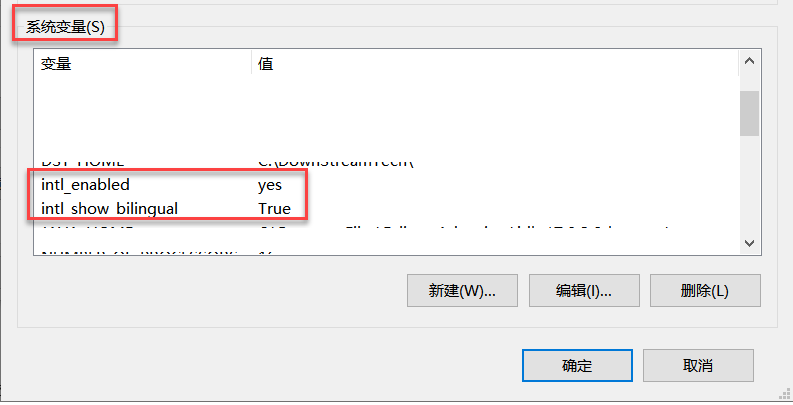
start-up allegro PCB Editor, It is already bilingual .

Online materials , Some people say that bilingual display takes up space , Slow speed .
My bilingual display , I don't think it takes up space , It may have something to do with the resolution . My resolution is 1920X1080.
The operating speed is also swishing . As long as the computer configuration can , There will be no slowness or jamming .
This is the origin of online materials .
I started to set the reason why it didn't work , Second hand information on the Internet says , The value to be set is 1. But look at the official data , Value should be yes or True
Maybe when people do experiments , cadence Version and I used S026 Dissimilarity .
So I read the first-hand information , It's much better than reading second-hand materials . Something went wrong. , It's also easy to get rid of problems by yourself .
Roast charges articles
Now look csdn Related articles of , Some operations were found , Very upset . e.g. Set the article to be read for a fee , Set the article to VIP so , Make articles visible to fans .
I do not know! csdn And what these authors think , Does it work ? Are your articles the only ones in the world ? Is there any intellectual patent protection ?
Most articles are 2 Handwritten articles , The better thing is to 1 After understanding the manual data , Plus some of my own experience . Is such an article worth realizing ? Is it valuable ?
be not in csdn Look at the article , Go to other places to find information , You can still find . because stay csdn Content of the article , There is no scarcity . Take yourself too seriously , Not so good .
If it's making a little money , It's better to do things by yourself , Have an idea , Landing , I'm sure I can make money ( At least csdn Articles earn money with peace of mind and dignity ). Retired aunts pick up garbage , Is better than csdn The article charges more money ?
If it is to pull fans , In addition to the number of fans installed B, What's the use ?
I want to say to the author who has these operations , You have the ability to publish a book ! Write what article , Can you make money ?
I met a big man before , Several monographs in this field have been published . People only publish books for the dissemination of knowledge , It's not about making money , I can't earn ( Big brother's original words ).
END
边栏推荐
- 【滑动窗口】leetcode992. Subarrays with K Different Integers
- How do beginners get started quickly and learn deeply?
- 美团基于 Flink 的实时数仓平台建设新进展
- Oracle ASM使用asmcmd中的cp命令来执行远程复制
- 为什么现在大家都不用外键了(二)?
- Introduction to the unique variable reading and writing function of Kunlun distributed database
- 瑞达期货安全么?期货开户都是哪些流程?期货手续费怎么降低?
- 外包干了四年,感觉废了..
- 最安全的现货白银的心理分析
- Because I said: volatile is a lightweight synchronized, the interviewer asked me to go back and wait for the notice!
猜你喜欢
最安全的现货白银的心理分析
SAP UI5 应用开发教程之一百零二 - SAP UI5 应用的打印(Print)功能实现详解试读版

XML escape character cross reference table

Dig three feet to solve the data consistency problem between redis and MySQL

BGP联邦综合实验

SAP UI5 应用开发教程之一百零三 - 如何在 SAP UI5 应用中消费第三方库试读版

美团基于 Flink 的实时数仓平台建设新进展

Isolation level of transaction system

Typecho imitation of Lu Songsong's blog theme template / Technology Information blog theme template
How to solve the problem that easycvr does not display the interface when RTMP streaming is used?
随机推荐
Shell 日志与打印输出
flowable 全局监听 监听流程的启动和流程的结束
贵金属现货白银如何呢?
【UVM】别再说你的 VIP 用不了 RAL Model
Oracle ASM使用asmcmd中的cp命令来执行远程复制
Kunlun distributed database sequence function and its implementation mechanism
瑞达期货安全么?期货开户都是哪些流程?期货手续费怎么降低?
【GO】go多态
【GO】Go Modules入门
TiDB VS MySQL
2022天梯赛-全国总决赛复盘赛
如何使用enum数据类型
C sqlsugar, hisql, FreeSQL ORM framework all-round performance test vs. sqlserver performance test
MySQL-Seconds_behind_master 的精度误差
黄金etf持仓量如何算
OLAP - Druid introduction
Some thoughts about the technology of test / development programmers are very advanced, and they can't go on
Does qiniu school belong to a securities company? Is it safe to open an account?
KunlunDB备份和恢复
How to use enum data types