当前位置:网站首页>Wechat applet_ 3. Wxml template syntax
Wechat applet_ 3. Wxml template syntax
2022-06-21 07:02:00 【icestone_ kai】
Event binding :
Events are the means of communication from the rendering layer to the logical layer , Through events, the user's behavior in the render layer can be , Feed back to the logic layer for business processing

Events commonly used in applets :
| type | Binding method | Description of the incident |
|---|---|---|
| tap | bindtap or bind:tap | Leave as soon as you touch your fingers , Be similar to HTML Medium click event |
| input | bindinput or bind:input | The input event of the text box |
| change | bindchange or bind:change | Triggered when the state changes |
Property list of the event object :
When the event is triggered by a callback , Will receive an event object event, Its detailed properties are shown in the following table :
| attribute | type | explain |
|---|---|---|
| type | String | Event type |
| timeStamp | Integer | The number of milliseconds it took for the page to open to trigger the event |
| currentTarget | Object | Some property value collections of the current component |
| detail | Object | Additional information |
| touches | Array | Touch event , An array of touch point information currently on the screen |
| changedTouches | Array | Touch event , Array of currently changing touchpoint information |
In development , What we use more is :target,detail
target and currentTarget The difference between :
target Is the source component that triggered the event , and currentTarget Is the component bound by the current event , Examples are as follows :
Click the internal button , Click the event to bubble outward , It also triggers the outer layer view Of tap Event handler
- e.target It points to the source component that triggers the event , therefore ,e.target Is an internal component button
- ecurrentTarget It refers to the component that is currently triggering the event , therefore ,e.currentTarget It is current. view Components
bindtap Grammar format :
In the applet , non-existent HTML Medium onclick Mouse click event , But through tap Event in response to the user's touch behavior
1. adopt bindtap, You can bind to components tap Touch event , The grammar is as follows :
WXML:
<view>
  <button type="primary" bindtap="btnTapHandler">
     Button
  </button>
</view>
.js:
Page({
  btnTapHandler(e) {
    console.log(e);
  },
  })
In the event handler function is data Data assignment in :
By calling this.setData(dataObject) Method , You can give pages data Reassign the data in , Examples are as follows :
WXML:
<button type="primary" bindtap="changeCount">count+1</button>
.js:
  changeCount() {
    this.setData({
      count: this.data.count + 1
    })
  },
Event biography :
The event parameters in the applet are special , You cannot pass parameters to an event handler while binding an event , for example , The following code will not work properly :
WXML:
<view>
   The following code does not work properly :
  <button type="primary" bindtap="btnHandler(123)">
     Event biography
  </button>
</view>
.js:
  btnHandler(str) {
    console.log('btn click' + str);
  },
Run and click , The debugger will report an error here :
Because the applet will bindtap The attribute value , It is treated as an event name , Equivalent to calling a btnHandler(123) Event handler for
Can provide... For components data-* Custom attribute transfer parameter , among * Represents the name of the parameter , The example code is as follows :
WXML:
<button type="primary" bindtap="btnHandler" data-info="{
   {2}}">
     Event biography
  </button>
.js:
  btnHandler(str) {
    console.log(str);
  },
Run and click :
Final :
- info Will be resolved to the name of the parameter
- The number 2 Will be resolved to the value of the parameter
bindinput Grammar format :
In the applet , adopt input Event to respond to the input of the text box , The syntax is as follows :
1. adopt bindinput, You can enter events for text box binding :
WXML:
  <text>
     Get text box data :
  </text>
  <input bindinput="inputHandler"></input>
.js:
  inputHandler(e) {
    console.log(e.detail.value);
  },
function :
Implement text boxes and data Data synchronization between :
Implementation steps :
1. Defining data
2. Render structure
3. Beautification style
4. binding input Event handler
WXML:
  {
   {msg}}
  <text>
     Text box input and copy to data
  </text>
  <input value="{
   {msg}}" bindinput="iptHandler"></input>
.js:
  iptHandler(e) {
    this.setData({
      msg: e.detail.value
    })
  },
  data: {
    msg: "test msg"
  },
Conditions apply colours to a drawing :
wx:if
In the applet , Use wx:if="{ {condition}}" To determine whether the code block needs to be rendered :
<text wx:if="{
   {flag}}"> test flag by true, Show this area </text>
You can also use wx:elif and wx:else To add else Judge :
WXML:
<view>
  <text wx:for="{
   {array}}">
     The index is :{
   {index}}, Current item is :{
   {item}}
  </text>
</view>
.js:
  data: {
    array:['asdasd','as2s','asdasdsa3','4sdfsdfad','5asdsad',6,7]
  },
function :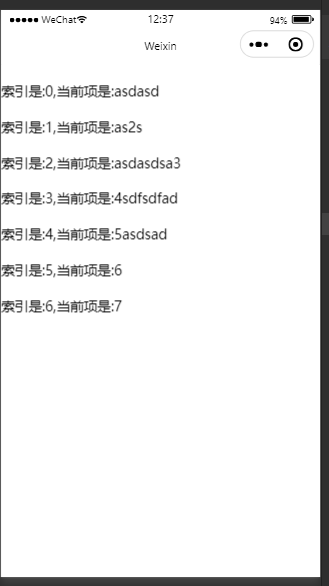
By default , The index reference of the current circular item index Express , Current circular item item Express
Manually specify the index and the variable name of the current item :
- Use wx:for-index You can specify the variable name of the index of the current item
- Use wx:for-item You can specify the variable name of the current item
The sample code is as follows :
WXML:
  <text>
     Specify the index and the variable name of the current item :
    <text wx:for="{
   {array}}" wx:for-index="inde" wx:for-item="it">
       The current index is :{
   {inde}},
       Current item is :{
   {it}}
    </text>
  </text>
.js:
  data: {
    array:['asdasd','as2s','asdasdsa3','4sdfsdfad','5asdsad',6,7]
  },
function :

wx:key Use :
Be similar to Vue List rendering key, When the applet realizes list rendering , It is also recommended that you specify a unique... For the rendered list items key value , So as to improve the efficiency of rendering , The sample code is as follows :
WXML:
<text wx:for="{
   {list}}" wx:key="id">
    <text user-select="text">
       Current index yes :{
   {index}},
      filename:{
   {item.filename}},
      email:{
   {item.userEmail}},
      email:{
   {item.description}},
      key:{
   {item.id}}
    </text>
  </text>
.js:
 data: {
    list: [
      {
          "id": 1,
          "userEmail": "[email protected]",
          "filename": " Test article name ",
          "fileData": " Here is the test article data ",
          "states": null,
          "postTime": null,
          "description": "des",
          "praise": null,
          "view": null,
          "tag1": null,
          "tag2": null,
          "tag3": null,
          "createdAt": "2022-06-12T03:10:33.000Z",
          "updatedAt": "2022-06-12T03:10:33.000Z"
      },
      {
          "id": 2,
          "userEmail": "[email protected]",
          "filename": " Test article name ",
          "fileData": " Here is the test article data ",
          "states": null,
          "postTime": null,
          "description": " The test article des",
          "praise": null,
          "view": null,
          "tag1": null,
          "tag2": null,
          "tag3": null,
          "createdAt": "2022-06-12T03:10:34.000Z",
          "updatedAt": "2022-06-12T03:10:34.000Z"
      },
      {
          "id": 3,
          "userEmail": "[email protected]",
          "filename": " Test article name ",
          "fileData": " Here is the test article data ",
          "states": null,
          "postTime": null,
          "description": null,
          "praise": null,
          "view": null,
          "tag1": null,
          "tag2": null,
          "tag3": null,
          "createdAt": "2022-06-12T03:10:34.000Z",
          "updatedAt": "2022-06-12T03:10:34.000Z"
      },
      {
          "id": 4,
          "userEmail": "[email protected]",
          "filename": " Test article name ",
          "fileData": " Here is the test article data ",
          "states": null,
          "postTime": null,
          "description": null,
          "praise": null,
          "view": null,
          "tag1": null,
          "tag2": null,
          "tag3": null,
          "createdAt": "2022-06-12T03:10:35.000Z",
          "updatedAt": "2022-06-12T03:10:35.000Z"
      },
      {
          "id": 5,
          "userEmail": "[email protected]",
          "filename": " Test article name ",
          "fileData": " Here is the test article data ",
          "states": null,
          "postTime": null,
          "description": null,
          "praise": null,
          "view": null,
          "tag1": null,
          "tag2": null,
          "tag3": null,
          "createdAt": "2022-06-12T03:10:35.000Z",
          "updatedAt": "2022-06-12T03:10:35.000Z"
      },
      {
          "id": 6,
          "userEmail": "[email protected]",
          "filename": " Test article name ",
          "fileData": " Here is the test article data ",
          "states": null,
          "postTime": null,
          "description": null,
          "praise": null,
          "view": null,
          "tag1": null,
          "tag2": null,
          "tag3": null,
          "createdAt": "2022-06-12T03:10:36.000Z",
          "updatedAt": "2022-06-12T03:10:36.000Z"
      },
      {
          "id": 7,
          "userEmail": "[email protected]",
          "filename": " Test article name ",
          "fileData": " Here is the test article data ",
          "states": null,
          "postTime": null,
          "description": null,
          "praise": null,
          "view": null,
          "tag1": null,
          "tag2": null,
          "tag3": null,
          "createdAt": "2022-06-12T03:10:36.000Z",
          "updatedAt": "2022-06-12T03:10:36.000Z"
      },
      {
          "id": 8,
          "userEmail": "[email protected]",
          "filename": " Test article name ",
          "fileData": " Here is the test article data ",
          "states": null,
          "postTime": null,
          "description": " ",
          "praise": null,
          "view": null,
          "tag1": " ",
          "tag2": " ",
          "tag3": " ",
          "createdAt": "2022-06-12T07:29:31.000Z",
          "updatedAt": "2022-06-12T07:29:31.000Z"
      }
  ]
  },
there data It is randomly adjusted from the database , It doesn't matter
function :
Notice if you don't give one here key value , It will prompt on the console :

边栏推荐
- 布隆過濾器
- 基于C#的ArcEngine二次开发57:每用户订阅上的所有人SID 不存在
- Dynamic planning exercises (II)
- 【JS】截取字符串
- Two ideas of I2C driver implementation (I2C dev.c and I2C core.c)
- 工作那点事
- PyG教程(5):剖析GNN中的消息传播机制
- kubernetes集群搭建详细教程
- 微信小程序_5,全局配置
- Ztmao theme cat WordPress Theme classic lost version /wp website template download station source code + global SEO function setting
猜你喜欢
微信小程序_3,WXML模板语法

Issue 13: Flink zero foundation learning route

Modbus poll v9.9.2 build 1690 MODBUS test tool single file version

布隆过滤器
Butler-Volmer 公式的由来

【转】刘润:不要和没有逻辑的人讨论业务
微信小程序_5,全局配置

Trick or treat SVG Halloween JS special effect

Google Earth Engine(GEE)——美国本土岩性数据集
![Hamming code verification [simple and detailed]](/img/a4/2b1e7977fb0a7bf399a6209165e47d.jpg)
Hamming code verification [simple and detailed]
随机推荐
C skill tree evaluation
查询数据表中第N行数据。更新表第N行数据
Introduction to missing data filling dataset (2) -- Introduction to multiple datasets and dataset preprocessing (mushroom, news, spam, wine red and year)
[notes for personal use] detailed steps for connecting MyEclipse to MySQL database
On June 13, 2022, interview questions were asked
Minesweeping - C language - Advanced (recursive automatic expansion + chess mark)
Dynamic planning exercises (II)
Bloom filter
Old users come back and have a look
Hub, switch, router
Debezium报错处理系列之十八:解决无法获取表结构问题
Lnc2meth: methylation sites on disease-related lncrna
How to select PostgreSQL and MySQL
153 Solana create PDA and storage
Data analysis part: common indicators of different industries
IDM mobile terminal function upgrade description
ADEX governance voting: pledge reward halved
Modbus poll v9.9.2 build 1690 MODBUS test tool single file version
ArcEngine secondary development based on C 57: the owner Sid on each user subscription does not exist
Building a hard core Gateway - resume