当前位置:网站首页>[hcie security] dual computer hot standby - primary and standby backup
[hcie security] dual computer hot standby - primary and standby backup
2022-07-26 21:18:00 【Heterogenesis】
The reasons for the dual machine hot standby Technology
The traditional networking mode is shown in the figure , All interactive messages of internal users and external users pass FW1. If FW1 Something goes wrong , All in the internal network are FW1 The communication between the host as the default gateway and the external network will be interrupted , Communication reliability cannot be guaranteed .
When designing the network architecture , Two are usually deployed at key locations ( Two ) Or multiple devices , To enhance the possibility of the network .
The deployment of dual hot standby on the router
The router will not record the exchange status and application layer information of the message , Therefore, the dual machine deployment of the router , The reliability of the service can be guaranteed only by making routing backup .
Dual hot standby protocol architecture
VRRP( Virtual Redundancy Protocol )
Responsible for single interface Fault detection and flow guidance . Every VRRP The backup group has a virtual IP Address , As the gateway address of the network ; stay VRRP In case of active / standby switching, it is free to send ARP To refresh the docking device MAC Forward the table to guide traffic .
VGMP(VRRP Group management protocol , Huawei private )
Put all the VRRP Centralized management of backup groups , Unified switching of control state , Ensure that the uplink traffic can be synchronously switched to the standby firewall in case of failure .
HRP( Huawei redundancy agreement , Huawei private )
Be responsible for data synchronization between two computers .
Active and standby backup and load sharing application scenarios

Two problems must be solved first in firewall dual machine hot standby networking :
1、 The firewall must be able to detect link or device failure .
2、 The firewall can realize the smooth switching of traffic after detecting the failure .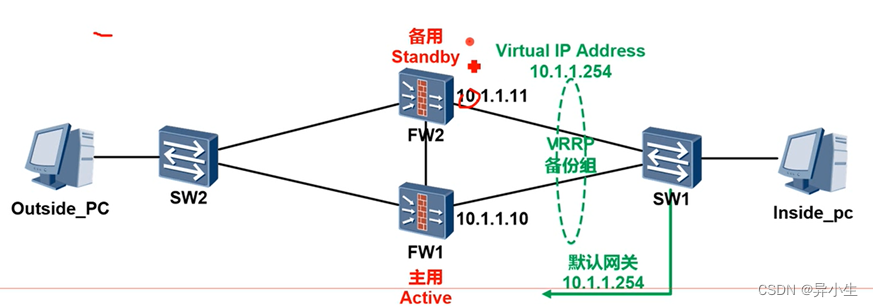
When the upstream and downstream service ports of the fire wall are configured VRRP When backing up a group , these two items. VRRP Backup groups run independently , There may be ups and downs VRRP The status of the backup group is inconsistent .
for example , The inner interface on the firewall of the main gateway fails ,VRRP Switch to the standby firewall , Therefore, the outgoing traffic is forwarded from the standby firewall . But for the Internet side VRRP, On the firewall of the main gateway VRRP Still the Lord , Therefore, the return traffic will still be sent to the main gateway firewall , But the business traffic cannot be sent back to the intranet , Leading to business disruption .
VGMP produce
In order to solve the separate configuration mentioned above VRRP Possible state inconsistency , Huawei in VRRP On the basis of the development of VGMP Group management protocol (VRRP Group Management Protocol), namely VGMP.
VGMP Put forward VRRP The concept of management group , Connect multiple on the same firewall VRRP All backup groups are joined to one VRRP Management Group , The management group is responsible for the unified management of all VRRP Backup group , By unifying empty each VRRP Switching of backup group status , To ensure that all in the management group VRRP The backup group status is consistent .
HRP Introduce
HRP(Huawei Redundancy Protoco) agreement , It is used to synchronize the key configuration and connection status of the main firewall with the standby firewall .
HRP The module provides basic data backup mechanism and transmission function . Each application module collects the data that needs to be backed up by this module , Provide to HRP modular ,HRP The module is responsible for sending data to the corresponding module of the opposite firewall , The application module needs to re HRP The module submits the data for analysis , And join the dynamic operation data pool of the firewall .
Backup content : The connection status data to be backed up includes TCP/UDP Session table for 、ServerMap Table item 、 Dynamic blacklist 、NO-PAT Table item 、ARP Table items, etc .
HRP Data backup scope
Able to back up configuration commands : It can only be configured on the master device , Standby equipment cannot be configured

Configuration commands that cannot be backed up : Both primary and standby devices can be configured .

Dual hot standby basic networking
1、 Configure dual machine hot standby for primary and standby backup ,FW1 Mainly ,FW2 For the case .
2、VRRP1 The virtual IP The address is 10.1.1.253,VRRP2 The virtual IP The address is 202.100.1.253.
3、 Heartbeat interface is not configured remote Parameters ( Use VRRP Message encapsulation , For multicast traffic , There is no need to release the security policy )
CLI Detailed configuration
SW1 Underlying bridging configuration
interface Ethernet 0/0/5
port link-type trunk
port trunk allow-pass vlan 10 16
interface Ethernet 0/0/6
port link-type access
port default vlan 21
interface Ethernet 0/0/8
port link Ethernet 0/0/8
port link-type access
port default vlan 19
undo ip route-static 0.0.0.0 0 10.1.1.10 ( take SW1 The default gateway address of is changed to VRRP The virtual address of )
ip route-static 0.0.0.0 0 10.1.1.253
modify ISP The route on is virtual IP 202.100.1.253
ISP(config)# no ip route 10.1.0.0 255.255.0.0 202.100.1.10
ISP(config)# no ip route 172.16.0.0 255.255.0.0 202.100.1.10
ISP(config)# no ip route 192.168.0.0 255.255.0.0 202.100.1.10
ISP(config)# ip route 10.1.0.0 255.255.0.0 202.100.1.253
ISP(config)# ip route 172.16.0.0 255.255.0.0 202.100.1.253
ISP(config)# ip route 192.168.0.0 255.255.0.0 202.100.1.253
establish HA Zone
[FW1] firewall zone name HA
[FW1]
set priority 70
[FW2]firewall zone name HA
[FW2]set priotity 70

Configure firewall heartbeat port
FW1:
interface GigabitEthernet0/0/3
ip address 172.16.1.10 255.255.255.0
firewall zone HA
add interface GiagabitEternet 0/0/3
FW2:
interface GigabitEthernet0/0/3
ip address 172.16.1.11 255.255.255.0
firewall zone HA
add interface GigabitEthernet 0/0/3
FW2 HA To configure
hrp enable
hrp standby-device
hrp interface GigabitEthernet0/0/3
interface GigabitEthernet0/0/1.10
vlan-type dot1q 10
ip address 10.1.1.11 24
vrrp vird 1 virtual-ip 10.1.253 standby
vrrp virtual-mac enable
interface GigabitEthernet0/0/2
ip address 202.100.1.11 255.255.255.0
vrrp vird 2 vitual-ip 202.100.1.253 standby
vrrp virtual-amc enable
hot standby Web To configure
One 、FW1 Configure active and standby dual machine hot standby 
Two 、 Enable 【 hot standby 】, The model is 【 Primary backup 】, The running role is 【 Main use 】, The heartbeat interface is 【g0/0/3】, New virtual IP The address is 【10.1.1.253】, Enable 【 fictitious MAC】.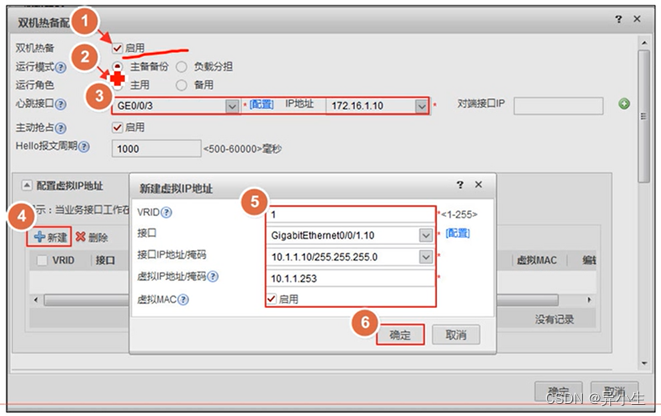

3、 ... and 、 newly build vrid 2 , fictitious IP The address is 【202.100.1.253】, Enable 【 fictitious MAC】.

Check status 


The security policy :

Cannot synchronize routes


Dual machine hot standby configuration idea :
The firewall works on the third floor , Connect the switch up and down ( Main and standby mode )
First step : Basic configuration (IP ZONE route )
The second step : To configure VRRP And VGMP
Main equipment :
interface GigabitEthernet0/0/1.10
vlan-type dot1q 10
ip address 10.1.1.10 255.255.255.0
vrrp vird 1 virtual-ip 10.1.1.253 active
vrrp virtual-mac enable
Standby equipment :
interface GigabitEthernet0/0/1.10
vlan-type dot1q 10
ip add 10.1.1.11 255.255.255.0
vrrp vrid virtual-ip 10.1.1.253 standby
vrrp virtual-mac enable
The third step : Configure heartbeat port
hrp interface GigabitEtherne0/0/3
Step four : Start dual machine hot standby :
Active and standby configuration
hrp enable
Step five : Define the dual machine hot standby mode
Main mode :
hrp active-device( The default devices are all primary , You can choose to knock )
Standby equipment :
hrp standby-device( You must knock )
Brother six steps : Check the configuration
HRP_ALFw1jdisplay vrrp
21:37:04 2019/09/19
GigabitEthernet0/0/2 l virtual Router 2
VRRP Group : Active
state : Active
Virtuai Ip :202.100.1.253
Virtual MAc : 0000-5e00-0102
Primary IP :202.100.1.10
Priority Run : 120
Priority config : 100
Active Priority : 120
Preempt : YEs Delay Time : 0
Advertisement Timer : 1
Auth Type : NONE
Check TTL : YES
GigabitEthernet0/0/1.10 l virtual Router 1
VRRP Group : Active
State : Active
Virtual IP : 10.1.1.253
Virtual MAc : 0000-5e00-0101
Primary IP :10.1.1.10
Priority Run : 120
Priority config : 100
Active Priority : 120
Preempt : YES Delay Time : 0
Advertisement Timer : 1
Auth Type : NONE
Check TL : YES
HRP_A[FW1]display hrp group
21:37:17 2022/07/24
Active group status:
Group enabled : Yes
State :active
Priority running 65001 # Priority of primary backup
Total VRRP members:2
Hello interval(ms):1000
Preempt enabled : yes # Preemption is on by default
Preempt delay(s): 60 # Default preemption delay 60s, You can modify
Tcp check delay(s):0
Peer group available:1
Peer’s member same:yes
Standby group status:
Step seven : Release security strategy
Only need to configure in the main device , The standby device will synchronize the security policy
security-policy
rule name trust_untrust
source-zone trust
destination-zone untrust
action permit
Step eight : Business flow switching test
边栏推荐
- Apaas low code platform (I) | leave complexity to yourself and simplicity to users
- Rare discounts on Apple's official website, with a discount of 600 yuan for all iphone13 series; Chess robot injured the fingers of chess playing children; Domestic go language lovers launch a new pro
- Why does it system need observability?
- 手机\固定电话座机呼叫转移设置方法
- 和月薪3W的字节程序员聊过后,才知道自己一直在打杂...
- Redis hash和string的区别
- idea中debug时如何进入指定的用户方法体中?
- 一些意想不到的bug记录
- [virtual machine data recovery] data recovery of XenServer virtual machine unavailable due to unexpected power failure
- leetcode 链表类
猜你喜欢

SSM整合实例
SSM integration example

微服务化解决文库下载业务问题实践

ECCV 2022 | 同时完成四项跟踪任务!Unicorn: 迈向目标跟踪的大统一

Serial port communication failure

每日练习------有一组学员的成绩,将它们按降序排列,要增加一个学员的成绩,将它插入成绩序列,并保持降序

2022 open atom global open source summit agenda express | list of sub forum agenda on July 27

About: get the domain controller of the current client login

Swiftui 4's new function of real-time access to click location.Ontapgeture {location in} (tutorial with source code)

How to enter the specified user method body when debugging in idea?
随机推荐
GOM login configuration free version generate graphic tutorial
Use Baidu PaddlePaddle easydl to complete garbage classification
09_ UE4 advanced_ Enter the next level and reserve the blood volume
Daily practice ----- there is a group of students' grades. Arrange them in descending order. To add a student's grade, insert it into the grade sequence and keep the descending order
Multivariable time series prediction using LSTM -- problem summary
Using union to sort MySQL
TableWidget
PointPillars: Fast Encoders for Object Detection from Point Clouds 阅读笔记
About: get the domain controller of the current client login
Test cases should never be used casually, recording the thinking caused by the exception of a test case
Leetcode linked list problem - 19. Delete the penultimate node of the linked list (learn the linked list with one question and one article)
JDBC connection
Shell comprehensive application cases, archive files
ROS2获取当前系统时间的方法
leetcode 数组类
[problem] process the set [','] into (',')
Remember the idea of solving the problem of invalid bound statement xxxxx once
What kind of security problems will the server encounter?
[pytorch advanced] preservation and use of pytorch model
服务器的防护会遇到什么样的安全问题呢?