当前位置:网站首页>Is there a Hongmeng version of the song ordering system? Lao Wang was the first to experience it
Is there a Hongmeng version of the song ordering system? Lao Wang was the first to experience it
2022-06-21 19:18:00 【Hongmeng developer Lao Wang】
Hello everyone , I'm Lao Wang ~
Hongmeng recently released the ark development framework , Declarative development mode , and react It's very similar . This project is based on ArkUI 3.0 Development , It is a relatively perfect system .
There are many problems in the process of this project , Everything that can be solved has been solved , What cannot be solved will be put forward here , The framework will be updated again after it is upgraded .
Next, we will explain the developed system from these aspects , Project directory 、 The development process 、 And the most important component related content .
One 、 Realization effect
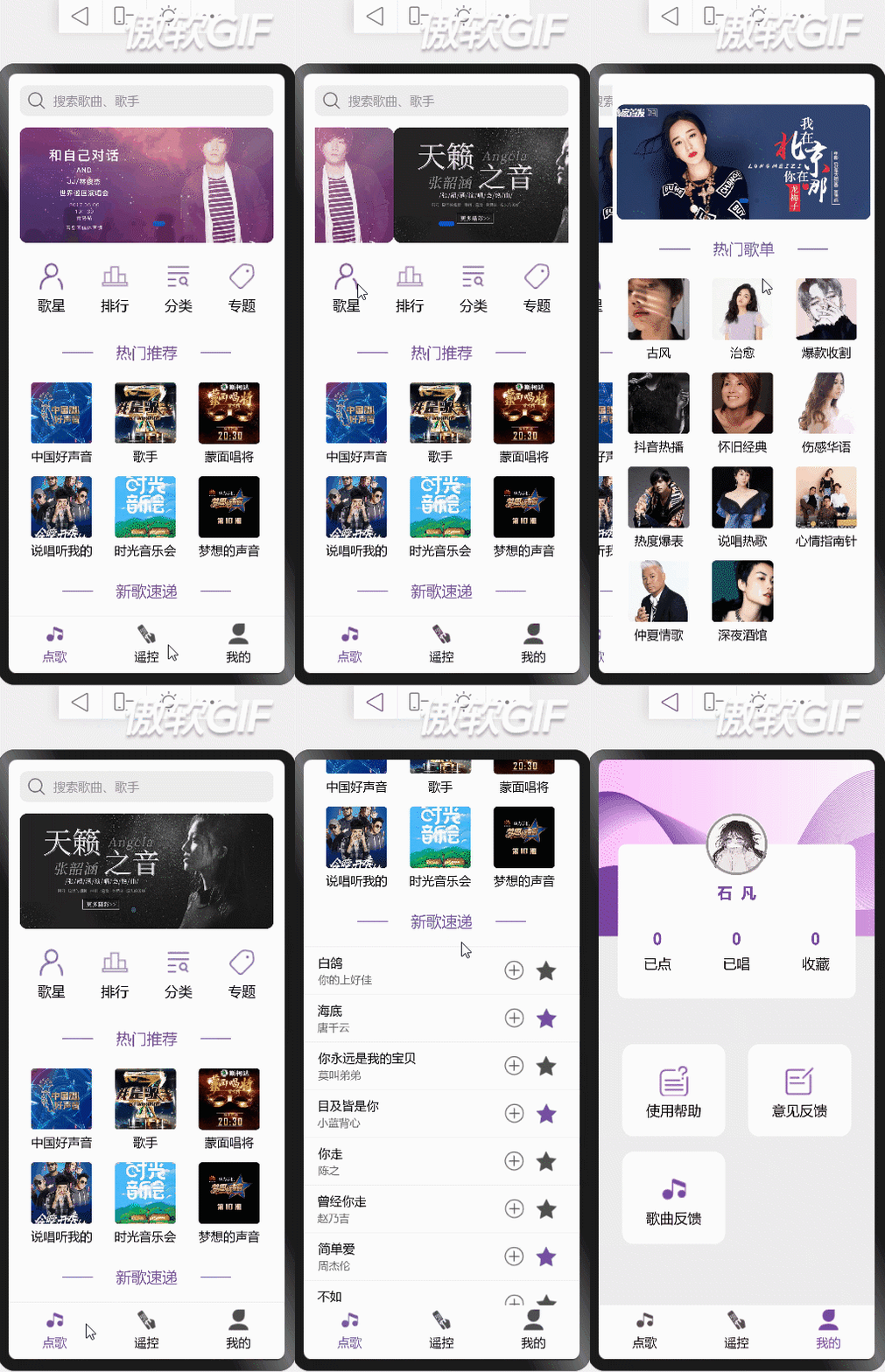
Two 、 Project directory

3、 ... and 、 Components
Implementation components
It's very simple , Use @Component The modified structures have the ability of componentization
Various decorators for components
@Entry: If you want this component to be the default entry to your page, you need to use this decorator
@Preview: Can be in DevEco Of PC Preview a single component on the preview
@Builder: Quickly generate multiple layout contents in a custom component , I think this is chicken ribs , It is also possible to use custom components directly
@Extend: This component is more practical , If you want to override some properties of a custom component , Directly use this component to modify
Component definition and use
Create a new one Components Folder , Put various components in the folder
Components need to use es6 Of import Import 、export export
//  Component definition
@Component
export struct Component {
    build() {
      Text(' My first component ')
    }
}
//  Components use
import {Component} from ' Your file path '
Component()
Data communication of components
The parent component passes the value to the child component , The parent component can directly pass the value , Such as :Component({value: ' Value delivered '}), If the sub component receives it , I need to define a value Property receive
If you need page synchronization after changing data, you need to use @States To embellish
Two way communication between parent and child components , The parent component needs to define value attribute , And use @States Modifier modification , Subcomponent definition value Property receive , Use at the same time @Link Modifier modification , In this way, the parent component will be modified synchronously after the child component data is modified
The child component calls the parent component method , There is no relevant description in the document , But if you want to call the parent component method, you can communicate in both directions first , Then use... In the parent component @Watch Decorator listens for attribute changes , Once the attribute changes, execute the corresponding method
Four 、 Project development
The main entrance

The main entry sets a current display page currentId, Click on the bottom nav when currentId Will change , according to currentId Show different pages .
The data change page does not refresh , If you want to refresh the page , You need to add decorators to the dependent data @State, meanwhile @State Decorated data has a certain effect on the display and concealment of components
The data is out of range , Can't scroll , It is necessary to wrap the outer layer of the components Scroll Components
Main code
@Entry
@Component
struct Index {
  @State currentId: number = 1
  build() {
    Column() {
      Scroll() {
        Column() {
          if (this.currentId === 1) {
            //  Song ordering page
            ChooseSong()
          } else if (this.currentId === 2) {
            //  Remote control page
            RemoteControl()
          } else {
            //  My page
            Home()
          }
        }.width('100%')
      }.height('91%').scrollBarWidth(0)
      //  Bottom nav
      Column() {
        MyBottomNav({ currentId: $currentId })
      }.width('100%').height('9%')
    }.width('100%').height('100%')
  }
}
Song ordering page


ets The frame is not out of the input box component for the time being , A false input field written temporarily in layout , Wait for the input box components to be replaced
The search box component click event is defined in the parent component ,isClick use @Link Decoration can realize two-way data binding , The parent component listens to isClick To trigger a click event
prompt.showToastt Pop up ,ets I won't support it , Error will be reported when using , Pop up events added to the song list will be added after support .

This page has 5 A component , Search box components 、menu Components 、title Components 、 Song recommendation component 、 Song list component
Code
//  The main entrance
@Entry
@Component
export struct ChooseSong {
  @State currentId: number = 1
  @State @Watch("clickHandle") isClick: boolean = false
  @State searchValue:string = ''
  clickHandle() {
    router.push({
      uri: 'pages/search'
    })
  }

  build() {
    Column() {
      //  Search box
      Flex({ justifyContent: FlexAlign.Center }) {
        MySearch({isClick: $isClick, searchValue: $searchValue})
      }.margin({ top: 15 }).width('100%')

      //  Shuffling figure
      Swiper() {
        ForEach(bannerImage, (item) => {
          Image(item.url).width('100%').height('100%').border({ radius: 10 })
        }, item => item.id)
      }
      .width('92%')
      .height(150)
      .margin({ top: 15 })
      .index(1)
      .autoPlay(true)

      //  Son menu
      Flex({ justifyContent: FlexAlign.Center }) {
        MyMenu({menuList: songMenu})
      }.margin({ top: 15 }).width('100%')

      //  Hot recommended
      Column() {
        MyTitle({ title: ' Hot recommended ' })
        SongSheet({ dataList: songRecommend, isShowAll: true })
      }.margin({ top: 15 }).width('100%')

      //  New song express
      Column() {
        MyTitle({ title: ' New song express ' })
        SongList({ dataList: songData })
      }.margin({ top: 30 }).width('100%')
    }.width('100%')
  }
}
//  Input box components
@Component
export struct MySearch {
  @Link isClick: Boolean
  @Link searchValue: string
  build() {
    Flex({alignItems: ItemAlign.Center}) {
      Image($r('app.media.search')).width(24).height(24).margin({left: 10, right: 10})
      Text(this.searchValue ? this.searchValue : ' Search the song 、 singer ').fontSize(16).fontColor(this.searchValue ? '#000' : '#999')
    }.width('92%').height(40).backgroundColor('#eee').border({radius: 10}).onClick(() => {
      this.isClick = !this.isClick
    })
  }
}
//  classification menu Components
@Component
export struct MyMenu {
  @State menuList: object[] = []
  @State width: string = '25%'
  @State height: string | number = 80
  @State isShowBorder: boolean = false

  build() {
    Flex({ alignItems: ItemAlign.Center, wrap: FlexWrap.Wrap, justifyContent: FlexAlign.SpaceBetween }) {
      ForEach(this.menuList, (item) => {
        Flex({ direction: FlexDirection.Column, alignItems: ItemAlign.Center, justifyContent: FlexAlign.Center }) {
          Image(item.icon).width(40).height(40).margin({ top: 6, bottom: 6 })
          Text(item.name).fontSize(18).fontColor('#000')
        }
        .width(this.width)
        .height(this.height)
        .backgroundColor(this.isShowBorder ? '#fff' : '')
        .border({ radius: 15 })
        .margin({ bottom: 20 })
        .onClick(() => {
          if (item.url) {
            router.push({
              uri: item.url,
              params: item.params
            })
          }
        })
      }, item => item.id)
    }.width('92%').height(100)
  }
}
//  Title Component
@Component
export struct MyTitle {
  @State title: string = ' Hot recommended '
  build() {
    Flex({justifyContent: FlexAlign.Center}) {
      Text('——').fontSize(20).fontColor($r('app.color.base'))
      Text(this.title).fontColor($r('app.color.base')).fontSize(20).margin({left: 15, right: 15})
      Text('——').fontSize(20).fontColor($r('app.color.base'))
    }
  }
}
//  Top recommended components
@Component
export struct SongSheet {
  @State dataList: object[] = []
  @State isShowAll: boolean = false
  build() {
    Flex({ alignItems: ItemAlign.Center, wrap: FlexWrap.Wrap }) {
      ForEach(this.dataList, (item) => {
        Column() {
          Image(item.img).width(80).height(80).margin({ top: 6, bottom: 6 }).border({ radius: 5 })
          Text(item.name).fontSize(16).fontColor('#000')
        }.width('33%').margin({ top: 10 }).onClick(() => {
          router.push({
            uri: 'pages/search',
            params: {
              searchValue: item.name,
              isShowAll: this.isShowAll
            }
          })
        })
      }, item => item.id)
    }.width('92%').margin({ top: 10 })
  }
}
//  Song list component
@Component
export struct SongList {
  @State dataList: song[] = []
  setDataList(id) {
    console.log(id)
    this.dataList = this.dataList.map(item => {
      return item.id === id ? {...item, star: !item.star} : item
    })
  }
  build() {
    Column() {
      ForEach(this.dataList, (item) => {
        Flex({ alignItems: ItemAlign.Center }) {
          Column() {
            Text(item.name).fontSize(16).fontColor('#000')
            Text(item.author).fontSize(14).fontColor('#666').margin({ top: 3 })
          }.width('66%').alignItems(HorizontalAlign.Start).margin({ left: '5%' })

          Flex() {
            Image($r('app.media.xz')).width(30).height(30).margin({ right: 8 }).onClick(() => {
              console.log(' Join list ')
            })
            Image(item.star ? $r('app.media.scY') : $r('app.media.scN')).width(30).height(30).onClick(() => {
              this.setDataList(item.id)
            })
          }.width('23%')
        }
        .width('100%')
        .border({ width: item.id % 2 ? 1 : 0, color: '#eee' })
        .padding({ top: 10, bottom: 10 })
        .onClick(() => {
          item.star = !item.star
        })
      }, item => item.id)
    }.width('100%').margin({ top: 20 })
  }
}
Remote control page

The increase and decrease of components are mainly for @Link Embellished value attribute , Record the current value value , When value Changing the value will directly change the value of the parent component
Use prompt.showToast The pop-up window shows the current volume , An error is reported at the bottom of the editor , This should be an official issue . Change the project after it is solved
Code
@Entry
@Component
export struct RemoteControl {
  @State @Watch('changeVolume') volume: number = 10 //  The volume
  @State @Watch('changeTone') tone: number = 10 //  tone
  changeVolume() {
    prompt.showToast({
      message: ` The current volume is ${this.volume}`,
      duration: 2000,
    });
  }
  changeTone() {
    console.log(` The current tone is ${this.tone}`)
  }
  build() {
    Column() {
      //  Volume switch
      Column() {
        Column() {
          Flex({ justifyContent: FlexAlign.Center }) {
            Flex({ alignItems: ItemAlign.Center }) {
              Image($r("app.media.yf")).width(30).height(30).margin({ right: 5 })
              Text(' Music volume ').fontSize(20)
            }
            MySwitch({value: $volume})
          }

          Flex({ justifyContent: FlexAlign.Center }) {
            Flex({ alignItems: ItemAlign.Center }) {
              Image($r("app.media.tj")).width(30).height(30).margin({ right: 5 })
              Text(' Up and down ').fontSize(20)
            }

            MySwitch({value: $tone})
          }.margin({ top: 40 })
        }.padding({ left: 40, right: 40, top: 30, bottom: 50 })

        Blank().width('100%').height(2).backgroundColor('#999')
      }.margin({ top: 15 }).width('100%')

      Flex({justifyContent: FlexAlign.Center}) {
        ForEach(menuList, item => {
          Column() {
            Flex({justifyContent:FlexAlign.Center, alignItems: ItemAlign.Center}) {
              Image(item.icon).width(30).height(30)
            }.width(60).height(60).border({radius: 30}).margin({bottom: 10}).linearGradient({
              angle: 0,
              direction: GradientDirection.Bottom,
              colors: item.color
            })
            Text(item.name).fontSize(16)
          }.width('23%')
        }, item => item.id)
      }.width('100%').margin({top: 50})

      //  Shuffling figure
      Swiper() {
        ForEach(bannerImage, (item) => {
          Image(item.url).width('100%').height('100%').border({ radius: 10 })
        }, item => item.id)
      }
      .width('92%')
      .height(150)
      .margin({ top: 100 })
      .index(1)
      .autoPlay(true)
    }.width('100%')
  }
}
//  Increase decrease switch
@Component
export struct MySwitch {
  @Link value: number

  build() {
    Flex() {
      //  Reduce
      Button({ type: ButtonType.Circle, stateEffect: true }) {
        Text('-').fontSize(40).fontColor('#fff').position({ y: -5, x: 0 })
      }
      .width(45)
      .height(45)
      .backgroundColor('#005bea')
      .margin({ left: 2, top: 2 })
      .onClick(() => {
        this.value -= 1
      })
      //  increase
      Button({ type: ButtonType.Circle, stateEffect: true }) {
        Text('+').fontSize(40).fontColor('#fff')
      }
      .width(45)
      .height(45)
      .margin({ left: 18, top: 2 })
      .backgroundColor('#fa71cd')
      .onClick(() => {
        this.value += 1
      })
    }.border({ width: 2, color: '#999', radius: 38 }).width(128).height(55)
  }
}
My page

This page has two components , Personal information card assembly ,menu Components
Use help and feedback on the same page , Determine which page the incoming page belongs to by using the route value passing method router.push({ uri: item.url,params: item.params})
Use router.getParams() Method to obtain the information passed in the routing address params Value
Code
@Entry
@Component
export struct Home {
  build() {
    Column() {
      Image($r('app.media.bg')).width('100%').height(230)
      //  Personal information card
      PerInfo()

      //  Son menu
      Flex({ justifyContent: FlexAlign.Center }) {
        MyMenu({menuList: homeMenuList, width: '45%', height: 120, isShowBorder: true})
      }.margin({ top: -60 }).width('90%')


    }.width('100%').height('100%').backgroundColor('#eee')
  }
}
//  Personal information card
@Component
export struct PerInfo {
  build() {
    Column() {
      Column() {
        Image($r('app.media.tx')).width(80).height(80).border({radius: 40, width: 3, color: '#999'})
        Text(' stone    all ').fontSize(20).margin({top: 10}).fontColor($r('app.color.base')).fontWeight(600)
      }.margin({top: -40})
      Flex() {
        ForEach(homeInfoList, item => {
          Flex({direction: FlexDirection.Column, alignItems: ItemAlign.Center}) {
            Text(item.value.toString()).fontSize(22).fontColor($r('app.color.base')).fontWeight(600)
            Text(item.name).fontSize(18).margin({top: 8})
          }.width('33.3%')
        }, item=>item.id)
      }.margin({top: -5})
    }.width('86%').backgroundColor('#fff').height(200).margin({top: -120}).border({radius: 10})
  }
}
Search page


The search box component click event is defined in the parent component ,isClick use @Link Decoration can realize two-way data binding , The parent component listens to isClick To trigger a click event
Determine whether the popular search is displayed by whether the input box has a value
Filter the song library by listening for changes in the value of the input box , Show the songs after searching
Code
@Entry
@Component
struct SearchPage {
  @State @Watch("clickHandle") isClick: boolean = false
  @State @Watch("changeValue") searchValue: string = ''
  @State isShowAll: boolean = false
  dataList: object[] = []

  setDataList() {
    if (this.isShowAll) {
      this.dataList = songData.sort(item => {
        return Math.random() > 0.5 ? -1 : 1
      })
      return false;
    }
    this.dataList = songData.filter(item => {
      console.log(item.author.indexOf(this.searchValue) + item.name.indexOf(this.searchValue) + '')
      return (item.author.indexOf(this.searchValue) !== -1 || item.name.indexOf(this.searchValue) !== -1) ? item : ''
    })
  }
  changeValue() {
    this.setDataList()
  }
  aboutToAppear() {
    this.searchValue = router.getParams() ? router.getParams().searchValue : ''
    this.isShowAll = router.getParams() ? router.getParams().isShowAll : false

    this.setDataList()
  }
  clickHandle() {
    console.log(' Pop up the input keyboard ')
  }

  build() {
    Scroll() {
      Column() {
        //  Search box
        Flex({ justifyContent: FlexAlign.Center }) {
          MySearch({ isClick: $isClick, searchValue: $searchValue })
        }.margin({ top: 15 }).width('100%')

        if (this.searchValue || this.isShowAll) {
          Column() {
            MyTitle({ title: ' The search results ' })
            SongList({ dataList: this.dataList })
          }.margin({ top: 30 }).width('100%')
        } else {
          //  Hot search
          Flex({ direction: FlexDirection.Column }) {
            Text(' Hot search ').fontSize(16).fontColor('#999')
            BreadBlock({searchValue: $searchValue})
          }.width('92%').margin({ top: 15 })
        }
      }
      .width('100%')
    }

  }
}
//  Hot search
@Component
export struct BreadBlock {
  @Link searchValue: string
  build() {
    Flex({ wrap: FlexWrap.Wrap }) {
      ForEach(hotSearchList, item => {
          Text(item)
            .fontSize(16)
            .padding({ left: 15, right: 15, top: 16 })
            .onClick(() => {
              this.searchValue = item
            })
      }, item => item)
    }
  }
}
The ark development framework is not perfect yet , It's still hard to develop a complete large-scale project , But some small dome It can still be developed . I hope the framework will become more and more perfect , After all, declarative development is the mainstream trend of future development .
The last attached git Address :https://gitee.com/shi-fan-a/song-ordering-system
——————
original : Lao Wang 【 official account : Hongmeng developer Lao Wang 】 Huawei certified lecturer / Tencent certified lecturer / The pioneer of Hongmeng development
边栏推荐
猜你喜欢

ThreeJS飞机地球3D场景动画
Must the database primary key be self incremented? What scenarios do not suggest self augmentation?

Mvcc implementation principle of MySQL

产品图文列表说明布局样式

Must the database primary key be self incremented? What scenarios do not suggest self augmentation?

Servlet learning (II)

牛客网:归并两个有序的数组

Notes on writing questions in C language -- find s=a+aa+aaa+aaaa+aa Value of a

秒云云原生信创全兼容解决方案再升级,助力信创产业加速落地

工地建设动画网页建设中js特效

随机推荐
Servlet specification (I)
el-table分页全选功能讲解
JDBC Basics
Must the database primary key be self incremented? What scenarios do not suggest self augmentation?
Deep Copy
Canvas interactive color gradient JS special effect code
ThreeJS飞机地球3D场景动画
秒云云原生信创全兼容解决方案再升级,助力信创产业加速落地
EL表达式
MarkDown初级语法一文精通,兼容MarkText
canvas交互式颜色渐变js特效代码
2021-10-26 metagenome analysis (personal note 2)
Disclose the design idea of MVVM framework supporting Baidu search, feed and applet, and San core personnel have made great efforts to build it
Teachers, Oracle CDC encounters a DML statement that cannot be parsed because a field in this statement is a special spatial and geographical bit
7. space removal function -strip
This humble doctor's thesis is very popular: looking back, I feel sorry for countless mountains
Mvcc implementation principle of MySQL
Stata quick check backup (personal notes)
Six steps of JDBC programming
JDBC 笔记