当前位置:网站首页>Visual display method of machine learning project
Visual display method of machine learning project
2022-07-27 23:21:00 【Xiaobai learns vision】
Click on the above “ Xiaobai studies vision ”, Optional plus " Star standard " or “ Roof placement ”
Heavy dry goods , First time delivery machine learning
Author: Yang Jianli ,Datawhale member , Data Analyst
From:Datawhale
There's a pain in many scientific workers , Because there is no skill tree that can light up the front end of the web page , Lead to in the project exhibition or project cooperation , It's impossible to quickly develop such a user interface for use . And what I'm going to introduce today Streamlit It's in response to this pain .
Streamlit It's for a machine learning engineer , Application development framework for machine learning and data science teams , It's the fastest way to develop custom machine learning tools . It can be said that its goal is to replace Flask Position in machine learning projects , It can help machine learning engineers develop user interaction tools quickly .
Contents of this article :
1. Streamlit What is it? 2. How to start a Streamlit project 3. Streamlit Architecture and design
APP Model
Page layout
4. Summary of common tools
Show text
Display the data
Show interactive controls
Show chart
Other tools
Sidebar
5. Important functions
Caching mechanisms
Screen recording function
6. Recent major updates
7. good demo
Automatic driving target detection
GAN Face generation project
One 、Streamlit What is it? ?
Streamlit Is a powerful python Open Source Toolkit , Can be used to quickly build web app, To gracefully showcase your machine learning or data science projects .
Streamlit The advantage is that :
It can be easily built without any web front-end design foundation web app
because web It will automatically refresh with the code block , When writing a program, you can observe the influence of every code change on the display effect of the web page in time , Convenient debugging
An interactive interface can gracefully present data science projects
streamlit The code framework follows the logic of running from top to bottom , Easy to understand , What you see is what you get
Two 、 How to start a Streamlit project
In the installation streamlit Before , We need to pay attention to python Version at least 3.6. Use pip install streamlit library
$ pip install streamlitstay python Import package from script
import streamlit as stStart a streamlit app There are two ways ( Command line ).
1) Run the local python file
$ streamlit run myapp.py2) Run remote url, This function can be run directly github Link in
$ streamlit run https://raw.githubusercontent.com/streamlit/demo-uber-nyc-pickups/master/app.pyYou can try to run the following command to start the demo project
$ streamlit hello3、 ... and 、Streamlit Architecture and design
At the beginning streamlit Many of the gadgets provided before , Need a brief introduction streamlit The architecture and layout design ideas of .
3.1 APP Model
The picture below shows app Model architecture , One streamlit app It works like this :
streamlit Will python Scripts run from top to bottom in order
Every time the user opens it points to the app Service page , The entire script will be re executed
While the script is running ,streamlit The data table will be , Images , Control is displayed on the web page in real time
At run time ,streamlit The cache is called first ( It needs the user to set... In the program ) Avoid expensive Computing
Every time a user interacts with a control , The script will be re executed , Images , Control is redisplayed as a new value

3.2 Page layout
Streamlit It's a very simple layout ( This is both its advantage , It's also a disadvantage ). and bootstrap The layout of complex grid in the front-end frame is different ,Streamlit It only supports the layout of the left sidebar and the right main column , In fact, as mentioned in the previous section Streamlit A special structure for executing programs from the top down , Users don't have to think about layout , Controls will be arranged naturally from top to bottom in the order in the program .
Such a design naturally greatly simplifies the user's efforts in layout design , More energy can be devoted to project presentation .

Four 、 Summary of common tools

4.1 Show text
st.title
st.header
st.subheader
st.text
st.markdown
st.code
st.write
Common commands for displaying text include headings title, Title of the text header, Text subtitle subheader, Body text text,markdown Format ( Support text and emoji expression ), Code code
st.title('Streamlit introduction')
st.header('Build your first app')
st.subheader('Text widgets are shown as below')
st.text('I am the tool to display text')
st.markdown('I am the *tool* to **display markdown**')
st.markdown(':sunglasses:')
st.code('''
def hello():
    print("Hello, Streamlit!")''', language='python')
stay streamlit There is also a universal display tool in st.write, This method can accept many kinds of input parameters , Text ,markdown, Data frame , Chart , Dictionaries , function , And with different input formats , It will be presented in different ways .
4.2 Display the data
st.table
st.dataframe
st.json
streamlit Supports data frames and json Display data in the format of , among table and dataframe The difference is that table For static data ,dataframe For dynamic data .
df = pd.DataFrame(
    np.random.randn(10, 5),
   columns=('col %d' % i for i in range(5)))


st.table(df)
st.dataframe(df)


st.json({
    'foo': 'bar',
    'baz': 'boz',
    'stuff': [
         'stuff 1',
        'stuff 2',
        'stuff 3',
         'stuff 5',
    ],
 })
4.3 Show interactive controls
st.checkbox
st.selectbox
st.multiselect
st.ratio
st.slider
This set of tools can be used to select user parameters when building machine learning model , Such as drop-down radio selection , Pull down multiple choices , Slider selection and other functions .
st.write('-----------------------------------------checkbox--------------------------------------------')
agree = st.checkbox('I agree')
if agree:
    st.write('Great! You agreed!')


st.write('-----------------------------------------selectbox-------------------------------------------')
option = st.selectbox(
    'Select your model',
     ('decision tree', 'logistic regression', 'SVM'))
st.write('You selected:', option)


st.write('-----------------------------------------multiselect-------------------------------------------')
options = st.multiselect(
 'What are your favorite colors',
    ['Green', 'Yellow', 'Red', 'Blue'],
    ['Yellow', 'Red'])
st.write('You selected:', options)


st.write('-----------------------------------------ratio-------------------------------------------')
genre = st.radio(
    "What's your favorite model",
    ('linear regression', 'neural network'))
if genre == 'linear regression':
    st.write('You like simple model')
else:
    st.write("You like complex model")


st.write('-----------------------------------------slider-------------------------------------------')
st.slider('How old are you?', min_value=0, max_value=100, value=20, step=5)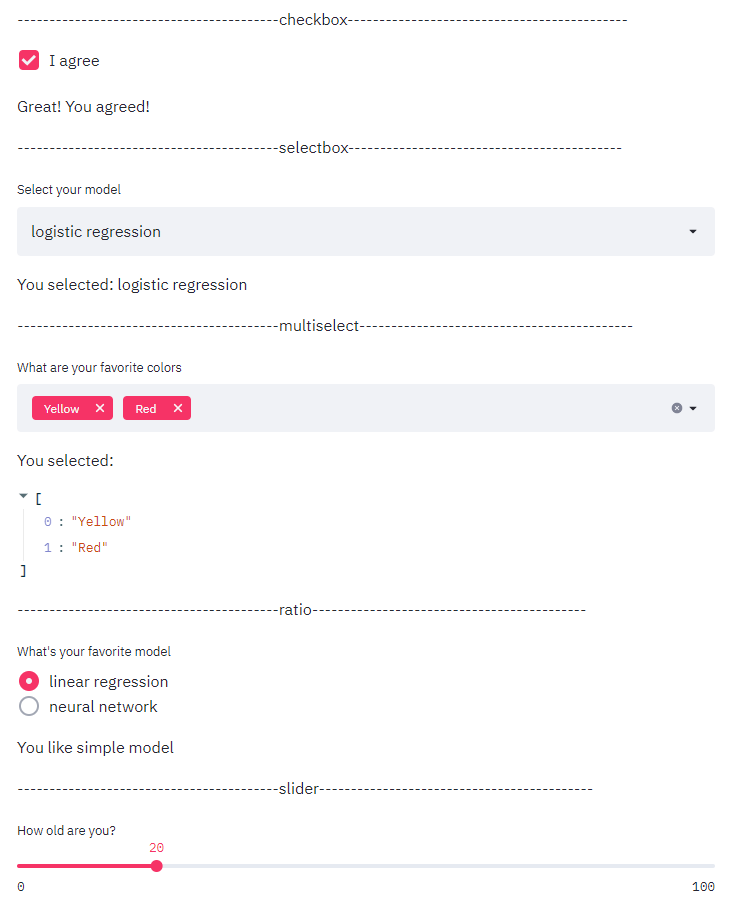
st.text_input
st.number_input
st.text_area
st.date_input
st.file_uploader
This set of tools can be used for different formats of user input and data upload when building machine learning models . among file_uploader The maximum file upload size supported by default is 200MB.
st.write('-----------------------------------------text_input--------------------------------------------')
st.text_input('Movie title', 'Life of Brian')


st.write('-----------------------------------------number_input-------------------------------------------')
st.number_input('Insert a number')


st.write('-----------------------------------------text_area-------------------------------------------')
txt = st.text_area('Text to analyze', '''It was the best of times, it was the worst of times, it was
the age of wisdom, it was the age of foolishness, it was
the epoch of belief, it was the epoch of incredulity, it
was the season of Light, it was the season of Darkness, it
was the spring of hope, it was the winter of despair, (...)
''')


st.write('-----------------------------------------date_input-------------------------------------------')
st.date_input(
    "When's your birthday",
    datetime.date(2019, 7, 6))


st.write('-----------------------------------------file_uploader-------------------------------------------')
uploaded_file = st.file_uploader("Choose a CSV file", type="csv")
4.4 Show chart
st.line_chart
st.bar_chart
st.area_chart
streamlit It supports three native graphic forms , Broken line diagram , Bar charts and area charts , But it's not usually used , because streamlit It also supports a large number of third-party visual chart interfaces .
chart_data = pd.DataFrame(
     np.random.randn(20, 3),
     columns=['a', 'b', 'c'])
st.line_chart(chart_data)


chart_data = pd.DataFrame(
     np.random.randn(50, 3),
    columns=["a", "b", "c"])
st.bar_chart(chart_data)


chart_data = pd.DataFrame(
     np.random.randn(20, 3),
     columns=['a', 'b', 'c'])
st.area_chart(chart_data)
st.pyplot
st.altair_chart
st.plotly_chart
st.bokeh_chart
st.pydeck_chart
st.deck_gl_chart
st.graphviz_chart
streamlit The power of the system is to provide a large number of third-party visualization interfaces , With the most common matplotlib For example , Just add a sentence to the regular code st.pyplot() You can display the chart on the web page
arr = np.random.normal(1, 1, size=100)
plt.hist(arr, bins=20)
st.pyplot()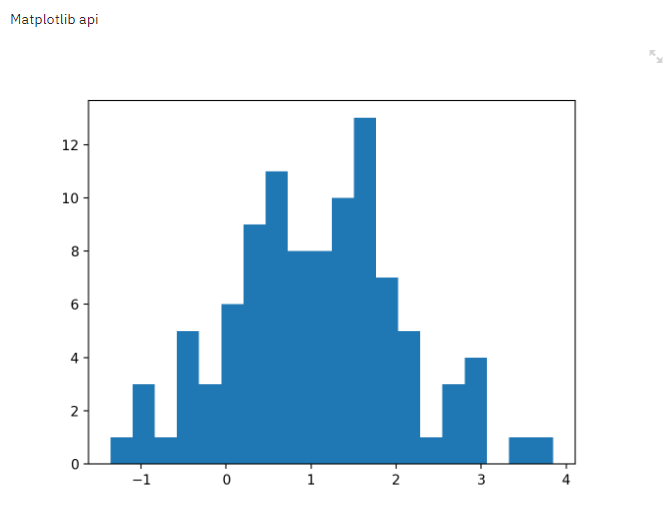
4.5 Other tools
st.image
st.audio
st.video
This is a set of pictures to show , Audio and video functions
st.progress
st.spinner
progress Used to display a progress bar in a loop ,spinner Used to indicate that the code is running
st.error
st.warning
st.info
st.success
This is a set of tools for displaying different states
st.error('This is an error')
st.warning('This is a warning')
st.info('This is a purely informational message')
st.success('This is a success message!')
4.6 Sidebar
Almost all of the tools mentioned above can be placed in the sidebar , Code to st.sidebar.[element_name] Given in the form of , With selectbox For example ,st.sidebar.selectbox This means that the tool will appear on the left . Similarly, the tool layout of the sidebar is displayed from top to bottom in code order .
add_selectbox = st.sidebar.selectbox(
    "How would you like to be contacted?",
    ("Email", "Home phone", "Mobile phone")
)
5、 ... and 、 Important functions
5.1 Caching mechanisms
The caching mechanism is streamlit One of the most important functions of , The cache function enables users to read the cache directly when loading or processing large data , Avoid expensive calculations .
streamlit Our caching mechanism is through @st.cache The decorator of .
@st.cache
def expensive_computation(a, b):
    time.sleep(10)
    return a * b


a = 2
b = 21
res = expensive_computation(a, b)


st.write("Result:", res)
Every time the program runs to be cache When decorating a function , When first run , It will execute normally and store the results in the cache , When the function is run again , First of all, I will judge the input parameters of the function , Whether the main content of the function has changed , If there is a change , Then rerun the function , Otherwise, the function is skipped , Read cache results directly .
5.2 Screen recording function
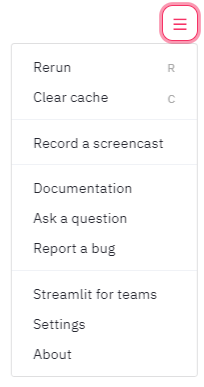
streamlit It also provides a very useful screen recording function , On the menu bar in the top right corner of the page , There is one Record a screencast function , Can support recording screen interactive operation , Perfect for team work and effect presentation .

6、 ... and 、 Recent major to update
streamlit Although it was not long ago , Already has a very active community and user base , And the official website is constantly enriching the existing functions , In response to the general needs of users .
According to the official website 2020 The roadmap , Some major new features are expected to come out today , Include :
Customized components ( User customization Javascript/React)
Customized layout structure ( New grid and horizontal layout )
Richer caching mechanisms
7、 ... and 、 good demo
The official website contains many excellent demo works , Fully demonstrate streamlit The power and application prospect of the technology .
7.1 Automatic driving target detection
This project doesn't use 300 Line code , adopt streamlit The interactive interface shows Udacity Autopilot data sets and YOLO Application of target detection method .
$ streamlit run https://raw.githubusercontent.com/streamlit/demo-self-driving/master/app.py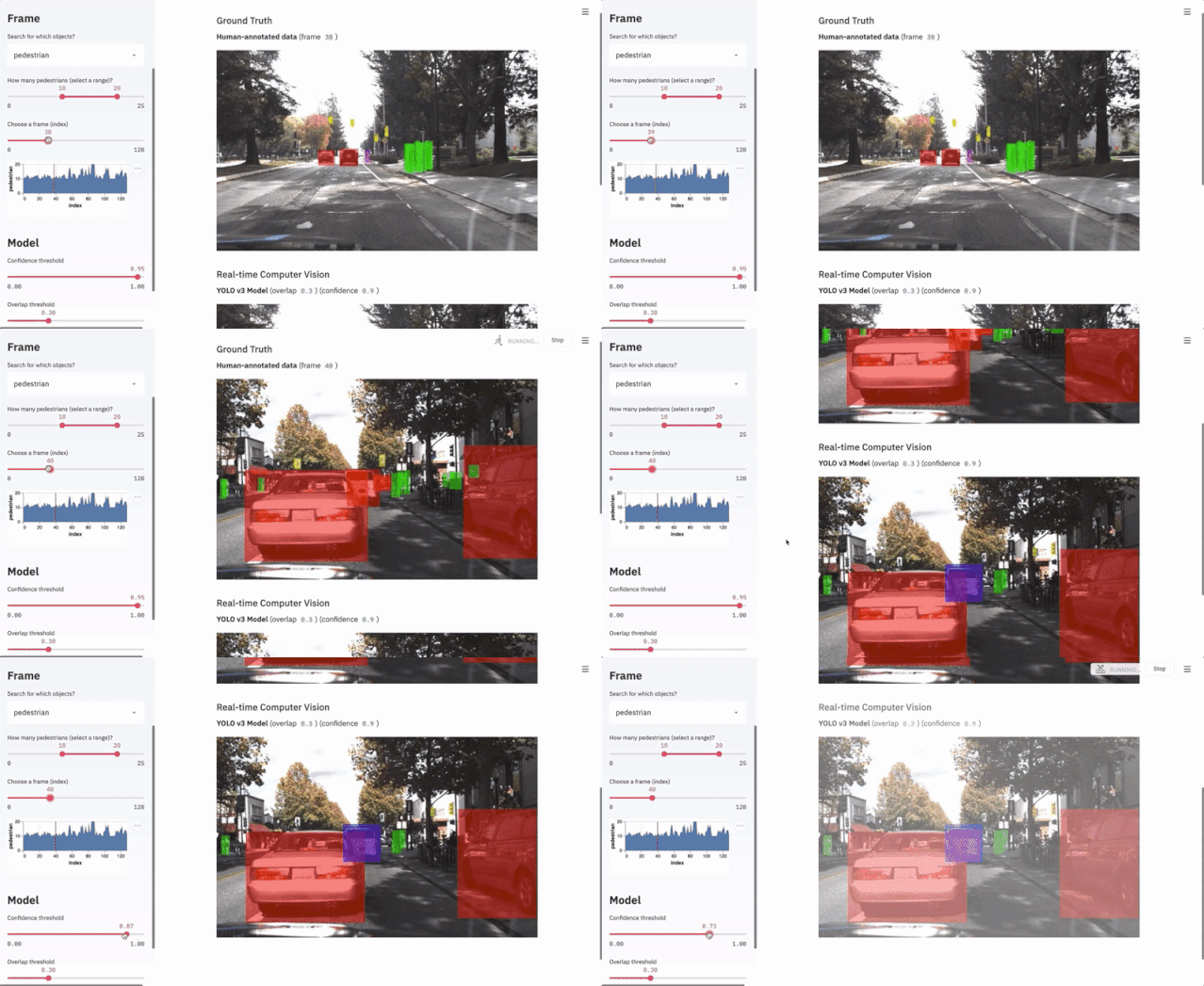
7.2 GAN Face generation project
This project uses only 150 Line code , It shows tensorflow and Nvidia Of Progressive Growing of GANs as well as Shaobo Guan Of Transparent Latent-space GAN Methods in facial feature generation .
$ git clone https://github.com/streamlit/demo-face-gan.git
$ cd demo-face-gan
$ pip install -r requirements.txt
$ streamlit run app.py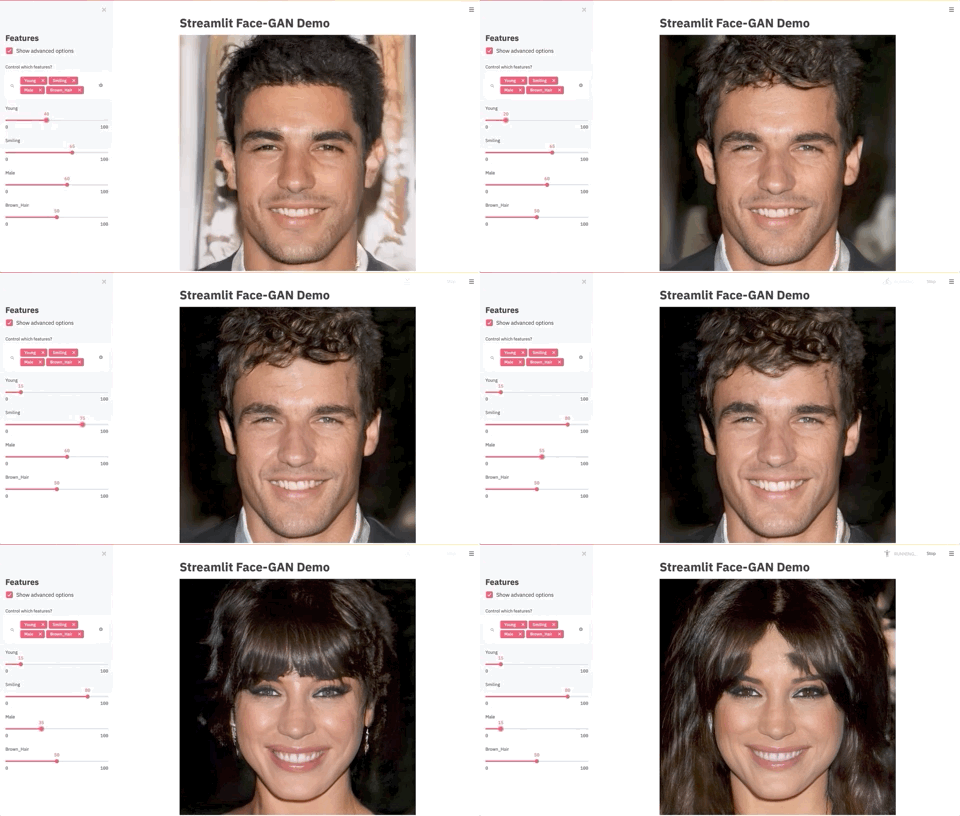
The good news !
Xiaobai learns visual knowledge about the planet
Open to the outside world

 download 1:OpenCV-Contrib Chinese version of extension module

 stay 「 Xiaobai studies vision 」 Official account back office reply : Extension module Chinese course , You can download the first copy of the whole network OpenCV Extension module tutorial Chinese version , Cover expansion module installation 、SFM Algorithm 、 Stereo vision 、 Target tracking 、 Biological vision 、 Super resolution processing and other more than 20 chapters .


 download 2:Python Visual combat project 52 speak
 stay 「 Xiaobai studies vision 」 Official account back office reply :Python Visual combat project , You can download, including image segmentation 、 Mask detection 、 Lane line detection 、 Vehicle count 、 Add Eyeliner 、 License plate recognition 、 Character recognition 、 Emotional tests 、 Text content extraction 、 Face recognition, etc 31 A visual combat project , Help fast school computer vision .


 download 3:OpenCV Actual project 20 speak
 stay 「 Xiaobai studies vision 」 Official account back office reply :OpenCV Actual project 20 speak , You can download the 20 Based on OpenCV Realization 20 A real project , Realization OpenCV Learn advanced .


 Communication group

Welcome to join the official account reader group to communicate with your colleagues , There are SLAM、 3 d visual 、 sensor 、 Autopilot 、 Computational photography 、 testing 、 Division 、 distinguish 、 Medical imaging 、GAN、 Wechat groups such as algorithm competition ( It will be subdivided gradually in the future ), Please scan the following micro signal clustering , remarks :” nickname + School / company + Research direction “, for example :” Zhang San + Shanghai Jiaotong University + Vision SLAM“. Please note... According to the format , Otherwise, it will not pass . After successful addition, they will be invited to relevant wechat groups according to the research direction . Please do not send ads in the group , Or you'll be invited out , Thanks for your understanding ~边栏推荐
- Cron expression
- 干货|语义网、Web3.0、Web3、元宇宙这些概念还傻傻分不清楚?(中)
- Analysis of cloud native application security organization structure
- 360入选中国安全产业全景图63个领域 ISC2022共话安全服务方向
- 云计算服务主要安全风险及应对措施
- 2022/3/10 exam summary
- Cloudcompare & PCL platform convex hull method to calculate crown volume
- 网络开发套接字以及UDP、TCP协议
- 你不知道的Redis那些事,我来详解Redis底层数据结构
- 物联网架构完全指南
猜你喜欢
leetcode-461.汉明距离

Pyqt5 rapid development and practice 4.10 window drawing controls

JVM composition and memory model

Parameter transmission of components

cron 表达式

Analysis of cloud native application security organization structure

MySQL basic installation and startup

Object creation process and object layout

Cloudcompare & PCL platform convex hull method to calculate crown volume

CSDN dedicated killer technology -- Google browser plug-in
随机推荐
Shuffle, partition and read of tfrecord
NOI 2018 简要题解
你不知道的Redis那些事,我来详解Redis底层数据结构
Bubbling, fast sorting, heap sorting and cardinality sorting of the eight sorts
jvm组成及内存模型
【数字识别】基于知识库实现手写体数字识别附matlab代码
许锦波:AI蛋白质预测与设计
2022/5/13 考试总结
对象创建过程及对象布局
You don't know about redis. Let me explain the underlying data structure of redis in detail
机器学习项目可视化展示方法
Introduction to the paper | language model for long text under transformer architecture
Cloudcompare & PCL point cloud equally spaced slices
Jeninkins离线部署
Convnext:a convnet for the 2020s - model Brief
C language explanation series -- understanding of functions (5) function recursion and iteration
2022年软件开发的趋势
containerd ctr运行ansible容器执行ansible-playbook任务完整命令
Read an article to understand artificial neural network
20 character short domain name bypass replication