当前位置:网站首页>Latex formula and table recognition
Latex formula and table recognition
2022-06-24 09:39:00 【qq_ forty-five million seven hundred and fifty-nine thousand tw】
Formula recognition
I found a good thing today , If you want to copy the formulas in other people's articles to your own latex in , You can use the following website
https://www.latexlive.com/home##
After landing , You can take a screenshot directly , Then we can get the corresponding latex Code
for example 
Copy the screenshot directly to the online website  You can see that this result is much faster than knocking one by one
With this above , I want to do another thing , Whether there is latex What about the plug-ins that recognize tables ,
I searched it , There is , yes excel2latex La
install excel2latex
Reference resources
https://www.bilibili.com/read/cv14219721/
First go to the official website to download
https://ctan.org/tex-archive/support/excel2latex/ Then open the excel

Get into  Then find the download just now xla file , Click OK to install
If the installation is successful , So the final result is as follows 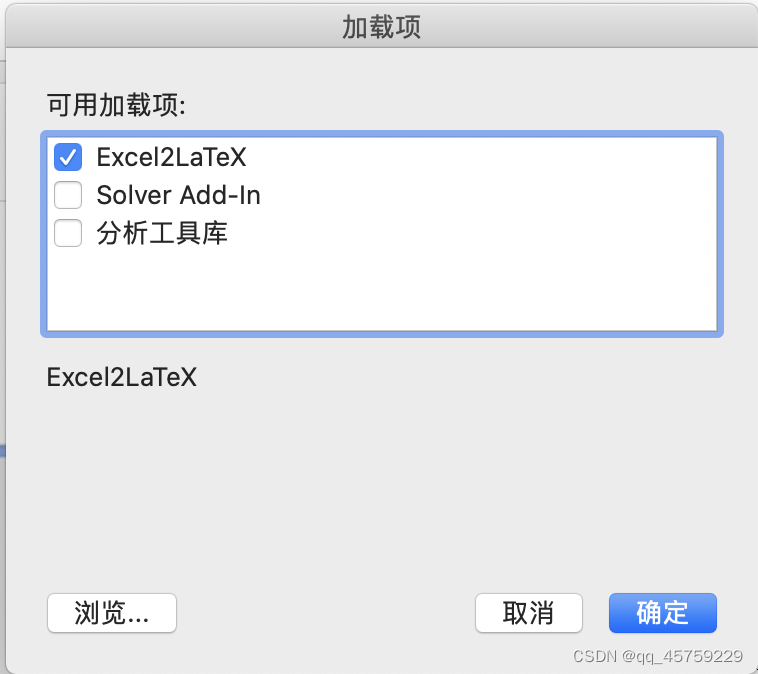
Use the tutorial
First prepare a excel form , as follows  First select all the data of the table
Then select the corresponding table in the add in , as follows  Here we can generate
  Click on Copy to Clipboard You can copy it to the pasteboard , There seems to be an error when saving to a file , But I don't need this either ,
But here's a little bug,
Now copy it latex In fact, the code format is messy , Copy directly to texstudio in 
This is too messy , Direct operation will report an error , Value required \begin{table} and \end{table} Change the line before
, Or you can copy the code to typora in , And then from typora Zhongba latex Code copy to texstudio in 
Here you can see , The format has changed , Finally, you can run texstudio Look at the results of the table , Here is my test code
%  example 5
\documentclass{
    article}

\usepackage{
    booktabs}
\usepackage{
    multirow}

\title{
    My First Document}
\author{
    Mingliang Zhang}
\date{
    \today}

\begin{
    document}
	\maketitle

	Hello,$$f(x)=3x^2+x-1$$This is a message.

	\begin{
    table}[htbp]
		\centering
		\caption{
    Add caption}
		\begin{
    tabular}{
    lrrrrrrrr}
			4batch\_4celltype\_multi & \multicolumn{
    1}{
    l}{
    tDCA} & \multicolumn{
    1}{
    l}{
    fastMNN} & \multicolumn{
    1}{
    l}{
    harmony} & \multicolumn{
    1}{
    l}{
    Seurat3} & \multicolumn{
    1}{
    l}{
    scanorama} & \multicolumn{
    1}{
    l}{
    INSCT} & \multicolumn{
    1}{
    l}{
    BBKNN} & \multicolumn{
    1}{
    l}{
    liger} \\
			ARI   & 1     & 1     & 0.333 & 1     & 1     & 1     & 1     & 0.866 \\
			NMI   & 1     & 1     & 0.667 & 1     & 1     & 1     & 1     & 0.816 \\
			ASW\_label & 0.727 & 0.655 & 0.533 & 0.643 & 0.632 & 0.962 & 0.93  & 0.563 \\
			ASW\_label/batch & 0.98  & 0.981 & 0.276 & 0.925 & 0.988 & 0.854 & 0.565 & 0.971 \\
			BatchKL & 0.187 & 0.205 & 2     & 0.612 & 0.158 & 0.611 & 1.499 & 0.167 \\
			cLISI & 1     & 1     & 1     & 1     & 1     & 1     & 1     & 1.037 \\
			iLISI & 3.132 & 3.089 & 1     & 2.174 & 3.217 & 2.462 & 1.173 & 3.225 \\
		\end{
    tabular}%
		\label{
    tab:addlabel}%
	\end{
    table}%


% Table generated by Excel2LaTeX from sheet '4batch_4celltype_multi_evaluati'
\begin{
    table}[htbp]
	\centering
	\caption{
    Add caption}
	\begin{
    tabular}{
    lrrrrrrrr}
		& \multicolumn{
    1}{
    l}{
    tDCA} & \multicolumn{
    1}{
    l}{
    fastMNN} & \multicolumn{
    1}{
    l}{
    harmony} & \multicolumn{
    1}{
    l}{
    Seurat3} & \multicolumn{
    1}{
    l}{
    scanorama} & \multicolumn{
    1}{
    l}{
    INSCT} & \multicolumn{
    1}{
    l}{
    BBKNN} & \multicolumn{
    1}{
    l}{
    liger} \\
		ARI   & 1     & 1     & 0.333 & 1     & 1     & 1     & 1     & 0.866 \\
		NMI   & 1     & 1     & 0.667 & 1     & 1     & 1     & 1     & 0.816 \\
		ASW\_label & 0.727 & 0.655 & 0.533 & 0.643 & 0.632 & 0.962 & 0.93  & 0.563 \\
		ASW\_label/batch & 0.98  & 0.981 & 0.276 & 0.925 & 0.988 & 0.854 & 0.565 & 0.971 \\
		BatchKL & 0.187 & 0.205 & 2     & 0.612 & 0.158 & 0.611 & 1.499 & 0.167 \\
		cLISI & 1     & 1     & 1     & 1     & 1     & 1     & 1     & 1.037 \\
		iLISI & 3.132 & 3.089 & 1     & 2.174 & 3.217 & 2.462 & 1.173 & 3.225 \\
	\end{
    tabular}%
	\label{
    tab:addlabel}%
\end{
    table}%


% Table generated by Excel2LaTeX from sheet 'Sheet1'
\begin{
    table}[htbp]
	\centering
	\caption{
    Add caption}
	\begin{
    tabular}{
    c|lrrrrrrrrr}
		\toprule
		\multicolumn{
    2}{
    c}{
    \multirow{
    2}[4]{
    *}{
    \textbf{
    Method}}} & \multicolumn{
    3}{
    c}{
    \textbf{
    Dataset 1}} & \multicolumn{
    3}{
    c}{
    \textbf{
    Dataset 2}} & \multicolumn{
    3}{
    c}{
    \textbf{
    Dataset 3}} \\
		\cmidrule{
    3-11}    \multicolumn{
    2}{
    c}{
    } & \multicolumn{
    1}{
    c}{
    RMSE} & \multicolumn{
    1}{
    c}{
    MAE} & \multicolumn{
    1}{
    c}{
    ACC} & \multicolumn{
    1}{
    c}{
    RMSE} & \multicolumn{
    1}{
    c}{
    MAE} & \multicolumn{
    1}{
    c}{
    ACC} & \multicolumn{
    1}{
    c}{
    RMSE} & \multicolumn{
    1}{
    c}{
    MAE} & \multicolumn{
    1}{
    c}{
    ACC} \\
		\midrule
		\multirow{
    2}[2]{
    *}{
    Non-Graph} & MLP  &      &      &      &      &      &      &      &      &  \\
		& SVR  &      &      &      &      &      &      &      &      &  \\
		\midrule
		\multirow{
    5}[2]{
    *}{
    Graph} & GCN  &      &      &      &      &      &      &      &      &  \\
		& GAT  &      &      &      &      &      &      &      &      &  \\
		& RGCN &      &      &      &      &      &      &      &      &  \\
		& GIN  &      &      &      &      &      &      &      &      &  \\
		& ChebNet &      &      &      &      &      &      &      &      &  \\
		\midrule
		\midrule
		\textbf{
    Proposed} & \textbf{
    ABC} &      &      &      &      &      &      &      &      &  \\
		\bottomrule
	\end{
    tabular}%
	\label{
    tab:addlabel}%
\end{
    table}%

% Table generated by Excel2LaTeX from sheet 'Sheet1'
\begin{
    table}[htbp]
	\centering
	\setlength{
    \abovecaptionskip}{
    2pt}%
	\setlength{
    \belowcaptionskip}{
    10pt}%
	\caption{
    It is a table.}
	\begin{
    tabular}{
    c|lrrrrrrrrr}
		\bottomrule %\toprule
		\multicolumn{
    2}{
    c}{
    \multirow{
    2}[4]{
    *}{
    \textbf{
    Method}}} & \multicolumn{
    3}{
    c}{
    \textbf{
    Dataset 1}} & \multicolumn{
    3}{
    c}{
    \textbf{
    Dataset 2}} & \multicolumn{
    3}{
    c}{
    \textbf{
    Dataset 3}} \\
		\cmidrule(r){
    3-5} \cmidrule(r){
    6-8} \cmidrule{
    9-11}  \multicolumn{
    2}{
    c}{
    } & \multicolumn{
    1}{
    c}{
    RMSE} & \multicolumn{
    1}{
    c}{
    MAE} & \multicolumn{
    1}{
    c}{
    ACC} & \multicolumn{
    1}{
    c}{
    RMSE} & \multicolumn{
    1}{
    c}{
    MAE} & \multicolumn{
    1}{
    c}{
    ACC} & \multicolumn{
    1}{
    c}{
    RMSE} & \multicolumn{
    1}{
    c}{
    MAE} & \multicolumn{
    1}{
    c}{
    ACC} \\
		\hline
		\multirow{
    2}[2]{
    *}{
    Non-Graph} & MLP &   &   &      &    &      &      &      &      &  \\
		& SVR  &      &      &      &      &      &      &      &      &  \\
		\hline
		\multirow{
    5}[2]{
    *}{
    Graph} & GCN  &  &  &      &      &      &      &      &      &  \\
		& GAT  &      &      &      & & &      &      &      &  \\
		& RGCN &      &      &      &      &      &      &      &      &  \\
		& GIN  &      &      &      &      &      &      &      &      &  \\
		& ChebNet &      &      &      &      &      &      &      &      &  \\
		\hline
		\hline
		\textbf{
    Proposed} & \textbf{
    ABC} &      &      &      &      &      &      &      &      &  \\
		\toprule %\bottomrule
	\end{
    tabular}%
	\label{
    tab:addlabel}%
\end{
    table}%

% Table generated by Excel2LaTeX from sheet '4batch_4celltype_multi_evaluati'\begin{
    table}[htbp]  \centering  \caption{
    Add caption}    \begin{
    tabular}{
    lrrrrrrrr}    4batch\_4celltype\_multi & \multicolumn{
    1}{
    l}{
    tDCA} & \multicolumn{
    1}{
    l}{
    fastMNN} & \multicolumn{
    1}{
    l}{
    harmony} & \multicolumn{
    1}{
    l}{
    Seurat3} & \multicolumn{
    1}{
    l}{
    scanorama} & \multicolumn{
    1}{
    l}{
    INSCT} & \multicolumn{
    1}{
    l}{
    BBKNN} & \multicolumn{
    1}{
    l}{
    liger} \\    ARI   & 1     & 1     & 0.333 & 1     & 1     & 1     & 1     & 0.866 \\    NMI   & 1     & 1     & 0.667 & 1     & 1     & 1     & 1     & 0.816 \\    ASW\_label & 0.727 & 0.655 & 0.533 & 0.643 & 0.632 & 0.962 & 0.93  & 0.563 \\    ASW\_label/batch & 0.98  & 0.981 & 0.276 & 0.925 & 0.988 & 0.854 & 0.565 & 0.971 \\    BatchKL & 0.187 & 0.205 & 2     & 0.612 & 0.158 & 0.611 & 1.499 & 0.167 \\    cLISI & 1     & 1     & 1     & 1     & 1     & 1     & 1     & 1.037 \\    iLISI & 3.132 & 3.089 & 1     & 2.174 & 3.217 & 2.462 & 1.173 & 3.225 \\    \end{
    tabular}%  \label{
    tab:addlabel}%\end{table}%

\end{
    document}
The final results are as follows 

I can see that the result I want is achieved
边栏推荐
- latex公式及表格识别
- LeetCode之最长公共前缀
- Learn Tai Chi Maker - esp8226 (12) esp8266 multitasking
- Implementation of simple floating frame in WindowManager
- Seekbar with text: customize progressdrawable/thumb: solve incomplete display
- PHP使用递归和非递归方式实现创建多级文件夹
- WindowManager 简单悬浮框的实现
- R 椭圆随机点产生并画图
- NETRCA: AN EFFECTIVE NETWORK FAULT CAUSE LOCALIZATION之论文阅读
- Oracle数据文件头SCN不一致处理方法
猜你喜欢

零基础自学SQL课程 | 子查询

医学图像开源数据集汇总(二)

In depth analysis of Apache bookkeeper series: Part 3 - reading principle

实战剖析:app扫码登陆实现原理(app+网页端详细逻辑)附源码

Zero foundation self-study SQL course | related sub query
Depens:*** but it is not going to be installed

PTA猴子选大王(约瑟夫环问题)

Xiaobai needs to learn MySQL - incremental statistical SQL

五心红娘
latex公式及表格识别
随机推荐
LeetCode: 377. 组合总和 Ⅳ
Go language project development practice directory
蜜罐2款hfish,ehoney
Numpy numpy中的np.c_和np.r_详解
Niuke network realizes simple calculator function
LeetCode之最长公共前缀
L01_ How is an SQL query executed?
NLP-D59-nlp比赛D28—我想,也好—阶段总结—心态调整
ApplicationContextInitializer的三种使用方法
软件系统依赖关系分析
Weekly recommended short video: talk about "meta universe" with a serious attitude
Thinkphp5清除runtime下的cache缓存,temp缓存,log缓存
Microblog writing - flow chart - sequence chart - Gantt chart - Mermaid flow chart - good results
Niuke.com string deformation
Zero foundation self-study SQL course | syntax sequence and execution sequence of SQL statements
Support vector machine (SVC, nusvc, linearsvc)
Codeforces Round #392 (Div. 2) D. Ability To Convert
医学图像开源数据集汇总(二)
【自定义Endpoint 及实现原理】
How to locate lock waiting in Dameng database