当前位置:网站首页>Linux Installation mysql8.0.29 detailed tutorial
Linux Installation mysql8.0.29 detailed tutorial
2022-07-28 01:58:00 【Guihai】
I uninstalled my years of companionship above mysql5.7, Now ready to install mysql8.0.
One 、 Sign in mysql Download from the official website mysql Installation package ( My system is Centos7)
MySQL :: Download MySQL Community Server

1) According to the number of digits of your computer and you cpu Architecture compliant installation

2)) Find it after selection RPM Bundle Click to download

3) In the red box, you can not log in mysql Account installation .
Two 、 install mysql8.0
1、 Log in to your Linux, Whether it's cloud server or virtual machine

2、 Use the tool handle window Of mysql File transfer to linux End

These bags are in turn , If it's too troublesome, you can also send the whole compressed packet
1. mysql-community-common
2. mysql-community-client-plugins
3. mysql-community-libs
4. mysql-community-client
5. mysql-community-icu-data-files
6. mysql-community-server
3、 Check your centos7 Is there a mariadb
rpm -qa |grep mariadbI uninstalled this before, so I didn't respond

because centos7 System comes with mariadb This database , If you don't uninstall it, it may be associated with mysql Database conflict ,
4、 Find you put it mysql The location of the file unzip it
1) If you are sending the whole compressed package, decompress it first
tar -xvf And yours mysql file name 2) Like me, it can reach you linux Check the directory of to see if there is any error

5、 In turn, installation mysql Of rpm
Because there is a dependency between packages , Here is their installation sequence
rpm -ivh mysql-community-common-8.0.29-1.el7.x86_64.rpm
rpm -ivh mysql-community-client-plugins-8.0.29-1.el7.x86_64.rpm
rpm -ivh mysql-community-libs-8.0.29-1.el7.x86_64.rpm
rpm -ivh mysql-community-client-8.0.29-1.el7.x86_64.rpm
rpm -ivh mysql-community-icu-data-files-8.0.29-1.el7.x86_64.rpm
rpm -ivh mysql-community-server-8.0.29-1.el7.x86_64.rpm

Four 、 To configure Mysql
1、 initial mysql
mysqld --initialize --console 
2、 modify mysql The permission of is convenient for setting and tapping commands in the future
chown -R mysql:mysql /var/lib/mysql/ 
3、 start-up mysql Look at the temporary password configured by the system

4、 Log in to your mysql Enter the password to see if it works. The following figure is the success page
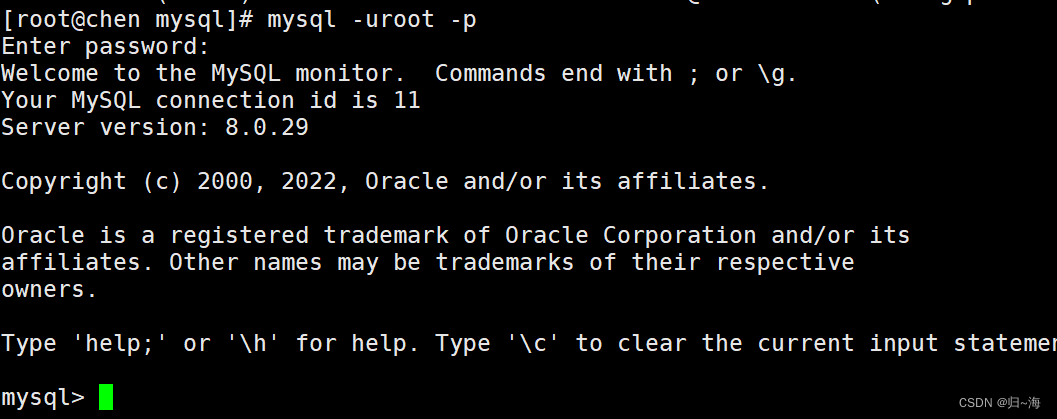
5、 Amend your mysql password
alter user 'root'@'localhost' identified by ' New password '

Log in again mysql Enter some sql Command to see if it is normal

6、 Configure graphical myql
1、 Turn off the firewall before configuring
systemctl disable firewalld.service2、 According to your mysql Password and virtual machine ip Address configuration

And then it's done .

边栏推荐
- N32L43x Flash读\写\擦除操作总结
- Qlib tutorial - based on source code (II) local data saving and loading
- 自定义类型:结构体,枚举,联合
- 石油化工行业迎战涨价大潮,经销商分销系统平台数字化赋能经销商与门店
- Netease cloud copywriting
- 阿门的故事
- 抓包精灵NetCapture APP抓包教程《齐全》
- ue4 unreal NDisplay插件 简易使用 三折幕 详细...
- 存储成本降低 80%,有赞数据中台成本治理怎么做的?
- JS what situations can't use json Parse, json.stringify deep copy and a better deep copy method
猜你喜欢


![[interview: concurrent article 28:volatile] orderliness](/img/8d/c4c2ca08d8883e997709d208b7395b.png)


随机推荐
GBase 8c 事务ID和快照(六)
Flink's real-time data analysis practice in iFLYTEK AI marketing business
处理数据 给数据换名字
Gbase 8C transaction ID and snapshot (V)
Thinking about some things
Gbase 8C backup control function (III)
Gbase 8C database object size function (I)
HRD 1. a simple and reliable HRD detection method
实时数仓:美团的实时数仓建设实践
GBase 8c 配置设置函数
[interview: concurrent article 28:volatile] orderliness
Fiddler 手机抓包代理设置(针对华为荣耀60S)
2022软件测试技能 Robotframework + SeleniumLibrary + Jenkins web关键字驱动自动化实战教程
What is method and methodology: understand the underlying logic of self-improvement
The story of the third uncle
忘记root密码
In the era of great changes in material enterprises, SRM supplier procurement system helps enterprises build a digital benchmark for property procurement
likeshop外卖点餐系统【100%开源无加密】
自定义类型:结构体,枚举,联合
LeetCode 第 302 场周赛