当前位置:网站首页>Learning Tai Chi Maker - mqtt Chapter II (IX) test of this chapter
Learning Tai Chi Maker - mqtt Chapter II (IX) test of this chapter
2022-06-29 02:16:00 【xuechanba】
The program code is as follows ,
/**********************************************************************  Project name /Project :  Zero basic introduction to the Internet of things   Program name /Program name : complete_connect  The team /Team :  Taiji maker team  / Taichi-Maker (www.taichi-maker.com)  author /Author : CYNO Shuo   date /Date(YYYYMMDD) : 20201024  Purpose of procedure /Purpose :  The purpose of this program is to demonstrate how to use PubSubClient Library connection MQTT All parameter options for the server  -----------------------------------------------------------------------  Modify the record : 20201227 -  Added user name and password content ( Replace the original NULL) -----------------------------------------------------------------------  This sample program is made by Taiji maker team 《 Zero basic introduction to the Internet of things 》 Sample program in .  This tutorial is designed and produced by friends who are interested in the development of the Internet of things . For more information about this tutorial , Please refer to the following pages : http://www.taichi-maker.com/homepage/esp8266-nodemcu-iot/iot-c/esp8266-nodemcu-web-client/http-request/ ***********************************************************************/
#include <ESP8266WiFi.h>
#include <PubSubClient.h>

//  Set up wifi Access information ( Please according to your WiFi Modify the information )
const char* ssid = "FAST_153C80";
const char* password = "123456798";
const char* mqttServer = "test.ranye-iot.net";
//  As above MQTT The server cannot connect normally , Please go to the following page to find a solution
// http://www.taichi-maker.com/public-mqtt-broker/

WiFiClient wifiClient;
PubSubClient mqttClient(wifiClient);

const int subQoS = 1;     //  When the client subscribes to the topic QoS Level ( end 2020-10-07, Support only QoS = 1, I won't support it QoS = 2)
const bool cleanSession = false; //  Clear session ( Such as QoS>0 Must be set to false)

const char* willTopic = "willTopic";    //  Subject name of the will
const char* willMsg = "willMsg";        //  Subject information of the will
const int willQos = 0;                  //  will QoS
const int willRetain = false;           //  Testamentary reservation
const char* mqttUserName = "test-user"; //  Server connection user name
const char* mqttPassword = "ranye-iot"; //  Server connection password

void setup() {

  pinMode(LED_BUILTIN, OUTPUT);     //  Set up on the board LED Pin is output mode
  digitalWrite(LED_BUILTIN, HIGH);  //  Turn it on and off the board LED
  Serial.begin(9600);               //  Start serial communication

  // Set up ESP8266 The working mode is wireless terminal mode
  WiFi.mode(WIFI_STA);

  //  Connect WiFi
  connectWifi();

  //  Set up MQTT Server and port number
  mqttClient.setServer(mqttServer, 1883);
  mqttClient.setCallback(receiveCallback);

  //  Connect MQTT The server
  connectMQTTserver();
}

void loop() {

  //  If the development board fails to connect to the server , Then try to connect to the server
  if (!mqttClient.connected()) {

    connectMQTTserver();
  }

   //  Process information and heartbeat
   mqttClient.loop();

}

//  Connect MQTT Server and subscribe to information
void connectMQTTserver(){

  //  according to ESP8266 Of MAC Address generation client ID( Avoid contact with other ESP8266 The client of ID The nuptial )
  String clientId = "client-" + WiFi.macAddress();

  /*  Connect MQTT The server  boolean connect(const char* id, const char* user, const char* pass, const char* willTopic, uint8_t willQos, boolean willRetain, const char* willMessage, boolean cleanSession);  If the device is offline, it can still make qos1 Work , be connect At the time of the cleanSession I need to set to false */
  if (mqttClient.connect(clientId.c_str(), mqttUserName,
                         mqttPassword, willTopic,
                         willQos, willRetain, willMsg, cleanSession)) {

    Serial.print("MQTT Server Connected. ClientId: ");
    Serial.println(clientId);
    Serial.print("MQTT Server: ");
    Serial.println(mqttServer);

    subscribeTopic(); //  Subscribe to specific topics
  } else {

    Serial.print("MQTT Server Connect Failed. Client State:");
    Serial.println(mqttClient.state());
    delay(5000);
  }
}

//  Callback function after receiving information
void receiveCallback(char* topic, byte* payload, unsigned int length) {

  Serial.print("Message Received [");
  Serial.print(topic);
  Serial.print("] ");
  for (int i = 0; i < length; i++) {

    Serial.print((char)payload[i]);
  }
  Serial.println("");
  Serial.print("Message Length(Bytes) ");
  Serial.println(length);

  if ((char)payload[0] == '1') {
         //  If you receive a message with “1” For the beginning
    digitalWrite(BUILTIN_LED, LOW);  //  Then light up LED.
  } else {

    digitalWrite(BUILTIN_LED, HIGH); //  Otherwise, it goes out LED.
  }
}

//  Subscribe to specific topics
void subscribeTopic(){

  //  Create a subscription topic . The title of the topic is Taichi-Maker-Sub The prefix , The device is added later MAC Address .
  //  This is to make sure that different devices use the same MQTT When the server tests the message subscription , The topic names you subscribe to are different
  String topicString = "test-user/Pub-" + WiFi.macAddress();
  char subTopic[topicString.length() + 1];
  strcpy(subTopic, topicString.c_str());

  //  The serial port monitor outputs whether the topic is successfully subscribed and the name of the subscription topic
  //  Please note that subscribe The second parameter number of the function is QoS Level . Here for QoS = 1
  if(mqttClient.subscribe(subTopic, subQoS)){

    Serial.print("Subscribed Topic: ");
    Serial.println(subTopic);
  } else {

    Serial.print("Subscribe Fail...");
  }
}

// ESP8266 Connect wifi
void connectWifi(){


  WiFi.begin(ssid, password);

  // wait for WiFi Connect , Output success information after successful connection
  while (WiFi.status() != WL_CONNECTED) {

    delay(1000);
    Serial.print(".");
  }
  Serial.println("");
  Serial.println("WiFi Connected!");
  Serial.println("");
}
After power on , The program output is as follows ,
then , operation MQTT.fx This software .
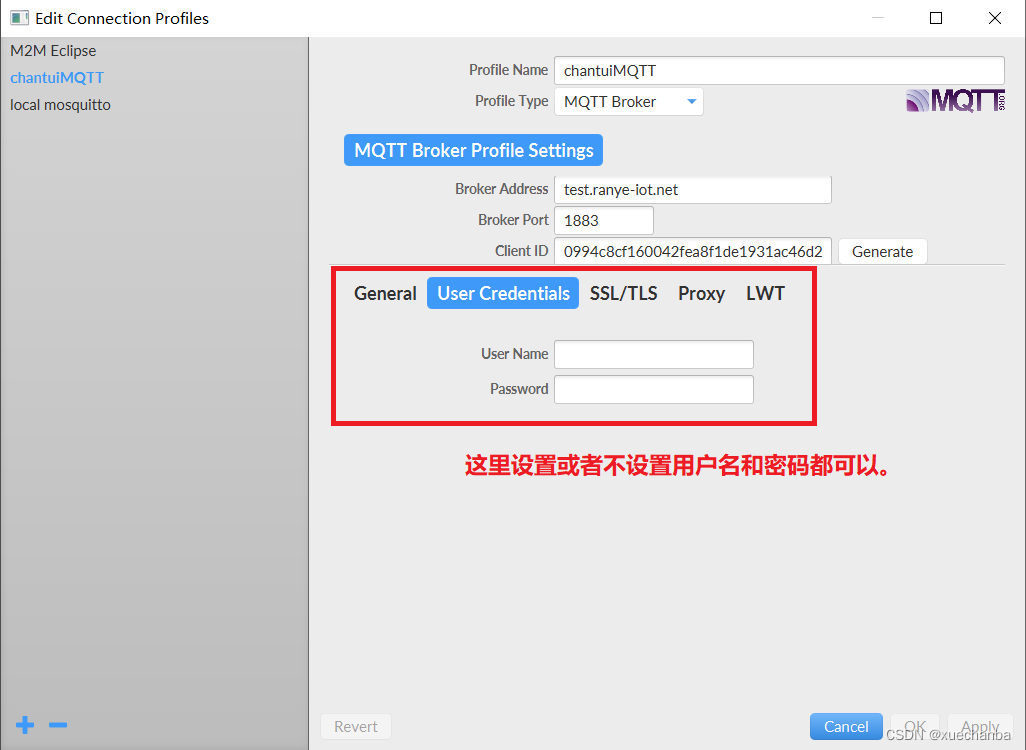
1、 Because this is the client (ESP8266 Development board ) It's subscribers , Instead of being the publisher as in the previous section , So in operation MQTT.fx This software is used to connect MQTT The user name and password do not need to be set for the server ( The specific reason is that the server does not have the permission to subscribe to users ).
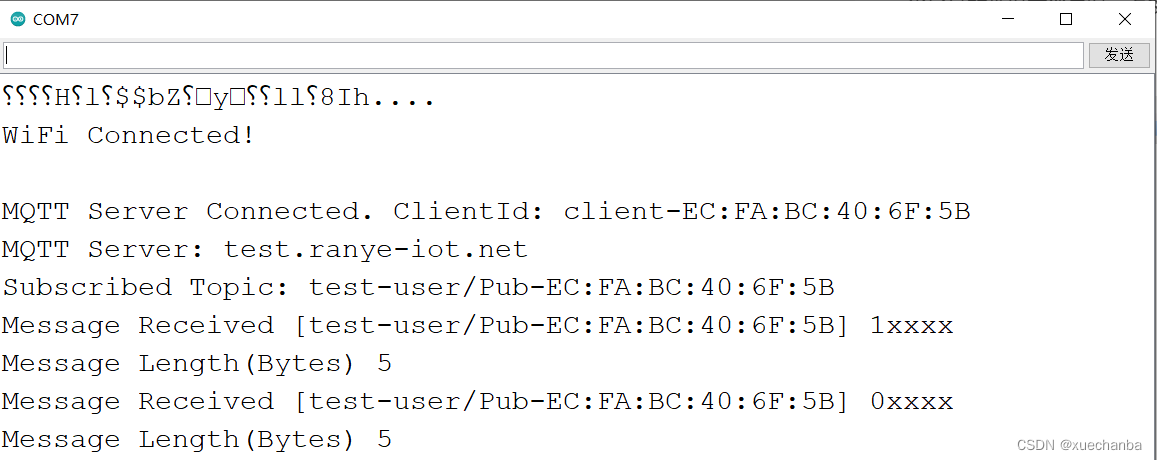
When publishing messages through software , ESP8266 ( subscriber ) Received with 1 After the first message , Will light up LED The lamp , Other messages go out LED The lamp .

meanwhile , It will output information through the serial port monitor .
The above test also involves a problem of quality degradation ( Because when I released it, I used QoS = 0 released ).
below , Will be with QoS = 1 ( Attention should be paid to the QoS=1 Setting requirements for ) Test the news release ( It is consistent with the test method in the previous chapter , take ESP8266 After disconnecting the power supply , adopt MQTT.fx The software publishes messages to topics , After the ESP8266 Reconnect the power supply ).

ESP8266 After the development board restarts , You can receive messages immediately .

There is another problem , This program does not involve publishing or subscribing to wills ( because ESP8266 The development board is just a subscriber ), The variables related to the will here are only used as connection functions connect The parameter of .
边栏推荐
- e. Difference between target and e.currenttarget
- [high concurrency, high performance and high availability of massive data MySQL practice-10] - Implementation of mvcc in InnoDB
- OculusRiftS与Unity.UI的交互(1)-总览
- 【Redis】数据介绍 & 通用命令 & String类型
- okcc呼叫中心的计费方式哪个最好
- 大智慧手机股票开户哪个券商更安全更方便?
- Wechat campaign auto like
- Examen final de troisième année
- 网上联系客户经理办理炒股开户安全吗?
- [learning notes] subsets and questions
猜你喜欢

SystemVerilog structure (I)
Scala 基础 (三):运算符和流程控制
![[redis] sortedset type](/img/7f/f5f1aa603c8994b669d52a435fed7e.png)
[redis] sortedset type
Finally got the byte offer. The 25-year-old inexperienced experience in software testing is written to you who are still confused

How to become a senior digital IC Design Engineer (4-5) script: file comparison operation implemented by shell script

【Redis】Key的层级结构
【Redis】初识 Redis

The 10 most commonly used gadgets for waterfall project management can be built and used freely
OculusRiftS与Unity.UI的交互(1)-总览
How to become a senior digital IC Design Engineer (4-2) script: file read / write operation realized by Verilog HDL code

随机推荐
Oculusrifts and unity UI interaction (1) - Overview
什么叫股票线上开户?网上开户安全么?
Tiflash compiler oriented automatic vectorization acceleration
[learn FPGA programming from scratch -49]: Vision - how is the chip designed?
Dialogue with opensea co creation Alex: we still only touch the tip of the iceberg of NFT capability | chain catcher
Which brokerage is safer and more convenient to open a stock account for big smart phones?
[learn FPGA programming from scratch -50]: Vision - how are chips made? The thirteen steps of chip manufacturing.
Wechat campaign auto like
微信运动自动点赞
Secondary encapsulation of storage (sessionstorage/localstorage) using TS
Use code binding DataGridView control to display tables in program interface
如何成为一名高级数字 IC 设计工程师(4-2)脚本篇:Verilog HDL 代码实现的文件读写操作
To apply for a test engineer after years, the resume with high scores should be written like this
如何成为一名高级数字 IC 设计工程师(4-3)脚本篇:C 语言实现的文件读写操作
Live broadcast preview | can SQL also play industrial machine learning? Mlops meetup V3 takes you to the bottom!
Digital IC design, FPGA design written examination questions, answers and analysis of autumn move (1) 2022 Ziguang zhanrui (Part 1)
计算矩形面积
三角函数计算
如何成为一名高级数字 IC 设计工程师(1-1)Verilog 编码语法篇:引言
如何用项目甘特图,做好项目汇报