当前位置:网站首页>sessionStorage 和 localStorage 的使用
sessionStorage 和 localStorage 的使用
2022-06-22 06:51:00 【webchang】
一、概述
Storage 接口用于脚本在浏览器保存数据。两个对象部署了这个接口:window.sessionStorage 和window.localStorage。
sessionStorage保存的数据用于浏览器的一次会话(session),当会话结束(通常是窗口关闭),数据被清空;localStorage保存的数据长期存在,下一次访问该网站的时候,网页可以直接读取以前保存的数据。 除了保存期限的长短不同,这两个对象的其他方面都一致。
保存的数据都以“键值对”的形式存在。也就是说,每一项数据都有一个键名和对应的值。所有的数据都是以文本格式保存。它们也受同域限制,某个网页存入的数据,只有同域下的网页才能读取,如果跨域操作会报错。它们都仅在客户端使用,不和服务端进行通信。
二、属性
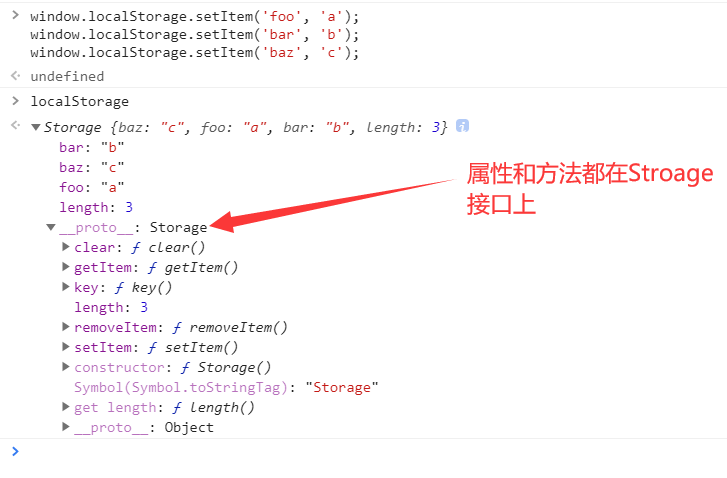
Storage 接口只有一个属性。
Storage.length:返回保存的数据项个数。
window.localStorage.setItem('foo', 'a');
window.localStorage.setItem('bar', 'b');
window.localStorage.setItem('baz', 'c');

window.localStorage.length // 3
三、方法
Storage接口提供5个方法。
1、setItem()
Storage.setItem() 方法用于存入数据。它接受两个参数,第一个是键名,第二个是保存的数据。如果键名已经存在,该方法会更新已有的键值。该方法没有返回值。两个参数都是字符串。如果不是字符串,会自动转成字符串,再存入浏览器。
window.sessionStorage.setItem('key', 'value');
window.localStorage.setItem('key', 'value');
如果储存空间已满,该方法会抛错。
写入不一定要用这个方法,直接赋值也是可以的。
// 下面三种写法等价
window.localStorage.foo = '123';
window.localStorage['foo'] = '123';
window.localStorage.setItem('foo', '123');
2、getItem()
Storage.getItem() 方法用于读取数据。它只有一个参数,就是键名。如果键名不存在,该方法返回 null。键名应该是一个字符串,否则会被自动转为字符串。
window.sessionStorage.getItem('key')
window.localStorage.getItem('key')
3、removeItem()
Storage.removeItem() 方法用于清除某个键名对应的键值。它接受键名作为参数,如果键名不存在,该方法不会做任何事情。该方法的返回值是 undefined。
sessionStorage.removeItem('key');
localStorage.removeItem('key');
4、clear()
Storage.clear() 方法用于清除所有保存的数据。该方法的返回值是 undefined。
window.sessionStorage.clear()
window.localStorage.clear()
5、key()
Storage.key() 接受一个整数作为参数(从零开始),返回该位置对应的键名。
window.sessionStorage.setItem('key', 'value');
window.sessionStorage.key(0) // "key"
结合使用 Storage.length 属性和 Storage.key() 方法,可以遍历所有的键。
for (let i = 0; i < localStorage.length; i++) {

  let key = localStorage.key(i);
  console.log(key,localStorage.getItem(key));
}
6、小案例
(1)案例1: localStorage中存入数据并显示在页面上
<!DOCTYPE html>
<html lang="en">
<head>
  <meta charset="UTF-8">
  <title>test</title>
</head>
<body>
<h1 id="name"></h1>
<h1 id="age"></h1>
</body>
<script> localStorage.setItem('name','webchang'); localStorage.setItem('age',18); let name = localStorage.getItem('name'); let age = localStorage.getItem('age'); document.getElementById('name').textContent = name; document.getElementById('age').textContent = age; </script>
</html>
(2)案例2:
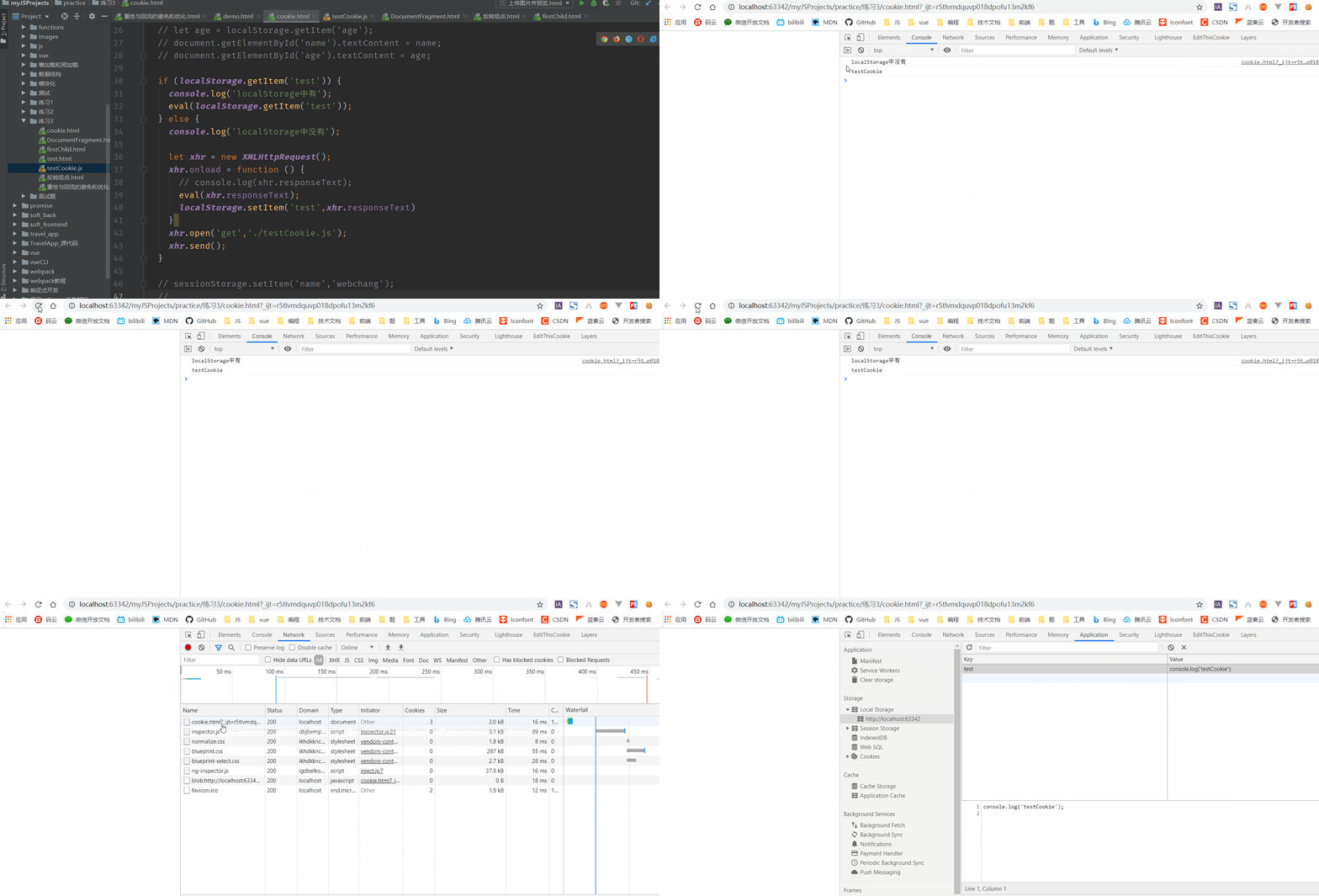
对于一个网站而言,我们可以把页面中经常用到的一些js、css、图片等资源缓存到LocalStorage中。在用户首次进入的时候浏览器发送网络请求获取这些资源,然后把它保存在LocalStorage中,在接下来用户关闭页面再进入的时候,资源会直接从LocalStorage中加载,这样可以减少网络请求的数量,提升速度。
<!DOCTYPE html>
<html lang="en">
<head>
  <meta charset="UTF-8">
  <title>test</title>
</head>
<body>

</body>
<script> if (localStorage.getItem('test')) {
      console.log('localStorage中有'); eval(localStorage.getItem('test')); // 执行它 } else {
      console.log('localStorage中没有'); let xhr = new XMLHttpRequest(); xhr.onload = function () {
      eval(xhr.responseText); localStorage.setItem('test',xhr.responseText) } xhr.open('get','./testCookie.js'); // testCookie.js中只有一句代码:console.log('testCookie'); xhr.send(); } </script>
</html>
(3)sessionStorage的应用场景:
- 比如我们在某一个页面中有一个很长的表单需要用户去填写,但是表单中有很多的信息。用户在填写一半的时候,不小心刷新了页面,如果我们没有一个处理的话,用户就需要重新去填这个表单。此时我们就可以使用sessionstorage来暂时存储用户填写表单的相关信息,就算用户刷新这个页面,表单中的信息依然是存在的。但是如果关闭了浏览器的这个标签页,sessionstorage之中的信息就清空了。
- 还有一种使用场景,我们的表单可能会有很多页,第一页,第二页,用户在填完第一页进入下一页的时候需要存储上一页的表单信息,因为用户可能会回退到上一页重新填写修改信息。所以此时可以利用sessionstorage来维护表单在多页面切换的时候信息的一个传递。
四、storage 事件
Storage 接口储存的数据发生变化时,会触发 storage 事件,可以指定这个事件的监听函数。
window.addEventListener('storage', onStorageChange);
监听函数接受一个 event 实例对象作为参数。这个实例对象继承了 StorageEvent 接口,有几个特有的属性,都是只读属性。
StorageEvent.key:字符串,表示发生变动的键名。如果 storage 事件是由clear()方法引起,该属性返回null。StorageEvent.newValue:字符串,表示新的键值。如果 storage 事件是由clear()方法或删除该键值对引发的,该属性返回null。StorageEvent.oldValue:字符串,表示旧的键值。如果该键值对是新增的,该属性返回null。StorageEvent.storageArea:对象,返回键值对所在的整个对象。也说是说,可以从这个属性上面拿到当前域名储存的所有键值对。StorageEvent.url:字符串,表示原始触发 storage 事件的那个网页的网址。
function onStorageChange(e) {

  console.log(e.key);
}

window.addEventListener('storage', onStorageChange);
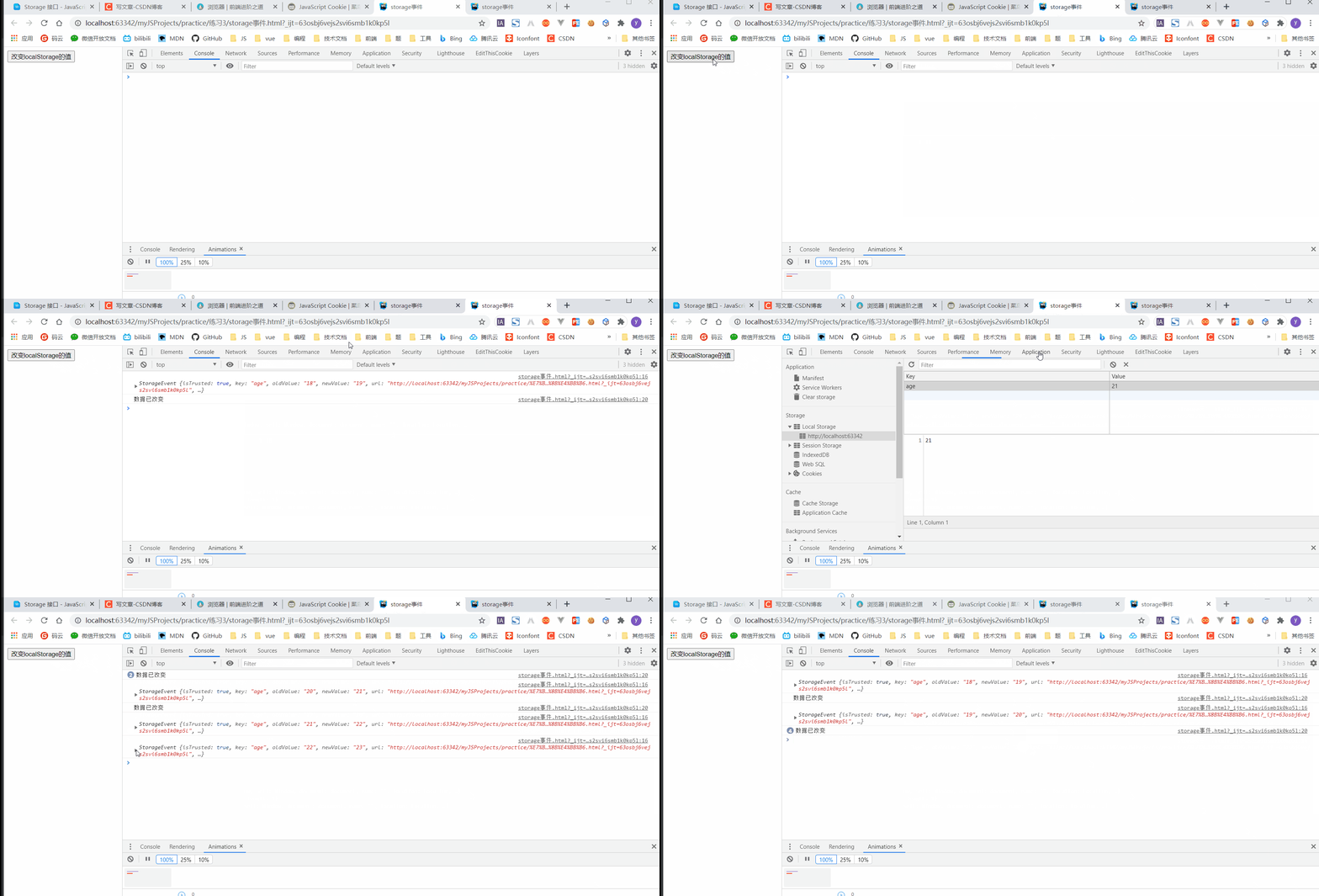
注意,该事件有一个很特别的地方,就是该事件不在导致数据变化的当前页面触发,而是在同一个域名的其他窗口触发。也就是说,如果浏览器只打开一个窗口,可能观察不到这个事件。比如同时打开多个窗口,当其中的一个窗口导致储存的数据发生改变时,只有在其他窗口才能观察到监听函数的执行。可以通过这种机制,实现多个窗口之间的通信。
案例:
<!DOCTYPE html>
<html lang="en">
<head>
  <meta charset="UTF-8">
  <title>storage事件</title>
</head>
<body>
<button onclick="change()">改变localStorage的值</button>
</body>
<script> let count = 18; localStorage.setItem('age','18'); window.addEventListener('storage',function (e) {
      console.log(e); }) function change() {
      console.log('数据已改变'); count++; localStorage.setItem('age',count); } </script>
</html>
动图展示一下效果:
五、参考资料
Storage 接口 - JavaScript 教程 - 网道
cookie、sessionStorage 和 localStorage的区别
前端学习交流QQ群,群内学习讨论的氛围很好,大佬云集,期待您的加入:862748629 点击加入
边栏推荐
- Introduction to PMOD interface of kv260
- Py之scorecardpy:scorecardpy的简介、安装、使用方法之详细攻略
- Correspondence between pytorch and torchvision
- vue连接mysql数据库失败
- OpenGL - Textures
- 实训渗透靶场02|3星vh-lll靶机|vulnhub靶场Node1
- 深度解析Optimism被盗2000万个OP事件(含代码)
- 代理模式与装饰模式到底哪家强
- Training penetration range 02 | 3-star VH LLL target | vulnhub range node1
- Introduction to 51 Single Chip Microcomputer -- digital clock
猜你喜欢
How to learn 32-bit MCU
![[php]tp6 cli mode to create tp6 and multi application configurations and common problems](/img/19/0a3319b04fe6449c90ade6f27fca4a.png)
[php]tp6 cli mode to create tp6 and multi application configurations and common problems

Py's scorecardpy: a detailed introduction to the introduction, installation and use of scorecardpy

Wildfire stm32f407zgt6 learning notes beginner level chapter basic knowledge points

首次用DBeaver连接mysql报错

SQL injection vulnerability (XII) cookie injection
Introduction to PMOD interface of kv260

Four functional interfaces (required)

Don't throw away the electric kettle. It's easy to fix!

Blog add mailbox private message shortcut
随机推荐
Detailed tutorial on connecting MySQL with tableau
Data security practice guide - data collection security management
Introduction to 51 Single Chip Microcomputer -- digital clock
Anaconda introduction, installation and use nanny level tutorial
Xh_CMS渗透测试文档
KV260的PMOD接口介绍
【5G NR】NGAP协议之NG Setup
【Rust 日报】2022-01-23 WebAPI Benchmarking
Neuron+eKuiper 实现工业物联网数据采集、清理与反控
【5G NR】NG接口
Cactus Song - online operation (5)
[M32] SCM xxx Simple interpretation of map file
Leetcode--- search insertion location
仙人掌之歌——上线运营(4)
仙人掌之歌——进军To C直播(3)
Introduction to 51 Single Chip Microcomputer -- minimum system of single chip microcomputer
[PHP] composer 安装
OpenGL - Textures
How to learn 32-bit MCU
【OpenAirInterface5g】ITTI消息收发机制