当前位置:网站首页>OpenGL learning (III) glut two-dimensional image rendering
OpenGL learning (III) glut two-dimensional image rendering
2022-07-24 18:46:00 【Pony Baby】
List of articles
1.Opengl Of Hello world
The most basic program , I drew a triangle , Please make sure you understand this procedure , The core is opengl Is a state machine . Think opengl It's a geometric sketchpad ,glBegin(GL_TRIANGLES); Click to draw triangle .glColor3f(1.0, 0.0, 0.0); Is to set the color to red . Then you point three points at three different positions .glFlush(); Save and submit to the screen . Then you get the result .
#include <gl/glut.h>
// When the window changes ( Such as changing the size ) Automatically call
void mydisplay()
{

	// Clear color cache
	glClear(GL_COLOR_BUFFER_BIT);
	glBegin(GL_TRIANGLES);
	// Two dimensional can also be used glVertex2f
		// The first point is red
		glColor3f(1.0, 0.0, 0.0);
		glVertex3f(1.0, 0.0, 0.0);
		// Second, green
		glColor3f(0.0, 1.0, 0.0);
		glVertex3f(0.0, 1.0, 0.0);
		// The third point is blue
		glColor3f(0.0, 0.0, 1.0);
		glVertex3f(0.0, 0.0, 0.0);
	glEnd();
	glFlush();
}

int main(int argc, char** argv)
{

	glutInit(&argc, argv);
	// Initialize window name
	glutCreateWindow("A Triangle");
	// binding display function
	glutDisplayFunc(mydisplay);
	// Open window loop
	glutMainLoop();
	return 0;
}

2. initialization ( Adjustment attempt )
Manually set the use RGB draw 、 Window position and size . And in init Function has been added glOrtho(0.0, 1.0, 0.0, 1.0, 0.0, 1.0); Turn the image into the image (x,y,z) Respectively corresponding to the range (0-1,0-1,0-1) Section .
#include <gl/glut.h>
// When the window changes ( Such as changing the size ) Automatically call
void mydisplay()
{

	// Clear color cache
	glClear(GL_COLOR_BUFFER_BIT);
	glBegin(GL_TRIANGLES);
	// Two dimensional can also be used glVertex2f
		// The first point is red
		glColor3f(1.0, 0.0, 0.0);
		glVertex3f(1.0, 0.0, 0.0);
		// Second, green
		glColor3f(0.0, 1.0, 0.0);
		glVertex3f(0.0, 1.0, 0.0);
		// The third point is blue
		glColor3f(0.0, 0.0, 1.0);
		glVertex3f(0.0, 0.0, 0.0);
	glEnd();
	glFlush();
}

void init()
{

	// The full screen color turns black
	glClearColor(0.0, 0.0, 0.0, 1.0);
	// Change the projection view ,
	glMatrixMode(GL_PROJECTION);
	//opengl Is a state machine , First clear the previous transformation matrix data , Therefore, each perspective operation must first be changed into an identity matrix
	glLoadIdentity();
	glOrtho(0.0, 1.0, 0.0, 1.0, 0.0, 1.0);
}


int main(int argc, char** argv)
{

	glutInit(&argc, argv);
	//GLUT_RGB Refers to the use RGB Drawing
	glutInitDisplayMode(GLUT_RGB);
	// Initialize window size
	glutInitWindowSize(100, 100);
	// Initialize window position
	glutInitWindowPosition(100, 100);
	// Set window name
	glutCreateWindow("A Triangle");
	// binding display function
	glutDisplayFunc(mydisplay);
	// Set up opengl The initial state
	init();
	// Open window loop
	glutMainLoop();
	return 0;
}

3. increase Reshape function
The function that will be called when changing the window . default reshape Function will stretch the graph directly .
We want the image not to be stretched , But keep the original size .
#include <gl/glut.h>

// Initial window size
int initW = 300;
int initH = 300;

// When the window changes ( Such as changing the size ) Automatically call
void mydisplay()
{

	// Clear color cache
	glClear(GL_COLOR_BUFFER_BIT);
	glBegin(GL_TRIANGLES);
	// Two dimensional can also be used glVertex2f
		// The first point is red
		glColor3f(1.0, 0.0, 0.0);
		glVertex3f(1.0, 0.0, 0.0);
		// Second, green
		glColor3f(0.0, 1.0, 0.0);
		glVertex3f(0.0, 1.0, 0.0);
		// The third point is blue
		glColor3f(0.0, 0.0, 1.0);
		glVertex3f(0.0, 0.0, 0.0);
	glEnd();
	glFlush();
}

// Initialization function , Generally, it includes perspective, etc
void init()
{

	// The full screen color turns black
	glClearColor(0.0, 0.0, 0.0, 1.0);
	// Change the projection view ,
	glMatrixMode(GL_PROJECTION);
	//opengl Is a state machine , First clear the previous transformation matrix data
	glLoadIdentity();
	glOrtho(0.0, 1.0, 0.0, 1.0, 0.0, 1.0);
}

// Data called when the window size is changed
void myReshape(int w, int h)
{

	glViewport(0, 0, w, h);
	glMatrixMode(GL_PROJECTION);
	glLoadIdentity();
	if (w <= h)
		glOrtho(0, 1.0, 0.0, (GLfloat)h / (GLfloat)w * 1.0, 0.0, 1.0);
	else
		glOrtho(0, (GLfloat)w / (GLfloat)h * 1.0, 0.0, 1.0, 0.0, 1.0);
}


int main(int argc, char** argv)
{

	glutInit(&argc, argv);
	//GLUT_RGB Refers to the use RGB Drawing
	glutInitDisplayMode( GLUT_RGB);
	// Initialize window size
	glutInitWindowSize(initW, initH);
	// Initialize window position
	glutInitWindowPosition(100, 100);
	// Set window name
	glutCreateWindow("A Triangle");
	// binding display function
	glutDisplayFunc(mydisplay);
	// Set up opengl The initial state
	init();
	// Bind the function called when changing the window size
	glutReshapeFunc(myReshape);
	// Open window loop
	glutMainLoop();
	return 0;
}

3. event
Added left mouse click event mouse, Clicking will change the brightness of the image and output the click position
#include <gl/glut.h>
#include <iostream>

// Initial window size
int initW = 300;
int initH = 300;

// Color brightness
GLfloat brightness = 1.0;
GLfloat increment = -0.1;

// When the window changes ( Such as changing the size ) Automatically call
void mydisplay()
{

	// Clear color cache
	glClear(GL_COLOR_BUFFER_BIT);
	glBegin(GL_TRIANGLES);
	// Two dimensional can also be used glVertex2f
		// The first point is red
		glColor3f(brightness, 0.0, 0.0);
		glVertex3f(1.0, 0.0, 0.0);
		// Second, green
		glColor3f(0.0, brightness, 0.0);
		glVertex3f(0.0, 1.0, 0.0);
		// The third point is blue
		glColor3f(0.0, 0.0, brightness);
		glVertex3f(0.0, 0.0, 0.0);
	glEnd();
	glFlush();
}

// Initialization function , Generally, it includes perspective, etc
void init()
{

	// The full screen color turns black
	glClearColor(0.0, 0.0, 0.0, 1.0);
	// Change the projection view ,
	glMatrixMode(GL_PROJECTION);
	//opengl Is a state machine , First clear the previous transformation matrix data
	glLoadIdentity();
	glOrtho(0.0, 1.0, 0.0, 1.0, 0.0, 1.0);
}

// Data called when the window size is changed
void myReshape(int w, int h)
{

	glViewport(0, 0, w, h);
	glMatrixMode(GL_PROJECTION);
	glLoadIdentity();
	if (w <= h)
		glOrtho(0, 1.0, 0.0, (GLfloat)h / (GLfloat)w * 1.0, 0.0, 1.0);
	else
		glOrtho(0, (GLfloat)w / (GLfloat)h * 1.0, 0.0, 1.0, 0.0, 1.0);
}

// Mouse events
void mouse(int btn, int state, int x, int y)
{

	// Left click mouse , Adjust the brightness of the image
	if (btn == GLUT_LEFT_BUTTON && state == GLUT_DOWN)
	{

		// Output location , Note that the origin of the mouse is in the upper left corner , The image origin is in the lower right corner , therefore y It's the opposite
		std::cout << "x: " << x << " y: " << y << std::endl;
		// Change the brightness
		brightness += increment;
		if (brightness >= 1.0 || brightness <= 0.0)
			increment = -increment;
	}
}


int main(int argc, char** argv)
{

	glutInit(&argc, argv);
	//GLUT_RGB Refers to the use RGB Drawing
	glutInitDisplayMode( GLUT_RGB);
	// Initialize window size
	glutInitWindowSize(initW, initH);
	// Initialize window position
	glutInitWindowPosition(100, 100);
	// Set window name
	glutCreateWindow("A Triangle");

	// binding display function
	glutDisplayFunc(mydisplay);
	// Set up opengl The initial state
	init();
	// Bind the function called when changing the window size
	glutReshapeFunc(myReshape);
	// Bind mouse events
	glutMouseFunc(mouse);
	// Open window loop
	glutMainLoop();
	return 0;
}
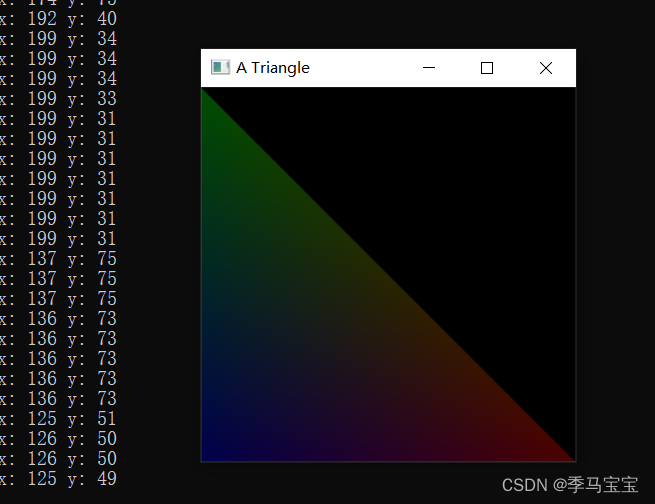
4. Animation
An animation using a timer , Image brightness changes with time
#include <gl/glut.h>
#include <iostream>

// Initial window size
int initW = 300;
int initH = 300;

// Color brightness
GLfloat brightness = 1.0;
GLfloat increment = -0.1;

// When the window changes ( Such as changing the size ) Automatically call
void mydisplay()
{

	// Clear color cache
	glClear(GL_COLOR_BUFFER_BIT);
	glBegin(GL_TRIANGLES);
	// Two dimensional can also be used glVertex2f
		// The first point is red
		glColor3f(brightness, 0.0, 0.0);
		glVertex3f(1.0, 0.0, 0.0);
		// Second, green
		glColor3f(0.0, brightness, 0.0);
		glVertex3f(0.0, 1.0, 0.0);
		// The third point is blue
		glColor3f(0.0, 0.0, brightness);
		glVertex3f(0.0, 0.0, 0.0);
	glEnd();
	// Use DOUBLE_BUFFER after , Use the following code to swap the front and back memory
	glutSwapBuffers();
}

// Functions called by timer
void changeColor(int x)
{

	// Change the brightness
	brightness += increment;
	if (brightness >= 1.0 || brightness <= 0.0)
		increment = -increment;
	// Call again immediately display function , Otherwise, the image will not be drawn immediately
	glutPostRedisplay();
	// Set a new timer
	glutTimerFunc(100, changeColor, 0);
}

// Initialization function , Generally, it includes perspective, etc
void init()
{

	// The full screen color turns black
	glClearColor(0.0, 0.0, 0.0, 1.0);
	// Change the projection view ,
	glMatrixMode(GL_PROJECTION);
	//opengl Is a state machine , First clear the previous transformation matrix data
	glLoadIdentity();
	glOrtho(0.0, 1.0, 0.0, 1.0, 0.0, 1.0);
}

int main(int argc, char** argv)
{

	glutInit(&argc, argv);
	//GLUT_DOUBLE Double cache , Usually used in animation , It can make the animation smoother
	//GLUT_RGB Refers to the use RGB Drawing
	glutInitDisplayMode( GLUT_RGB|GLUT_DOUBLE);
	// Initialize window size
	glutInitWindowSize(initW, initH);
	// Initialize window position
	glutInitWindowPosition(100, 100);
	// Set window name
	glutCreateWindow("A Triangle");
	// Set the timing function
	glutTimerFunc(10, changeColor, 0);
	// binding display function
	glutDisplayFunc(mydisplay);
	// Set up opengl The initial state
	init();
	// Open window loop
	glutMainLoop();
	return 0;
}
边栏推荐
- L4L7负载均衡
- The problem that files cannot be uploaded to the server using TFTP is solved
- 微信小程序逆向
- [Tkinter] layout management and event system
- Calling startActivity() from outside of an Activity context requires the FLAG_ACTIVITY_NEW_TASK flag
- 卷积神经网络感受野计算指南
- 多线程与并发编程常见问题(未完待续)
- [wechat applet development] custom tabbar case (custom message 99 + little hearts)
- Show or hide password plaintext + password box verification information
- QT - animation frame
猜你喜欢

Data analysis of network security competition of national vocational college skills competition digital forensics-a

FPGA 20个例程篇:9.DDR3内存颗粒初始化写入并通过RS232读取(上)

Understand corners_ Align, two perspectives for viewing pixels

National vocational college skills competition network security competition -- detailed explanation of Apache security configuration

Leetcode memory deep search / dynamic planning V2

Understand dynamic calculation diagram, requires_ grad、zero_ grad

2022杭电多校第二场1009 ShuanQ(数学)

Go小白实现一个简易的go mock server

【历史上的今天】7 月 24 日:Caldera 诉微软案;AMD 宣布收购 ATI;谷歌推出 Chromecast

微信小程序逆向
随机推荐
Some buckles
奶头乐理论介绍及个人感悟
Getaverse, a distant bridge to Web3
Calling startActivity() from outside of an Activity context requires the FLAG_ACTIVITY_NEW_TASK flag
【TkInter】常用组件(一)
Sqoop
L4l7 load balancing
13. What is the difference between onkeydown, up and onkeypress?
缺失值处理
【Tkinter】常用组件(二)
Show or hide password plaintext + password box verification information
OPENGL学习(四)GLUT三维图像绘制
Ionic4 learning notes 3
Latex mathematical formula
树链剖分板子
Vsftpd2.3.4-端口渗透 6200 irc_3281_backdoor
Wechat applet reverse
FPGA 20个例程篇:9.DDR3内存颗粒初始化写入并通过RS232读取(上)
ETL开发工具Kettle下载安装环境搭建及使用教程
matplotlib