当前位置:网站首页>Reinforcement learning - grid world
Reinforcement learning - grid world
2022-06-28 06:49:00 【A cat that doesn't eat mice】
Reinforcement learning —— Grid world
Project source address :https://gitee.com/infiniteStars/machine-learning-experiment
1. Experimental content


2. Experimental code
import numpy as np
import matplotlib.pyplot as plt
from matplotlib.table import Table
from xml.dom.minidom import Document
# Manually enter the size of the grid
WORLD_SIZE = int(input(" Please enter the number of statuses :"))
#  The position of the two ends ( Subscript from 0 Start , The same below )
A_POS = [0,0]
#  state B The location of
B_POS = [WORLD_SIZE-1, WORLD_SIZE-1]
#  The discount factor
DISCOUNT = 0.9
#  Action set ={ On , Next , Left , Right }
ACTIONS = [np.array([0, -1]),  # left
           np.array([-1, 0]),  # up
           np.array([0, 1]),   # right
           np.array([1, 0])]   # down
#  Strategy , Equal probability of each action
ACTION_PROB = 0.25

#  Write the data into xml In file
def write_datato_xml(data,name):
    #  Instantiate a Domcument
    dom = Document()
    #  Create a root node
    paper = dom.createElement("Paper")
    #  Add the root node to domcument in
    dom.appendChild(paper)
    #  Loop through all the data , write in domcument in

    #  take sortnumber  write in
    for x in range(len(data)):
        #  establish sortnumber label
        sortnumber = dom.createElement(name)
        #  take sortnumber Join to the root node paper
        paper.appendChild(sortnumber)
        #  Take out every data
        x_data = data[x]
        #  establish text label
        sortnumber_text = dom.createTextNode(x_data)
        #  take text Add tag to sortnumber In the label
        sortnumber.appendChild(sortnumber_text)
        #  Add attribute
        sortnumber.setAttribute("number",'{}'.format(x))

    with open("data.xml",'w',encoding='utf-8') as f:
        # f: File object ,indent: Every tag The characters filled in front ,addindent: Indent character of each child node ,newl: Every tag Characters filled after
        dom.writexml(f, indent='\t', newl='\n', addindent='\t')
        f.close()

#  Drawing correlation function
def draw_image(image):
    fig, ax = plt.subplots()
    ax.set_axis_off()
    tb = Table(ax, bbox=[0, 0, 1, 1])
    nrows, ncols = image.shape
    width, height = 1.0 / ncols, 1.0 / nrows
    #  Add table
    for (i, j), val in np.ndenumerate(image):
        tb.add_cell(i, j, width, height, text=val,
                    loc='center', facecolor='white')
    #  Row labels
    for i, label in enumerate(range(len(image))):
        tb.add_cell(i, -1, width, height, text=label + 1, loc='right',
                    edgecolor='none', facecolor='none')
    #  Column labels
    for j, label in enumerate(range(len(image))):
        tb.add_cell(WORLD_SIZE, j, width, height / 2, text=label + 1, loc='center',
                    edgecolor='none', facecolor='none')
    ax.add_table(tb)

def step(state, action):
    """ One step at a time  :param state: current state , Coordinate list, such as [1,1] :param action: Current action taken , It is the correction of the State coordinates  :return: Next state ( Coordinate list) and reward """
    if state == A_POS:
        return A_POS, 0
    if state == B_POS:
        return B_POS, 0

    next_state = (np.array(state) + action).tolist()
    x, y = next_state
    #  Judge whether it is out of bounds
    if x < 0 or x >= WORLD_SIZE or y < 0 or y >= WORLD_SIZE:
        reward = -1.0
        next_state = state
    else:
        reward = -1.0
    return next_state, reward

#  Use iterative policy evaluation  Calculate the state value function for each cell
def grid_world_value_function():
    #  The initial value of the state value function
    value = np.zeros((WORLD_SIZE, WORLD_SIZE))
    episode = 0
    history = {
    }
    status = [];
    while True:
        episode = episode + 1
        #  Each iteration produces a new_value, until new_value and value Very close, that is, convergence
        new_value = np.zeros_like(value)
        for i in range(WORLD_SIZE):
            for j in range(WORLD_SIZE):
                for action in ACTIONS:
                    (next_i, next_j), reward = step([i, j], action)
                    # bellman equation
                    #  Because there is only one in each direction reward and s' The combination of , there p(s',r|s,a)=1
                    new_value[i, j] += ACTION_PROB * (reward + DISCOUNT * value[next_i, next_j])
        error = np.sum(np.abs(new_value - value))
        history[episode] = error
        if error < 1e-4:
            draw_image(np.round(new_value, decimals=2))
            plt.title('$v_{\pi}$')
            plt.show()
            plt.close()
            break
        #  Observe the change of state value function and its error in each round
        value1 = f"{
      episode}-{
      np.round(error,decimals=5)}:\n{
      np.round(new_value,decimals=2)}";
        status.append(value1);
        # print(f"{episode}-{np.round(error,decimals=5)}:\n{np.round(new_value,decimals=2)}")
        value = new_value
    write_datato_xml(status,"grid_world_value_function")
    return history, value

#  Calculate the optimal value function of the lattice world  ( From this figure, you can see which direction each grid should go )
def grid_world_optimal_policy():
    value = np.zeros((WORLD_SIZE, WORLD_SIZE))
    #  An array is used to represent the optimal action of each lattice ,1 Indicates the optimal in the corresponding direction
    optimal_policy = np.zeros((WORLD_SIZE, WORLD_SIZE, len(ACTIONS)))
    episode = 0
    while True:
        episode = episode + 1
        # keep iteration until convergence
        new_value = np.zeros_like(value)
        for i in range(WORLD_SIZE):
            for j in range(WORLD_SIZE):
                #  Save all of the current grid action Under the state value
                action_values = []
                for action in ACTIONS:
                    (next_i, next_j), reward = step([i, j], action)
                    # value iteration
                    action_values.append(reward + DISCOUNT * value[next_i, next_j])
                new_value[i, j] = np.max(action_values)
        error = np.sum(np.abs(new_value - value))
        if error < 1e-4:
            draw_image(np.round(new_value, decimals=2))
            plt.title('$v_{*}$')
            plt.show()
            plt.close()
            break
        #  Observe the change of state value function and its error in each round
        print(f"{
      episode}-{
      np.round(error,decimals=5)}:\n{
      np.round(new_value,decimals=2)}")
        value = new_value

def plot_his(history, title):
    # for his in history:
    # index, error = his.keys(), his.values()
    # plt.plot(index, error)
    index, error = history.keys(), history.values()
    plt.plot(index, error)
    plt.title(title)
    plt.xlabel("episode")
    plt.ylabel("error")
    if len(history) != 1:
        plt.legend(["grid_world_value_function", "grid_world_value_function_in_place"])
    plt.show()


if __name__ == '__main__':

    history1, _ = grid_world_value_function()
    # history2, _ = grid_world_value_function_in_place()
    # plot_his([history1, history2], "iterative policy evaluation error")
    plot_his(history1, "iterative policy evaluation error")
    grid_world_optimal_policy()
3. experimental result
- The status value of each cell is shown in the following figure

- The change of error value after each iteration is shown in the following figure .

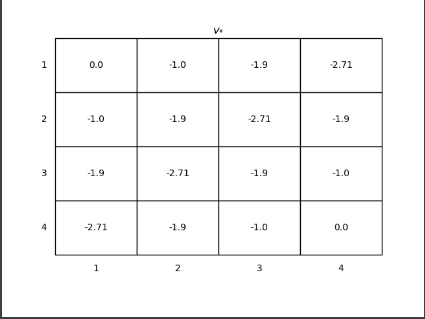
- The optimal value of each cell is shown in the figure below .
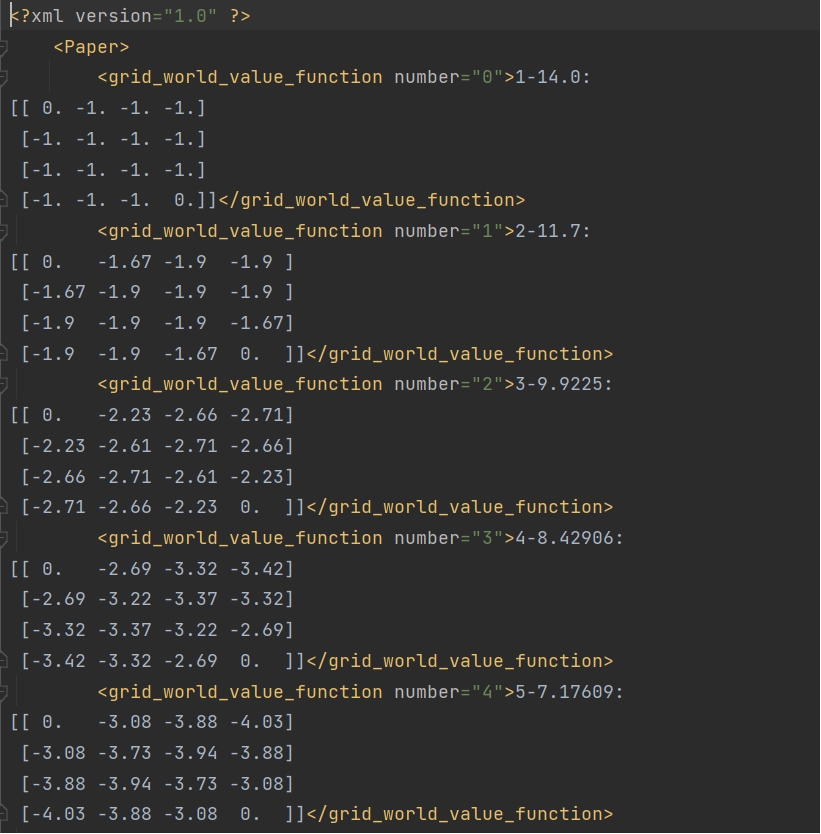
- After each iteration, the state value of the cell is saved in XML In the document , Some screenshots are shown in the following figure .
4. Experimental analysis and summary
It can be seen from the optimal value table of each cell , The closer to the final state of the cell , The greater its value . This is because unless the final state is reached , Otherwise, the return value of all state changes is -1. From this table , It can also be seen that agent Which direction should I go , As long as the value of adjacent cells is greater than agent The cell where it is , You can move . for instance , If agent stay (1,1) It's about , It can go up , Go to the left , because (0,1),(1,0) Cell values at are greater than (1,1) It's about .
边栏推荐
- Parsing ng template with let total in NZ Pagination
- ROS rviz_ Satellite function package visualizes GNSS track and uses satellite map
- 【Rust翻譯】從頭實現Rust异步執行器
- 图片按日期批量导入WPS表格
- 文件头信息对照表
- Caused by: com. fasterxml. jackson. databind. Exc.invalidformatexception: exception resolution
- Exception handling (I) -- null pointer and array index out of bounds
- Extern "C" overview
- 编译配置in文件
- eyebeam高级设置
猜你喜欢

YOLOv5增加小目标检测层

ROS rviz_ Satellite function package visualizes GNSS track and uses satellite map
图片按日期批量导入WPS表格

浮动与定位

AutoCAD C polyline small acute angle detection

搭建你jmeter+jenkins+ant

VM332 WAService.js:2 Error: _vm.changeTabs is not a function报错

FPGA - 7系列 FPGA SelectIO -08- 高级逻辑资源之OSERDESE2

JS regular expression system explanation (comprehensive summary)

fpm工具安装
随机推荐
FPGA - 7系列 FPGA SelectIO -07- 高级逻辑资源之ISERDESE2
职场IT老鸟的几点小习惯
eyebeam高级设置
Yolov5 adds a small target detection layer
[rust daily] published on rust 1.43.0 on April 23, 2020
Overview, implementation and use of CRC32
Freeswitch uses Mod_ Shot module plays mp3
【Paper Reading-3D Detection】Fully Convolutional One-Stage 3D Object Detection on LiDAR Range Images
fpm工具安装
编译原理期末复习
FPM tool installation
Build your jmeter+jenkins+ant
freeswitch设置最大呼叫时长
Batch import of pictures into WPS table by date
extern “C“概述
ROS rviz_ Satellite function package visualizes GNSS track and uses satellite map
Online facing such an online world, the only limitation is our imagination
[produced by Xinghai] operation and maintenance inspection collection
C语言教程大全
Camx架构开UMD、KMD log以及dump图的方式