当前位置:网站首页>Cadence learning path (VIII) PCB placement components
Cadence learning path (VIII) PCB placement components
2022-07-23 10:55:00 【Video game bench】
1. preparation
Before placing components , Make sure your two paths are correct :

If you are imported from the first-party weblist ( Use Allegro Export netlist ) So pay attention to padpath and psmpath If the path is correct , If you are a third-party software (AD、 Lichuang ) Imported netlist , Then you should pay attention to devpath The path is correct .
2. Quickly place components
Place - Quickplace You can enter the following interface , My interface is Chinese :
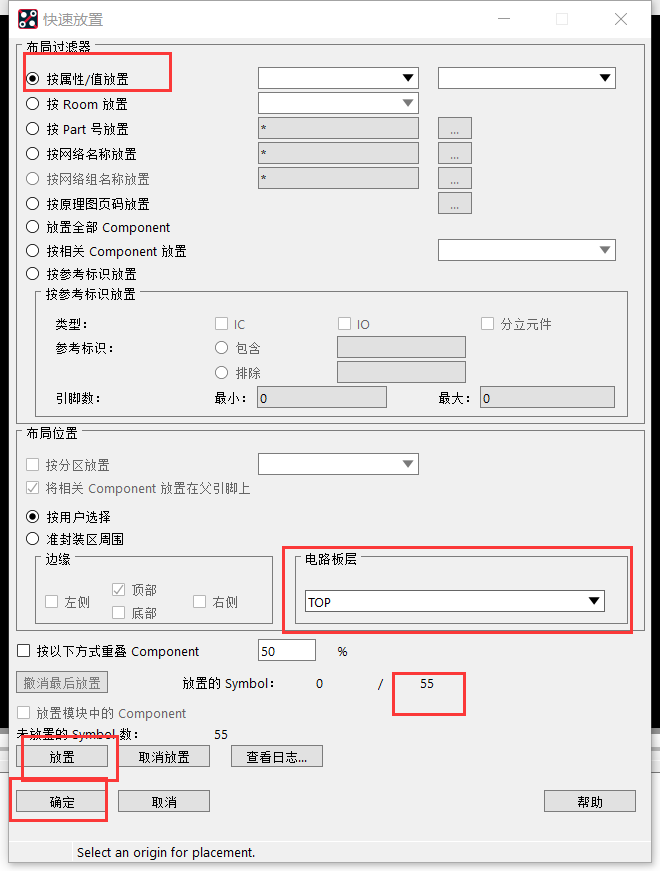
Because I am. 17.4 edition , You can directly click to place , If you are a lower version Cadence, You need to draw the board and frame before placing , We talked about that before 17.2 Version import board frame , Let's introduce 17.4 Import board frame :
3. Draw a board and frame by yourself :
Choose to place a rectangle ,17.4 Then place it on the lower layer


4.Cadence17.4 Import board frame
Import DXF Note that the path should not use Chinese or special characters :

Next, set the mapping of layers , If your DXF If the file has multiple layers, you must set the mapping , Otherwise, you cannot import , As shown in the above figure, the import button is gray

As shown in the figure below, import succeeded :

5. The board and frame are changed to the corresponding layer
①Edit - change , And then in find Select... In the panel shapes Can be related to each other ,
② Set the layer you want to change : You must tick 
Then left click your board frame to move to the corresponding layer .

6. Place components -- Precise positioning
The following figure shows the package after I rotate , But we can't accurately place it in the board and frame area in the figure
 Next, we use the center of the circle to accurately align : First select the move button , Then right click on the center of the board frame and select the following :
 choice sym origin The system selects the reference point


Of course, you can also use line segment positioning , You need to choose User pick User specified point , Select a wire of your device , Select segment vertex alignment , Then select the line of the board frame you want to align , When selecting segment vertices, select their options , It can be .

7. It can also be placed by coordinates , But it's more troublesome , adopt show element Know the coordinates of both , Select the device , Enter the coordinates you selected , Then enter the coordinates of where you want to go , Use the command line .
8.Capture And PCB Editor Interactive layout
First, in the Capture In software Option - preference - Check the following options

And only the first party netlist can interact , Import the net list again .
stay PCB Design Select move Symbol, That is, mobile devices , Interaction can be realized , Go to Capture Select device ,PCB Will highlight , Double click to move . You can also choose the network , Or vice versa PCB-- Schematic diagram selection .
9. The display of flying line is closed

hide GND Fly line
stay find Choose from nets The Internet , choice GND,Edit - properties Set the voltage to 0V You can hide the fly line


In the same way , We can hide 3V3 Flying wire of power supply

alike , We need to show , Just remove the previously set value .
10. Module reuse
Reuse the connection layout of the left figure to the right figure

First, choose the layout mode , Select all devices on the left symbol,place replicate create

End of choice Done, Click any point inside the module with the left mouse button as the center point , You can save .mdd file
Next, select the right device ,apply You can call .

11. Add vias

All Layers find vias Option add via , Double click the left mouse button when routing to drill holes , Two rows of fans are recommended for punching .

12. Add differential pairs manually
Logic - Assign Differential Pair, And then in PCB Add a differential pair by selecting pins in , After the addition, they will be wired together

You can also add... Directly in the rule manager 
边栏推荐
- Mysql数据库基础
- 12 open source background management systems suitable for outsourcing projects
- 300 题 第六讲 二次型
- 【Unity日常Bug】Unity报错Unexpected character ‘‘
- Understand asp Net core - Cookie based authentication
- Redis source code and design analysis -- 9. String object
- sort
- Visual studio 2022 interesting and powerful intelligent auxiliary coding
- Chapter 1 Overview - Section 1 - 1.2 overview of the Internet
- Analysis of network security level protection 2.0 standard
猜你喜欢





随机推荐
HBV parameter extraction and fitting [draft]
Redis源码与设计剖析 -- 14.数据库实现
Comprehensive experiment of realizing private network interworking under mGRE environment
Anaconda虚拟环境下安装opencv报错的问题
SQLZOO——SELECT Quiz
Redis source code and design analysis -- 9. String object
thing JS笔记
20. Valid brackets
C ivalueconverter interface usage example
PXE remote installation and kickstart unattended installation technical documents
[visual slam] orb slam: tracking and mapping recognizable features
0 basic career change software test, the necessary skills with a monthly salary of 6000 and 11000 are quite different
牛客刷题篇——剑指offer (第二期)
Visual studio 2022 interesting and powerful intelligent auxiliary coding
Reading the thesis "sentence embeddings using Siamese Bert networks"
Understand asp Net core - Cookie based authentication
What does resource pooling and resource pooling mean?
Redis源码与设计剖析 -- 9.字符串对象
Leetcode skimming -- bit by bit record 023
NOTIFIER诺帝菲尔消防主机电源维修及日常维护