当前位置:网站首页>Uni app background audio will not be played after the screen is turned off or returned to the desktop
Uni app background audio will not be played after the screen is turned off or returned to the desktop
2022-07-24 13:48:00 【A blog】
terms of settlement : download Android native plug-ins , And configure the foreground service configuration in offline packaging
1、 Import the plug-in into HBuilder X in
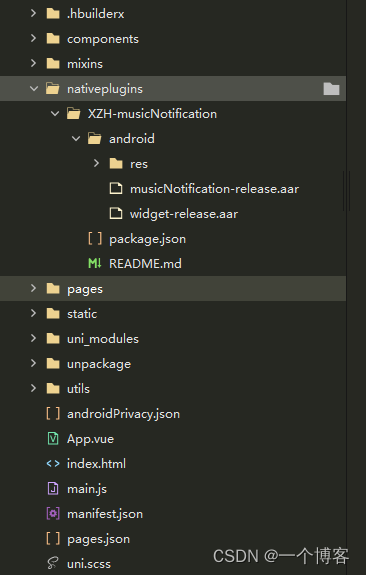
2、manifest.json The configuration in is as follows
"nativePlugins" : {

		    "XZH-musicNotification" : {

		        "page" : "page/story/storyDetails",
		        "favour" : "false",
		        "themeColor" : "#ffffff",
		        "titleColor" : "#ffffff",
		        "artistColor" : "#ffffff",
		        "__plugin_info__" : {

		            "name" : "XZH-musicNotification",
		            "description" : "Android Music notice bar ",
		            "platforms" : "Android",
		            "url" : "",
		            "android_package_name" : "",
		            "ios_bundle_id" : "",
		            "isCloud" : false,
		            "bought" : -1,
		            "pid" : "",
		            "parameters" : {

		                "page" : {

		                    "des" : " Page path ( Such as :pages/*/*)",
		                    "key" : "xzh_page",
		                    "value" : ""
		                },
		                "favour" : {

		                    "des" : " Whether to turn on the favorite button ",
		                    "key" : "xzh_favour",
		                    "value" : ""
		                },
		                "themeColor" : {

		                    "des" : "widget Background color ( Please use  ARGB  Format )",
		                    "key" : "xzh_theme_color",
		                    "value" : ""
		                },
		                "titleColor" : {

		                    "des" : "widget Song name and body color ( Please use  ARGB  Format )",
		                    "key" : "xzh_title_color",
		                    "value" : ""
		                },
		                "artistColor" : {

		                    "des" : "widget Singer font color ( Please use  ARGB  Format )",
		                    "key" : "xzh_artist_color",
		                    "value" : ""
		                }
		            }
		        }
		    }
		}

3、 encapsulation JS Method called
Encapsulation of player call code : musicNotification.js Extraction code :7zbd
Packaging of background audio : audioUtils.js Extraction code :xtyy
4、 Use
(1) stay app.vue Inside, call the initialization method
			this.$mc.init({

				// Click the notice bar to jump to the page
				path: '/pages/story/storyDetails.vue',
				// Set the status bar small icon , Only  android 8.0  The above is valid
				icon: '/static/image/logo.png',
			})
(2)main.js Global definitions in Background audio
// Background audio
import audioUtils from './utils/audioUtils.js'
Vue.prototype.$audioUtils = audioUtils;
(3) You need to use the page of the player , Create and generate
import music from '@/utils/musicNotification.js'

data() {

			return {

				isInitPlay:false,
				audio:null,
				isLockActivity:false,
			}
},
onLoad() {


	// There's a problem, huh , This method of background audio will also be implemented in other pages , So you need to add a judge whether it is the current page
	let currentRoutes = getCurrentPages(); //  Gets the currently opened page routing array
	let currentRoute = currentRoutes[currentRoutes.length - 1].route // Get the current page route
	if (currentRoute == "pages/story/storyDetails") {

		this.isaudio=true;
	}
	// Judge whether the user goes to set the notification permission   Reset the story information after returning
	if(uni.getStorageSync("musicIsUpdata")==1){

		this.updataInfoX(this.storyList[this.current])
		uni.setStorageSync("musicIsUpdata",0)
	}
	this.audio=this.$audioUtils.initContext();// Get encapsulated background audio
},
onUnload() {

	this.isaudio=false;
	let timer=setTimeout(function(){

		//  Add remove   player
		plus.globalEvent.removeEventListener('musicNotificationPause')
		uni.removeStorageSync("createMusic");
		music.playOrPause(JSON.parse(false))
		music.cancel();
		clearTimeout(timer)
	},300)
},
mounted(){

	let _this=this;
	// Switch to the next song
	plus.globalEvent.addEventListener('musicNotificationNext', function(e) {

		_this.onNext();
		music.playOrPause(JSON.parse(true));
	});
	// Switch to the previous one
	plus.globalEvent.addEventListener('musicNotificationPrevious', function(e) {

		_this.onPre();
		music.playOrPause(JSON.parse(true));
	});
	// Pause and play
	plus.globalEvent.addEventListener('musicNotificationPause', function(e) {

		_this.onSwitch()
	});
	// The audio can be played
	this.audio.onCanplay(function(e){

		if(this.isaudio){

				this.timeLength=Math.floor(_this.audio.duration)
				if(this.isHide){

					// Update audio playback
					this.Notification()
				}
		}
	})
},
onHide() {

	this.isHide=true;
	// Show audio player
	this.Notification();
},
methods:{

			//  Prompt the user to give notification permission
			updataInfo(storyInfo){

				let Info=storyInfo;
				  let res = music.update({

				  	songName: Info.title,
				  	favour: false, // Here I write dead ,
				  	picUrl: Info.img_url
				  });
				  switch (res.code) {

				  	case -1: // Unknown error
				  		return;
				  	case -2: // No authority
				  		uni.showModal({

				  			title: ' Instructions for opening the notification ',
				  			cancelText:" Go to settings ",
				  			confirmText:" Ignore this time ",
				  			content: ' Dear user , The application needs to start notification to ensure that the program can run normally in the background . If you choose not to open , The application will be recycled by the system in the background for a period of time , Cause playback interruption , It is strongly recommended that you turn on !( After ignoring, you can continue to click on this page to set up next time )',
				  			success: function (res) {

				  				if (res.confirm) {

				  				} else if (res.cancel) {

				  					music.openPermissionSetting(); // No authority , Jump to settings page
				  					uni.setStorageSync("musicIsUpdata",1)
				  				}
				  			}
				  		});
				  		return;
				  }
			},
			//  Update notification information
			updataInfoX(storyInfo){

				let res = music.update({

					songName: storyInfo.title,
					favour: false, // Here I write dead ,
					picUrl: storyInfo.img_url
				});
				console.log(res)
				switch (res.code) {

					case -1: // Unknown error
						return;
					case -2: // No authority
						return;
				}
			},
			Notification(){

				if(this.isHide){

					if(this.isInitPlay){

						this.updataInfoX(this.storyList[this.current])
					}else{

						let storyList=this.storyList[this.current]
						music.createNotification(res=>{

							this.updataInfo(storyList)
							music.playOrPause(JSON.parse(true))
							this.isInitPlay=true
						})
					}
				}
			},
			lockActivity(){

				//  Set the lock screen , At the same time, the authorization status is returned
				if (!music.openLockActivity({

						lock: !this.isLockActivity
					})) {

					//  No authority , Pop up a dialog box
					uni.showModal({

						content: 'android 10  The above requires the permission to open the floating window to open the lock screen ',
						success: (res) => {

							if (res.confirm) {

								//  The user clicks ok , Register authorization to listen
								plus.globalEvent.addEventListener('openLockActivity', ({

									type
								}) => {

									if (type) {

										//  Get permission of floating window , Reset the lock screen
										this.lockActivity()
									}
									//  Log off authorization listening
									plus.globalEvent.removeEventListener('openLockActivity');
								});
								/**
								 *  No hover window permission , Jump to settings page
								 * android 10  Without this permission, you can't unlock the screen
								 */
								music.openOverlaySetting();
							}
						}
					});
				} else {

					//  Have permission , Just modify the front-end state
					this.isLockActivity = !this.isLockActivity;
				}
			},
}
5、 Configuration in offline packaging
1、 stay AndroidManifest.xml There are three permissions configured
    <!--  Allow the creation of application shortcuts -->
    <uses-permission android:name="android.permission.INSTALL_SHORTCUT"/>
    <!--  Allow the background process to still run after the phone screen is closed -->
    <uses-permission android:name="android.permission.WAKE_LOCK"/>
    <!--  Permission of front desk service -->
    <uses-permission android:name="android.permission.FOREGROUND_SERVICE"/>
2、dcloud_uniplugins.json: Integrated information
{

  "nativePlugins": [
    {

      "integrateType": "aar",
      "compileOptions": {

        "sourceCompatibility": "1.8",
        "targetCompatibility": "1.8"
      },
      "plugins": [{

        "type": "module",
        "name": "XZH-musicNotification",
        "class": "com.xzh.musicnotification.MusicNotificationModule"
      }]
    }
  ]
}

3、 Import audio player musicNotification-release.aar Compressed files
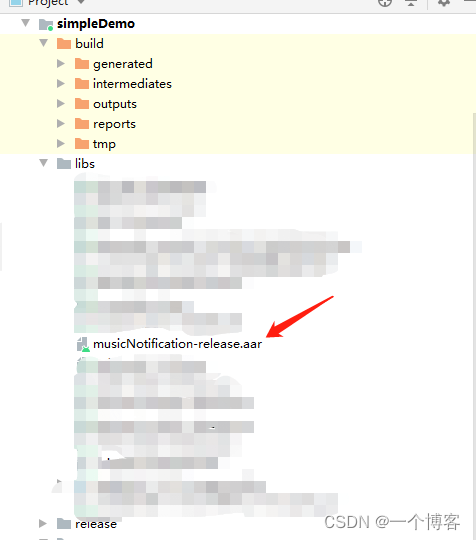
4、 stay AndroidManifest.xml It has parameters
  <meta-data
      android:name="xzh_favour"
      android:value="true"/>
  <meta-data
      android:name="xzh_theme_color"
      android:value="#55000000"/>

   <meta-data
      android:name="xzh_title_color"
      android:value="#ffffff"/>

   <meta-data
      android:name="xzh_artist_color"
      android:value="#ffffff"/>

边栏推荐
猜你喜欢
Kunyu installation details

在EXCEL表格中如何进行快速换行

网络安全——文件上传白名单绕过

群体知识图谱:分布式知识迁移与联邦式图谱推理

网络安全——函数绕过注入
Network security - filtering bypass injection

Network security - use exchange SSRF vulnerabilities in combination with NTLM trunking for penetration testing

网络安全——使用Evil Maid物理访问安全漏洞进行渗透

Unity UGUI中scroll bar在游戏中启动界面时没有从最上面显示
网络安全——使用Exchange SSRF 漏洞结合NTLM中继进行渗透测试
随机推荐
基于图正则化的贝叶斯宽度学习系统
代码签名证书与SSL证书区别
论文笔记:Swin-Unet: Unet-like Pure Transformer for MedicalImage Segmentation
Flink comprehensive case (IX)
通配符(泛域名)SSL证书
Flink综合案例(九)
Unity行人随机行走不碰撞
Error reported when using activiti to create a database table
OWASP ZAP安全测试工具使用教程(高级)
Flink容错机制(五)
R language uses the statstack function of epidisplay package to view the statistics (mean, median, etc.) of continuous variables and the corresponding hypothesis test in a hierarchical manner based on
JS execution mechanism
网络安全——文件上传黑名单绕过
RHCE first operation
The scroll bar in unity ugui is not displayed from the top when launching the interface in the game
使用Activiti创建数据库表报错,
Click event to create a new node
How to generate expected data? Emory University and others' latest "deep learning controllable data generation" review, 52 page PDF, covering 346 documents, comprehensively expounds the controllable g
Explain flex layout in detail
R语言tidyr包的gather函数将从宽表转化为长表(宽表转化为长表)、第一个参数指定原多个数据列名称生成的新数据列名称、第二个参数指定原表内容值、第三个和第四个参数通过列索引指定不变的列名称列表