当前位置:网站首页>Keras深度学习实战(11)——可视化神经网络中间层输出
Keras深度学习实战(11)——可视化神经网络中间层输出
2022-06-24 13:03:00 【盼小辉丶】
Keras深度学习实战(11)——可视化神经网络中间层输出
0. 前言
在使用《卷积神经网络进行性别分类》的应用中,我们构建了一个卷积神经网络 (Convolutional Neural Network, CNN) 模型,该模型可以以 95% 的准确率对图像中人物的性别进行分类。但是,有关 CNN 模型学习到的内容,对于我们来说仍然是一个黑匣子。
在本节中,我们将学习如何提取模型中各种卷积核学习到的内容特征。此外,我们将对比 CNN 中开始几个卷积层中的卷积核学习到的内容与最后几个卷积层中的卷积核学习到的内容。
1. 可视化神经网络中间层输出
为了提取卷积核学习到的内容,我们采用以下策略:
- 选择要进行分析的图像
- 选择模型的第一个卷积层,以了解第一个卷积层中的各个卷积核学习到的内容
- 计算第一层中卷积的输出,要提取第一层的输出,需要使用函数式
API:- 函数式
API的输入是输入图像,输出是模型第一层的输出 - 返回所有通道(卷积核)上得到的中间层的输出
- 函数式
- 在模型的最后一个卷积层上同样执行的步骤,以可视化最后一卷积层的输出
- 然后,我们将可视化所有通道上的卷积运算的输出
- 最后,我们还将可视化所有图像上给定通道的输出
接下来,我们将使用 Keras 实现以上策略用于可视化第一层和最后一层的所有卷积核学习到的内容。
2. 利用 Keras 可视化神经网络中间层输出
2.1 数据加载
我们重用在《卷积神经网络进行性别分类》中使用的数据加载代码,并查看加载的图片:
x = []
y = []
for i in glob('man_woman/a_resized/*.jpg')[:800]:
    try:
        image = io.imread(i)
        x.append(image)
        y.append(0)
    except:
        continue

for i in glob('man_woman/b_resized/*.jpg')[:800]:
    try:
        image = io.imread(i)
        x.append(image)
        y.append(1)
    except:
        continue
查看要用于可视化的输入图像:
from matplotlib import pyplot as plt
plt.imshow(x[-3])
plt.show()

2.2 可视化第一个卷积层的输出
定义函数式 API,将以上图像作为输入,将第一个卷积层的输出作为输出:
from keras.models import Model
vgg16_model = VGG16(include_top=False, weights='imagenet', input_shape=(256, 256, 3))
input_img = preprocess_input(x[-3].reshape(1, 256, 256, 3))
activation_model = Model(inputs=vgg16_model.input, outputs=vgg16_model.layers[1].output)
activations = activation_model.predict(preprocess_input(input_img))
在以上代码中,我们定义了一个名为 activation_model 的模型用于获取模型第一个卷积层的输出,在该模型中,我们图像作为输入传递,并提取第一层的输出作为 activation_model 模型的输出。一旦定义了模型,我们可以向模型中传入输入图像来提取第一层的输出。需要注意的是,我们必须整形输入图像的形状,以便能够将其输入到模型中。
可视化得到的第一个卷积层中的前 49 个卷积核的输出,如下所示:
fig, axs = plt.subplots(7, 7, figsize=(10, 10))
for i in range(7):
    for j in range(7):
        try:
            axs[i,j].set_ylim((224, 0))
            axs[i,j].contourf(first_layer_activation[0,:,:,((7*i)+j)],7,cmap='viridis')
            axs[i,j].set_title('filter: '+str((7*i)+j))
            axs[i,j].axis('off')
        except:
            continue
在以上中,我们创建了一个 7 x 7 的画布,以便在其中绘制 49 张图像。此外,我们遍历 first_layer_activation 中的前49个通道,并绘制得到的输出,如下所示:

在这里,我们可以看到某些卷积核可以提取原始图像的轮廓(例如,卷积核 0、11、30、34)。另外,某些卷积核学会了如何识别图像的部分特征,例如耳朵,眼睛,头发和鼻子(例如卷积核 12、27)。
我们继续对此进行验证,使多张图像(这里使用 49 张)通过第一个卷积层后提取第 11 个卷积核的输出(即得到的特征图的第 11 个通道),来获取原始图像的轮廓,如下所示:
input_images = preprocess_input(np.array(x[:49]).reshape(49,256,256,3))
activations = activation_model.predict(input_images)
fig, axs = plt.subplots(7, 7, figsize=(10, 10))
fig.subplots_adjust(hspace = .5, wspace=.5)
first_layer_activation = activations
for i in range(7):
    for j in range(7):
        try:
            axs[i,j].set_ylim((224, 0))
            axs[i,j].contourf(first_layer_activation[((7*i)+j),:,:,11],7,cmap='viridis')
            axs[i,j].set_title('image: '+str((7*i)+j))
            axs[i,j].axis('off')
        except:
            continue

plt.show()
在前面的代码中,我们遍历前 49 张图像,并使用这些图像绘制第一个卷积层中第 11 个卷积核的输出:

从上图可以看出,在所有图像中,第 11 个卷积核均学习了图像中的轮廓。
2.3 可视化最后一个卷积层的输出
接下来,我们继续了解最后一个卷积层中的卷积核学习了什么。为了了解最后一个卷积层在模型中的索引,我们提取模型中的各个层,并输出各层的名字:
for i, layer in enumerate(vgg16_model.layers):
    print(i, layer.name)
通过执行以上代码,将打印出图层名称,如下:
0 input_1
1 block1_conv1
2 block1_conv2
3 block1_pool
4 block2_conv1
5 block2_conv2
6 block2_pool
7 block3_conv1
8 block3_conv2
9 block3_conv3
10 block3_pool
11 block4_conv1
12 block4_conv2
13 block4_conv3
14 block4_pool
15 block5_conv1
16 block5_conv2
17 block5_conv3
18 block5_pool
可以看到,最后一个卷积层在模型中的索引为 17,可以按以下方式提取:
activation_model = Model(inputs=vgg16_model.input,outputs=vgg16_model.layers[-2].output)
input_img = preprocess_input(x[-3].reshape(1, 256, 256, 3))
last_layer_activation = activation_model.predict(input_img)
由于在网络中执行了多个池化操作,因此得到的图像尺寸已被多次缩小,缩小为 1 x 8 x 8 x 512,最后一个卷积层中的各个卷积核的输出可视化如下:
count = 0
for i in range(7):
    for j in range(11):
        try:
            count+=1
            axs[i,j].set_ylim((6, 0))
            axs[i,j].contourf(last_layer_activation[0,:,:,((7*i)+j)],11,cmap='viridis')
            axs[i,j].set_title('filter: '+str(count))
            axs[i,j].axis('off')
        except:
            continue

plt.show()
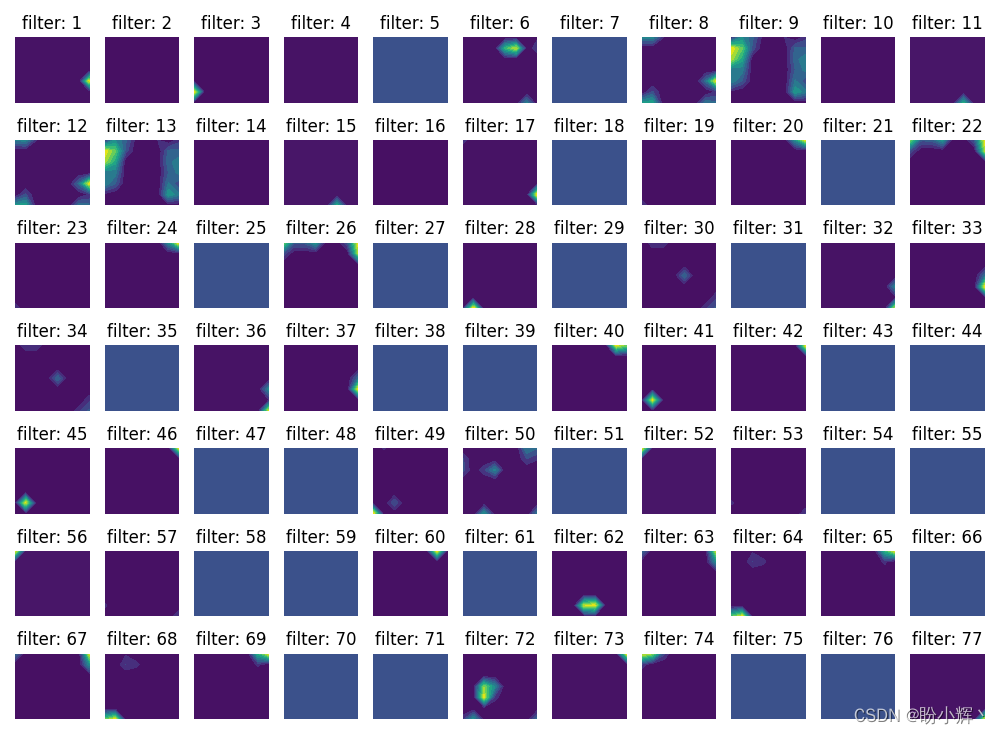
如上所示,我们并不能直观的看出最后一个卷积层的卷积核学习到了什么,因为很难将低级特征与原始图像相对应,这些低级特征可以逐渐得到组合以得到直观的图像轮廓。
小结
在本节中,我们针对卷积神经网络训练过程的黑盒特性问题,学习了如何提取模型中各种卷积核学习到的内容特征,并对比卷积神经网络开始几个卷积层中的卷积核学习到的内容与最后几个卷积层中的卷积核学习到的内容,以此来对卷积神经网络的训练过程有一个更清晰的认知。
相关链接
Keras深度学习实战(1)——神经网络基础与模型训练过程详解
Keras深度学习实战(2)——使用Keras构建神经网络
Keras深度学习实战(3)——神经网络性能优化技术
Keras深度学习实战(4)——深度学习中常用激活函数和损失函数详解
Keras深度学习实战(5)——批归一化详解
Keras深度学习实战(6)——深度学习过拟合问题及解决方法
Keras深度学习实战(7)——卷积神经网络详解与实现
Keras深度学习实战(8)——使用数据增强提高神经网络性能
Keras深度学习实战(9)——卷积神经网络的局限性
Keras深度学习实战(10)——迁移学习
边栏推荐
- SAP Marketing Cloud 功能概述(三)
- 厨卫电器行业B2B交易协同管理平台开发,优化企业库存结构
- MIT-6.824-lab4A-2022(万字讲解-代码构建)
- pgsql查询分组中某个字段最大或者最小的一条数据
- 杰理之串口接收 IO 需要设置数字功能【篇】
- P2PDB 白皮书
- 2022 construction elevator driver (construction special type of work) examination questions and online simulation examination
- Jerry's infrared filtering [chapter]
- 【Pytorch】量化
- Unity 热力图建立方法
猜你喜欢
简谈企业Power BI CI /CD 实施框架

百度地图API绘制点及提示信息
Baidu map API drawing points and tips

ASCII code table extracted from tanhaoqiang's C program design (comparison table of common characters and ASCII codes)

HarmonyOS-3
SaaS management system solution of smart Park: enabling the park to realize information and digital management

puzzle(016.2)指画星河

P2pdb white paper

数商云:加强供应商管理,助推航空运输企业与供应商高效协同

SAP Marketing Cloud 功能概述(四)
随机推荐
Online text entity extraction capability helps applications analyze massive text data
记录一次Mongotemplate的And和Or的各种套
Jericho After sleep, the system will wake up regularly and continue to run without resetting [chapter]
MySQL日志管理、备份与恢复
融云通信“三板斧”,“砍”到了银行的心坎上
Overview of SAP marketing cloud functions (III)
常见的单例模式&简单工厂
远程办公之:在家露营办公小工具| 社区征文
Defoaming
2022 coal mine gas drainage operation certificate examination questions and simulation examination
Promotion of Project Manager
杰理之红外滤波【篇】
文本对比学习综述
Gatling performance test
Zhiyuan community weekly 86: Gary Marcus talks about three linguistic factors that can be used for reference in large model research; Google puts forward the Wensheng graph model parti which is compar
SAP Marketing Cloud 功能概述(三)
如何避免下重复订单
AutoRF:从单视角观察中学习3D物体辐射场(CVPR 2022)
90% of the project managers have skipped the pit. Are you still in the pit?
Preliminary study on AQS