当前位置:网站首页>Flink高级特性和新特性(八)
Flink高级特性和新特性(八)
2022-07-24 13:37:00 【华为云】
Flink高级特性和新特性(八)
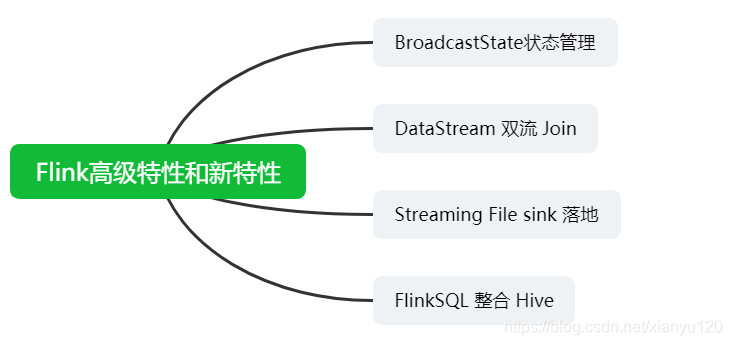
BroadcastState 状态管理
- broadcast state 广播变量状态

应用场景
关联更新的规则,获取指定的数据(给ip得到经度纬度)=> 地图 API 获取到 省市区街道位置
需求
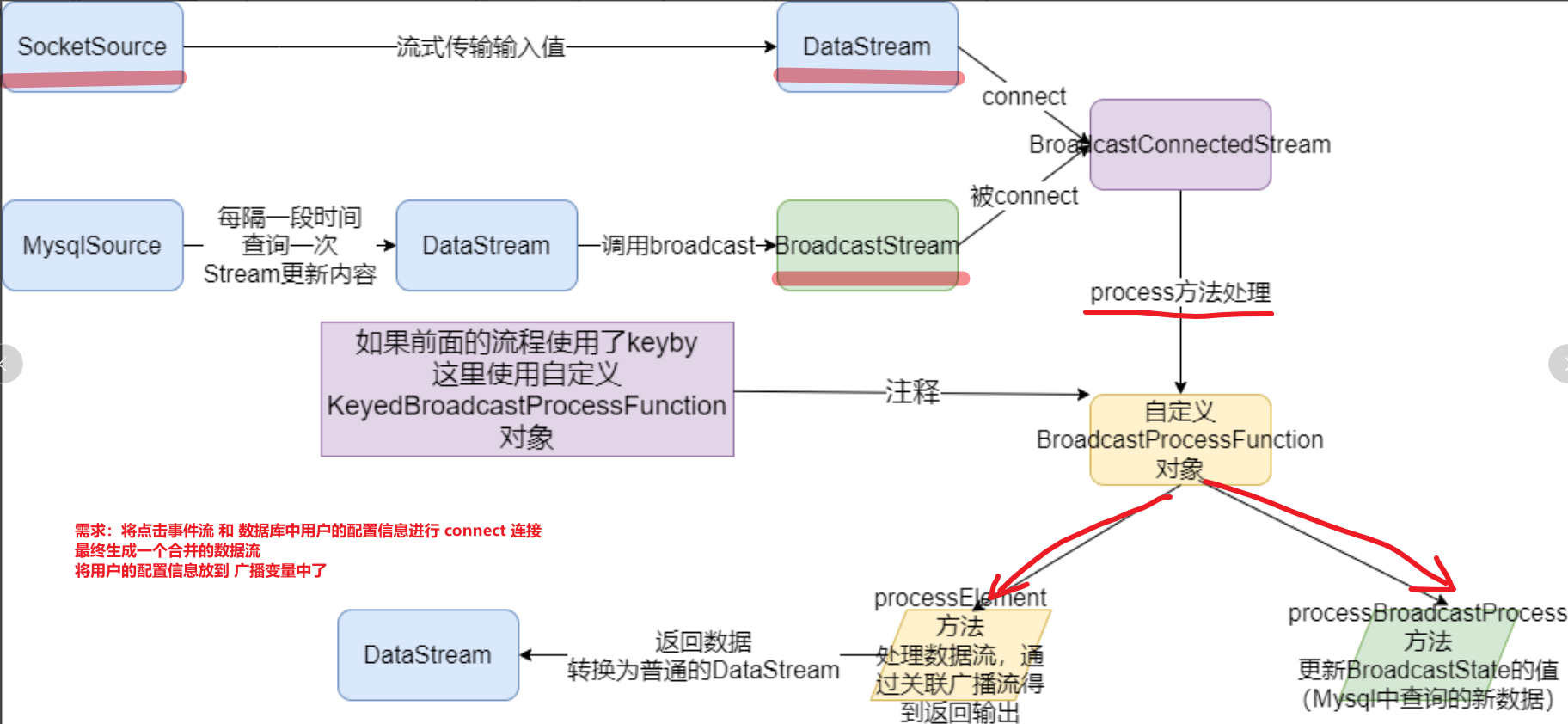
实时Flink DataStream 过滤出配置中(数据库)的用户,并在事件流中补全这批用户的基础信息。
需求流程
- 开发步骤
package cn.itcast.flink.broadcast;import org.apache.flink.api.common.state.BroadcastState;import org.apache.flink.api.common.state.MapStateDescriptor;import org.apache.flink.api.common.state.ReadOnlyBroadcastState;import org.apache.flink.api.common.typeinfo.Types;import org.apache.flink.api.java.tuple.Tuple;import org.apache.flink.api.java.tuple.Tuple2;import org.apache.flink.api.java.tuple.Tuple4;import org.apache.flink.api.java.tuple.Tuple6;import org.apache.flink.configuration.Configuration;import org.apache.flink.streaming.api.datastream.BroadcastStream;import org.apache.flink.streaming.api.datastream.DataStreamSource;import org.apache.flink.streaming.api.datastream.SingleOutputStreamOperator;import org.apache.flink.streaming.api.environment.StreamExecutionEnvironment;import org.apache.flink.streaming.api.functions.co.BroadcastProcessFunction;import org.apache.flink.streaming.api.functions.source.RichSourceFunction;import org.apache.flink.streaming.api.functions.source.SourceFunction;import org.apache.flink.util.Collector;import java.sql.Connection;import java.sql.DriverManager;import java.sql.PreparedStatement;import java.sql.ResultSet;import java.text.SimpleDateFormat;import java.util.Date;import java.util.HashMap;import java.util.Map;import java.util.Random;/** * Author itcast * Date 2021/6/24 8:29 * 两个数据流 1.事件流 2.用户配置流 3.connect关联操作 4.打印输出 5.执行任务 * <String,String,String,Integer></> * {"userID": "user_3", "eventTime": "2019-08-17 12:19:47", "eventType": "browse", "productID": 1} * {"userID": "user_2", "eventTime": "2019-08-17 12:19:48", "eventType": "click", "productID": 1} * <String, String, Integer ></> * 'user_2', '李四', 20 * 最终的数据流 6个 Tuple6<String,String,String,Integer,String,Integer></> * (user_3,2019-08-17 12:19:47,browse,1,王五,33) * (user_2,2019-08-17 12:19:48,click,1,李四,20) */public class BroadcastStateDemo { public static void main(String[] args) throws Exception { //1.env StreamExecutionEnvironment env = StreamExecutionEnvironment.getExecutionEnvironment(); //设置并行度 env.setParallelism(1); //2.source //-1.构建实时数据事件流-自定义随机 //<userID, eventTime, eventType, productID> DataStreamSource<Tuple4<String, String, String, Integer>> clickSource = env.addSource(new MySource()); //-2.构建配置流-从MySQL //<用户id,<姓名,年龄>> DataStreamSource<Map<String, Tuple2<String, Integer>>> configSource = env.addSource(new MySQLSource()); //3.transformation //-1.定义状态描述器 //MapStateDescriptor<Void, Map<String, Tuple2<String, Integer>>> descriptor = //new MapStateDescriptor<>("config",Types.VOID, Types.MAP(Types.STRING, Types.TUPLE(Types.STRING, Types.INT))); MapStateDescriptor<Void, Map<String, Tuple2<String,Integer>>> broadcastDesc = new MapStateDescriptor<>("config", Types.VOID, Types.MAP(Types.STRING, Types.TUPLE(Types.STRING, Types.INT))); //-2.广播配置流 //BroadcastStream<Map<String, Tuple2<String, Integer>>> broadcastDS = configDS.broadcast(descriptor); BroadcastStream<Map<String, Tuple2<String, Integer>>> broadcastDS = configSource.broadcast(broadcastDesc); //-3.将事件流和广播流进行连接 //BroadcastConnectedStream<Tuple4<String, String, String, Integer>, Map<String, Tuple2<String, Integer>>> connectDS =eventDS.connect(broadcastDS); SingleOutputStreamOperator<Tuple6<String, String, String, Integer, String, Integer>> result = clickSource.connect(broadcastDS) //-4.处理连接后的流-根据配置流补全事件流中的用户的信息 .process(new BroadcastProcessFunction<Tuple4<String, String, String, Integer>, Map<String, Tuple2<String, Integer>>, Tuple6<String, String, String, Integer, String, Integer>>() { @Override public void processElement(Tuple4<String, String, String, Integer> value, ReadOnlyContext ctx, Collector<Tuple6<String, String, String, Integer, String, Integer>> out) throws Exception { //读取出来 f0 为 userId //事件流中读取用户 userId String userId = value.f0; //从ctx环境变量中通过 desc 读取出来广播状态 ReadOnlyBroadcastState<Void, Map<String, Tuple2<String, Integer>>> broadcastState = ctx.getBroadcastState(broadcastDesc); //如果广播状态不为空,get(null) 获取出来 配置数据Tuple2 if (broadcastState != null) { Map<String, Tuple2<String, Integer>> map = broadcastState.get(null); //判断 map 不为空则 if (map != null) { Tuple2<String, Integer> stringIntegerTuple2 = map.get(userId); //取出姓名和年龄 //collect 收集 Tuple6 //3-4.处理(process)连接后的流-根据配置流补全事件流中的用户的信息,Tuple4和Tuple2合并 //处理每一条元素,processElement out.collect(Tuple6.of( userId, value.f1, value.f2, value.f3, stringIntegerTuple2.f0, stringIntegerTuple2.f1 )); } } } //value就是MySQLSource中每隔一段时间获取到的最新的map数据 //先根据状态描述器获取历史的广播状态 ctx.getBroadcastState(desc) @Override public void processBroadcastElement(Map<String, Tuple2<String, Integer>> value, Context ctx, Collector<Tuple6<String, String, String, Integer, String, Integer>> out) throws Exception { //再清空历史状态 broadcastState 数据 BroadcastState<Void, Map<String, Tuple2<String, Integer>>> broadcastState = ctx.getBroadcastState(broadcastDesc); //最后将最新的广播流数据放到 state 中(更新状态数据) broadcastState.put(null,value) broadcastState.clear(); broadcastState.put(null, value); } }); //处理广播中的元素 //4.sinks result.print(); //5.execute env.execute(); } /** * <userID, eventTime, eventType, productID> */ public static class MySource implements SourceFunction<Tuple4<String, String, String, Integer>> { private boolean isRunning = true; @Override public void run(SourceContext<Tuple4<String, String, String, Integer>> ctx) throws Exception { Random random = new Random(); SimpleDateFormat df = new SimpleDateFormat("yyyy-MM-dd HH:mm:ss"); while (isRunning){ int id = random.nextInt(4) + 1; String user_id = "user_" + id; String eventTime = df.format(new Date()); String eventType = "type_" + random.nextInt(3); int productId = random.nextInt(4); ctx.collect(Tuple4.of(user_id,eventTime,eventType,productId)); Thread.sleep(500); } } @Override public void cancel() { isRunning = false; } } /** * <用户id,<姓名,年龄>> */ public static class MySQLSource extends RichSourceFunction<Map<String, Tuple2<String, Integer>>> { private boolean flag = true; private Connection conn = null; private PreparedStatement ps = null; private ResultSet rs = null; @Override public void open(Configuration parameters) throws Exception { conn = DriverManager.getConnection("jdbc:mysql://node3:3306/bigdata?useSSL=false", "root", "123456"); String sql = "select `userID`, `userName`, `userAge` from `user_info`"; ps = conn.prepareStatement(sql); } @Override public void run(SourceContext<Map<String, Tuple2<String, Integer>>> ctx) throws Exception { while (flag){ Map<String, Tuple2<String, Integer>> map = new HashMap<>(); ResultSet rs = ps.executeQuery(); while (rs.next()){ String userID = rs.getString("userID"); String userName = rs.getString("userName"); int userAge = rs.getInt("userAge"); //Map<String, Tuple2<String, Integer>> map.put(userID, Tuple2.of(userName,userAge)); } ctx.collect(map); Thread.sleep(5000);//每隔5s更新一下用户的配置信息! } } @Override public void cancel() { flag = false; } @Override public void close() throws Exception { if (conn != null) conn.close(); if (ps != null) ps.close(); if (rs != null) rs.close(); } }}- 实时的数据流和 动态变化的数据库中的配置流 进行 connect 操作, 打印输出
边栏推荐
- HCIP第十三天
- Summary of embedded network problems (packet loss of network card, unrecognized network card)
- 2021年最新最全Flink系列教程_Flink原理初探和流批一体API(二.五)v2
- How to quickly learn Embedded
- [paper reading] temporary binding for semi-superior learning
- 使用Activiti创建数据库表报错,
- Paper notes: swing UNET: UNET like pure transformer for medicalimage segmentation
- ICML2022 | 分支强化学习
- Aike AI frontier promotion (7.24)
- Knowledge sharing | sharing some methods to improve the level of enterprise document management
猜你喜欢

【论文阅读】Mean teachers are better role models

Simulate the implementation of the library function memcpy-- copy memory blocks. Understand memory overlap and accurate replication in detail

网络安全——文件上传竞争条件绕过

网络安全——文件上传渗透测试

Common OJ questions of stack and queue

ICML2022 | 分支强化学习

Unity UGUI中scroll bar在游戏中启动界面时没有从最上面显示
网络安全——服务漏洞扫描与利用
[paper reading] mean teachers are better role models

WSDM 22 | graph recommendation based on hyperbolic geometry
随机推荐
CSDN垃圾的没有底线!
WSDM 22 | graph recommendation based on hyperbolic geometry
指针进阶部分(1)
论文笔记:Swin-Unet: Unet-like Pure Transformer for MedicalImage Segmentation
How to configure webrtc protocol for low latency playback on easycvr platform v2.5.0 and above?
Knowledge sharing | sharing some methods to improve the level of enterprise document management
基于典型相关分析的多视图学习方法综述
使用activiti创建数据库表报错
申请了SSL数字证书如何进行域名验证?
网络安全——Web渗透测试
Win10 log in with Microsoft account and open all programs by default with administrator privileges: 2020-12-14
Network security - Web information collection
The EAS BOS development environment client cannot be started, but the server does show that it is ready
Solution to embedded SD card /u disk read-only problem (fat read-only repair method)
Data formatting widget
Packet switching and label switching in MPLS
flow
Aike AI frontier promotion (7.24)
Overview of multi view learning methods based on canonical correlation analysis
网络安全——使用Evil Maid物理访问安全漏洞进行渗透