当前位置:网站首页>Nmap performs analysis of all network segment IP survivals in host detection
Nmap performs analysis of all network segment IP survivals in host detection
2022-06-11 21:53:00 【Red hat Xiaosheng】
nmap Host sniffing
This is what I'm using Vmware Installed in the virtual machine kali Linux built-in nmap A problem is found when the tool detects the host . Use regular nmap command
nmap -sP 192.168.1.0/24
Probe the hosts of this network segment , However, it is found that all hosts in this network segment are active .
Nmap done : 256 IP address (256 hosts up) scanned in 28.35 seconds
The environment is :Vmware Virtual machine installation kali Linux, The network connection mode is NAT Pattern .nmap Scan segments , Detection results 256 individual IP All online , The reality is that there are only 3 One is alive , Use ping command , The rest IP yes ping It doesn't work .
in other words , Use nmap The scan result is 256 individual IP All exist , But with ping Command test found only 3 individual IP Is there , The rest ping no .
speculation
Nmap As a scanning artifact , After many updates , Such false positives should not occur . according to Nmap Official documents of ,Nmap Use -sn Parameter specifies that only host survival discovery is performed ( Some previous versions used -sP, In the new version -sn and -sP You can use , Is the same parameter ), No port scanning .Nmap Think the host is alive , Only one of the following four methods is required to determine that the host is alive :
ICMP echo request

TCP SYN to port 443

TCP ACK to port 80

ICMP timestamp request
Linux By default Ping Command to use ICMP echo request , Now? Ping no , The first request has no host survival characteristics , The problem may lie in the following three requests .
Use nmap Of kali host IP by :192.168.17.10, Select a nonexistent in the target network segment IP 192.168.1.10. Through packet capturing analysis ,ICMP echo Request and ICMP timestamp No response to the request , But it's strange , To 80 Port of ACK request , There is one RST The response of the flag , The window size is 32767. Under normal circumstances , The packet is sent to a nonexistent IP, No response will be received .
TCP The connection port is not listening 、 request timeout 、 Abnormal shutdown and other conditions will be sent RST The response of the flag .IP There is , But the port is closed , received ACK Mark the package when , Will return a RST Marked package , The content is Seq=1,Win=0,Len=0.
Here comes back a RST Marked package , And the window size is not 0,Nmap Consider the port open ( Reference resources Nmap Of TCP Windows Scan), It is this package that causes Nmap Misjudgment of host survival . Where did this bag come from ? The network structure is very simple , except VMware Of NAT Outside , No other network devices , Explain that this package is NAT Back to .
Summary
Through analysis, we found that ,Nmap The cause of false positives is NAT The pot of patterns , In the use of NAT In the case of mode , We can specify nmap Use only ICMP echo Request detection (-PE) host , Add -PE Parameters , such nmap Just send one ICMP echo request , There will be no miscarriage of justice :
nmap -sn -PE -n 192.168.1.0/24
Use -n The parameter is to disable domain name resolution , Avoid wasting time on domain name resolution .
Choose one of the surviving IP:192.168.1.5 To test ,Nmap Send it once IMCP echo request , received 102 Of ICMP After response , Judge whether the host is alive , No more packets are being sent .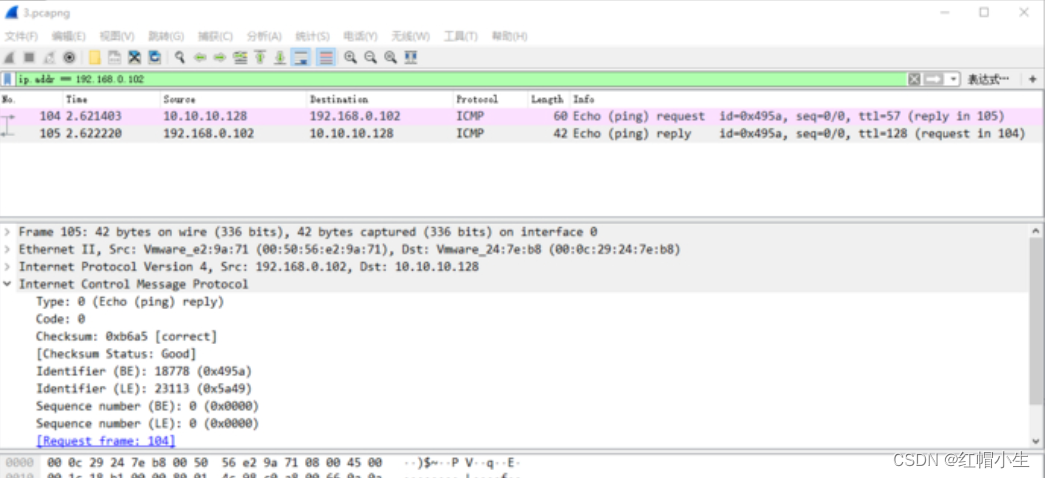
Choose one that doesn't survive IP:192.168.1.16,nmap It will be sent twice ICMP echo request , The second time I still haven't received 106 Of ICMP Response time , It is judged that the host is not alive . But there is a problem with this approach ,Nmap Send up to two times ICMP echo request , Disable on the host Ping In the case of or packet loss, it will cause false positives .
In fact, the simplest way is to VMware The network connection mode of is changed to Bridging mode . Since the problem is VMware Of NAT Caused by the , Then simply do not NAT 了 , Change to bridge , This is also VMware Official advice .
Actually ,VMware Network connection uses bridge mode , The benefits are not just solved Nmap Miscalculation of host survival , It also avoids the impossibility of traceroute And the operating system judgment is not accurate ( We usually use them TTL To determine the operating system , And pass by VMware NAT Returned packet ,TTL Forever 128, Even if the other operating system is Linux.) The problem of , You can create a bounce directly shell Listening port , The network performance is also better than NAT.
In the use of -O Parameter guessing the target operating system , Bridging mode will be better than NAT Pattern . Therefore, the bridge mode is preferred for penetration testing .
however NAT Patterns are not without benefits , stay NAT In mode , The host will be separated by the LAN , It is equivalent to an additional layer of protection . The second is that you can share one with the host IP Address . Because for the hard-working students , The bridge mode needs to use different account numbers to authenticate the campus network . in other words , There is Portal The certification WiFi Next , After the physical machine is connected , virtual machine Cannot use bridge mode . commonly web The domain name of the authentication page is as follows :
https://portal.xxx.cn
The reason lies in , Using the bridge mode will assign a single in the LAN IP, But every one of them IP Need to go online , Must be certified by the campus network , Not certified IP You can't surf the Internet , This causes the physical host to connect to the campus network , Virtual machines cannot use the bridge mode . See my article for details : Portal
stay Portal In the authentication solution of , The first time a user visits WLAN The network authentication process is shown in the figure . The specific certification process is as follows: :
The first 1 Step . Users connect to WLAN Online SSID, adopt DHCP Server acquisition IP Address information .
The first 2 Step .AC Will monitor users' Internet traffic .
The first 3 Step . When AC When the monitored user traffic reaches the threshold ( for example , The traffic threshold can be set to 5 The cumulative flow per minute is 10kB),AC To MAC Bind server to initiate MAC Query request .
The first 4 Step .MAC The binding server returns the query results to AC: Unbound terminal MAC Information .( This is the first time this end user has connected to WLAN The Internet , So in MAC The binding server does not have this terminal MAC Address information )
step 5 and AC According to the normal Portal Process will Portal Verify that the page is redirected to the terminal .
The first 6 Step . The user terminal enters the user name and password information to start Portal verification .
The first 7 Step . Realization AC and Portal Servers and AAA Between servers Portal authentication .
The first 8 Step .ac towards mac Bind server to initiate mac Binding request .MAC Bind the server to complete the... Of the user terminal MAC Address information and Portal Account binding .
The first 9 Step . User authentication succeeded , And can be accessed normally Internet.
stay Portal Of No sense Authentication In solution , User revisits WLAN Network authentication process , The specific certification process is as follows: :
The first 1 Step . Users connect to WLAN Online SSID, adopt DHCP Server acquisition IP Address information .
The first 2 Step .AC Will monitor users' Internet traffic .
The first 3 Step . When AC When the monitored user traffic reaches the threshold ( for example , The traffic threshold can be set to 5 The cumulative flow per minute is 10kB),AC To MAC Bind server to initiate MAC Query request .
The first 4 Step .MAC The binding server returns the query results to AC: terminal MAC Information is bound , And connect the terminal Portal account / The password information is carried to AC Start up Portal Authentication .( Because this end user has completed his first login ,MAC Address 、Portal account / The password is already in MAC The binding server has completed the information binding )
The first 5 Step . Realization AC and Portal Servers and AAA Between servers Portal authentication .
The first 6 Step . User authentication succeeded , And can be accessed normally Internet.
More content on official account :“ Geek Capriccio ”.
attach
TTL
TTL(Time To Live) Is the timer value contained in the packet sent over the network , It tells the receiver that the packet is being discarded ( Data packets ) And keep or use the packet before it expires . Different operating systems TTL Values are different . therefore , We can use TTL Value determines the operating system .Linux The default value is 64.
Different equipment / The default operating system TTL value :


Campus network Portal authentication
Portal Authentication is often referred to as Web authentication , Generally will Portal A certified website is called a portal . When users surf the Internet , Must be authenticated on the portal , If authentication is not successful , Only specific network resources can be accessed , After successful certification , To access other network resources .
advantage :
1、 In general , The client does not need to install additional software , Directly in Web Authentication on the page , Easy and convenient .
2、 Easy to operate , Can be in Portal Business development on the page , Such as advertising push 、 Enterprise propaganda, etc .
3、 Mature technology , It is widely used by operators 、 Fast food chains 、 The hotel 、 Schools and other networks .
4、 Flexible deployment location , Access control can be performed at the access layer or the entry of key data .
5、 Flexible user management , Can be based on user name and VLAN/IP Address /MAC The combination of addresses authenticates the user .
Portal The authentication system is shown in the figure , It mainly includes four basic elements : client 、 Access equipment 、Portal Server and authentication server .
1、 Access equipment : Switch 、 Routers and other access devices , It has three main functions .
- Before certification , All users in the network segment will be authenticated HTTP/HTTPS Requests are redirected to Portal The server .
- In the process of certification , And Portal The server 、 Authentication server interaction , Complete user authentication 、 Authorization and billing functions .
- After certification , Allow users to access network resources authorized by the administrator .
2、Portal The server : The server system that receives the client authentication request , Provide free portal service and authentication interface , Authentication information of the client interacting with the access device .
3、 Authentication server : Interact with access devices , Complete user authentication 、 Authorization and billing .
Portal The server may be an independent entity other than the access device ( External location Portal The server ), It can also be an embedded entity existing in the access device ( built-in Portal The server ). built-in Portal The access device of the server implements a simple Portal Server function , It can only be provided to users through Web Go online by 、 Basic functions of offline , It is not a complete substitute for independent Portal The server , It also does not support any extended functions of external independent servers , For example, it does not support MAC Priority Portal authentication .
Through the built-in Portal Server run Portal authentication , There is no need to deploy additional Portal The server , Therefore, the Portal Universality of certification . however , Limited by the storage space of the access device 、 Function and performance , built-in Portal The server is suitable for simple functions 、 Scenarios with a small number of users , For example, the connection provided by small restaurants Internet service .
As implemented in the network Portal Network level of authentication ,Portal There are two authentication methods : Two layer authentication and three-layer authentication .
When there is a layer-2 network between the client and the access device , That is, the client is directly connected to the access device ( Or there are only two layers of equipment ), The access device can learn from the client MAC Address , Then the access device can use IP Address and MAC Address to identify the user , It can be configured at this time Portal Authentication is a two-level authentication method .
The two-level authentication process is simple , High safety , However, the user can only be in the same network segment with the access device , Therefore, the networking flexibility is not high .
When there is a three-layer network between the client and the access device , That is, there are three layers of forwarding devices between the client and the access device , The access device cannot obtain the certificate of the authentication client MAC Address , Only with IP Address as the unique identification of the user , At this time, we need to Portal The authentication configuration is a three-layer authentication mode .
The three-layer authentication network is flexible , Easy to realize remote control , But because we can only IP Address as the unique identification of the user , So the security is not high .
Under the two-level authentication mode , The message interaction process when the user goes online is shown in the figure . For three-tier Authentication , There is no pre connection process between the client and the access device , The processing flow of other messages is completely consistent with that of layer 2 authentication .
- A pre connection is established between the client and the access device before authentication , That is, the client user has established user online entries on the access device before successful authentication , And only some network access rights .
- Client initiated HTTP Connection request .
- The access device receives HTTP Connection request message , If it's a visit Portal Server or authentication free network resource HTTP message , The access device allows it to pass ; If you are visiting another address HTTP message , Then the access device will URL The address is redirected to Portal Authentication page .
- The client gets the URL Address to Portal The server initiates HTTP Connection request .
- Portal The server returns... To the client Portal Authentication page .
- The user is in Portal Enter the user name and password on the authentication page , Client to Portal The server initiates Portal Authentication request .
- ( Optional )Portal Server received Portal After authentication request , If Portal Between the server and the access equipment CHAP authentication , be Portal The server sends a message to the access device Portal Challenge word request message (REQ_CHALLENGE); If Portal Between the server and the access equipment PAP authentication , Then, the access equipment directly performs the second 9 Step .
- ( Optional ) The access device is directed to Portal The server responds Portal Challenge word response message (ACK_CHALLENGE).
- Portal The server encapsulates the user name and password entered by the user in Portal Authentication request message (REQ_AUTH) in , And send it to the access device .
- Access device according to the obtained user name and password , towards RADIUS Server send RADIUS Authentication request (ACCESS-REQUEST).
- RADIUS The server authenticates the user name and password . If the authentication is successful , be RADIUS The server sends authentication acceptance message to the access device (ACCESS-ACCEPT); If authentication fails , be RADIUS The server returns the authentication rejection message (ACCESS-REJECT). because RADIUS The protocol incorporates the process of authentication and authorization , Therefore, the authentication acceptance message also contains the authorization information of the user .
- The access device accesses according to the received authentication result / Reject user . If the user is allowed to access , Then the access device sends a message to RADIUS The server sends a billing start request message (ACCOUNTING-REQUEST).
- RADIUS The server returns the billing start response message (ACCOUNTING-RESPONSE), And start billing , Add users to your online user list .
- The access device is directed to Portal Server return Portal Certification results (ACK_AUTH), And add users to their online user list .
- Portal The server sends authentication result message to the client , Notify the client that authentication is successful , And add users to their online user list .
- Portal The server sends an authentication response confirmation to the access device (AFF_ACK_AUTH).
边栏推荐
- JVM | local method interface; Native Method Stack
- [v2.1] automatic update system based on motion step API (repair bug, increase completion display, support disconnection reconnection and data compensation)
- LabVIEW控制Arduino实现红外测距(进阶篇—6)
- 领先企业推进智慧财务的同款效率工具,赶快了解一下?
- Redis basic data type (list)
- R语言书籍学习03 《深入浅出R语言数据分析》-第八章 逻辑回归模型 第九章 聚类模型
- 每日一题 - 罗马数字转整数
- 科普 | NFT的类型有哪些(上)
- LabVIEW Arduino electronic weighing system (project Part-1)
- RPA+低代码为何是加速财务数字化转型之利器?
猜你喜欢

On the night of the joint commissioning, I beat up my colleagues

领先企业推进智慧财务的同款效率工具,赶快了解一下?

Release of version 5.6 of rainbow, add multiple installation methods, and optimize the topology operation experience

EndnoteX9簡介及基本教程使用說明

C语言实现迷宫问题

Classes and objects (3)

All features of polymorphism

C语言实现八种排序(2)

189. 轮转数组

How does the chief financial officer of RPA find the "super entrance" of digital transformation?
随机推荐
Game client performance (memory) [previous]
R语言书籍学习03 《深入浅出R语言数据分析》-第八章 逻辑回归模型 第九章 聚类模型
继承的所有特征
[niuke.com] dp31 [template] complete Backpack
Leetcode-155-minimum stack
Redis basic data type (list)
Educational Codeforces Round 114 (Rated for Div. 2) D
The same efficiency tool for leading enterprises to promote smart finance. Let's have a quick look?
Customer information management software
R语言相关文章、文献整理合集(持续更新)
All features of polymorphism
EndnoteX9簡介及基本教程使用說明
Binary search - Learning
How to use the transaction code sat to find the name trial version of the background storage database table corresponding to a sapgui screen field
JVM | introduction
RPA super automation | nongnongji and cloud expansion accelerate financial intelligent operation
网络连接正常但百度网页打不开显示无法访问此网站解决方案
EndnoteX9简介及基本教程使用说明
BZOJ3189 : [Coci2011] Slika
Classes and objects (4)