当前位置:网站首页>顶部下滑沉浸式dialog
顶部下滑沉浸式dialog
2022-06-13 05:22:00 【-SOLO-】
研究了一下怎么实现顶部下滑沉浸式dialog。
效果如下。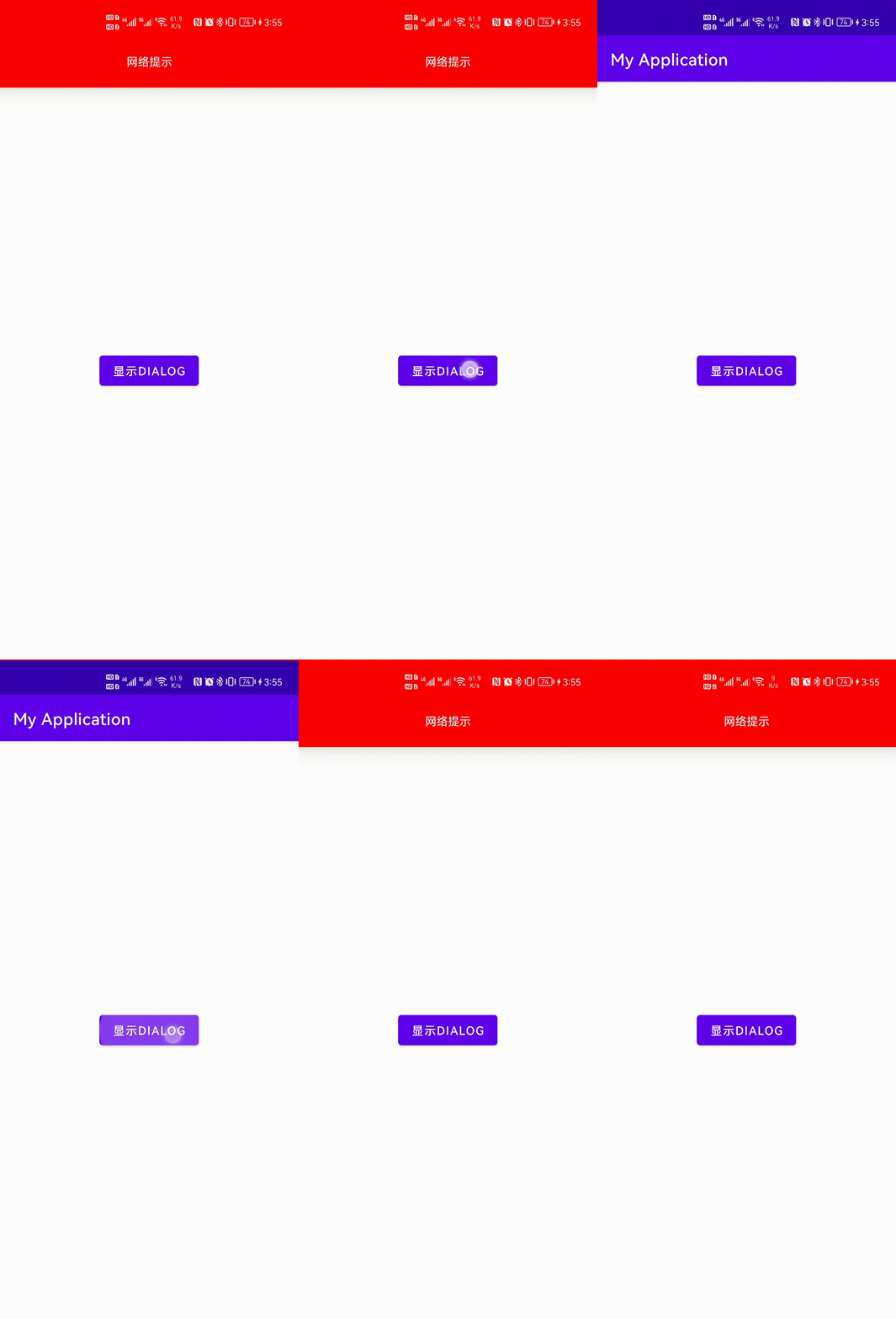
在这里插入图片描述
代码如下
   public void showDialog(View view) {

        Dialog dialog = new Dialog(this);
        View dialogView = LayoutInflater.from(this).inflate(R.layout.layout_dialog, null);
        dialog.setContentView(dialogView);
        dialog.getWindow().getDecorView().setBackgroundColor(Color.RED);
        WindowManager.LayoutParams params = dialog.getWindow().getAttributes();
        params.width = WindowManager.LayoutParams.MATCH_PARENT;
        params.flags = WindowManager.LayoutParams.FLAG_DRAWS_SYSTEM_BAR_BACKGROUNDS;
        if (Build.VERSION.SDK_INT >= Build.VERSION_CODES.P) {

            params.layoutInDisplayCutoutMode = WindowManager.LayoutParams.LAYOUT_IN_DISPLAY_CUTOUT_MODE_SHORT_EDGES;
        }
        params.height = 350;

        dialog.getWindow().setGravity(Gravity.TOP);
        dialog.getWindow().setAttributes(params);
        dialog.getWindow().setWindowAnimations(R.style.dialogWindowAnim);
        dialog.getWindow().setDimAmount(0);


        dialog.getWindow().getDecorView().setPadding(0, 0, 0, 0);
        dialog.show();

    }
动画
dialog_in
<?xml version="1.0" encoding="utf-8"?>

<translate xmlns:android="http://schemas.android.com/apk/res/android" android:interpolator="@android:anim/accelerate_interpolator" android:fromYDelta="-100%" android:toYDelta="0%" android:duration="300">

</translate>
dialog_out
<?xml version="1.0" encoding="utf-8"?>

<translate xmlns:android="http://schemas.android.com/apk/res/android" android:interpolator="@android:anim/accelerate_interpolator" android:fromYDelta="0%" android:toYDelta="-100%" android:duration="300">

</translate>
style
<?xml version="1.0" encoding="utf-8"?>
<resources>
    <style name="dialogWindowAnim" parent="android:Animation"> <item name="android:windowEnterAnimation" >@anim/dialog_in</item> <item name="android:windowExitAnimation" >@anim/dialog_out</item> </style>
</resources>
说明
dialog的宽高控制
主要是通过设置其window的layoutParam来实现的。
      WindowManager.LayoutParams params = dialog.getWindow().getAttributes();
        params.width = WindowManager.LayoutParams.MATCH_PARENT;
        params.height = 350;
dialog 横向全屏
必须设置两点。一个人dialog的window的DecorView的padding必须为0。默认不为0。 DecorView必须设置背景。否则可能显示不全
    dialog.getWindow().getDecorView().setBackgroundColor(Color.RED);
       dialog.getWindow().getDecorView().setPadding(0, 0, 0, 0);
dialog沉浸式
要想沉浸式必须设置如下代码
   params.flags = WindowManager.LayoutParams.FLAG_DRAWS_SYSTEM_BAR_BACKGROUNDS;


        if (Build.VERSION.SDK_INT >= Build.VERSION_CODES.P) {

            params.layoutInDisplayCutoutMode = WindowManager.LayoutParams.LAYOUT_IN_DISPLAY_CUTOUT_MODE_SHORT_EDGES;
        }
动画
dialog.getWindow().setWindowAnimations(R.style.dialogWindowAnim);
dialog背景全透明
主要是设置如下
dialog.getWindow().setDimAmount(0);
边栏推荐
- Float type value range
- Time display of the 12th Blue Bridge Cup
- 【多线程】线程池核心类-ThreadPoolExecutor
- 17.6 unique_ Lock details
- 语音信号分帧的理解
- Case - traversing the directory (file class & recursive call)
- Metaltc4.0 stable release
- Chapter 17 free space management
- Flex布局自适应失效的问题
- Solutions to conflicts between xampp and VMware port 443
猜你喜欢

Enhanced for loop

Case - recursive factorial (recursive)

Understanding inode

Time display of the 12th Blue Bridge Cup

Dup2 use
MySQL installation, architecture and management

External sort

Wampserver (MySQL) installation

Dynamic and static libraries

Case - count the number of occurrences of each string in the string
随机推荐
890. Find and Replace Pattern
MySQL transactions and foreign keys
Bm1z002fj-evk-001 startup evaluation
Dynamic programming - longest common substring
Pychart error resolution: process finished with exit code -1073741819 (0xc0000005)
【线程/多线程】线程的执行顺序
redis
Pyqt5 controls qpixmap, qlineedit qsplitter, qcombobox
Small project - household income and expenditure software (1)
C language learning log 1.24
Clause 30: be familiar with the failure of perfect forwarding
Use the browser to cut the entire page (take chrome as an example)
Wampserver (MySQL) installation
Case - random numbers without repetition (HashSet and TreeSet)
Install harbor (online offline)
Hainan University Postgraduate Entrance Examination electronic information (085400) landing experience
Building Nacos 2 based on docker compose (using MySQL for persistence)
C language learning log 12.25
Jeffery0207 blog navigation
Explain the opencv function cv:: add() in detail, and attach sample code and running results of various cases