当前位置:网站首页>How to use yolov5 as an intelligent transportation system for red light running monitoring (1)
How to use yolov5 as an intelligent transportation system for red light running monitoring (1)
2022-07-25 23:56:00 【MioeC】
List of articles
gossip
- A few days ago, I was caught riding a battery car by Xiamen Traffic Police , Sent me a text message ,××××××, You are on × month × Number , No helmet ,
- Please travel in a civilized and safe way , Feeling that technology is becoming more and more powerful , I just wonder if we can make this thing by ourselves , Arrange it immediately .
effect
Demo address https://www.bilibili.com/video/BV1pe4y1Q7zP?spm_id_from=333.999.0.0
Code address
https://github.com/cdmstrong/traffic-light

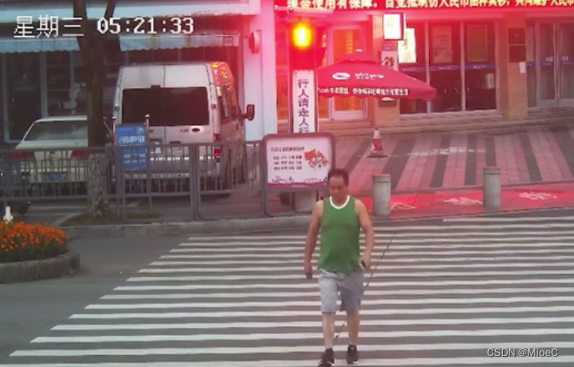

Ideas
- First, ah. , I need a camera at the intersection to monitor the video input , First use small online videos to replace
- so what , We also need target detection algorithm , Zebra crossings need to be detected , Pedestrians , Helmet , Battery car , traffic lights
- then , We also need a target tracking algorithm , Track the same person in the picture , Otherwise, countless people will appear
- And then , I need to judge the traffic lights , And the state and location of pedestrians , Consider whether to run the red light according to various situations
- Then feed back to the interface operation , Show the boss the effect , Good promotion and salary increase
step
Download a small video
- This video is really hard to find , It's really rare ,
Click on the link to download
Detection algorithm implementation
- Left and right , still yolov5 It suits me better , It is mainly a scheme that has been used to detect pedestrians
- This part is more complicated , Is the core of the project
Tracking algorithm implementation
- I chose this without hesitation deepsort Algorithm , The algorithm of bull force , Daniel's design , Don't explain
- The paper refers to download
Judge the traffic lights
Helmet judgment

- My idea is to recognize people and cars , but yolov5 It is identified separately , That is, people and cars recognize different objects , So we need to combine people and cars for training , It is to train the recognition model of human cycling , Then judge whether there is a helmet
- Another way of thinking is , Train a recognition model without a helmet , Direct detection without wearing People with helmets can , This is a better implementation , However, due to limited circumstances , Less data , Plus there is no computer GPU Environmental Science , So helmet detection cannot be realized .
Traffic light snapshot
- This does not require a training model , And relatively simple , Just check the traffic lights , Then judge whether someone has crossed the road .

- So we first make it clear that the object to be detected is the traffic light , people -
- Filter conditions are set to two types
OBJ_LIST = ['person', 'traffic light']
- Capture the picture of the red light , Conduct opencv Judge
def isRed(img):
    # cv2.imwrite('video/' + time.strftime('%Y-%m-%d-%H-%M-%S') + '.png', img)
    img = cv2.medianBlur(img, 3)
    img = cv2.cvtColor(img, cv2.COLOR_BGR2HSV)
    min = np.array([0, 43, 46])
    max = np.array([10, 255, 255])
    img = cv2.inRange(img, min, max)
    if np.max(img):
        return True
    else :
        return False
- Capture method
def catch_person(isLight, track_id, img, ori):
    if isLight:
        if track_id not in person_list:
            person_list.append(track_id)
            cv2.imwrite('video/catch/' + time.strftime('%Y-%m-%d-%H-%M-%S') + '.png', img)
            cv2.imwrite('video/catch/' + time.strftime('%Y-%m-%d-%H-%M-%S') + str(track_id) + '.png', ori)
            #
            print(' Demon xiula , Dare to run the red light ')
Draw a line in the middle of the road at the zebra crossing , There are pedestrians passing and the traffic light is red , Just run the red light
Application cv2.fillPoly Draw a detection rectangle
polygon_yellow_value_2 = cv2.fillPoly(mask_image_temp, [ndarray_pts_yellow], color=1)
polygon_yellow_value_2 = polygon_yellow_value_2[:, :, np.newaxis]
- Detect collision
if polygon_mask_blue_and_yellow[y, x] == 1:
- In this way, the complete capture function is realized
import time
import numpy as np

import objtracker
from objdetector import Detector
import cv2


VIDEO_PATH = './video/short.mp4'
def isRed(img):
    # cv2.imwrite('video/' + time.strftime('%Y-%m-%d-%H-%M-%S') + '.png', img)
    img = cv2.medianBlur(img, 3)
    img = cv2.cvtColor(img, cv2.COLOR_BGR2HSV)
    min = np.array([0, 43, 46])
    max = np.array([10, 255, 255])
    img = cv2.inRange(img, min, max)
    if np.max(img):
        return True
    else :
        return False
def catch_person(isLight, track_id, img, ori):
    if isLight:
        if track_id not in person_list:
            person_list.append(track_id)
            cv2.imwrite('video/catch/' + time.strftime('%Y-%m-%d-%H-%M-%S') + '.png', img)
            cv2.imwrite('video/catch/' + time.strftime('%Y-%m-%d-%H-%M-%S') + str(track_id) + '.png', ori)
            #
            print(' Demon xiula , Dare to run the red light ')
if __name__ == '__main__':

    #  According to video size , Fill in the... Used for line collision calculation polygon
    width = 1920
    height = 1080
    mask_image_temp = np.zeros((height, width), dtype=np.uint8)

    #  Fill in the first collision line polygon( Blue )
    # list_pts_blue = [[204, 305], [227, 431], [605, 522], [1101, 464], [1900, 601], [1902, 495], [1125, 379], [604, 437],
                    # [299, 375], [267, 289]]
    list_pts_blue = [[0, 450], [1890, 450], [1890, 550], [0, 550]]
    ndarray_pts_blue = np.array(list_pts_blue, np.int32)

    #  Fill in the second collision line polygon( yellow )
    mask_image_temp = np.zeros((height, width), dtype=np.uint8)
    # list_pts_yellow = [[181, 305], [207, 442], [603, 544], [1107, 485], [1898, 625], [1893, 701], [1101, 568],
    # [594, 637], [118, 483], [109, 303]]
    list_pts_yellow = [[0, 600], [1890, 600], [1890, 750], [0, 750]]

    ndarray_pts_yellow = np.array(list_pts_yellow, np.int32)
    polygon_yellow_value_2 = cv2.fillPoly(mask_image_temp, [ndarray_pts_yellow], color=1)
    polygon_yellow_value_2 = polygon_yellow_value_2[:, :, np.newaxis]

    #  For line collision detection mask, contain 2 individual polygon,( Range of values  0、1、2), For line collision calculation
    polygon_mask_blue_and_yellow = polygon_yellow_value_2

    #  Reduce size ,1920x1080->960x540
    polygon_mask_blue_and_yellow = cv2.resize(polygon_mask_blue_and_yellow, (width//2, height//2))


    #  yellow   Color disk
    yellow_color_plate = [0, 255, 255]
    #  yellow  polygon picture
    yellow_image = np.array(polygon_yellow_value_2 * yellow_color_plate, np.uint8)

    #  Color picture ( Range of values  0-255)
    color_polygons_image = yellow_image

    #  Reduce size ,1920x1080->960x540
    color_polygons_image = cv2.resize(color_polygons_image, (width//2, height//2))

    # list  And blue polygon overlap
    list_overlapping_blue_polygon = []

    # list  And yellow polygon overlap
    list_overlapping_yellow_polygon = []

    #  Downlink quantity
    down_count = 0
    #  Uplink number
    up_count = 0

    font_draw_number = cv2.FONT_HERSHEY_SIMPLEX
    draw_text_postion = (int((width/2) * 0.01), int((height/2) * 0.05))

    #  Instantiation yolov5 detector
    detector = Detector()

    #  Open the video
    capture = cv2.VideoCapture(VIDEO_PATH)
    person_list = []

    while True:
        #  Read every picture
        _, im = capture.read()
        if im is None:
            break
        isLight = False
        #  Reduce size ,1920x1080->960x540
        im = cv2.resize(im, (width//2, height//2))
        im_ori = im.copy()
        list_bboxs = []
        # #  Detect traffic lights
        # red_img, red_box = detector.detect(im, ['traffic light'])
        # if len(red_box) > 0:
        # x1, y1, x2, y2, lbl, conf = red_box
        # red_light = isRed(red_img[y1: y2, x1: x2])
        # if red_light:
        # print(' Red light detected ')

        #  Update tracker
        output_image_frame, list_bboxs, light = objtracker.update(detector, im)
        #  Output pictures
        output_image_frame = cv2.add(output_image_frame, color_polygons_image)
        if light is not None:
            (x1, y1, x2, y2, label, conf) = light
            red_light = isRed(im_ori[y1: y2, x1: x2])
            if red_light:
                print(' Red light detected ')
                isLight = True
        if len(list_bboxs) > 0:
            # ---------------------- Judge the collision line ----------------------
            for item_bbox in list_bboxs:
                x1, y1, x2, y2, label, track_id = item_bbox

                #  Collision detection point ,(x1,y1),y Direction offset scale  0.0~1.0
                y1_offset = int(y1 + ((y2 - y1) * 0.6))
                #  The point of hitting the line
                y = y1_offset
                x = x1
                if polygon_mask_blue_and_yellow[y, x] == 1:

                    catch_person(isLight, track_id, im_ori[y1: y2, x1: x2], im_ori)
                    #  If hit   blue polygon
                    # if track_id not in list_overlapping_blue_polygon:
                    # list_overlapping_blue_polygon.append(track_id)
                    #  Judge   yellow polygon list Whether there is this in  track_id
                    #  With this track_id, Think it is  UP ( The upside ) Direction
                    # if track_id in list_overlapping_yellow_polygon:
                        #  The upside +1
                        # up_count += 1
                        # print('up count:', up_count, ', up id:', list_overlapping_yellow_polygon)
                        # #  Delete   yellow polygon list  This one in id
                        # list_overlapping_yellow_polygon.remove(track_id)
                        # catch_person(isLight, track_id, im_ori[y1: y2, x1: x2])
                # elif polygon_mask_blue_and_yellow[y, x] == 2:
                # #  If hit   yellow polygon
                # if track_id not in list_overlapping_yellow_polygon:
                # list_overlapping_yellow_polygon.append(track_id)
                # #  Judge   blue polygon list  Whether there is this in  track_id
                # #  With this  track_id, be   Think it's  DOWN( The downside ) Direction
                # if track_id in list_overlapping_blue_polygon:
                # #  The downside +1
                # down_count += 1
                # print('down count:', down_count, ', down id:', list_overlapping_blue_polygon)
                # #  Delete   blue polygon list  This one in id
                # list_overlapping_blue_polygon.remove(track_id)
                # catch_person(isLight, track_id, im_ori[y1: y2, x1: x2])
            # ---------------------- It's useless to clean up id----------------------
            # list_overlapping_all = list_overlapping_yellow_polygon + list_overlapping_blue_polygon
            # for id1 in list_overlapping_all:
            # is_found = False
            # for _, _, _, _, _, bbox_id in list_bboxs:
            # if bbox_id == id1:
            # is_found = True
            # if not is_found:
            # #  If not , Delete id
            # if id1 in list_overlapping_yellow_polygon:
            # list_overlapping_yellow_polygon.remove(id1)

            # if id1 in list_overlapping_blue_polygon:
            # list_overlapping_blue_polygon.remove(id1)
            # list_overlapping_all.clear()
            #  Empty list
            # list_bboxs.clear()
        else:
            #  If there is nothing in the image bbox, Leave blank list
            list_overlapping_blue_polygon.clear()
            list_overlapping_yellow_polygon.clear()

        #  Output count information
        text_draw = ' The number of people who run red lights : ' + str(len(person_list))

        output_image_frame = cv2.putText(img=output_image_frame, text=text_draw,
                                         org=draw_text_postion,
                                         fontFace=font_draw_number,
                                         fontScale=0.75, color=(0, 0, 255), thickness=2)
        cv2.imshow('Counting Demo', output_image_frame)
        cv2.waitKey(1)

    capture.release()
    cv2.destroyAllWindows()
Extraction and encapsulation of detection algorithm
- Model loading
- The image processing
- Call model method detection , And deal with pictures
class Detector(baseDet):
    def __init__(self):
        super(Detector, self).__init__()
        self.init_model()
        self.build_config()

    def init_model(self):
        self.weights = DETECTOR_PATH
        self.device = '0' if torch.cuda.is_available() else 'cpu'
        self.device = select_device(self.device)
        model = attempt_load(self.weights, map_location=self.device)
        model.to(self.device).eval()
        model.float()
        self.m = model
        self.names = model.module.names if hasattr(
            model, 'module') else model.names

    def preprocess(self, img):
        img0 = img.copy()
        img = letterbox(img, new_shape=self.img_size)[0]
        img = img[:, :, ::-1].transpose(2, 0, 1)
        img = np.ascontiguousarray(img)
        img = torch.from_numpy(img).to(self.device)
        img = img.float()  #  Semi precision
        img /= 255.0  #  Image normalization
        if img.ndimension() == 3:
            img = img.unsqueeze(0)
        return img0, img

    def detect(self, im, red = None):
        im0, img = self.preprocess(im)
        pred = self.m(img, augment=False)[0]
        pred = pred.float()
        pred = non_max_suppression(pred, self.threshold, 0.4)
        pred_boxes = []
        for det in pred:
            if det is not None and len(det):
                det[:, :4] = scale_coords(
                    img.shape[2:], det[:, :4], im0.shape).round()
                for *x, conf, cls_id in det:
                    lbl = self.names[int(cls_id)]
                    if not lbl in OBJ_LIST:
                        continue
                    x1, y1 = int(x[0]), int(x[1])
                    x2, y2 = int(x[2]), int(x[3])
                    pred_boxes.append(
                        (x1, y1, x2, y2, lbl, conf))
        return im, pred_boxes
Target tracking algorithm extraction
- Get the detection target ,
- use deepsort Update target
- Painting effect
from deep_sort.utils.parser import get_config
from deep_sort.deep_sort import DeepSort
import torch
import cv2
import numpy as np

cfg = get_config()
cfg.merge_from_file("deep_sort/configs/deep_sort.yaml")
deepsort = DeepSort(cfg.DEEPSORT.REID_CKPT,
                    max_dist=cfg.DEEPSORT.MAX_DIST, min_confidence=cfg.DEEPSORT.MIN_CONFIDENCE,
                    nms_max_overlap=cfg.DEEPSORT.NMS_MAX_OVERLAP, max_iou_distance=cfg.DEEPSORT.MAX_IOU_DISTANCE,
                    max_age=cfg.DEEPSORT.MAX_AGE, n_init=cfg.DEEPSORT.N_INIT, nn_budget=cfg.DEEPSORT.NN_BUDGET,
                    use_cuda=True)


def plot_bboxes(image, bboxes, line_thickness=None):
    # Plots one bounding box on image img
    tl = line_thickness or round(
        0.002 * (image.shape[0] + image.shape[1]) / 2) + 1  # line/font thickness
    list_pts = []
    point_radius = 4

    for (x1, y1, x2, y2, cls_id, pos_id) in bboxes:
        if cls_id in ['smoke', 'phone', 'eat']:
            color = (0, 0, 255)
        else:
            color = (0, 255, 0)
        if cls_id == 'eat':
            cls_id = 'eat-drink'

        # check whether hit line
        check_point_x = x1
        check_point_y = int(y1 + ((y2 - y1) * 0.6))

        c1, c2 = (x1, y1), (x2, y2)
        cv2.rectangle(image, c1, c2, color, thickness=tl, lineType=cv2.LINE_AA)
        tf = max(tl - 1, 1)  # font thickness
        t_size = cv2.getTextSize(cls_id, 0, fontScale=tl / 3, thickness=tf)[0]
        c2 = c1[0] + t_size[0], c1[1] - t_size[1] - 3
        cv2.rectangle(image, c1, c2, color, -1, cv2.LINE_AA)  # filled
        cv2.putText(image, '{} ID-{}'.format(cls_id, pos_id), (c1[0], c1[1] - 2), 0, tl / 3,
                    [225, 255, 255], thickness=tf, lineType=cv2.LINE_AA)

        list_pts.append([check_point_x-point_radius, check_point_y-point_radius])
        list_pts.append([check_point_x-point_radius, check_point_y+point_radius])
        list_pts.append([check_point_x+point_radius, check_point_y+point_radius])
        list_pts.append([check_point_x+point_radius, check_point_y-point_radius])

        ndarray_pts = np.array(list_pts, np.int32)
        cv2.fillPoly(image, [ndarray_pts], color=(0, 0, 255))
        list_pts.clear()
    return image

def update(target_detector, image):
        #  Get all detection boxes
        _, bboxes = target_detector.detect(image)
        bbox_xywh = []
        confs = []
        bboxes2draw = []
        light = None
        if len(bboxes):
            # Adapt detections to deep sort input format
            for x1, y1, x2, y2, label, conf in bboxes:
                obj = [
                    int((x1+x2)/2), int((y1+y2)/2),
                    x2-x1, y2-y1
                ]
                bbox_xywh.append(obj)
                if label == 'traffic light':
                    light = (x1, y1, x2, y2, label, conf)
                confs.append(conf)
            xywhs = torch.Tensor(bbox_xywh)
            confss = torch.Tensor(confs)
            # Pass detections to deepsort
            outputs = deepsort.update(xywhs, confss, image)
            for value in list(outputs):
                x1,y1,x2,y2,track_id = value
                bboxes2draw.append(
                    (x1, y1, x2, y2, "", track_id)
                )
        image = plot_bboxes(image, bboxes2draw)
        return image, bboxes2draw, light
It's too complicated. These two algorithms , Write a complete one after finishing it clearly
边栏推荐
- Nacos 下线服务时报错 errCode: 500
- Good news under the epidemic
- arcgis根据矢量范围裁取tif影像(栅格数据)、批量合并shp文件、根据矢量范围裁取区域内的矢量,输出地理坐标系、转换16位TIF影像的像素深度至8位、shp文件创建和矢量框标绘设置
- A brief introduction to OWASP
- Song of statistics lyrics
- 你还在用浏览器自带书签?这款书签插件超赞
- [learning notes] unreal 4 engine introduction (IV)
- 行为型模式之观察者模式
- 下一代终端安全管理的关键特征与应用趋势
- 寻找链表的中间节点
猜你喜欢

红娘的话

反射之类加载过程

Topsis与熵权法

How does JS judge whether the current date is within a certain range

Redis basic data type (string/list/set/hash/zset)

ABAP 代码中读取会计科目的字段状态(隐藏、可选、必输)
TOPSIS and entropy weight method
Good news under the epidemic

ArcGIS cuts TIF images (grid data) according to the vector range, merges shp files in batches, cuts vectors in the region according to the vector range, outputs the geographic coordinate system, conve
How to solve cross domain problems
随机推荐
Shardingsphere data slicing
获取马蜂窝酒店数据
2022-07-18 study notes of group 5 self-cultivation class (every day)
Promise resolve callback hell, async await modifier
什么是奇偶校验?如何用C语言实现?
【英雄哥七月集训】第 24天: 线性树
LeetCode 0135. 分发糖果
C - readonly and const keywords
Data intensive application system design - Application System Overview
二叉树——654. 最大二叉树
二叉树——617. 合并二叉树
Typescript TS basic knowledge and so on
面试重点——传输层的TCP协议
How does JS judge whether the current date is within a certain range
Part 74: overview of machine learning optimization methods and superparameter settings
LeetCode 0136. 只出现一次的数字:异或
ShardingSphere数据分片
redis-基本数据类型(String/list/Set/Hash/Zset)
二叉树——404. 左叶子之和
下一代终端安全管理的关键特征与应用趋势