当前位置:网站首页>MySQL explanation (II)
MySQL explanation (II)
2022-06-26 13:18:00 【C chord~】
Catalog
Two . Check the database structure
4. The structure of the display table
2. modify 、 Update the original data
6、 ... and . Modify the indication or table structure
1. Modify the name of the table
3、 Modify fields ( Column ) name , Add unique key
One 、SQL Statement Overview
1、SQL Language
- Structured Query Language Abbreviation , Structured query language
- Standard language for relational databases
- For maintaining the management database
- Including data query 、 Data update 、 Access control 、 Object management and other functions
2.SQL classification
DDL	 Data definition language , Used to create database objects , Ruku 、 surface 、 Index, etc.
DML	 Data manipulation language , It is used to manage the data in the table
DQL	 Data query language , Used to find eligible data records from the data table
DCL	 Data control language , Used to set or change database user or role permissions
Two . Check the database structure
1. Visit the library
mysql -u root -p
 password

 perhaps
mysql -u root -p password 
2. View database information
show  databases;
In English ; ending 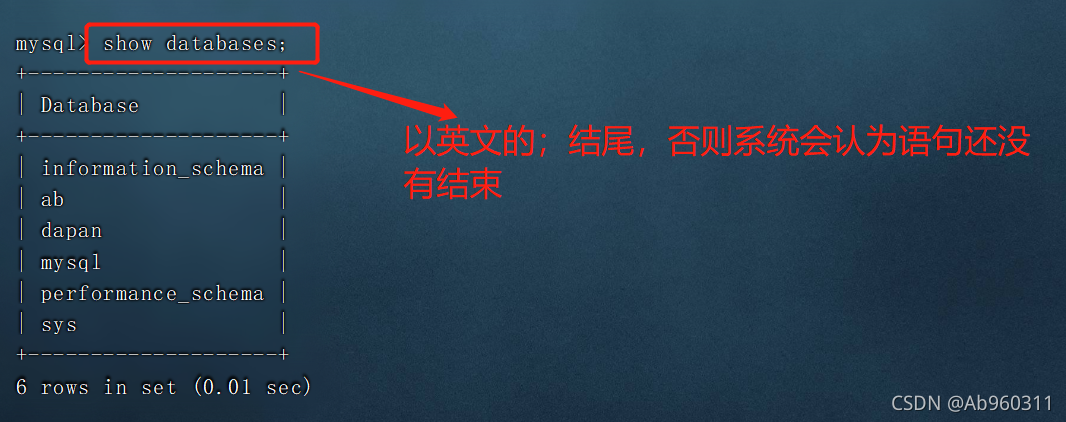
3. See the table
use  Library name    # First enter the database where the tables are stored
show tables;  # Display all tables in the current library

4. The structure of the display table
describe  database . Table name
 or
desc database . Table name 
3、 ... and . data type
 type 	 explain
int	     integer ( Define integer type data )
float	 Single precision floating point ,4 byte 32 position , Accurate to six decimal places
double	 Double precision floating point ,8 byte 64 position
char	 Fixed length character types , Define character class data
varchar	 Variable length character types
text	 Text
image	 picture
decimal (5,2)	5 A valid length number , After the decimal point is 2 position , Specifies the length of the array
Four .DDL
1. Create database
create database Database name ;
2. Create table
create table Table name ( Field 1 data type , Field 2 data type .... [primary key( Primary key name )]); 
field	     Field
type	     type
not null	 Not allowed to be empty
default 	 The default is empty.
primary key	 Primary key ( Generally, select fields that are not duplicate and not empty )
3. Delete table
use  Library name
drop table  Table name ;
 or
drop table  Library name . indicate ;
4. Delete Library
drop database Database name ;

5、 ... and .DML
1. Insert new data
insert into  Table name ( Field 1, Field 2[,...]) values( Field 1 Value , Field 2 Value ,...);

 Field , You can use  password(' password ') , Be able to use encrypted passwords


2. modify 、 Update the original data
update Table name set Field name 1= field value 1[, Field name 2= field value 2] [where Conditional expression ];

notes : When changing data , Need to be careful , It is recommended to use the primary key as the conditional expression option , Because the primary key is unique .
3. Delete data
delete from Table name [where Conditional expression ];

5、 ... and .DQL
1. Query data
select  Field name 1, Field name 2[,...] from  Table name  [where  Conditional expression ];
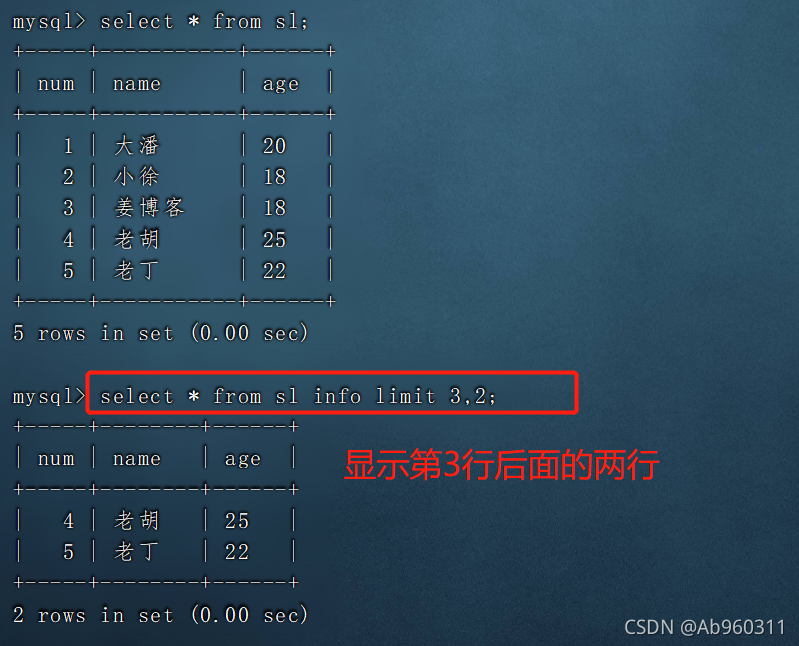
select * from  Table name ;           # Show all
select  Field 1, Field 2 from  Table name ;  # Show fields 1 And field 2
select  Field 1 from  Table name \G;      # Display vertically as a list
select * from  Table name  info limit 2;   # Show only headers 2 That's ok
select * from  Table name  info limit 2,3; # According to the first 2 Front after row 3 That's ok



6、 ... and . Modify the indication or table structure
1. Modify the name of the table
alter table The old name of the table rename The new name of the table ;

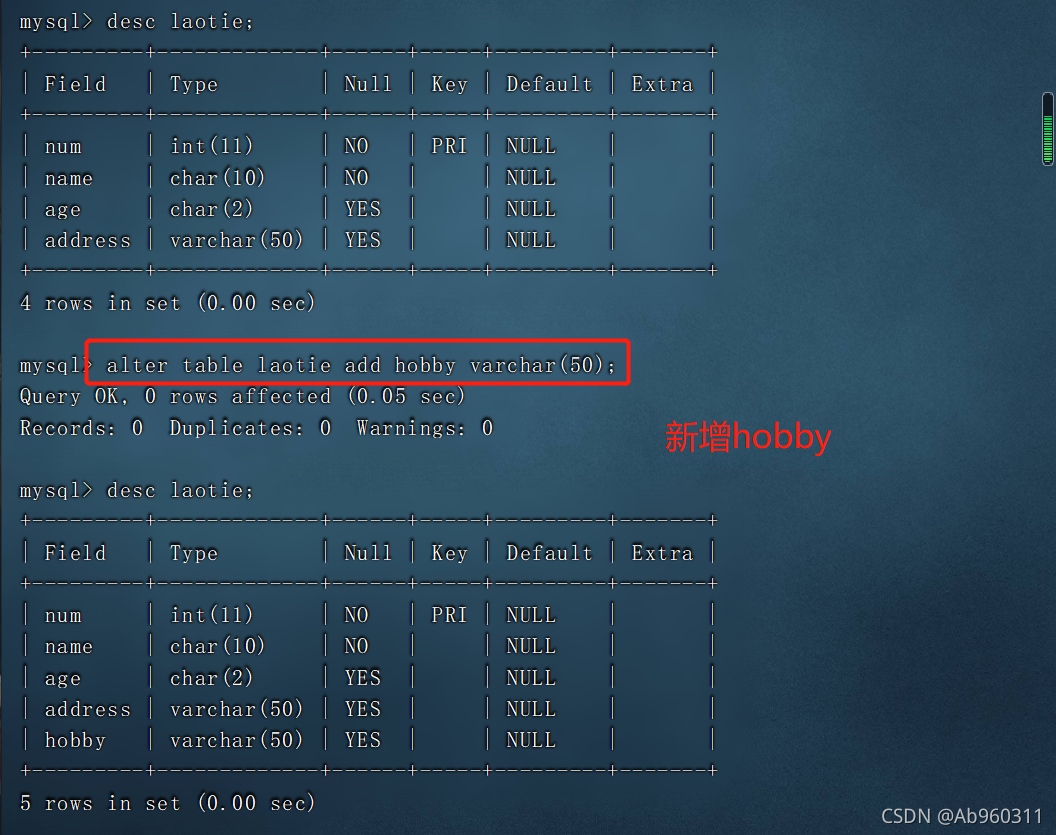
2. Extended table structure
alter table Table name add Extension name data type ;
3、 Modify fields ( Column ) name , Add unique key
alter table  Table name  change  Old column names   New column names   data type  [unique key];

#change  Field name can be modified 、 data type 、 Constraints, etc

 The only key : only , But it can be empty ( Null values can only appear once )

 The primary key contains some properties of a unique key
 A unique key cannot be used as a primary key

4、 Delete field 、 Primary key
alter table Table name drop Field name ;

summary
- We do the database daily “ increase 、 Delete 、 Change 、 check ”
- To create a primary key, you must use a unique
- where The option suggests using a primary key , Because the only one , Not easy to make mistakes
- sql Statement is case insensitive
- sql Statements need to be very precise , Every wrong letter will cause the statement to fail
- The operation of the database must be cautious
边栏推荐
- 外观模式(Facade)
- HDU 3709 Balanced Number
- 倍福TwinCAT3 NCI在NC轴界面中的基本配置和测试
- Processing function translate (mousex, mousey) learning
- Update and download of Beifu EtherCAT XML description file
- Composite mode
- H5 video automatic playback and circular playback
- Beifu PLC model selection -- how to see whether the motor is a multi turn absolute value encoder or a single turn absolute value encoder
- Appearance mode (facade)
- P2393 yyy loves Maths II
猜你喜欢

Beifu PLC obtains system time, local time, current time zone and system time zone conversion through program
IDC报告:百度智能云AI Cloud市场份额连续六次第一

Electron official docs series: Processes in Electron
Bridge mode
![8. [STM32] timer (TIM) -- interrupt, PWM, input capture experiment (proficient in timer)](/img/e7/2fd8ec8d5e5473c7f84f3e3bcedca8.png)
8. [STM32] timer (TIM) -- interrupt, PWM, input capture experiment (proficient in timer)
![Hdu1724[Simpson formula for integral]ellipse](/img/57/fb5098e150b5f3d91a5d0983a336ee.png)
Hdu1724[Simpson formula for integral]ellipse

2、并行接口、协议和相关芯片介绍(8080、8060)

Beifu PLC model selection -- how to see whether the motor is a multi turn absolute value encoder or a single turn absolute value encoder

P2393 yyy loves Maths II
2. Introduction to parallel interface, protocol and related chips (8080, 8060)
随机推荐
scrapy——爬取漫画自定义存储路径下载到本地
I - Dollar Dayz
Typescript
HDU 3555 Bomb
Zoomeeper sets ACL permission control (only specific IP access is allowed to enhance security)
B - Bridging signals
UVA10341 solve it 二分
G - Cow Bowling
OPLG: 新一代云原生可观测最佳实践
To solve the difficulties of small and medium-sized enterprises, Baidu AI Cloud makes an example
Electron official docs series: Examples
System tasks (display / print class) in Verilog - $display, $write, $strobe, $monitor
倍福EtherCAT Xml描述文件更新和下载
Arcpy - - utilisation de la fonction insertlayer (): ajout de calques dans un document de carte
Processing polyhedron change
Beifu PLC based on NT_ Shutdown to realize automatic shutdown and restart of controller
Machine learning notes - seasonality of time series
Oplg: new generation cloud native observable best practices
First pass! Baidu AI Cloud Xiling platform has obtained the authoritative certification of digital human ability evaluation from the Institute of information technology
[how to connect the network] Chapter 1: the browser generates messages