当前位置:网站首页>一文详解Nodejs中fs文件模块与path路径模块
一文详解Nodejs中fs文件模块与path路径模块
2022-07-26 10:35:00 【InfoQ】
1.初识 Node.js


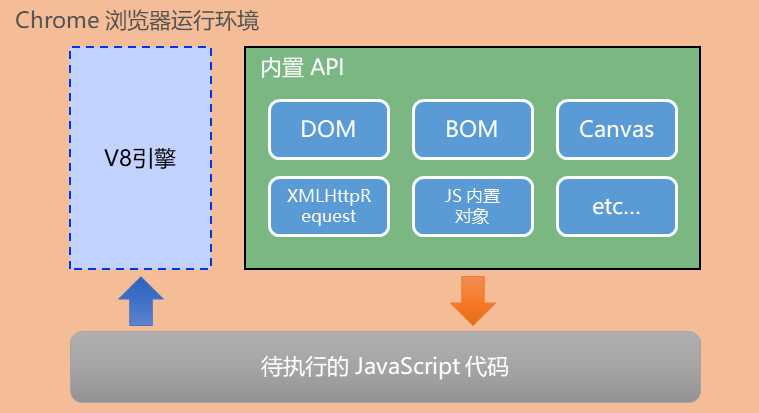
- V8 引擎负责解析和执行 JavaScript 代码
- 内置 API 是由运行环境提供的特殊接口,只能在所属的运行环境中被调用
Node.js 简介
- 什么是 Node.jsNode.js 是一个基于 Chrome V8 引擎的JavaScript 运行环境官网地址 https://nodejs.org/zh-cn/
- Node.js 中的 JavaScript 运行环境
- 浏览器是 JavaScript 的前端运行环境
- Node.js 是 JavaScript 的后端运行环境
- Node.js 中无法调用 DOM 和 BOM 等浏览器内置 API
- Node.js 可以做什么
- a基于 Express 框架 http://www.expressjs.com.cn/ 可以快速构建 Web 应用
- b基于 Electron 框架 https://electronjs.org/ 可以构建跨平台的桌面应用
- c基于 restify 框架 http://restify.com/ 可以快速构建 API 接口项目
- d读写和操作数据库、创建实用的命令行工具辅助前端开发、etc…
- Node.js 怎么学
- 浏览器中的 JavaScript 学习路径
- JavaScript 基础语法 + 浏览器内置 API(DOM + BOM) + 第三方库(jQuery、art-template 等)
- Node.js 的学习路径JavaScript 基础语法 + Node.js 内置 API(fs、path、http等)+ 第三方 API 模块(express、mysql 等)
- ,可以快速定位到上一次执行的命令。
- tab键,可以快速补全文件的路径(先输入第一个字,然后使用tab键,可以快速补全路径)
- ESC,可以快速清空已输入的命令
- cls,清空powershell面板
2.fs 文件系统模块
什么是 fs 文件系统模块
const fs = require("fs")
fs.readFile(path[, option], callback)pathoptioncallback// 1. 导入 fs 模块,来操作文件
const fs = require('fs')
// 2. 调用 fs.readFile() 方法读取文件
// 参数1:读取文件的存放路径
// 参数2:读取文件时候采用的编码格式,一般默认指定 utf8
// 参数3:回调函数,拿到读取失败和成功的结果 err dataStr
fs.readFile('./files/1.txt', 'utf8', function(err, dataStr) {
// 2.1 打印失败的结果
// 如果读取成功,则 err 的值为 null
// 如果读取失败,则 err 的值为 错误对象,dataStr 的值为 undefined
console.log(err)
console.log('-------')
// 2.2 打印成功的结果
console.log(dataStr)
})
//一般逻辑可以这么写:
fs.readFile('./files/11.txt', 'utf8', function(err, dataStr) {
if (err) {
return console.log('读取文件失败!' + err.message)
}
console.log('读取文件成功!' + dataStr)
})
fs.writeFile(path, data[, option], callback)pathdataoptioncallbackconst fs = require('fs')
// 2. 调用 fs.writeFile() 方法,写入文件的内容
// 参数1:表示文件的存放路径
// 参数2:表示要写入的内容
// 参数3:回调函数
fs.writeFile('./files/3.txt', 'ok123', function(err) {
// 2.1 如果文件写入成功,则 err 的值等于 null
// 2.2 如果文件写入失败,则 err 的值等于一个 错误对象
// console.log(err)
//判断是否写入成功
if (err) {
return console.log('文件写入失败!' + err.message)
}
console.log('文件写入成功!')
})
console.log(__dirname)

fs.readFile(__dirname + '/files/1.txt', 'utf8', function(err, dataStr) {
 if (err) {
 return console.log('读取文件失败!' + err.message)
 }
 console.log('读取文件成功!' + dataStr)
})
3.path 路径模块
const path = require("path")
path.join(...paths)- ...paths <string> 路径片段的序列
- 返回<string>注意:凡是涉及到路径拼接的操作,都要使用 path.join() 方法进行处理。不直接使用+进行字符串的拼接
const path = require('path')
const fs = require('fs')

// 注意: ../ 会抵消前面的路径
const pathStr = path.join('/a', '/b/c', '../../', './d', 'e')
console.log(pathStr) // \a\b\d\e

// 取代fs.readFile(__dirname + '/files/1.txt', ...)
fs.readFile(path.join(__dirname, './files/1.txt'), 'utf8', function(err, dataStr) {
 if (err) {
 return console.log(err.message)
 }
 console.log(dataStr)
})
path.basename(path[, ext])- path <string>必选参数,表示一个路径的字符串
- ext <string>可选参数,表示文件扩展名
- 返回 <string> 路径的最后一部分
const path = require('path')

// 定义文件的存放路径
const fpath = '/a/b/c/index.html'

const fullName = path.basename(fpath)
console.log(fullName) // index.html

const nameWithoutExt = path.basename(fpath, '.html')
console.log(nameWithoutExt) // index
path.extname(path)- path <string> 必选参数,表示一个路径的字符串
- 返回 <string> 返回得到的扩展名字符串
const path = require('path')

// 这是文件的存放路径
const fpath = '/a/b/c/index.html'

const fext = path.extname(fpath)
console.log(fext)//输出.html
边栏推荐
- [C language] named type and anonymous type
- 构造器、方法重载、对象数组和static
- [socket] the three handshakes are completed in listen, and accept only takes out one connection from the queue that completes the connection
- js翻页、kkpager.js翻页
- [转]ArcGIS中判断两个Geometry之间的关系
- [Halcon vision] image filtering
- 2022/07/25 ------ arrangement of strings
- Analyze the hybrid construction objects in JS in detail (construction plus attributes, prototype plus methods)
- 404页面和路由钩子
- videojs转canvas暂停、播放、切换视频
猜你喜欢

The difference between equals and = =

Centos8 (liunx) deploying WTM (asp.net 5) using PgSQL
![[Halcon vision] affine transformation](/img/f1/32284c71e78e6eea390fdb6058ba0f.png)
[Halcon vision] affine transformation

oracle 启动不了 tnslistener服务启动不了

Introduction to data analysis | kaggle Titanic mission

videojs转canvas暂停、播放、切换视频
【机器学习小记】【人脸识别】deeplearning.ai course4 4th week programming

js 获得当前时间,时间与时间戳的转换

粽子大战 —— 猜猜谁能赢
![Structure of [Halcon vision] operator](/img/d9/e16ea52cea7897e3a1d61d83de472f.png)
Structure of [Halcon vision] operator
随机推荐
Redis docker instance and data structure
.NET操作Redis Hash对象
STM32 阿里云MQTT esp8266 AT命令
Introduction to data analysis | kaggle Titanic mission
[Halcon vision] programming logic
oracle 启动不了 tnslistener服务启动不了
[Halcon vision] image gray change
干货likeshop外卖点餐系统开源啦100%开源无加密
What if MySQL can't get in
原生JS-获取transform值 x y z及rotate旋转角度
【dectectron2】跟着官方demo一起做
[leetcode每日一题2021/4/29]403. 青蛙过河
Okaleido ecological core equity Oka, all in fusion mining mode
异常的概念与处理
videojs转canvas暂停、播放、切换视频
【论文下饭】Deep Mining External Imperfect Data for ChestX-ray Disease Screening
Simple use of json-c Library -- converting JSON files to struct
Unit test, what is unit test and why is it so difficult to write a single test
Uninstall Meizu app store
将json文件中数组转换为struct