当前位置:网站首页>ESP32-CAM高性价比温湿度监控系统
ESP32-CAM高性价比温湿度监控系统
2022-06-23 10:35:00 【daodanjishui】
ESP32-CAM ArduinoIDE开发系列文章目录
第一篇:ESP32-CAM高性价比WIFI图传方案快速入门教程
第二篇:ESP32-CAM第一个无线点灯程序
第三篇:ESP32-CAM智能网关的设计与实现
第四篇:ESP32-CAM创建热点构成并发式DNS服务器
第五篇:ESP32-CAM高性价比温湿度监控系统
文章目录
前言
daodanjishui物联网核心原创技术之ESP32 Arduino IDE开发之嵌入式网页服务器架设、http请求收发与解析、单片机IO口读写操作、AJAX技术、并发服务器技术、DNS技术和传感器DHT11整合组成:ESP32-CAM高性价比温湿度监控系统。
一、ESP32-CAM高性价比温湿度监控系统是什么?
daodanjishui在上一篇的项目:ESP32-CAM创建热点构成并发式DNS服务器详细介绍了嵌入式服务器局域网DNS的应用,当时的服务器主页只能查询ESP32-CAM板载LED 灯的状态和控制LED灯的打开和关闭,但是没有查询环境参数功能,没有真正体现出物联网技术的精髓,也是上一篇不足的地方。
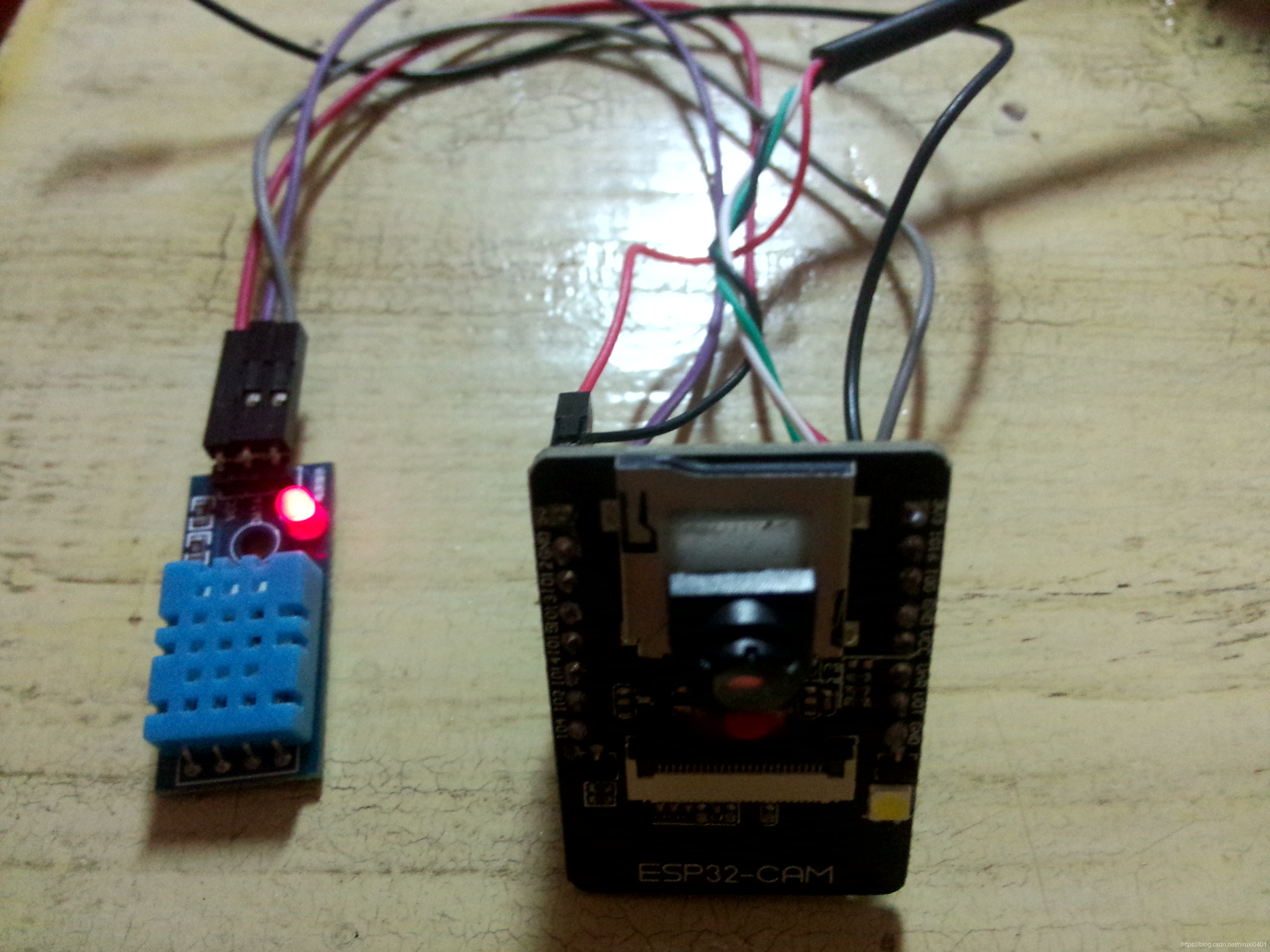
daodanjishui在这一篇的项目中,保留上一篇的功能之外,将加入DHT11温湿度传感器模块,并且加入传感器驱动程序,这个模块只有一个数据接口data,所以只占用ESP32-CAM的一个GPIO14,所以很容易将上一期的项目改造成一个温湿度监控系统。系统的功能就是在表单的窗口中输入:data 再点击cmd按钮提交命令,ESP32服务器就会查询温湿度数据返回到服务器主页,用户就可以查询到环境参数,显示在反馈信息那里,对上一篇功能不清楚的买家可以去看看上一篇(第四篇)的介绍。硬件效果如下图所示:
程序运行效果如下所示(红色字体就是传感器采集回来的数据):
DHT11的驱动程序当时是在网上随便找一个驱动程序实现采集数据功能的,测试的效果不是很好,测几次才得一次数据,其实差不多就可以了,要准确就要好好修改驱动程序,后面找到一个靠谱一点的DHT驱动程序,在这里分享一下,一些常用的库可以在:http://www.taichi-maker.com/homepage/download/#library-download
免费下载得到。
二、软件开发过程
1.引入库dht11.h和dht11.cpp
dht11.h代码如下:
#ifndef dht11_h
#define dht11_h

#if defined(ARDUINO) && (ARDUINO >= 100)
#include <Arduino.h>
#else
#include <WProgram.h>
#endif

#define DHT11LIB_VERSION "0.4.1"

#define DHTLIB_OK 0
#define DHTLIB_ERROR_CHECKSUM -1
#define DHTLIB_ERROR_TIMEOUT -2

class dht11
{

public:
    int read(int pin);
	int humidity;
	int temperature;
};
#endif
//
// END OF FILE
//
dht11.c代码如下:
//
// FILE: dht11.cpp
// VERSION: 0.4.1
// PURPOSE: DHT11 Temperature & Humidity Sensor library for Arduino
// LICENSE: GPL v3 (http://www.gnu.org/licenses/gpl.html)
//
// DATASHEET: http://www.micro4you.com/files/sensor/DHT11.pdf
//
// HISTORY:
// George Hadjikyriacou - Original version (??)
// Mod by SimKard - Version 0.2 (24/11/2010)
// Mod by Rob Tillaart - Version 0.3 (28/03/2011)
// + added comments
// + removed all non DHT11 specific code
// + added references
// Mod by Rob Tillaart - Version 0.4 (17/03/2012)
// + added 1.0 support
// Mod by Rob Tillaart - Version 0.4.1 (19/05/2012)
// + added error codes
//

#include "dht11.h"

// Return values:
// DHTLIB_OK
// DHTLIB_ERROR_CHECKSUM
// DHTLIB_ERROR_TIMEOUT
int dht11::read(int pin)
{

	// BUFFER TO RECEIVE
	uint8_t bits[5];
	uint8_t cnt = 7;
	uint8_t idx = 0;

	// EMPTY BUFFER
	for (int i=0; i< 5; i++) bits[i] = 0;

	// REQUEST SAMPLE
	pinMode(pin, OUTPUT);
	digitalWrite(pin, LOW);
	delay(18);
	digitalWrite(pin, HIGH);
	delayMicroseconds(40);
	pinMode(pin, INPUT);

	// ACKNOWLEDGE or TIMEOUT
	unsigned int loopCnt = 10000;
	while(digitalRead(pin) == LOW)
		if (loopCnt-- == 0) return DHTLIB_ERROR_TIMEOUT;

	loopCnt = 10000;
	while(digitalRead(pin) == HIGH)
		if (loopCnt-- == 0) return DHTLIB_ERROR_TIMEOUT;

	// READ OUTPUT - 40 BITS => 5 BYTES or TIMEOUT
	for (int i=0; i<40; i++)
	{

		loopCnt = 10000;
		while(digitalRead(pin) == LOW)
			if (loopCnt-- == 0) return DHTLIB_ERROR_TIMEOUT;

		unsigned long t = micros();

		loopCnt = 10000;
		while(digitalRead(pin) == HIGH)
			if (loopCnt-- == 0) return DHTLIB_ERROR_TIMEOUT;

		if ((micros() - t) > 40) bits[idx] |= (1 << cnt);
		if (cnt == 0)   // next byte?
		{

			cnt = 7;    // restart at MSB
			idx++;      // next byte!
		}
		else cnt--;
	}

	// WRITE TO RIGHT VARS
        // as bits[1] and bits[3] are allways zero they are omitted in formulas.
	humidity    = bits[0];
	temperature = bits[2];

	uint8_t sum = bits[0] + bits[2];

	if (bits[4] != sum) return DHTLIB_ERROR_CHECKSUM;
	return DHTLIB_OK;
}
//
// END OF FILE
//
2.读入数据
Arduino传感器驱动代码如下:
double Fahrenheit(double celsius)
{

        return 1.8 * celsius + 32;
}    //摄氏温度度转化为华氏温度

double Kelvin(double celsius)
{

        return celsius + 273.15;
}     //摄氏温度转化为开氏温度

// 露点(点在此温度时,空气饱和并产生露珠)
// 参考: http://wahiduddin.net/calc/density_algorithms.htm
double dewPoint(double celsius, double humidity)
{

        double A0= 373.15/(273.15 + celsius);
        double SUM = -7.90298 * (A0-1);
        SUM += 5.02808 * log10(A0);
        SUM += -1.3816e-7 * (pow(10, (11.344*(1-1/A0)))-1) ;
        SUM += 8.1328e-3 * (pow(10,(-3.49149*(A0-1)))-1) ;
        SUM += log10(1013.246);
        double VP = pow(10, SUM-3) * humidity;
        double T = log(VP/0.61078);   // temp var
        return (241.88 * T) / (17.558-T);
}

// 快速计算露点,速度是5倍dewPoint()
// 参考: http://en.wikipedia.org/wiki/Dew_point
double dewPointFast(double celsius, double humidity)
{

        double a = 17.271;
        double b = 237.7;
        double temp = (a * celsius) / (b + celsius) + log(humidity/100);
        double Td = (b * temp) / (a - temp);
        return Td;
}

#include <dht11.h>

dht11 DHT11;

#define DHT11PIN 2

void setup()
{

  Serial.begin(9600);
  Serial.println("DHT11 TEST PROGRAM ");
  Serial.print("LIBRARY VERSION: ");
  Serial.println(DHT11LIB_VERSION);
  Serial.println();
}

void loop()
{

  Serial.println("\n");

  int chk = DHT11.read(DHT11PIN);

  Serial.print("Read sensor: ");
  switch (chk)
  {

    case DHTLIB_OK:
                Serial.println("OK");
                break;
    case DHTLIB_ERROR_CHECKSUM:
                Serial.println("Checksum error");
                break;
    case DHTLIB_ERROR_TIMEOUT:
                Serial.println("Time out error");
                break;
    default:
                Serial.println("Unknown error");
                break;
  }

  Serial.print("Humidity (%): ");
  Serial.println((float)DHT11.humidity, 2);

  Serial.print("Temperature (oC): ");
  Serial.println((float)DHT11.temperature, 2);

  Serial.print("Temperature (oF): ");
  Serial.println(Fahrenheit(DHT11.temperature), 2);

  Serial.print("Temperature (K): ");
  Serial.println(Kelvin(DHT11.temperature), 2);

  Serial.print("Dew Point (oC): ");
  Serial.println(dewPoint(DHT11.temperature, DHT11.humidity));

  Serial.print("Dew PointFast (oC): ");
  Serial.println(dewPointFast(DHT11.temperature, DHT11.humidity));

  delay(2000);
}
3.移植到工程
在上一篇的工程里面加入这个代码就可以用网页去触发查询环境参数了。
 if(!strcmp(value_buf, "data")){
    //查询温度和湿度
            dht11 DHT11;
            if (DHTLIB_OK == DHT11.read(14))//我用的是GPIO14
            {

              Serial.print("HUMID = ");
              Serial.print(DHT11.humidity);
              Serial.println(" %RH");
              Serial.print("TMEP = ");
              Serial.print(DHT11.temperature);
              Serial.println("^C");
              String  T=DHT11.temperature+"";
              String  H=DHT11.humidity+"";
              return request->send(200, "text/plain", "temperature="+T+" humidity="+H);//返回温度和湿度
            }else return request->send(200, "text/plain", "no temperature and humidity");//返回温度和湿度
         }
总结

daodanjishui这一期比上一期的源码多了两个文件,这两个文件就是arduino的dht11库,网上也比较难找,调试过程也出了不少问题,最终实现了温湿度查询的功能,上一期我也说过,这个姐妹篇的代码扩展程度很高,随意提升系统的功能,所以现在把姐妹篇的代码改造一下变成温湿度监控系统,读者想学习怎么拓展系统功能,可以考虑都看看这两套代码的异同点,一般人添加库函数进去肯定会出现不少错误的,不是那么容易成功的,对比过这两套代码,就会添加新的传感器代码进去了,肯定有所收获!!!
代码传送地址:https://www.cirmall.com/circuit/19388/
点击跳转下载
边栏推荐
- NOI OJ 1.3 15:苹果和虫子 C语言
- [software and system security] heap overflow
- 为什么指针做形参没有改变对应的值
- Picture storage -- Reference
- 5次登陆失败,限制登录实践
- list的介绍及使用
- Flush is the stock market? Is online account opening safe?
- Verification code redis practice summary
- Weidongshan equipment information query routine learning
- JVM easy start-01
猜你喜欢

flutter系列之:flutter中的Wrap

Too helpless! Microsoft stopped selling AI emotion recognition and other technologies, saying frankly: "the law can not keep up with the development of AI"

社招腾讯高P(高级产品经理)的面试手册
深潜Kotlin协程(十四):共享状态的问题

R和RStudio下载安装详细步骤

为什么poll/select在open时要使用非阻塞NONBLOCK

炫酷相册代码,祝对象生日快乐!

Solve the problem that Preview PDF cannot be downloaded
Why should poll/select use Nonblock when opening

Build a QQ robot to wake up your girlfriend
随机推荐
UART的奇偶校验
验证码redis实践总结
Solve the problem that Preview PDF cannot be downloaded
php反射类使用
Noi OJ 1.3 17: calculating triangle area C language
R and rstudio download and install detailed steps
MySQL-01. Summary of database optimization and explain field knowledge in work
经济小常识
Flush recommended? Is it safe to open a mobile account?
AI芯片技术-2022年
NOI OJ 1.3 05:计算分数的浮点数值 C语言
安装typescript环境并开启VSCode自动监视编译ts文件为js文件
Google Earth Engine(GEE)——GEDI L2A Vector Canopy Top Height (Ver
Large homework collection
Weidongshan equipment information query routine learning
Confessing with Snake games (with source code)
Opencloudos uses snap to install NET 6
JVM easy start-02
Personal blog system graduation project opening report
Noi OJ 1.4 04: odd even ASCII value judgment C language