当前位置:网站首页>VB.net类库,获取屏幕内鼠标下的颜色(进阶——3)
VB.net类库,获取屏幕内鼠标下的颜色(进阶——3)
2022-06-26 20:40:00 【小虞163】
在解决方案中:
新建一个new class:myScreen

引用:
这一次多出一个System.Windows.Forms,因为我们需要用到button事件
接着写入三段函数
Public Class myScreen
    Public Image As Bitmap
    Private ispick As Boolean = False
    Private bmp As Bitmap
    Private g As Graphics

    ''' <summary>
    ''' 注意,请不要单独调用此函数,并且,该函数对应的button事件为MouseDown。获取鼠标情况并返回鼠标样式
    ''' </summary>
    ''' <param name="e">鼠标事件,是左键</param>
    ''' <param name="cur">传入鼠标的样式,并返回一个鼠标样式为Cross</param>
    ''' <returns></returns>
    Public Function PickColorDown(e As MouseEventArgs, cur As Cursor)
        If e.Button = MouseButtons.Left Then
            ispick = True
            Dim scr As Screen = Screen.PrimaryScreen
            Dim recSc As Rectangle = scr.Bounds
            bmp = New Bitmap(recSc.Width, recSc.Height)
            g = Graphics.FromImage(bmp)
            g.CopyFromScreen(New Point(0, 0), New Point(0, 0), New Size(recSc.Width, recSc.Height))
            cur = Cursors.Cross
            Return cur
        End If
    End Function
    ''' <summary>
    ''' 注意,请不要单独调用此函数,并且,该函数对应的button事件为MouseMove。获取鼠标情况并返回鼠标指针区域的颜色
    ''' </summary>
    ''' <param name="e">鼠标事件</param>
    ''' <param name="but">获取button</param>
    ''' <returns></returns>
    Public Function PickColorMove(e As MouseEventArgs, but As Button)
        Dim x, y As Integer
        Dim p As Point = New Point(e.X, e.Y)
        Dim colorpoint As Color
        If ispick = True Then
            x = but.PointToScreen(p).X
            y = but.PointToScreen(p).Y
            colorpoint = bmp.GetPixel(x, y)
            Return colorpoint
        End If

    End Function
    ''' <summary>
    ''' 注意,请不要单独调用此函数,并且,该函数对应的button事件为MouseUp。获取鼠标情况并返回鼠标样式
    ''' </summary>
    ''' <param name="cur">传入鼠标的样式,并返回一个鼠标样式为Default</param>
    ''' <returns></returns>
    Public Function PickColorUp(cur As Cursor)
        ispick = False
        cur = Cursors.Default
        Return cur
    End Function


End Class
这里参考了一下VB.net大佬的文章。
窗体上的调用:
在前面:声明一下myScreen的类
Public GDIscr As New GDI_Make_NET4_5.myScreen代码加入:
Private Sub Button3_MouseDown(sender As Object, e As MouseEventArgs) Handles Button3.MouseDown
        Cursor = GDIscr.PickColorDown(e, Cursor)

    End Sub

    Private Sub Button3_MouseMove(sender As Object, e As MouseEventArgs) Handles Button3.MouseMove
        Pic.BackColor = GDIscr.PickColorMove(e, Button3)
    End Sub

    Private Sub Button3_MouseUp(sender As Object, e As MouseEventArgs) Handles Button3.MouseUp
        Cursor = GDIscr.PickColorUp(Cursor)
    End Sub
看看: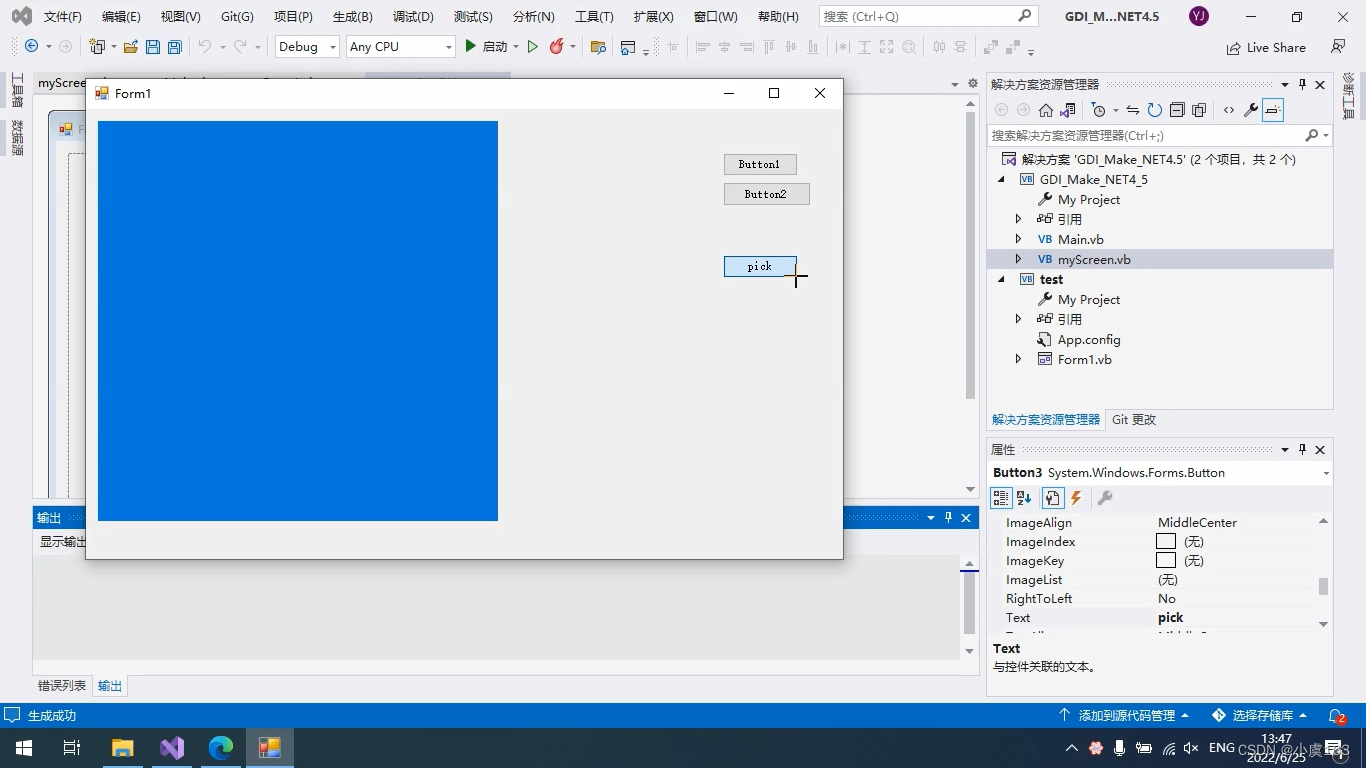
边栏推荐
- How to install mysql8.0 database under Windows system? (Graphic tutorial)
- JWT operation tool class sharing
- leetcode刷题:字符串06(实现 strStr())
- 【protobuf 】protobuf 升级后带来的一些坑
- 网上开户万一免五到底安不安全?
- 710. 黑名单中的随机数
- swagger:如何生成漂亮的静态文档说明页
- Dynamic planning 111
- Leetcode question brushing: String 06 (implement strstr())
- 【protobuf 】protobuf 昇級後帶來的一些坑
猜你喜欢

回首望月

leetcode刷题:字符串04(颠倒字符串中的单词)

Bonne Recommandation: développer des outils de sécurité pour les terminaux mobiles

【贝叶斯分类4】贝叶斯网

Distributed ID generation system

GameFi 活跃用户、交易量、融资额、新项目持续性下滑,Axie、StepN 能摆脱死亡螺旋吗?链游路在何方?
Muke 8. Service fault tolerance Sentinel

【protobuf 】protobuf 昇級後帶來的一些坑
12个MySQL慢查询的原因分析

这些地区考研太疯狂!哪个地区报考人数最多?
随机推荐
C exercise. Class list plus records, display records and clear records
Disruptor本地线程队列_使用transProcessor处理器和WorkPool两种方式进行消费对比---线程间通信工作笔记005
MySQL - table creation and management
Fixed length memory pool
大家都能看得懂的源码(一)ahooks 整体架构篇
【protobuf 】protobuf 昇級後帶來的一些坑
Gd32 USB composite device file descriptor
SentinelResource注解详解
Bonne Recommandation: développer des outils de sécurité pour les terminaux mobiles
IDEA 报错:Process terminated【已解决】
Many gravel 3D material mapping materials can be obtained with one click
On the origin of the dispute between the tradition and the future of database -- AWS series column
0 basic C language (3)
C: 反转链表
Development of NFT for digital collection platform
Treasure and niche cover PBR multi-channel mapping material website sharing
Browser event loop
Leetcode: hash table 08 (sum of four numbers)
[protobuf] some pits brought by protobuf upgrade
JWT operation tool class sharing