当前位置:网站首页>Hcip day 14 notes
Hcip day 14 notes
2022-07-27 03:11:00 【Lazy King eats Wolf】
LDP --- Label distribution agreement --- Mainly used in MPLS The control level of
MPL S The main work to be completed at the control level is to allocate labels and transfer labels . The premise of assigning labels is that labels must first exist in the local routing table , The premise of transferring labels is also to have a routing foundation . therefore ,LDP Want to work properly , You need to IGP As the foundation .

1, Assign tags
Not all devices assign labels to all routing entries in their local routing table , Instead, you decide that you are the outbound station of a certain network segment LSR when , Will actively assign labels .
Of course , In the form of reaching the target network segment LSP In the process , All the middle L SR Need to give the corresponding FEC Assign tags . Then other devices only receive the mapping relationship between the label and the target network segment , Will passively allocate labels . Before assigning labels, you need to complete the check action , Mainly check whether the local routing table of the target network segment can reach , And whether the next hop is the same as the announcer . Labels can be assigned if the inspection is passed , If you fail, you cannot assign labels .
LDP How to assign tags to :
1, In an orderly way --- By default, Huawei devices choose to allocate labels in an orderly manner
2, Independent way --- There is no need to confirm that you are leaving LSR, You can also actively assign labels to the routing entries in the routing table .
2, Transfer label
Departure LSR After assigning labels , It needs to be passed on to others LSR equipment , The prerequisite for transmission is that they must first LDP Peer relationship . and LDP The prerequisite for establishing peer relationship is to establish LDP conversation .
Local LDP conversation --- A direct connection is established between two devices LDP conversation
long-range LDP conversation --- Between non directly connected devices , You can create remote LDP conversation
LDP The agreement is to establish a local LDP Conversation time , There is no need to manually specify the neighbor IP Address , It can automatically discover neighbor relationships . Mainly because LDP First of all, there will always be multicast (224.0.0.2) Formal period of . Sexual transmission hello Bag to find neighbors .hello Package usage UDP 646 End C To complete .
Local LDP The process of establishing a session :
1, stay LSR. Activate on LDP after , First, send periodically hello Package to complete peer discovery .

stay HELL0 You need to carry a - Some parameters , It contains the transmission address and LDP ID. Transmission address : This address is mainly established later TCP The address needed for the conversation , By default , We will use the L SR ID As this address . So ask for ,LSR ID Must be available and accessible IP Address .
LDP ID: All active LDP Agreed L SR The equipment must have a LDP ID, This ID By 48 Bit binary structure , Expression bit 32 position : 16 position , front 32 Bit usage is LSRID, after 1 6 Bit use 0 To express . This is related to the label space , All device based tag spaces , It's all worth 0.
hello The default sending cycle of packets is 5s, The survival time is 3 times hello Time , Default 15 second
2, Both sides are interacting hello After the package , Will get the other party's transmission address , Will be established according to this transmission address TCP conversation .
In establishment TCP Between sessions ,LDP There are also check actions , You need to confirm the received transmission address first , Is it reachable in the local routing table , Reachable can be established normally TCP conversation .
If both sides establish TCP conversation , Two two-way channels will be created , Waste of resources . At the receiving end hello After the transmission address in the packet , Compare with the local transmission address , The larger the transmission address - Fang , We call it the active party , The active party can take the initiative to establish TCP conversation , The passive side does not establish .


3, complete TCP After the session is established , The larger the delivery address - Party A will give priority to the use of initialization messages , It contains some negotiated parameters and sends them to the passive party . If the other party confirms the parameters , Will reply keeplive Message to confirm , At the same time, send your own local initialization message , Carry your own parameters . The active party will also confirm the parameters after receiving , If there is no problem, it will also be sent keeplive message . Received by both parties keeplive message , It means that the parameter negotiation is successful ,LDP Session successfully established .

after , It also needs to be sent periodically keeplive Keep the message alive , The default sending cycle is 15S, The survival time is 3 Times the cycle sending time , The default is 45 second
Upstream downstream relationship --- It is determined by the flow direction of data layer traffic , The data sender is upstream , The recipient is the downstream . From the perspective of the control layer , Then the direction of label transmission should be from downstream to upstream . Then the upstream equipment will collect the downstream labels .
Label transfer method --- DU Pattern --- Downstream autonomous mode --- Huawei equipment adopts this mode by default , all LSR After assigning labels , You can actively transfer labels to others LSR
If you choose downstream autonomous mode , Then the device passes the label , Unable to judge the relationship between upstream and downstream , The label will be sent to all peer relationships . When the device receives the label , Then you can judge the upstream and downstream relationship based on the routing table . Huawei equipment , Only the upstream equipment will record the labels sent by the downstream equipment , Labels sent by upstream devices will not be saved .( And one more The storage mode of each label is to save both upstream and downstream labels .
DOD Pattern --- Downstream on demand mode --- Only the downstream equipment receives the notification from the upstream equipment , Will send labels to upstream devices .
Data level flow process
In the process of data level traffic passing , Inbound L SR Equipment and battle L SR Both devices need to query two tables , a sheet FIB surface ,- - Zhang LFIB Packets can complete the forwarding process , Resulting in reduced efficiency , Need to optimize .
Optimization idea :
Inbound LSR -- Because the inbound packet does not contain labels , therefore , Must view FIB surface . You can directly add the outbound label to FIB In the table , In this way, you will no longer need to view LFPB surface .
Departure LSR --- PHP --- Last hop pop-up mechanism ---- Departure L SR The equipment is giving FEC Assign special labels directly when assigning labels 3 ( Implicit empty tag ), after , Pass this tag to your upstream device , The upstream will record this tag as an outbound tag in LFIB In the table . When data comes to the device , matching LFIB It was found that the battle tag was 3, Then he will pop up this label directly . Then exit like this L SR The device will receive an unlabeled packet , Then he can directly check FIB Table to realize forwarding .
Huawei devices enable the next last hop pop-up mechanism by default .
LDP Configuration of
1, First of all LSR. Start the IGP agreement , Ensure the routing foundation
2, To configure MPLS Of LSR ID
[r1]mpls Isr-id 1.1.1.1
3, Activate MPLS and LDP
Global activation
[r1]mpls
Info: Mpls starting, please wait... OK!
[r1]mpls ldp
Interface activation
[r1-GigabitEthernet0/0/0]mpls
[r1-GigabitEthernet0/0/0]mpls ldp
[r1]display mpls Idp peer --- see LDP Peer relationship
[r1]display mpls ldp session --- see LDP conversation
[r4]display mpls Isp --- see LFIB surface
Be careful : Huawei equipment only gives /32 Host routing assignment label , because MPLS It is not mainly used in data forwarding , If there are too many routing entries in the routing table , Will result in too many LSP, Waste of resources .
[r4-mpls]lsp-trigger all -- This command can be given by the device /32 Route assignment label outside the host route
MPLS Solve the routing black hole problem
[r2]route recursive-lookup tunnel --- During recursive route lookup , If there is a tunnel, recursively enter the tunnel
[r2]display fib verbose --- see FIB Details of the table

PE --- Service provider boundary equipment
Connection required CE ( Boundary devices of customer network ) equipment , You need to accept the routing information of the customer's private network . He also needs to transmit the routing information of the private network to the remote PE equipment . On . The transmission of this part of the route mainly uses BGP Protocol to deliver . Then the middle P equipment ( Service provider's equipment ), Only need to complete the high-speed forwarding of routing information .
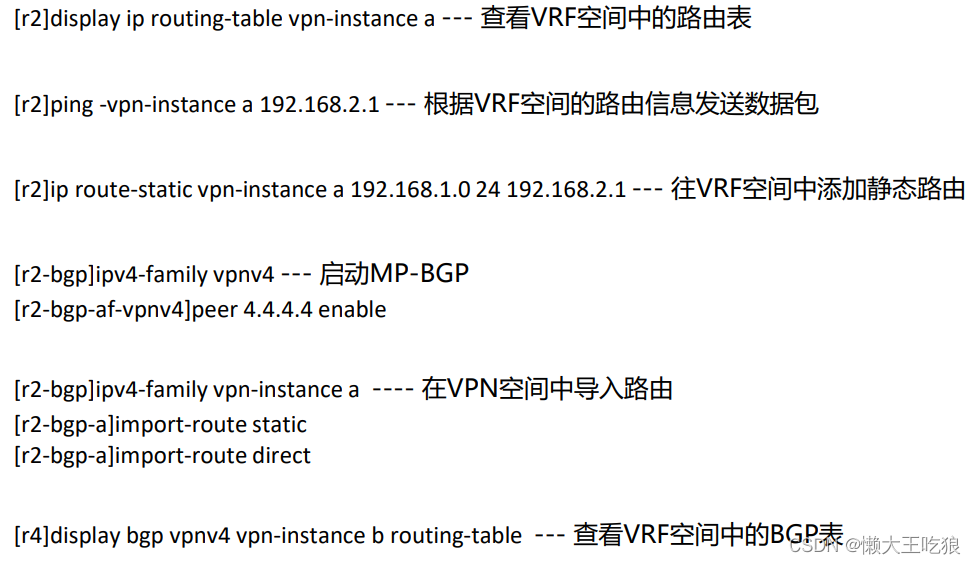
VRF --- Virtual routing forwarding
VPN instance (VPN example ) --- We can abstract a real physical device into several virtual devices . Every virtual device is called a VRF Space , Every VRF Each space has its own routing table ,FIB surface , Dynamic routing protocol , And interface .

RD value --- Routing discrimination code
from 64 Bit binary , The most common expression of Huawei equipment is AS:NN ( front AS Representative's AS Number , Back NN Represents a custom value )

VPNV4 route
IPV4 Add RD The value of , From the original 32 A into 96 position , It will become VPNV4 route .
MP-BGP
It can carry the routing information of various address groups . If you need to deliver VPNV4 route , You need to use MP- BGP To deliver .
RT--- Routing target value
VPN Target --- 32 Bit binary structure --- from BGP Community attributes to carry
Departure RT value --- Export RT --- PE The equipment is different VRF Outbound with different space configurations RT, Sent by the community attribute , Need and remote PE Inbound on device RT Corresponding .
Inbound RT value --- Import RT --- PE The equipment is different VRF Inbound with different space configurations RT, Compare according to the value carried in the community attribute , Put it in the corresponding VRF In space
Data layer traffic --- Data layer traffic mainly arrives at the far end PE When on the device, you can't tell which one is added VRF In the space , therefore , You need to use double-layer labels to distinguish .---- Outer label ( Close to the second floor ) --- Public label --- from LDP Agreement to allocate , Its purpose is to ensure that the data can pass normally MPLS Domain , Reach the far end PE.
Inner label ( Close to the third floor ) --- Private label --- from MP- BGP Agreement to allocate , The purpose is at the far end PE After the outer label pops up on the device , You can judge which one to reach according to the inner label VRF Of data traffic . The inner label needs to match VRF There is correspondence in space , This label is made up of MP- BGP After the distribution , The community attribute is passed along with the route to the opposite end PE.


边栏推荐
- Okaleido tiger logged into binance NFT on July 27, and has achieved good results in the first round
- Naive Bayes -- Document Classification
- 基于GoLang实现API短信网关
- Alibaba cloud technology expert Yang Zeqiang: Construction of observability on elastic computing cloud
- Is the low commission account opening of Galaxy Securities Fund reliable, reliable and safe
- CAS deployment and successful login jump address
- 商城小程序项目完整源码(微信小程序)
- [dynamic planning medium] leetcode 198. looting 740. delete and get points
- Inftnews | "traffic + experience" white lining e Digital Fashion Festival leads the new changes of digital fashion
- 论构造函数的原型是谁
猜你喜欢

阿里云解决方案架构师张平:云原生数字化安全生产的体系建设
Common questions and answers of software testing interview (divergent thinking, interface, performance, concept,)

Cs224w fall course - --- 1.1 why graphs?

Cloud development sleeping alarm clock wechat applet source code

五、MFC视图窗口和文档

Time module: acquisition and mutual transformation of timestamp, structured time and formatted time

Use the most primitive method to manually implement the common 20 array methods

Portraiture5全新升级版磨皮滤镜插件神器

Bulk copy baby upload prompt garbled, how to solve?

An error in the fourth edition of the red book?

随机推荐
2649: 段位计算
196. 删除重复的电子邮箱
[paper]PointLaneNet论文浅析
Attention should be paid to the first parameter of setTimeout
vs2019 中编译和使用 protobuf 库
百度云人脸识别
力扣(LeetCode)207. 课程表(2022.07.26)
数模1232
iNFTnews | GGAC联合中国航天ASES 独家出品《中国2065典藏版》
day6
How to use devaxpress WPF to create the first MVVM application in winui?
杀毒软件 clamav 的安装和使用
Debezium series: the binlog file cannot be recovered after the record is hung from the library server, and the task is switched to the main library to ensure that the data is not lost
A math problem cost the chip giant $500million!
Complete source code of mall applet project (wechat applet)
go实现导出excel表格
一体式水利视频监控站 遥测终端视频图像水位水质水量流速监测
Localstorage and sessionstorage
{“errcode“:44001,“errmsg“:“empty media data, hint: [1655962096234893527769663], from ip: 222.72.xxx.
Is the low commission account opening of Galaxy Securities Fund reliable, reliable and safe