当前位置:网站首页>Day13QMainWindow2021-09-28
Day13QMainWindow2021-09-28
2022-06-21 16:58:00 【晓晓暮雨潇潇】
QMainWindow——主窗口的使用
主窗口为建立应用程序用户界面提供了一个框架,Qt提供了QMainWindow和其他一些相关的类共同完成主窗口的管理。
菜单栏:QMenuBar,包含了一个下拉菜单项的列表,这些菜单项由QAction动作类实现。菜单栏位于主窗口的顶部,一个窗口只能有一个菜单栏。
工具栏:QToolBar,一般用于显示一些常用的菜单项目,也可以插入其他窗口部件,如按钮。
中心部件:在主窗口的中心区域可以放置一个窗口部件作为中心部件,是应用程序主要功能实现的区域。
Dock部件:QDockWidget,Dock部件常被称为停靠窗口,用来放置一些部件来实现功能,类似工具箱。
状态栏: QStatusBar,用于显示程序的一些状态信息,在主窗口最底部。
这些项目在窗口中的添加通常可以通过UI界面操作来完成, 但除状态栏之外。具体的功能通常需要用代码进行链接。下面案例将使用纯代码的方式添加上述内容到窗体中。
代码如下,注释已经描述清楚:
    this->resize(600,400);
    /****************菜单栏 只有一个***************/
    QMenuBar *bar=menuBar(); //这个方法是系统提供的,他的返回值是QMenuBar
    //将菜单栏设置到窗口中
    setMenuBar(bar);
    //添加菜单
    QMenu  *fileMenu=bar->addMenu("文件");
    //添加菜单项
    QAction *newAction=fileMenu->addAction("新建");
    //添加分割线
    fileMenu->addSeparator();
     QAction *newAction1=fileMenu->addAction("打开");

     /****************工具栏 可以 有多个***************/
     QToolBar *toolBar = new QToolBar(this);
     //将工具栏放入窗口中
     addToolBar(Qt::LeftToolBarArea,toolBar);//调整默认放在左面
     //只允许上下停靠
     toolBar->setAllowedAreas(Qt::LeftToolBarArea|Qt::RightToolBarArea);
     //不允许浮动
     toolBar->setFloatable(false);
     //关闭移动 总开关
     toolBar->setMovable(false);
     //工具栏中添加小控件
     QPushButton *btn = new QPushButton("按钮",this);
     toolBar->addWidget(btn);
     //工具栏中添加菜单项
     toolBar->addAction(newAction);
     //添加分割线
     toolBar->addSeparator();
     toolBar->addAction(newAction1);

     /****************状态栏 只有一个***************/
    QStatusBar *status = statusBar();
    //将状态兰添加到窗口中
    setStatusBar(status);

    //放入标签
    QLabel *label =new QLabel("左键信息",this);
    //将标签放入状态栏
    status->addWidget(label);

    QLabel *label1 =new QLabel("右键信息",this);
    status->addPermanentWidget(label1);

    //铆接部件 浮动窗口 可以有多个
    QDockWidget *dock = new QDockWidget("铆接部件",this);
    addDockWidget(Qt::BottomDockWidgetArea,dock);
    //设置停靠范围
    dock->setAllowedAreas(Qt::TopDockWidgetArea|Qt::BottomDockWidgetArea);

    //核心部件
    QTextEdit *text = new QTextEdit(this);
    setCentralWidget(text);
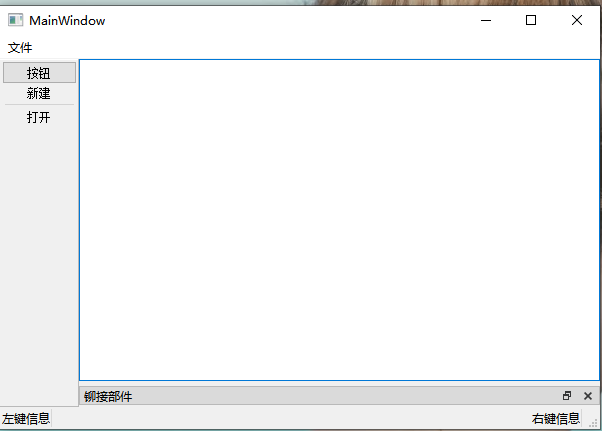
效果如下:
边栏推荐
- TypeScript类对象的初始化
- Leetcode 1108 IP address invalidation [violence] the leetcode path of heroding
- Threejs实现波动热点效果,波动标记,波动标签显示
- 剑指 Offer 12. 矩阵中的路径
- 云安全日报220621:Ubuntu操作系统发现英特尔微码漏洞,需要尽快升级
- Check information on the Internet after the college entrance examination, and pay attention to prevent websites without SSL certificates
- POSIX信号量
- EtherCAT igh主站控制埃斯顿伺服回零
- Window常用快捷键
- Vue. js+Node. JS full stack development tutorial: connecting to MySQL
猜你喜欢

Day11QPainter2021-09-26
力扣160. 相交链表

SQL操作:WITH表达式及其应用

ByteDance proposes a lightweight and efficient new network mocovit, which has better performance than GhostNet and mobilenetv3 in CV tasks such as classification and detection!

Day19QPushButton的使用2021-10-30

缓存型数据库Redis的配置与优化

CentOS使用composer install 报错 - phpunitphpunit 8

研发仅占3%的蕉下,是防晒黑科技,还是夏天的智商税?
Day14QProgressBar2021-10-17

是关于Linux中一步建立yum源缓存问题
随机推荐
2022年R1快开门式压力容器操作操作证考试题库模拟考试平台操作
Move Protocol Beta测试版稳定,临时决定奖池规模再扩大
EtherCAT igh master station controls three Delta asdaa2 servo rotating circles
Node的字符处理
Show you how to distinguish several kinds of parallelism
数据库面试总结
有哪些好用的工作汇报工具
国产API管理平台横向比较,到底哪家强?
Typescript compilation generation file comparison
快速失败和安全失败的区别
EtherCAT igh主站控制3个台达asdaa2伺服转圈圈
EtherCAT igh function attempt
Node模块化管理
Typescript interface
Lei Jun's hundreds of billions of mistakes?
字節跳動提出輕量級高效新型網絡MoCoViT,在分類、檢測等CV任務上性能優於GhostNet、MobileNetV3!
C3—Qt实现五子棋小游戏(一)2021.11.07
2022年高处安装、维护、拆除上岗证题库及模拟考试
AWS Device Shadow使用
网络爬虫开发工具:Screaming Frog SEO Spider