当前位置:网站首页>[boutique] detailed explanation of Pinia
[boutique] detailed explanation of Pinia
2022-06-29 19:37:00 【Liangyunliang】
brief introduction
pinia Is the latest generation of lightweight state management plug-ins .
advantage :
- Simple and convenient , Storage and components become very similar , You can easily write elegant storage .
= Type safety , Infer by type , It can provide the function of automatic completion .
= vue devtools Support , It is convenient for debugging .
= Pinia Support extended , Can be easily stored locally , Things, etc . - Modular design , By building multiple enclosures , Can let the program automatically split them .
- Very lightweight , Only about 1kb Size .
- Server side rendering support .
- complete ts Support for ;
- Remove mutations, Only state,getters,actions;
- actions Support synchronous and asynchronous ;
- Code flattening without module nesting , Only store The concept of ,store Can be used freely between , every last store They're all independent
- There is no need to manually add store,store Once created, it is automatically added ;
- Support Vue3 and Vue2
Installation configuration
- Installation command :
npm install pinia -S
- main.ts To configure
import {createPinia} from 'pinia'

const store= createPinia()
app.use(store)
adopt state modify
- stay state/index.ts In the file :
import {
    defineStore} from "pinia"

export const useUserStore = defineStore('user', {

    state: () => {

        return {

            name:'',
            age: 0
        }
    }
})
- Demo.vue
<template>
  {
   { user .name }}------{
   { user .age }}
  <br>
  <el-button type="primary" @click="user.age++"> Directly modifying </el-button>
  <el-button type="primary" @click="fun1"> Bulk changes </el-button>
  <el-button type="primary" @click="fun2"> Bulk changes : Functional writing </el-button>
  <el-button type="primary" @click="fun3"> Modify all values </el-button>
</template>

<script setup lang="ts"> import {
      useUserStore} from "@/store"; const user = useUserStore() const fun1 = ()=>{
       //$patch Method can modify multiple values in batch  user.$patch({
       name:' Zhang San ', age:1234 }) } const fun2 = ()=>{
       // Business logic can be written here ( Recommended ) user.$patch((state)=>{
       if (state.name ==''){
       state.age =6666 }else {
       state.age =8888 } }) } const fun3 = ()=>{
       //$state: Set as a new object to replace store The whole state of . Deficiency limit : All values must be modified  user.$state = {
       name:'zhangsan', age :3333 } } </script>
- result

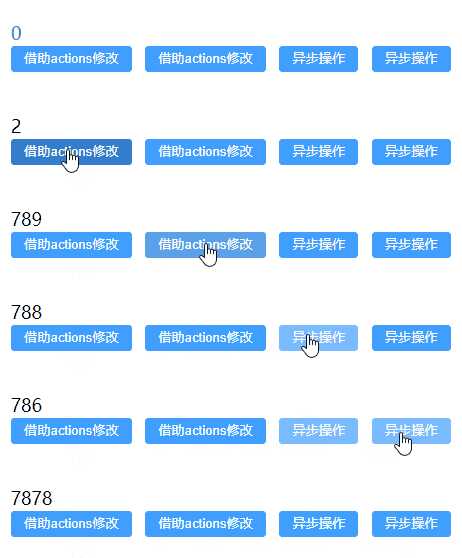
adopt actions modify
stay actions You can do synchronous or asynchronous operations in .
actions Methods in can call each other .
- store/index.ts
import {
    defineStore} from "pinia"

export const useCountStore = defineStore('count', {

    state: () => {

        return {

            count: 0
        }
    },
    actions: {

        increment() {

            this.count++
        },
        setCount(p: number) {

            this.count = p
        },
        // Asynchronous operations
        decrement() {

            setTimeout(() => {

                this.count--
            }, 1000)
        },
        async sth(){

            const tmp = await 1234
            this.count = tmp
            this.setCount(7878)  // call
        }
    }
})
- Demo.vue
<template>
  {
   { counter.count }}
  <br>
  <el-button type="primary" @click="fun1"> With the help of actions modify </el-button>
  <el-button type="primary" @click="fun2"> With the help of actions modify </el-button>
  <el-button type="primary" @click="counter.decrement"> Asynchronous operations </el-button>
  <el-button type="primary" @click="counter.sth"> Asynchronous operations </el-button>
</template>

<script setup lang="ts"> import {
      useCountStore} from "@/store"; const counter = useCountStore() // With the help of actions modify  const fun1 = ()=>{
       counter.increment() } // With the help of actions modify  const fun2 = ()=>{
       counter.setCount(789) } </script>
- result
getters
No matter how many times you call ,getters The function in will only be executed once , And will cache
- store/index.ts
import {
    defineStore} from "pinia"

export const useCountStore = defineStore('count', {

    state: () => {

        return {

            count: 10
        }
    },
    getters: {

        // Ordinary functional form , have access to this
        getCount(): number {

            return this.count
        },
        // Arrow function form , Out of commission this
        newCount: (state): number => {

            return state.count + 5
        },
        getDoubleCount(state): number {

            return state.count * 2 + this.getCount
        }
    }
})
- Demo.vue
<template>
  {
   {counter.count}} <br>
  {
   { counter.getCount }} <br>
  {
   { counter.getCount }} <br>
  {
   { counter.newCount }} <br>
  {
   { counter.getDoubleCount }} <br>
</template>

<script setup lang="ts"> import {
      useCountStore} from "@/store"; const counter = useCountStore() </script>
- result

Deconstruction object
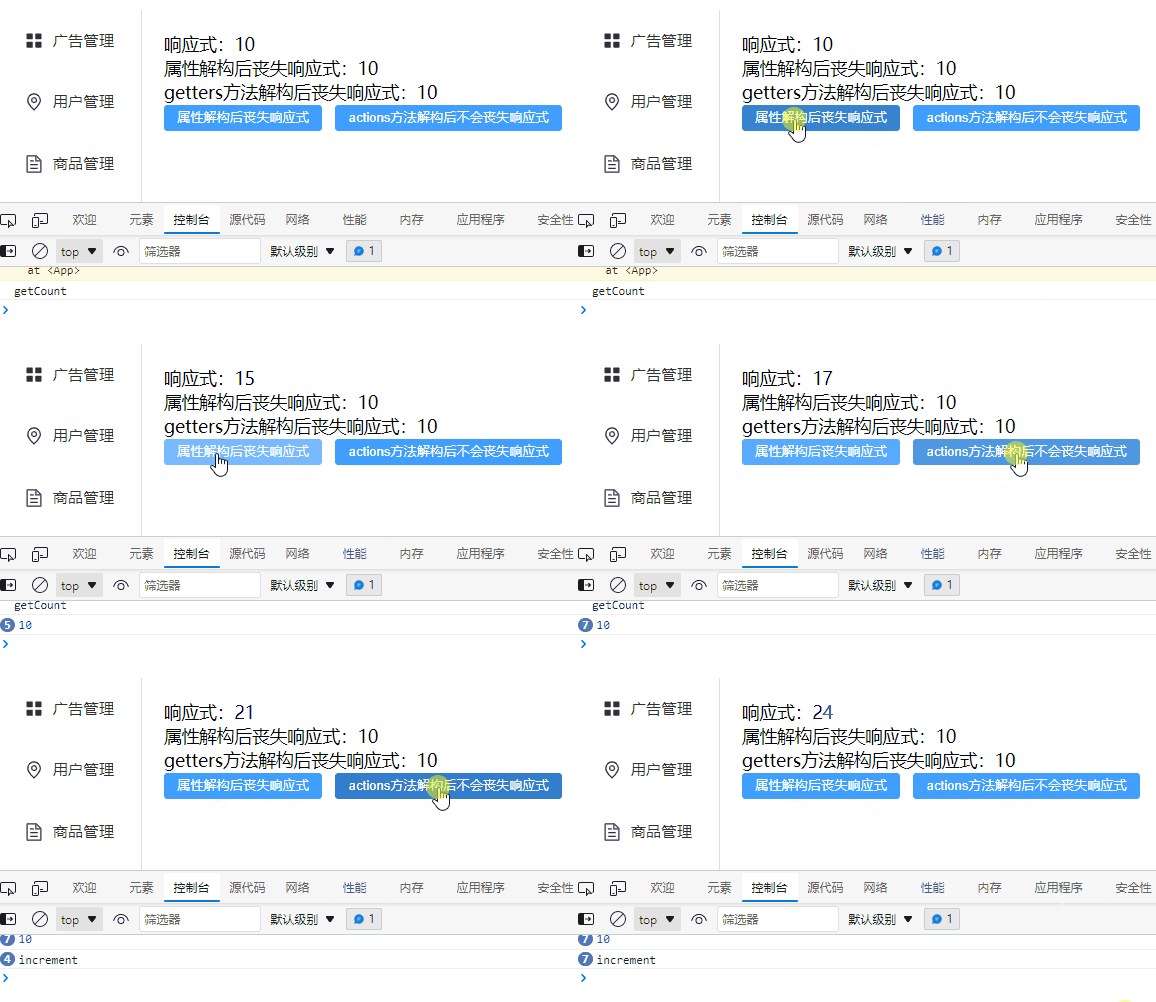
Deconstruction is mainly aimed at Store Medium state and getters.
Example 1
- store/index.js
import {
    defineStore} from "pinia"

export const useCountStore = defineStore('count', {

    state: () => {

        return {

            count: 10
        }
    },
    getters: {

        // Ordinary functional form , have access to this
        getCount(): number {

            console.info("getCount")
            return this.count
        }
    },
    actions: {

        increment() {

            console.info("increment")
           this.count++
        }
    },
})
- Demo.vue
<template>
   Response type :{
   {counter.count}} <br>
   After the attribute is deconstructed, the response expression is lost :{
   { count }} <br>
  getters The method loses its response after deconstruction :{
   {getCount}}
  <br>
  <el-button type="primary" @click="fun"> After the attribute is deconstructed, the response expression is lost </el-button>
  <el-button type="primary" @click="increment">actions Method does not lose its response after deconstruction </el-button>
</template>

<script setup lang="ts"> import {
      useCountStore} from "@/store"; const counter = useCountStore() // deconstruction  const {
      count, getCount, increment} = counter const fun = () => {
       counter.count++ // After the attribute is deconstructed, the response expression is lost  console.info(count) } </script>
- effect
Example 2
- store/index.js
import {
    defineStore} from "pinia"

export const useCountStore = defineStore('count', {

    state: () => {

        return {

            count: 10
        }
    },
    getters: {

        // Ordinary functional form , have access to this
        getCount(): number {

            console.info("getCount")
            return this.count
        }
    },
    actions: {

        increment() {

            console.info("increment")
           this.count++
        }
    },
})
- Demo.vue
<template>
   Response type :{
   {counter.count}} <br>
   After the attribute is deconstructed, the response expression is lost :{
   { count }} <br>
  getters The method loses its response after deconstruction :{
   {getCount}}
  <br>
  <el-button type="primary" @click="fun"> After the attribute is deconstructed, the response expression is lost </el-button>
</template>

<script setup lang="ts"> import {
      useCountStore} from "@/store"; import {
      storeToRefs} from "pinia"; const counter = useCountStore() // deconstruction  const {
      count, getCount} = storeToRefs(counter) const fun = () => {
       counter.count++ // After the attribute is deconstructed, the response expression is lost  console.info(count) } </script>
- effect

pinia Commonly used API
- store/index.ts
import {
    defineStore} from "pinia"

export const useCountStore = defineStore('count', {

    state: () => {

        return {

            count: 10
        }
    },
    actions: {

        increment() {

            console.info("increment")
            this.count++
        }
    },
})
- Demo.vue
<template>
  {
   {counter.count}}
  <br>
  <el-button type="primary" @click="counter.count++"> Self increasing </el-button>
  <el-button type="primary" @click="counter.increment()">actions: Self increasing </el-button>
  <el-button type="primary" @click="counter.$reset()"> Reset the status data to the final status </el-button>
</template>

<script setup lang="ts"> import {
      useCountStore} from "@/store"; const counter = useCountStore() //state Trigger when a change occurs  counter.$subscribe((args,state)=>{
       console.info(args,state) }) // monitor actions The method in  counter.$onAction(args=>{
       console.info(args) args.after(()=>{
       console.info("after") }) }) </script>
- result
边栏推荐
猜你喜欢

JVM(4) 字節碼技術+運行期優化

Kdd 2022 | prise en compte de l'alignement et de l'uniformité des représentations dans le Filtrage collaboratif
Connaissance générale des paramètres de sécurité du serveur Cloud
KDD 2022 | characterization alignment and uniformity are considered in collaborative filtering

npm ERR! fatal: early EOF npm ERR! fatal: index-pack failed

洞见科技作为「唯一」隐私计算数商,「首批」入驻长三角数据要素流通服务平台

创作者基金会 6 月份亮点

细说GaussDB(DWS)复杂多样的资源负载管理手段
KDD 2022 | 协同过滤中考虑表征对齐和均匀性

Inception 新结构 | 究竟卷积与Transformer如何结合才是最优的?
随机推荐
swift可选值总结
nacos 问题
JVM (4) bytecode technology + runtime optimization
ovirt数据库修改删除节点
4-2 port banner information acquisition
ArrayList&lt; Integer&gt; Use = = to compare whether the values are equal, and -129=- 129 situation thinking
freeswitch拨打分机号
3-3主机发现-四层发现
JVM (2) garbage collection
npm ERR! fatal: early EOF npm ERR! fatal: index-pack failed
童年经典蓝精灵之百变蓝爸爸数字藏品中奖名单公布
Rejected by a large company? Tencent experts summarized 11 reasons for being rejected!
Shell bash script note: there must be no other irrelevant characters after the escape character \ at the end of a single line (multi line command)
Wechat launched the picture big bang function; Apple's self-developed 5g chip may have failed; Microsoft solves the bug that causes edge to stop responding | geek headlines
Canonical的工程师们正努力解决Firefox Snap的性能问题
[software testing] 01 -- software life cycle and software development model
What if the win11 policy service is disabled? Solution to disabling win11 policy service
雲服務器的安全設置常識
KDD 2022 | characterization alignment and uniformity are considered in collaborative filtering
Win11系统小组件打不开?Win11系统小组件无法打开解决方法