当前位置:网站首页>Intranet penetration lanproxy deployment
Intranet penetration lanproxy deployment
2022-08-01 19:30:00 【little black note】
The environment used this time is centos 7.9
Both windows and Linux environments support the installation of both the server and the client.jdk
It is best to download the server and client as a set
Server: proxy-server
Client: proxy-client
1. Server deployment
1. In the server server, under the root directory, create a proxy directory
Instruction: mkdir /root/proxy
Verification means: ls /root Check whether the displayed content isContains proxy directory
2. Upload all files in the "server" directly to the /root/proxy directory
3. Start the intranet penetration service
Command: chmod +x /root/proxy/bin/startup.sh
Command: /root/proxy/bin/startup.sh
Verification method: ps -ef |grep lanproxy to see if there is any feedback
4. Set the service to start automatically at boot
Command: echo /root/proxy/bin/startup.sh >> /etc/rc.local
Verification method: cat /etc/rc.local to check whether it contains/root/proxy/bin/startup.sh
5. Web page login verification http://server IP: 8090 (I have to use the virtual machine for the experimental environment)
Username: admin Password: admin #Available in the configuration file /root/proxy/conf/config.Modify in properties
server.bind=0.0.0.0server.port=4900server.ssl.enable=trueserver.ssl.bind=0.0.0.0server.ssl.port=4993server.ssl.jksPath=testca.jksserver.ssl.keyStorePassword=testserver.ssl.keyManagerPassword=testserver.ssl.needsClientAuth=falseconfig.server.bind=0.0.0.0config.server.port=8090config.admin.username=adminconfig.admin.password=admin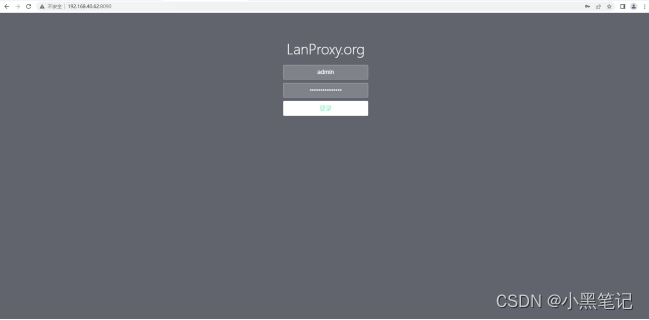
6. Port opening
Cloud host release: 4900, 4993, 8090, 10000-11000 port segment
Second, client deployment
1. In the client, under the root directory, create a proxy directory
Instruction: mkdir /root/proxy
Verification method: ls /root Check whether the displayed content containsproxy directory
2. Upload all files in the "client" directly to the /root/proxy directory
3. Create a client
Log in to the server web management interface and create a client
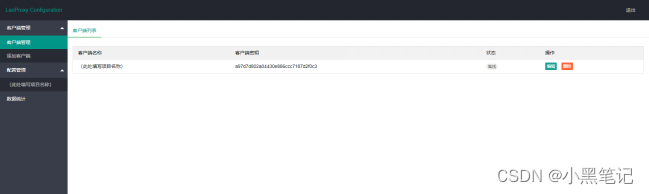
Copy client key
Log in to the client command line interface and modify the configuration file:
Modify the /root/proxy/conf/config.properties file as follows
ssl.enable=truessl.jksPath=testca.jksssl.keyStorePassword=testserver.host=192.168.163.100 #Here write the actual application scenario serverget IP#default ssl port is 4993server.port=4993client.key=a97d7d802a04430e886ccc7187d2f0c3 #client key4. Start the intranet penetration client
Command: chmod +x /root/proxy/bin/startup.sh
Command: /root/proxy/bin/startup.sh
Verification means: ps -ef |grep lanproxy to see if there is any feedback
5. Set the service to start automatically at boot
Command: echo /root/proxy/bin/startup.sh >> /etc/rc.local
Verification means: cat /etc/rc.local to see if it contains/root/proxy/bin/startup.sh
6. Log in to the web management interface of the server and check the online status of the client.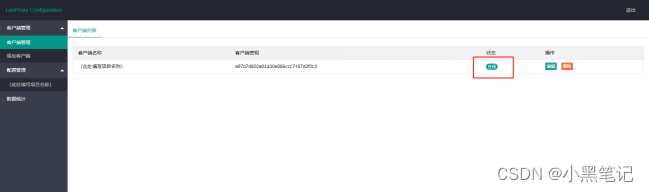
Do client port mapping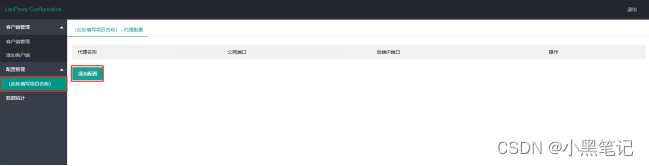
"Proxy name": Named after the port name that needs to be mapped, here is port 22
"Public network port": Port between 10000-11000, generally a single client is assigned 10 consecutive port numbers, the firstClient port range 10000-10009, and so on
"backend IP port": 127.0.0.1:22 (22 here is consistent with "proxy name")
Multiple ports can be added, for example:
边栏推荐
- How to install voice pack in Win11?Win11 Voice Pack Installation Tutorial
- C#/VB.NET 从PDF中提取表格
- Pytorch模型训练实用教程学习笔记:四、优化器与学习率调整
- Heavy cover special | intercept 99% malicious traffic, reveal WAF offensive and defensive drills best practices
- 突破边界,华为存储的破壁之旅
- 安装GBase 8c数据库的时候,报错显示“Resource:gbase8c already in use”,这怎么处理呢?
- easyUI中datagrid中的formatter里面向后台发送请求获取数据
- 10 个 PHP 代码安全漏洞扫描程序
- Creo5.0草绘如何绘制正六边形
- 在全志V853开发板试编译QT测试
猜你喜欢






随机推荐
如何记录分析你的炼丹流程—可视化神器Wandb使用笔记【1】
数据库系统原理与应用教程(071)—— MySQL 练习题:操作题 110-120(十五):综合练习
有点奇怪!访问目的网址,主机能容器却不行
GEE(8):使用MODIS填补由去云后的Landsat影像计算得到的NDVI数据
modbus bus module DAM-8082
八百客、销售易、纷享销客各行其道
app直播源码,点击搜索栏自动弹出下拉框
Redis启动时提示Creating Server TCP listening socket *:6379: bind: No error
MySQL开发技巧——存储过程
通配符 SSL/TLS 证书
短视频软件开发,Android开发,使用Kotlin实现WebView
CMake教程——Leeds_Garden
对于web性能优化我有话说!
C#/VB.NET 从PDF中提取表格
TestNG多个xml进行自动化测试
明尼苏达大学团队结合高通量实验与机器学习,实现有效可预测的特定位点重组过程,可调节基因编辑速度
How to query database configuration parameters in GBase 8c, such as datestyle.What function or syntax to use?
首篇 NLP 领域图神经网络综述:127 页,从图构建到实际应用面面观
ExcelPatternTool: Excel form-database mutual import tool
Keras deep learning practice - traffic sign recognition