当前位置:网站首页>OpenGL development with QT (II) drawing cube
OpenGL development with QT (II) drawing cube
2022-07-29 01:39:00 【Manon Feifei】
stay OpenGL Medium and three-dimensional entities will be split into small plane graphics for rendering . For example, the cube we draw , It can be divided into six planes to draw . Here we use a textured cube to illustrate the rendering method of three-dimensional entities .
Draw a cube
Because the cube has many points , In order to improve the encapsulation of data, we define a structure to represent the spatial coordinates and texture coordinates of each point .
struct CubePoint {

        QVector3D posCoord;        // Spatial coordinates
        QVector2D textureCoord;    // Texture coordinates
        CubePoint(const QVector3D& position = QVector3D(),
                      const QVector2D& texture = QVector2D()):
            posCoord(position), textureCoord(texture) {

        }
    };
After adding the data structure of each point of the cube , We can add the corresponding coordinate information . The coordinate diagram of the cube is shown below :
Initialize the position information and texture information of each vertex in the program :
//QVector<CubePoint> m_data;
//m_data It is the data container of vertex information
void SimpleGLWindow::initializeCubeData()
{

    // Cube six corresponding data
    m_data = {

        // FRONT FACE
        {
    {
    -0.5, -0.5,  0.5}, {
    0, 0}},        {
    {
     0.5, -0.5,  0.5}, {
    1, 0}},
        {
    {
     0.5,  0.5,  0.5}, {
    1, 1}},        {
    {
    -0.5,  0.5,  0.5}, {
    0, 1}},

        // TOP FACE
        {
    {
    -0.5,  0.5,  0.5}, {
    0, 0}},        {
    {
     0.5,  0.5,  0.5}, {
    1, 0}},
        {
    {
     0.5,  0.5, -0.5}, {
    1, 1}},        {
    {
    -0.5,  0.5, -0.5}, {
    0, 1}},

        // BACK FACE
        {
    {
    -0.5,  0.5, -0.5}, {
    0, 0}},        {
    {
     0.5,  0.5, -0.5}, {
    1, 0}},
        {
    {
     0.5, -0.5, -0.5}, {
    1, 1}},        {
    {
    -0.5, -0.5, -0.5}, {
    0, 1}},

         // BOTTOM FACE
        {
    {
    -0.5, -0.5, -0.5}, {
    0, 0}},        {
    {
     0.5, -0.5, -0.5}, {
    1, 0}},
        {
    {
     0.5, -0.5,  0.5}, {
    1, 1}},        {
    {
    -0.5, -0.5,  0.5}, {
    0, 1}},

        // LEFT FACE
        {
    {
    -0.5, -0.5, -0.5}, {
    0, 0}},        {
    {
    -0.5, -0.5,  0.5}, {
    1, 0}},
        {
    {
    -0.5,  0.5,  0.5}, {
    1, 1}},        {
    {
    -0.5,  0.5, -0.5}, {
    0, 1}},

        // RIGHT FACE
        {
    {
     0.5, -0.5,  0.5}, {
    0, 0}},        {
    {
     0.5, -0.5, -0.5}, {
    1, 0}},
        {
    {
     0.5,  0.5, -0.5}, {
    1, 1}},        {
    {
     0.5,  0.5,  0.5}, {
    0, 1}},
    };
}
stay initializeGL() Call the data initialization method :
void SimpleGLWindow::initializeGL()
{

    ...
    // Open depth test
    glEnable(GL_DEPTH_TEST);
    // Turn on the culling effect
    glEnable(GL_CULL_FACE);
    // Disable the lighting and shadow effects of the back , Avoid unnecessary calculations
    glCullFace(GL_BACK);
    // Initialization data
    initializeCubeData();
    // Set the default color when refreshing the display to RGB(255,255,255)
    glClearColor(1, 1, 1, 0);
}
After data initialization , We can draw the cube in the drawing method , The corresponding drawing operations are as follows :
void SimpleGLWindow::paintGL()
{

    // Empty the color cache and depth cache
    glClear(GL_COLOR_BUFFER_BIT | GL_DEPTH_BUFFER_BIT);
    // take OpenGL The viewport and window remain the same
    glViewport(0, 0, width(), height());

    // Reset the transformation matrix
    glLoadIdentity();

    // Rotate the view for convenience
    //m_angle It's the angle of rotation
    glRotatef(m_angle, 1.0, 0.0, 0.0);
    glRotatef(m_angle, 0.0, 1.0, 0.0);

    // Bind texture
    if(m_texture)
    {

        m_texture->bind();
    }

    // Start texture
    glEnable(GL_TEXTURE_2D);
    // Draw a cube
    glBegin(GL_QUADS);
    for(const CubePoint &point: m_data) {

        glTexCoord2d(point.textureCoord.x(), point.textureCoord.y());
        glVertex3f(point.posCoord.x(), point.posCoord.y(), point.posCoord.z());
    }
    glEnd();
    // Turn off texture
    glDisable(GL_TEXTURE_2D);
}
The effect drawn is as follows :
Cube animation
The cube drawn by the above method is static . In order to make the graph not so monotonous , We add a timer to make the cube rotate , The corresponding implementation is as follows :
SimpleGLWindow::SimpleGLWindow(QWindow *parent) :
    QOpenGLWindow(NoPartialUpdate, parent)
{

    // Set the value of multisampling
    QSurfaceFormat fmt = format();
    fmt.setSamples(25);
    setFormat(fmt);

    // Set the timer to modify the value of rotation
    QTimer* timer = new QTimer(this);
    timer->setInterval(30);
    connect(timer,&QTimer::timeout,this,[&](){
    m_angle+=1;this->update();});
    timer->start();
}
The display effect is as follows :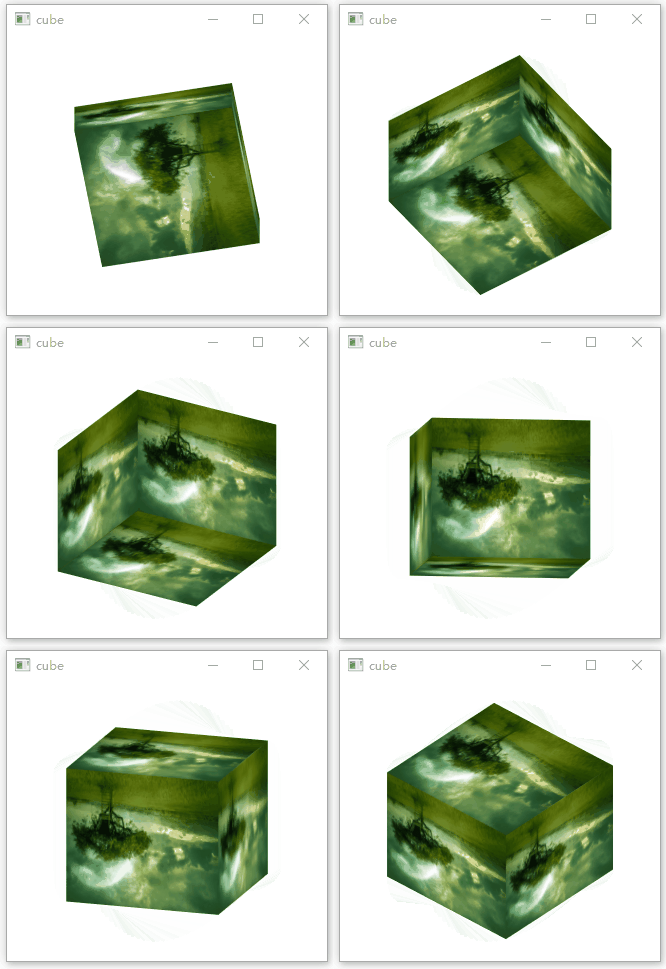
In addition to the timer , We can also use a more flexible animation framework to make the cube move , The corresponding settings are as follows :
//simpleglwindow.h
class SimpleGLWindow : public QOpenGLWindow, protected QOpenGLFunctions_1_1
{

    Q_OBJECT
    Q_PROPERTY(float angle READ angle WRITE setAngle)
public:
    qreal angle() const;
    void setAngle(const qreal &angle);
private:
     qreal m_angle = 60;
    ...
};
//simpleglwindow.cpp
SimpleGLWindow::SimpleGLWindow(QWindow *parent) :
    QOpenGLWindow(NoPartialUpdate, parent)
{

    // Set the value of multisampling
    QSurfaceFormat fmt = format();
    fmt.setSamples(25);
    setFormat(fmt);

    QPropertyAnimation *animation = new QPropertyAnimation(this);
    animation->setTargetObject(this);
    animation->setPropertyName("angle");
    animation->setStartValue(0);
    animation->setEndValue(359);
    animation->setDuration(5000);
    animation->setLoopCount(-1);
    animation->setEasingCurve(QEasingCurve::InCubic);
    animation->start();
}
qreal SimpleGLWindow::angle() const
{

    return m_angle;
}

void SimpleGLWindow::setAngle(const qreal &angle)
{

    m_angle = angle;
    this->update();
}
The display effect is as follows :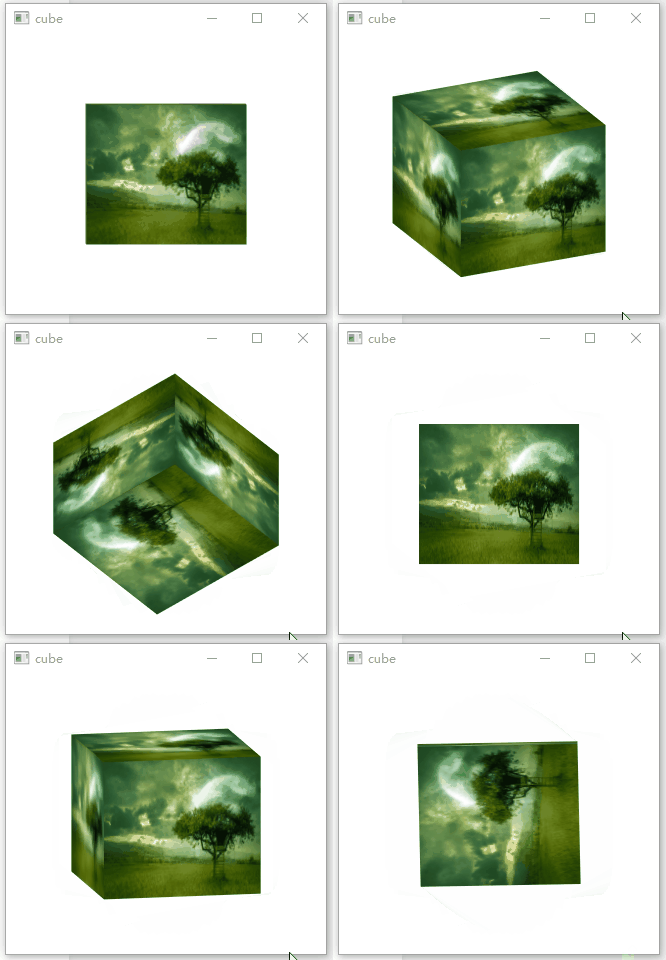
Complete engineering code , Welcome to :
//simpleglwindow.h
#pragma execution_character_set("utf-8")

#ifndef SIMPLEGLWINDOW_H
#define SIMPLEGLWINDOW_H

#include <QOpenGLWindow>
#include <QOpenGLFunctions_1_1>
#include <QOpenGLTexture>
#include <QVector3D>
#include <QVector2D>
#include <QTimer>
#include <QObject>

// The use of OpenGLFunction The version is 1.1
class SimpleGLWindow : public QOpenGLWindow, protected QOpenGLFunctions_1_1
{

    Q_OBJECT
    Q_PROPERTY(float angle READ angle WRITE setAngle)
public:
    SimpleGLWindow(QWindow *parent = 0);

    qreal angle() const;
    void setAngle(const qreal &angle);

protected:
    // Initialization operation
    void initializeGL();

    // Draw function
    void paintGL();

protected:
    // Event of window size change
    void resizeGL(int w, int h);

private:
    void initialTexture();
    // Initialize cube data
    void initializeCubeData();
    //OpenGL texture
    QOpenGLTexture* m_texture = nullptr;
    // Texture image
    QImage* m_texture_image = nullptr;

    struct CubePoint {

        QVector3D posCoord;        // Spatial coordinates
        QVector2D textureCoord;    // Texture coordinates
        CubePoint(const QVector3D& position = QVector3D(),
                      const QVector2D& texture = QVector2D()):
            posCoord(position), textureCoord(texture) {

        }
    };
    qreal m_angle = 60;
    QVector<CubePoint> m_data;
};

#endif // SIMPLEGLWINDOW_H
//simpleglwindow.cpp
#include "simpleglwindow.h"
#include <QDebug>
#include <QPropertyAnimation>

SimpleGLWindow::SimpleGLWindow(QWindow *parent) :
    QOpenGLWindow(NoPartialUpdate, parent)
{

    // Set the value of multisampling
    QSurfaceFormat fmt = format();
    fmt.setSamples(25);
    setFormat(fmt);

    QPropertyAnimation *animation = new QPropertyAnimation(this);
    animation->setTargetObject(this);
    animation->setPropertyName("angle");
    animation->setStartValue(0);
    animation->setEndValue(359);
    animation->setDuration(5000);
    animation->setLoopCount(-1);
    animation->setEasingCurve(QEasingCurve::InCubic);
    animation->start();

// QTimer* timer = new QTimer(this);
// timer->setInterval(30);
// connect(timer,&QTimer::timeout,this,[&](){m_angle+=1;this->update();});
// timer->start();
}

void SimpleGLWindow::initializeGL()
{

    // initialization OpenGL function
    if (!initializeOpenGLFunctions())
    {

        qDebug() << "init opengl functions failed";
    }
    initialTexture();
    // Open depth test
    glEnable(GL_DEPTH_TEST);
    // Turn on the culling effect
    glEnable(GL_CULL_FACE);
    // Disable the lighting and shadow effects of the back , Avoid unnecessary calculations
    glCullFace(GL_BACK);

    initializeCubeData();
    // Set the default color when refreshing the display to RGB(255,255,255)
    glClearColor(1, 1, 1, 0);
}

void SimpleGLWindow::paintGL()
{

    // Empty the color cache and depth cache
    glClear(GL_COLOR_BUFFER_BIT | GL_DEPTH_BUFFER_BIT);
    // take OpenGL The viewport and window remain the same
    glViewport(0, 0, width(), height());

    // Reset the transformation matrix
    glLoadIdentity();

    // Rotate the view for convenience
    glRotatef(m_angle, 1.0, 0.0, 0.0);
    glRotatef(m_angle, 0.0, 1.0, 0.0);

    // Bind texture
    if(m_texture)
    {

        m_texture->bind();
    }

    // Start texture
    glEnable(GL_TEXTURE_2D);
    glBegin(GL_QUADS);
    for(const CubePoint &point: m_data) {

        glTexCoord2d(point.textureCoord.x(), point.textureCoord.y());
        glVertex3f(point.posCoord.x(), point.posCoord.y(), point.posCoord.z());
    }
    glEnd();
    // Turn off texture
    glDisable(GL_TEXTURE_2D);
}

void SimpleGLWindow::resizeGL(int w, int h)
{

    qDebug() << w << h;
}

void SimpleGLWindow::initialTexture()
{

    // Initialize pictures and textures
    m_texture_image = new QImage(":/background.jpg");
    m_texture = new QOpenGLTexture(m_texture_image->mirrored());

    // Add filters for amplification and reduction
    m_texture->setMinificationFilter(QOpenGLTexture::LinearMipMapLinear);
    m_texture->setMagnificationFilter(QOpenGLTexture::Linear);
}

void SimpleGLWindow::initializeCubeData()
{

    m_data = {

        // FRONT FACE
        {
    {
    -0.5, -0.5,  0.5}, {
    0, 0}},        {
    {
     0.5, -0.5,  0.5}, {
    1, 0}},
        {
    {
     0.5,  0.5,  0.5}, {
    1, 1}},        {
    {
    -0.5,  0.5,  0.5}, {
    0, 1}},

        // TOP FACE
        {
    {
    -0.5,  0.5,  0.5}, {
    0, 0}},        {
    {
     0.5,  0.5,  0.5}, {
    1, 0}},
        {
    {
     0.5,  0.5, -0.5}, {
    1, 1}},        {
    {
    -0.5,  0.5, -0.5}, {
    0, 1}},

        // BACK FACE
        {
    {
    -0.5,  0.5, -0.5}, {
    0, 0}},        {
    {
     0.5,  0.5, -0.5}, {
    1, 0}},
        {
    {
     0.5, -0.5, -0.5}, {
    1, 1}},        {
    {
    -0.5, -0.5, -0.5}, {
    0, 1}},

         // BOTTOM FACE
        {
    {
    -0.5, -0.5, -0.5}, {
    0, 0}},        {
    {
     0.5, -0.5, -0.5}, {
    1, 0}},
        {
    {
     0.5, -0.5,  0.5}, {
    1, 1}},        {
    {
    -0.5, -0.5,  0.5}, {
    0, 1}},

        // LEFT FACE
        {
    {
    -0.5, -0.5, -0.5}, {
    0, 0}},        {
    {
    -0.5, -0.5,  0.5}, {
    1, 0}},
        {
    {
    -0.5,  0.5,  0.5}, {
    1, 1}},        {
    {
    -0.5,  0.5, -0.5}, {
    0, 1}},

        // RIGHT FACE
        {
    {
     0.5, -0.5,  0.5}, {
    0, 0}},        {
    {
     0.5, -0.5, -0.5}, {
    1, 0}},
        {
    {
     0.5,  0.5, -0.5}, {
    1, 1}},        {
    {
     0.5,  0.5,  0.5}, {
    0, 1}},
    };
}

qreal SimpleGLWindow::angle() const
{

    return m_angle;
}

void SimpleGLWindow::setAngle(const qreal &angle)
{

    m_angle = angle;
    this->update();
}
边栏推荐
- SiC功率半导体产业高峰论坛成功举办
- RHCE command practice (I)
- 第二轮Okaleido Tiger热卖的背后,是背后生态机构战略支持
- 【HCIP】MPLS 基础
- Test / development programmers rely on technology to survive the midlife crisis? Improve your own value
- T-sne降维
- 【Unity项目实践】合成大西瓜
- SQL question brushing: find the last of all employees_ Name and first_ Name and corresponding department number Dept_ no
- PlatoFarm社区生态福音,用户可借助Elephant Swap获得溢价收益
- C语言300行代码实现扫雷(可展开+可标记+可更改困难级别)
猜你喜欢

J9 number theory: what factors determine the value of NFT?

Docker compose install MySQL
![[unity project practice] synthetic watermelon](/img/60/20d4ef6f4ad99a9bdb7dc2b4dba23b.png)
[unity project practice] synthetic watermelon

地下水、土壤、地质、环境人看过来
Groundwater, soil, geology and environment

【搜索】—— 迭代加深/双向DFS/IDA*

mysql的执行顺序

20220728 sorting strings that are not pure numbers

Flash reports an error: type object 'news' has no attribute' query 'the view name is duplicate with the model name

瑞吉外卖项目实战Day01
随机推荐
Error installing mysqlclient module on MAC system
DVWA之SQL注入
Cross modal alignment 20220728
【HCIP】MGRE环境下OSPF实验,含多进程双向重发布及OSPF特殊区域
Docker compose install MySQL
2022年最火的十大测试工具,你掌握了几个
Self-attention neural architecture search for semantic image segmentation
Embedded sharing collection 23
BOM系列之window对象
[MySQL] historical cumulative de duplication of multiple indicators
易观分析:以用户为中心,提升手机银行用户体验,助力用户价值增长
[idea] where to use the query field
SiC Power Semiconductor Industry Summit Forum successfully held
T-sne降维
Regular checksum time formatting
Use of resttemplate and Eureka
SQL question brushing: find the last of all employees_ Name and first_ Name and corresponding department number Dept_ no
全面升级,你能想象的都在这————京东API接口
Code generator
ELS stop at all