当前位置:网站首页>Boutique enterprise class powerbi application pipeline deployment
Boutique enterprise class powerbi application pipeline deployment
2022-06-25 01:15:00 【Powerbi white tea】

We are in the process of implementing the project , Process has always been a very important concept .

For the sake of data confidentiality , The data we came into contact with during the development phase , It is often the data of the development environment . The data in the development environment is often too small , Or no real data , The data is mainly simulation , This can ensure that the development progress will not be affected , It can also keep the company's data confidential .
When the development phase is over , You need to switch the environment to the test environment , To test data and function points . The data of the test environment is compared with the development environment , Too much data , Data is usually historical data or some real data , Dimension relationship and data integrity are close to real data .
When the test is over , Will be switched to the production environment and put into use .
PowerBIServers Pipeline deployment
In general, the processing method of enterprises is to divide the environment in the data warehouse , and PowerBI On the cloud Servers The service introduces the pipeline deployment function .
So we can create parameters , To achieve rapid environment switching .
Let's first understand the service conditions ( Meet one of them ):
1. Your organization already has Power BI Premium subscribe , And you have the authority ;
2. You have Power BI Premium Per User (PPU) subscribe .
It is not difficult for us to see from the conditions of use , The pipeline deployment function is for enterprise applications PowerBI Prepared ;
If we want to learn, we can use a free account PPU Try to understand the overall operation process .

Next , We begin the overall process operation of pipeline deployment .
Data preparation :

In the white tea machine SQL Servers in , There is a name Dev、Test、Live Three databases of .


From the above results we can see that , The data table structure of the three databases is consistent , All single sheets Sales surface , There are only differences in the data magnitude .
New parameter :
open PowerBI, Enter into PowerQuery Interface .

Switch to “ View ” Interface , open “ Always allow ”.

Back to “ Home page ” Interface , choice “ Management parameters ” Below “ New parameter ”.

Name the parameter “Source”, The type is set to “ Text ”, The current value is set to “Tea”.

Continue adding parameters “Database”, Set the current value to “Dev”.

Select close and apply .

Connect to database :
Open get data , choice SQL Servers Data connection .

Here, change the server and database types to the two parameters we just set .

Select... In the database Sales surface .

New measure "Rows", Put it in the card diagram and let's have a look .
Rows =
COUNTROWS ( 'Sales' )

Come here , Our preparations are finished .
Time relation , White tea doesn't make too complicated reports for demonstration . We mainly understand the overall operation of pipeline deployment .
Create pipes :
Sign in PowerBI account number , Open my workspace panel , Select Create workspace .

Name it “ Development ”, License mode selection “Premium Per User”.

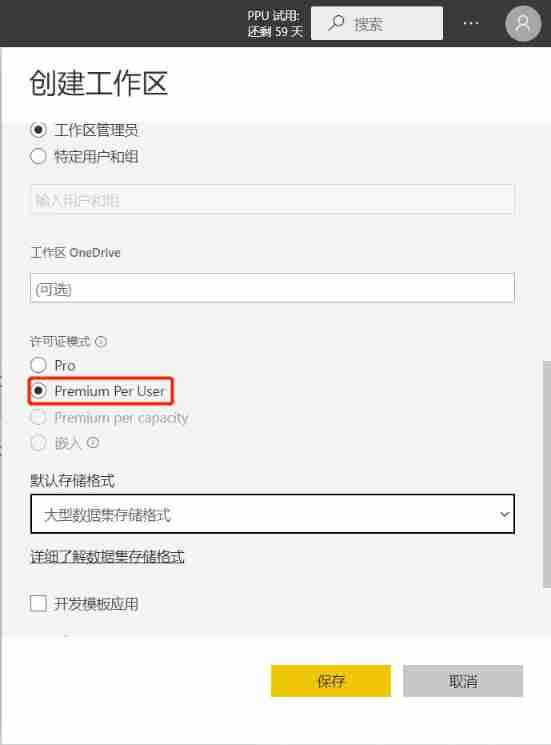
After the workspace is created , We can select... In the current workspace “ Create pipes ”.

Name it “ White tea ”, Choose to create .

Assign this workspace as “ Development ”.

In this case , Our first development pipeline was created .

Follow the steps above , We create... In turn “ test ”、“ production ” Environmental Science .

thus , Our pipeline is created .
Report deployment :
Take what we just had PowerBI file , Name it “Test”, Publish to the development environment .


Pipeline deployment :
stay “ Development ” In the pipeline , We can see the report file just uploaded , choice “ View in the pipeline ”.

Choose to deploy to “ test ” The Conduit .

choice “ test ” Pipeline deployment settings .

Choose a dataset , Enter the setting interface , We can see that there are data source rule settings and parameter rule settings , Here we choose “ Parameter rule settings ”.
notes : The data source rule settings are not recommended , It is convenient to use without parameters .

Select Add Rule , take “Database” Parameter set to Test.

According to the above operation , We deployed it to “ production ” Pipe and set .


thus , The overall process of pipeline deployment has been completed , Let's go into three environments to view the report data .


It can be seen from the overall valuation that , The difference between the data is consistent with the results we checked in the data warehouse .
matters needing attention :
White tea is used by this machine SQL Servers It needs to be used with a gateway , The specific operation will not be repeated here , Friends can try it by themselves .


This is white tea , One PowerBI Beginners .
边栏推荐
猜你喜欢

Bi-sql index

使用 Loki 微服务模式部署生产集群
Bi-sql Union

Using macro code to generate handwriting automatically in word or WPS

利用 Redis 的 sorted set 做每周热评的功能

Basic knowledge of assembly language (2) -debug

Danish Technical University pioneered the application of quantum computing to power flow modeling of energy system

Scala IO read by character

QT (35) - operate excel qxlsx qaxobject
The latest QQ wechat domain name anti red PHP program source code + forced jump to open

随机推荐
【实用系列】家内wifi全覆盖
Scala IO read by line
Tencent cloud wecity solution
Heavyweight: the domestic ide was released, developed by Alibaba, and is completely open source! (high performance + high customization)
Première application de l'informatique quantique à la modélisation des flux de puissance dans les systèmes énergétiques à l'Université technique danoise
扎克伯格上手演示四款VR头显原型机,Meta透露元宇宙「家底」
Novice, let me show you the "soft test" at one time
vb学习什么[通俗易懂]
Contentresolver, get the SMS content
Use redis' sorted set to make weekly hot Reviews
重磅:国产IDE发布,由阿里研发,完全开源!(高性能+高定制性)
腾讯云WeCity丨产业联合 协同创新 共贺新春!
汇编语言(4)函数传参
php easywechat 和 小程序 实现 长久订阅消息推送
中金财富证券开户佣金多少呢?股票开户交易安全靠谱吗?
Bi-sql select into
Basic knowledge of assembly language (2) -debug
Text editor for QT project practice -- Episode 9
The latest QQ wechat domain name anti red PHP program source code + forced jump to open
Bi-sql index