当前位置:网站首页>Background image and QR code synthesis
Background image and QR code synthesis
2022-07-24 22:35:00 【Work hard go】
demand : It is similar to making a code card , UI Provide background image template , The back end synthesizes the QR code into the background image template
Background image template Final rendering 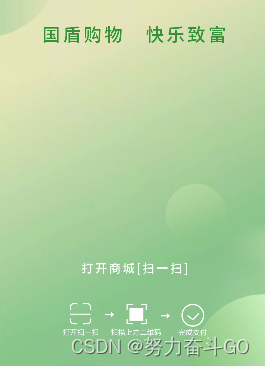

Open up
package cc.sunni;

import cn.hutool.core.util.StrUtil;
import cn.hutool.extra.qrcode.QrCodeUtil;
import cn.hutool.extra.qrcode.QrConfig;
import org.springframework.core.io.ClassPathResource;
import sun.misc.BASE64Encoder;

import javax.imageio.ImageIO;
import java.awt.*;
import java.awt.image.BufferedImage;
import java.io.ByteArrayOutputStream;
import java.io.File;
import java.io.IOException;
import java.io.InputStream;

/**
 *  Code card :  Synthesize the QR code into the background picture
 *
 * @author  Jiang Li
 * @since 2022-07-21
 */
public class QrCodeCard {

    /**
     *  The width of the QR code
     */
    private static final int QR_CODE_WIDTH = 640;
    /**
     *  The height of the QR code
     */
    private static final int QR_CODE_HEIGHT = 640;
    /**
     * title typeface
     */
    private static final Font TITLE_FONT = new Font(" Song style ", Font.BOLD, 30);
    /**
     * desc typeface
     */
    private static final Font DESC_FONT = new Font(" Song style ", Font.PLAIN, 25);
    /**
     * bottom typeface
     */
    private static final Font BOTTOM_FONT = new Font(" Song style ", Font.ITALIC, 24);

    private static final String FORMAT_NAME = "PNG";

    /**
     * @param title            title
     * @param desc             describe
     * @param content          QR code content
     * @param bottom           Bottom text
     * @param imgLogo          QR code middle picture address
     * @param backgroundImage  Background image address
     * @param imageY           QR code in the background picture Y Axis position , X The axis is centered
     * @return  return BufferedImage It is convenient for subsequent processing to generate pictures or base64 character string
     */
    public static BufferedImage createQrCode(String title, String desc, String content, String bottom, String imgLogo, String backgroundImage, int imageY) throws IOException {
        //  Create a master template image
        int maxWidth = getMaxWidth(title, desc, bottom);
        int maxHeight = getMaxHeight();
        BufferedImage image = new BufferedImage(maxWidth, maxHeight, BufferedImage.TYPE_INT_RGB);
        Graphics2D graphics = image.createGraphics();
        if (StrUtil.isNotBlank(backgroundImage)) {
            //  Set the background color of the picture to transparent ,  If you need to synthesize to the background image, set it to transparent
            image = graphics.getDeviceConfiguration().createCompatibleImage(maxWidth, maxHeight, Transparency.TRANSLUCENT);
        } else {
            //  Set the background color of the picture to white
            graphics.setColor(Color.white);
        }

        graphics.fillRect(0, 0, maxWidth, maxHeight);

        //  Dynamic height
        int height = 0;

        // *********************** title ***********************
        if (StrUtil.isNotBlank(title)) {
            graphics = image.createGraphics();
            //  Set font color  black black  white white
            graphics.setColor(Color.black);
            //  Set the font
            graphics.setFont(TITLE_FONT);
            graphics.setRenderingHint(RenderingHints.KEY_TEXT_ANTIALIASING, RenderingHints.VALUE_TEXT_ANTIALIAS_LCD_HRGB);
            //  In the middle  x Starting position :( Image width - font size * The number of words )/2
            int x = (maxWidth - (TITLE_FONT.getSize() * title.length())) / 2;
            int strHeight = getStringHeight(graphics);
            graphics.drawString(title, x, strHeight);
            height += strHeight;
        }

        // ********************** desc **********************
        if (StrUtil.isNotBlank(desc)) {
            graphics = image.createGraphics();
            //  Set font color , Set the color first , Refill content
            graphics.setColor(Color.black);
            //  Set the font
            graphics.setFont(DESC_FONT);
            graphics.setRenderingHint(RenderingHints.KEY_TEXT_ANTIALIASING, RenderingHints.VALUE_TEXT_ANTIALIAS_LCD_HRGB);
            //  Gets the character height
            int strHeight = getStringHeight(graphics);
            //  Center by line
            String[] info = desc.split("\\$");  //  Multiline text with  $  Separate
            for (int i = 0; i < info.length; i++) {
                String s = info[i];
                // x Starting position :( Image width - font size * The number of words )/2
                int strWidth = graphics.getFontMetrics().stringWidth(s);
                //  The total length minus half the length of the text   ( centered )
                int startX = (maxWidth - strWidth) / 2;
                height += strHeight * (i + 1);
                graphics.drawString(s, startX, height);
            }
        }

        // **********************  Insert QR code picture  **********************
        Graphics codePic = image.getGraphics();
        BufferedImage codeImg;
        QrConfig config = new QrConfig();
        config.setMargin(2);
        config.setWidth(QR_CODE_WIDTH);
        config.setHeight(QR_CODE_HEIGHT);
        if (StrUtil.isNotBlank(imgLogo)) {
            config.setImg(imgLogo);
        }
        codeImg = QrCodeUtil.generate(content, config);
        //  Draw qr code
        codePic.drawImage(codeImg, (maxWidth - QR_CODE_WIDTH) / 2, height, QR_CODE_WIDTH, QR_CODE_HEIGHT, null);
        codePic.dispose();

        // ********************** bottom **********************
        if (StrUtil.isNotBlank(bottom)) {
            graphics = image.createGraphics();
            //  Set font color
            graphics.setColor(Color.black);
            //  Set the font
            graphics.setFont(BOTTOM_FONT);
            graphics.setRenderingHint(RenderingHints.KEY_TEXT_ANTIALIASING, RenderingHints.VALUE_TEXT_ANTIALIAS_LCD_HRGB);
            // x Starting position :( Image width - font size * The number of words )/2
            int startX = (maxWidth - (BOTTOM_FONT.getSize() * bottom.length())) / 2;
            //  Gets the character height
            int footerStrHeight = getStringHeight(graphics);
            height += QR_CODE_HEIGHT + footerStrHeight;
            graphics.drawString(bottom, startX, height);
        }

        if (StrUtil.isNotBlank(backgroundImage)) {
            //  Load the background template
            ClassPathResource resource = new ClassPathResource(backgroundImage);
            InputStream inputStream = resource.getInputStream();
            BufferedImage templateImage = ImageIO.read(inputStream);
            Graphics graphicsTemplate = templateImage.getGraphics();
            //  According to the template width  -  QR code width   Calculate by centering X coordinate
            int widthX = (templateImage.getWidth() - image.getWidth()) / 2;
            //  Add QR code
            graphicsTemplate.drawImage(image, widthX, imageY, null);
            graphicsTemplate.dispose();
            return templateImage;
        } else {
            return image;
        }
    }

    //  Generate image file
    public static void createImage(BufferedImage image, String fileLocation) {
        if (image != null) {
            try {
                ImageIO.write(image, "png", new File(fileLocation));
            } catch (IOException e) {
                e.printStackTrace();
            }
        }
    }

    //  Get photo base64 data
    public static String base64ImageString(BufferedImage image) throws IOException {
        ByteArrayOutputStream bos = new ByteArrayOutputStream();//io flow
        ImageIO.write(image, FORMAT_NAME, bos);// Write to the stream
        byte[] bytes = bos.toByteArray();// Convert to bytes
        BASE64Encoder encoder = new BASE64Encoder();
        String jpgBase64 = encoder.encodeBuffer(bytes).trim();// convert to base64 strand
        jpgBase64 = jpgBase64.replaceAll("\n", "").replaceAll("\r", "");// Delete  \r\n
        return "data:image/jpg;base64," + jpgBase64;
    }

    //  Total string width
    private static int getStringLength(Graphics g, String str) {
        char[] chars = str.toCharArray();
        return g.getFontMetrics().charsWidth(chars, 0, str.length());
    }

    //  character height
    private static int getStringHeight(Graphics g) {
        return g.getFontMetrics().getHeight();
    }

    //  The number of characters in each line
    private static int getRowStrNum(int strNum, int rowWidth, int strWidth) {
        return (rowWidth * strNum) / strWidth;
    }

    //  Number of character lines
    private static int getRows(int strWidth, int rowWidth) {
        int rows;
        if (strWidth % rowWidth > 0) {
            rows = strWidth / rowWidth + 1;
        } else {
            rows = strWidth / rowWidth;
        }
        return rows;
    }

    //  Calculate the maximum width of the QR code picture
    private static int getMaxWidth(String title, String desc, String bottom) {
        int width = 0;
        BufferedImage image = new BufferedImage(QR_CODE_WIDTH, QR_CODE_HEIGHT, BufferedImage.TYPE_INT_RGB);
        Graphics2D graphics = image.createGraphics();
        if (StrUtil.isNotBlank(title)) {
            width = Math.max(getStringLength(graphics, title), width);
        }
        if (StrUtil.isNotBlank(desc)) {
            width = Math.max(getStringLength(graphics, desc), width);
        }
        if (StrUtil.isNotBlank(bottom)) {
            width = Math.max(getStringLength(graphics, bottom), width);
        }
        return Math.max(QR_CODE_WIDTH, width);
    }

    //  Calculate the maximum height of the QR code image
    private static int getMaxHeight() {
        int height = QR_CODE_HEIGHT;
        BufferedImage image = new BufferedImage(QR_CODE_WIDTH, QR_CODE_HEIGHT, BufferedImage.TYPE_INT_RGB);
        Graphics2D graphics = image.createGraphics();
        graphics.setFont(TITLE_FONT);
        height += getStringHeight(graphics);
        graphics.setFont(DESC_FONT);
        height += getStringHeight(graphics);
        graphics.setFont(BOTTOM_FONT);
        height += getStringHeight(graphics);
        return height;
    }

    public static void main(String[] args) throws IOException {
        String title = " Code card ";
        String desc = " Well known Internet companies CEO";
        String content = "https://www.baidu.com";
        String logo = "templates/[email protected]";
        String bottom = " National Certification ";
        String backgroundImage = "templates/announcer.png";
//        BufferedImage bufferedImage = createQrCode(null, null, content, logo, null, backgroundImage, 290);
        BufferedImage bufferedImage = createQrCode(title, desc, content, logo, bottom, backgroundImage, 290);
        createImage(bufferedImage, "D:/test.png");
    }
}
Without background With background
Attach the download method
@RestController
public class Controller {

    @PostMapping("/downloadQrCode")
    public void downloadQrCode(@RequestParam String content, @RequestParam(required = false) String title,
                               @RequestParam(required = false) String desc, @RequestParam(required = false) String bottom,
                               HttpServletResponse response) throws IOException {
        BufferedImage targetBufferedImage = QrCodeCard.createQrCode(title, desc, content,
                bottom, "templates/[email protected]", "templates/announcer.png", 290);
        OutputStream os = response.getOutputStream();
        response.setCharacterEncoding(Charsets.UTF_8.name());
        response.setContentType("multipart/form-data");
        response.setHeader("content-type", "image/png");
        ImageIO.write(targetBufferedImage, "png", os);
    }
}边栏推荐
- Homework of the 20th week
- Process / thread synchronization mechanism
- Org.json Jsonexception: what about no value for value
- 聊聊 Redis 是如何进行请求处理
- What are the methods of knowledge map relation extraction
- PCD file of PCL point cloud processing to TXT file (single or multiple batch conversion) (63)
- VScode默认输出到调试控制台如何调整到终端以及两者中的乱码问题
- 一文读懂Elephant Swap的LaaS方案的优势之处
- Outlook邮件创建的规则失效,可能的原因
- Let‘s Encrypt
猜你喜欢

Using FRP to achieve intranet penetration

Alibaba cloud SSL certificate
![洛谷 P2024 [NOI2001] 食物链](/img/7f/6ccbc19942f0d4a153025346496834.png)
洛谷 P2024 [NOI2001] 食物链

《JUC并发编程 - 高级篇》05 -共享模型之无锁 (CAS | 原子整数 | 原子引用 | 原子数组 | 字段更新器 | 原子累加器 | Unsafe类 )
![[Apipost和Apifox哪个更好用?看这篇就够了!]](/img/58/4dfe5c56d12e8e88b0a7f3583ff0a4.jpg)
[Apipost和Apifox哪个更好用?看这篇就够了!]
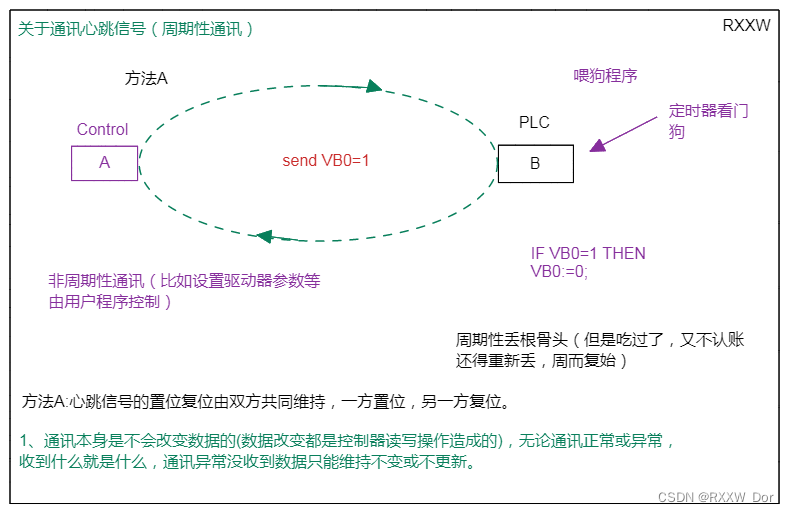
Application programming of communication heartbeat signal for communication abnormality judgment

EL & JSTL: JSTL summary
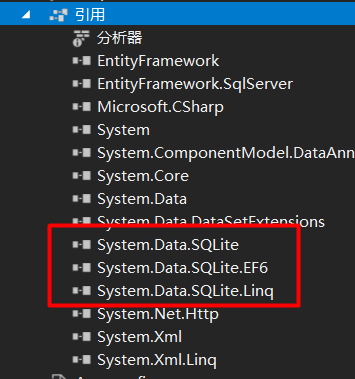
C # use SQLite

Go+ language

IP first experiment hdcl encapsulates PPP, chap, mGRE
随机推荐
About the word 'don't remember'
How about Minsheng futures? Is it safe?
WPF uses pathgeometry to draw the hour hand and minute hand
Brainstorming -- using reduce method to reconstruct concat function
Push information to wechat through enterprise wechat self built application
ODBC executes stored procedure to get return value
Trinitycore worldofwarcraft server - registration website
PCL point cloud processing ply file reading and saving (54)
Okaleido tiger NFT is about to log in to binance NFT platform, and the future market continues to be optimistic
Multi task face attribute analysis based on deep learning (based on paddlepaddle)
Visual studio input! No prompt
One click compilation and installation of redis6.2.4
Morris traversal
GEE - 数据集介绍MCD12Q1
Win10 solution Base64
Let‘s Encrypt
基于深度学习的多任务人脸属性分析(基于飞桨PaddlePaddle)
NVIDA-TensorRT部署(一)
关于板载继电器供电不足引起不能吸合的问题
Implementation of graph structure, from point to edge and then to graph