当前位置:网站首页>[image hiding] digital image information hiding system based on DCT, DWT, LHA, LSB, including various attacks and performance parameters, with matlab code
[image hiding] digital image information hiding system based on DCT, DWT, LHA, LSB, including various attacks and performance parameters, with matlab code
2022-07-28 19:12:00 【Matlab scientific research studio】
1 Content introduction
1.1 The purpose and significance of the research Since the 1990s , The Internet has been rapidly popularized in our life , The network almost exists In every household , In particular, some software for communication has brought to our lives since its birth Great convenience , Make it easy for people to communicate . But while the Internet facilitates our life , Also to the network Security poses a great threat . For example, we usually use the network or multimedia to communicate or send materials , This way of transmission breaks the previous correspondence , It greatly facilitates people's life , But in this message passed In the process, the security risks that can be seen everywhere on the network cannot be underestimated . For example, illegal people will intercept secrets Secret information , And publish the secret information after certain editing , The receiver will receive the wrong message and Cause great mistakes , If it is serious, it will cause a devastating blow to an enterprise and government agencies . In order to combat this kind of use of network theft , Even use the network to steal State secrets or enterprise secrets to commit crimes Behavior , In addition to the post-processing method of alarming by the public security organ , This behavior should also be considered directly in Strangle at the source , Therefore, it is urgent to study information security technology . At present, there are two main information security technologies , One is the traditional information security means encryption technology , The other is the emerging information security means information hiding technology [1]. Nowadays, these two technologies are widely studied and applied . Encryption technology was born much earlier than information hiding technology For a long time , It is also the most traditional means of information security , Encryption technology is through a series of transformations of plaintext , Get an end Ciphertext that can't see the original appearance of plaintext , By encrypting the ciphertext , Send it to the receiver , The receiver then Carry out a series of decryption work to ensure information security [2]. The birth of encryption technology has brought a lot to the field of information security Breakthrough , But this technology also brings some problems , For example, the illegal person can completely see this encrypted information , will Purposefully break through the encrypted information , If it arouses the interest of illegal persons, it is likely to be decrypted or Be destroyed . Information hiding technology solves the problem that encryption technology is easy to be targeted , It hides secret information Existence , So that the illegal person does not notice the existence of secret information , There will be no targeted attack . the Technology embeds secret information in a carrier that can be publicly disseminated , But it does not change the original appearance of the public carrier Son 、 Value and so on , To realize the transmission of secret information [3]. however , Once the secret information transmitted through hiding is found , Secret information will be exposed directly , Therefore, combined with the requirements of users for high concealment and high security of information security , Examination Considering the combination of encryption and information hiding [4].
Information hiding is a new information security technology , In information war , Digital media has many important applications in intellectual property protection and bill anti-counterfeiting . But as a discipline in the field of information security , There has been no systematic theoretical research on its security . We combine the relevant knowledge of Information Hiding Algorithm , For image-based airspace LSB Hiding algorithms 、DWT Transformation algorithm 、LHA Algorithm and DCT The security of transform domain algorithm is analyzed , I hope it can be helpful to the theoretical research of security . Experiments show that , The algorithm is applicable to pepper and salt 、 White noise 、 wave filtering 、 shear 、 A series of attacks such as compression and rotation have good robustness .
2 Simulation code
function varargout = info_hiding_gui(varargin)% INFO_HIDING_GUI M-file for info_hiding_gui.fig% INFO_HIDING_GUI, by itself, creates a new INFO_HIDING_GUI or raises the existing% singleton*.%% H = INFO_HIDING_GUI returns the handle to a new INFO_HIDING_GUI or the handle to% the existing singleton*.%% INFO_HIDING_GUI('CALLBACK',hObject,eventData,handles,...) calls the local% function named CALLBACK in INFO_HIDING_GUI.M with the given input arguments.%% INFO_HIDING_GUI('Property','Value',...) creates a new INFO_HIDING_GUI or raises the% existing singleton*. Starting from the left, property value pairs are% applied to the GUI before info_hiding_gui_OpeningFcn gets called. An% unrecognized property name or invalid value makes property application% stop. All inputs are passed to info_hiding_gui_OpeningFcn via varargin.%% *See GUI Options on GUIDE's Tools menu. Choose "GUI allows only one% instance to run (singleton)".%% See also: GUIDE, GUIDATA, GUIHANDLES% Edit the above text to modify the response to help info_hiding_gui% Last Modified by GUIDE v2.5 05-Jun-2010 19:09:16% Begin initialization code - DO NOT EDITgui_Singleton = 1;gui_State = struct('gui_Name', mfilename, ...'gui_Singleton', gui_Singleton, ...'gui_OpeningFcn', @info_hiding_gui_OpeningFcn, ...'gui_OutputFcn', @info_hiding_gui_OutputFcn, ...'gui_LayoutFcn', [] , ...'gui_Callback', []);if nargin && ischar(varargin{1})gui_State.gui_Callback = str2func(varargin{1});endif nargout[varargout{1:nargout}] = gui_mainfcn(gui_State, varargin{:});elsegui_mainfcn(gui_State, varargin{:});end% End initialization code - DO NOT EDIT% --- Executes just before info_hiding_gui is made visible.function info_hiding_gui_OpeningFcn(hObject, eventdata, handles, varargin)% This function has no output args, see OutputFcn.% hObject handle to figure% eventdata reserved - to be defined in a future version of MATLAB% handles structure with handles and user data (see GUIDATA)% varargin command line arguments to info_hiding_gui (see VARARGIN)clc;V=get(0,'screensize') ;% Get the size information of the current root screena=V(3)/2-500;b=V(4)/2-334;set(gcf,'Position',[a b 1001 669])%clear;% Choose default command line output for info_hiding_guihandles.output = hObject;% Update handles structureguidata(hObject, handles);set(handles.radiobutton31,'value',1);% Set the default value of noise attack to “ Noiseless ”set(handles.radiobutton32,'value',1);% Set the default value of filtering processing to “ No filtering ”set(handles.slider6,'value',0);% Set the default value of the slider to 0set(handles.slider7,'value',0);set(handles.slider8,'value',0);%set(handles.slider9,'value',0);set(handles.slider10,'value',0);set(handles.edit8,'string',0);set(handles.edit9,'string',0);set(handles.edit10,'string',0);%set(handles.edit11,'string',0);set(handles.edit12,'string',0);set(handles.edit15,'string',0);%key_1=[];% The initialization key is empty%key_2=[];%set(handles.edit1,'string','');%set(handles.edit2,'string','');% UIWAIT makes info_hiding_gui wait for user response (see UIRESUME)% uiwait(handles.figure1);% --- Outputs from this function are returned to the command line.function varargout = info_hiding_gui_OutputFcn(hObject, eventdata, handles)% varargout cell array for returning output args (see VARARGOUT);% hObject handle to figure% eventdata reserved - to be defined in a future version of MATLAB% handles structure with handles and user data (see GUIDATA)% Get default command line output from handles structurevarargout{1} = handles.output;% --- Executes on button press in pushbutton12.function pushbutton12_Callback(hObject, eventdata, handles)% hObject handle to pushbutton12 (see GCBO)% eventdata reserved - to be defined in a future version of MATLAB% handles structure with handles and user data (see GUIDATA)response=questdlg(' Are you sure you want to close this program ?',' Prompt dialog ',' close ',' Cancel ',1);if strcmp(' close ',response)close(gcf)end% --- Executes on button press in pushbutton13.function pushbutton13_Callback(hObject, eventdata, handles)% hObject handle to pushbutton13 (see GCBO)% eventdata reserved - to be defined in a future version of MATLAB% handles structure with handles and user data (see GUIDATA)%msgbox('name',' Copyright notice ','string','Copyright ? 2010-2100 He Jie Nanjing University of Posts and telecommunications ' )V=get(0,'screensize') ;% Get the size information of the current root screena=V(3)/2-234+3;b=V(4)/2-132+70;copyright('Position',[a b 468 264])% Set Popup copyright The window is near the middle of the screen% --- Executes on button press in pushbutton14.function pushbutton14_Callback(hObject, eventdata, handles)% hObject handle to pushbutton14 (see GCBO)% eventdata reserved - to be defined in a future version of MATLAB% handles structure with handles and user data (see GUIDATA)V=get(0,'screensize') ;% Get the size information of the current root screena=V(3)/2-151;b=V(4)/2-200+70;thanks('Position',[a b 303 403])% --- Executes on slider movement.function slider6_Callback(hObject, eventdata, handles)% hObject handle to slider6 (see GCBO)% eventdata reserved - to be defined in a future version of MATLAB% handles structure with handles and user data (see GUIDATA)% Hints: get(hObject,'Value') returns position of slider% get(hObject,'Min') and get(hObject,'Max') to determine range of slidergaussian_slide=get(handles.slider6,'value');%disp(gaussian_slide) % testset(handles.edit8,'string',gaussian_slide);% --- Executes during object creation, after setting all properties.function slider6_CreateFcn(hObject, eventdata, handles)% hObject handle to slider6 (see GCBO)% eventdata reserved - to be defined in a future version of MATLAB% handles empty - handles not created until after all CreateFcns called% Hint: slider controls usually have a light gray background.if isequal(get(hObject,'BackgroundColor'), get(0,'defaultUicontrolBackgroundColor'))set(hObject,'BackgroundColor',[.9 .9 .9]);end% --- Executes on slider movement.function slider7_Callback(hObject, eventdata, handles)% hObject handle to slider7 (see GCBO)% eventdata reserved - to be defined in a future version of MATLAB% handles structure with handles and user data (see GUIDATA)% Hints: get(hObject,'Value') returns position of slider% get(hObject,'Min') and get(hObject,'Max') to determine range of slidersalt_slide=get(handles.slider7,'value');%disp(gaussian_slide) % testset(handles.edit9,'string',salt_slide);% --- Executes during object creation, after setting all properties.function slider7_CreateFcn(hObject, eventdata, handles)% hObject handle to slider7 (see GCBO)% eventdata reserved - to be defined in a future version of MATLAB% handles empty - handles not created until after all CreateFcns called% Hint: slider controls usually have a light gray background.if isequal(get(hObject,'BackgroundColor'), get(0,'defaultUicontrolBackgroundColor'))set(hObject,'BackgroundColor',[.9 .9 .9]);end% --- Executes on slider movement.function slider8_Callback(hObject, eventdata, handles)% hObject handle to slider8 (see GCBO)% eventdata reserved - to be defined in a future version of MATLAB% handles structure with handles and user data (see GUIDATA)% Hints: get(hObject,'Value') returns position of slider% get(hObject,'Min') and get(hObject,'Max') to determine range of sliderlocalvar_slide=get(handles.slider8,'value');%disp(gaussian_slide) % testset(handles.edit10,'string',localvar_slide);% --- Executes during object creation, after setting all properties.function slider8_CreateFcn(hObject, eventdata, handles)% hObject handle to slider8 (see GCBO)% eventdata reserved - to be defined in a future version of MATLAB% handles empty - handles not created until after all CreateFcns called% Hint: slider controls usually have a light gray background.if isequal(get(hObject,'BackgroundColor'), get(0,'defaultUicontrolBackgroundColor'))set(hObject,'BackgroundColor',[.9 .9 .9]);end% --- Executes on slider movement.function slider9_Callback(hObject, eventdata, handles)% hObject handle to slider9 (see GCBO)% eventdata reserved - to be defined in a future version of MATLAB% handles structure with handles and user data (see GUIDATA)% Hints: get(hObject,'Value') returns position of slider% get(hObject,'Min') and get(hObject,'Max') to determine range of sliderpoisson_slide=get(handles.slider9,'value');%disp(gaussian_slide) % testset(handles.edit11,'string',poisson_slide);% --- Executes during object creation, after setting all properties.function slider9_CreateFcn(hObject, eventdata, handles)% hObject handle to slider9 (see GCBO)% eventdata reserved - to be defined in a future version of MATLAB% handles empty - handles not created until after all CreateFcns called% Hint: slider controls usually have a light gray background.if isequal(get(hObject,'BackgroundColor'), get(0,'defaultUicontrolBackgroundColor'))set(hObject,'BackgroundColor',[.9 .9 .9]);endfunction edit8_Callback(hObject, eventdata, handles)% hObject handle to edit8 (see GCBO)% eventdata reserved - to be defined in a future version of MATLAB% handles structure with handles and user data (see GUIDATA)% Hints: get(hObject,'String') returns contents of edit8 as text% str2double(get(hObject,'String')) returns contents of edit8 as a doublegaussian_edit=get(handles.edit8,'string');%disp(gaussian_slide) % testgaussian_edit=str2num(gaussian_edit);if gaussian_edit>0.1||gaussian_edit<0errordlg(' Input error , Please re-enter !')error();endset(handles.slider6,'value',gaussian_edit);% --- Executes during object creation, after setting all properties.function edit8_CreateFcn(hObject, eventdata, handles)% hObject handle to edit8 (see GCBO)% eventdata reserved - to be defined in a future version of MATLAB% handles empty - handles not created until after all CreateFcns called% Hint: edit controls usually have a white background on Windows.% See ISPC and COMPUTER.if ispc && isequal(get(hObject,'BackgroundColor'), get(0,'defaultUicontrolBackgroundColor'))set(hObject,'BackgroundColor','white');end% --- Executes on slider movement.function slider10_Callback(hObject, eventdata, handles)% hObject handle to slider10 (see GCBO)% eventdata reserved - to be defined in a future version of MATLAB% handles structure with handles and user data (see GUIDATA)% Hints: get(hObject,'Value') returns position of slider% get(hObject,'Min') and get(hObject,'Max') to determine range of sliderspeckle_slide=get(handles.slider10,'value');%disp(gaussian_slide) % testset(handles.edit12,'string',speckle_slide);% --- Executes during object creation, after setting all properties.function slider10_CreateFcn(hObject, eventdata, handles)% hObject handle to slider10 (see GCBO)% eventdata reserved - to be defined in a future version of MATLAB% handles empty - handles not created until after all CreateFcns called% Hint: slider controls usually have a light gray background.if isequal(get(hObject,'BackgroundColor'), get(0,'defaultUicontrolBackgroundColor'))set(hObject,'BackgroundColor',[.9 .9 .9]);endfunction edit9_Callback(hObject, eventdata, handles)% hObject handle to edit9 (see GCBO)% eventdata reserved - to be defined in a future version of MATLAB% handles structure with handles and user data (see GUIDATA)% Hints: get(hObject,'String') returns contents of edit9 as text% str2double(get(hObject,'String')) returns contents of edit9 as a doublesalt_edit=get(handles.edit9,'string');%disp(gaussian_slide) % testsalt_edit=str2num(salt_edit);if salt_edit>0.1||salt_edit<0errordlg(' Input error , Please re-enter !')error();endset(handles.slider7,'value',salt_edit);% --- Executes during object creation, after setting all properties.function edit9_CreateFcn(hObject, eventdata, handles)% hObject handle to edit9 (see GCBO)% eventdata reserved - to be defined in a future version of MATLAB% handles empty - handles not created until after all CreateFcns called% Hint: edit controls usually have a white background on Windows.% See ISPC and COMPUTER.if ispc && isequal(get(hObject,'BackgroundColor'), get(0,'defaultUicontrolBackgroundColor'))set(hObject,'BackgroundColor','white');endfunction edit10_Callback(hObject, eventdata, handles)% hObject handle to edit10 (see GCBO)% eventdata reserved - to be defined in a future version of MATLAB% handles structure with handles and user data (see GUIDATA)% Hints: get(hObject,'String') returns contents of edit10 as text% str2double(get(hObject,'String')) returns contents of edit10 as a doublelocalvar_edit=get(handles.edit10,'string');%disp(gaussian_slide) % testlocalvar_edit=str2num(localvar_edit);if localvar_edit>0.1||localvar_edit<0errordlg(' Input error , Please re-enter !')error();endset(handles.slider8,'value',localvar_edit);% --- Executes during object creation, after setting all properties.function edit10_CreateFcn(hObject, eventdata, handles)% hObject handle to edit10 (see GCBO)% eventdata reserved - to be defined in a future version of MATLAB% handles empty - handles not created until after all CreateFcns called% Hint: edit controls usually have a white background on Windows.% See ISPC and COMPUTER.if ispc && isequal(get(hObject,'BackgroundColor'), get(0,'defaultUicontrolBackgroundColor'))set(hObject,'BackgroundColor','white');endfunction edit11_Callback(hObject, eventdata, handles)% hObject handle to edit11 (see GCBO)% eventdata reserved - to be defined in a future version of MATLAB% handles structure with handles and user data (see GUIDATA)% Hints: get(hObject,'String') returns contents of edit11 as text% str2double(get(hObject,'String')) returns contents of edit11 as a doublepoisson_edit=get(handles.edit11,'string');%disp(gaussian_slide) % testpoisson_edit=str2num(poisson_edit);if poisson_edit>0.1||poisson_edit<0errordlg(' Input error , Please re-enter !')error();endset(handles.slider9,'value',poisson_edit);% --- Executes during object creation, after setting all properties.function edit11_CreateFcn(hObject, eventdata, handles)% hObject handle to edit11 (see GCBO)% eventdata reserved - to be defined in a future version of MATLAB% handles empty - handles not created until after all CreateFcns called% Hint: edit controls usually have a white background on Windows.% See ISPC and COMPUTER.if ispc && isequal(get(hObject,'BackgroundColor'), get(0,'defaultUicontrolBackgroundColor'))set(hObject,'BackgroundColor','white');endfunction edit12_Callback(hObject, eventdata, handles)% hObject handle to edit12 (see GCBO)% eventdata reserved - to be defined in a future version of MATLAB% handles structure with handles and user data (see GUIDATA)% Hints: get(hObject,'String') returns contents of edit12 as text% str2double(get(hObject,'String')) returns contents of edit12 as a doublespeckle_edit=get(handles.edit12,'string');%disp(gaussian_slide) % testspeckle_edit=str2num(speckle_edit);if speckle_edit>0.1||speckle_edit<0errordlg(' Input error , Please re-enter !')error();endset(handles.slider10,'value',speckle_edit);% --- Executes during object creation, after setting all properties.function edit12_CreateFcn(hObject, eventdata, handles)% hObject handle to edit12 (see GCBO)% eventdata reserved - to be defined in a future version of MATLAB% handles empty - handles not created until after all CreateFcns called% Hint: edit controls usually have a white background on Windows.% See ISPC and COMPUTER.if ispc && isequal(get(hObject,'BackgroundColor'), get(0,'defaultUicontrolBackgroundColor'))set(hObject,'BackgroundColor','white');end% --- Executes on button press in pushbutton7.function pushbutton7_Callback(hObject, eventdata, handles)% hObject handle to pushbutton7 (see GCBO)% eventdata reserved - to be defined in a future version of MATLAB% handles structure with handles and user data (see GUIDATA)global im_coverglobal im_messageglobal key_2get_var_error_expression % Determine whether to enter the keydisp('LSB extract ')% testnoisemyfilterlsb_get% --- Executes on button press in pushbutton8.function pushbutton8_Callback(hObject, eventdata, handles)% hObject handle to pushbutton8 (see GCBO)% eventdata reserved - to be defined in a future version of MATLAB% handles structure with handles and user data (see GUIDATA)% Call the carrier image 、 Global variables of secret information image and keyglobal im_coverglobal im_messageglobal key_2get_var_error_expression % Determine whether to enter the keydisp('DCT extract ') % testnoisemyfilterdct_get% --- Executes on button press in pushbutton9.function pushbutton9_Callback(hObject, eventdata, handles)% hObject handle to pushbutton9 (see GCBO)% eventdata reserved - to be defined in a future version of MATLAB% handles structure with handles and user data (see GUIDATA)global im_coverglobal im_messageglobal key_2get_var_error_expression % Determine whether to enter the keydisp('DWT extract ') % testnoisemyfilterdwt_get% --- Executes on button press in pushbutton1.function pushbutton1_Callback(hObject, eventdata, handles)% hObject handle to pushbutton1 (see GCBO)% eventdata reserved - to be defined in a future version of MATLAB% handles structure with handles and user data (see GUIDATA)global im_cover % Definition im Is a global variable% Select the carrier image[filename,pathname]=...uigetfile({'*.bmp'},' Select Picture ');% Synthesis path + file namestr=[pathname filename];% Read the pictureim_cover=imread(str);% Determine whether it is a grayscale image%if ndims(im_cover)~=2% if ~isgray(im_cover)% errordlg(' Please select gray image as the carrier image ');% error();% endim_cover=uint8(im_cover);set(handles.edit1,'string',str);% --- Executes on button press in pushbutton3.function pushbutton3_Callback(hObject, eventdata, handles)% hObject handle to pushbutton3 (see GCBO)% eventdata reserved - to be defined in a future version of MATLAB% handles structure with handles and user data (see GUIDATA)global im_message % Global variables% Select the carrier image[filename1,pathname1]=...uigetfile({'*.bmp'},' Select Picture ');% Synthesis path + file namestr=[pathname1 filename1];% Read the pictureim_message=imread(str);% Judge whether it is a two-dimensional binary image%test_message=find(im_message~=0&im_message~=1);%if isempty(test_message)% test_value=0;%else% test_value=1;%end%if ndims(im_message)~=2||test_value%if any(im_message~=0|im_message~=1)% if ~isbw(im_message)% errordlg(' Please select binary image as secret information image ');% error();% endset(handles.edit2,'string',str);% --- Executes on button press in pushbutton4.function pushbutton4_Callback(hObject, eventdata, handles)% hObject handle to pushbutton4 (see GCBO)% eventdata reserved - to be defined in a future version of MATLAB% handles structure with handles and user data (see GUIDATA)global im_coverglobal im_message % Make the variables of the global carrier image% Judge whether the carrier image and secret information image have been selectedif isempty(im_cover)errordlg(' Please select an image as the carrier image ',' error ');error();endif isempty(im_message)errordlg(' Please choose a picture as a secret picture ',' error ');error();end%if im_message==NULL% errordlg(' Please select carrier image ');% error();%endfiguresubplot(121);imshow(im_cover);title(' Carrier image ');subplot(122);imshow(im_message);title(' Secret information image ');function edit1_Callback(hObject, eventdata, handles)% hObject handle to edit1 (see GCBO)% eventdata reserved - to be defined in a future version of MATLAB% handles structure with handles and user data (see GUIDATA)% Hints: get(hObject,'String') returns contents of edit1 as text% str2double(get(hObject,'String')) returns contents of edit1 as a double% --- Executes during object creation, after setting all properties.function edit1_CreateFcn(hObject, eventdata, handles)% hObject handle to edit1 (see GCBO)% eventdata reserved - to be defined in a future version of MATLAB% handles empty - handles not created until after all CreateFcns called% Hint: edit controls usually have a white background on Windows.% See ISPC and COMPUTER.if ispc && isequal(get(hObject,'BackgroundColor'), get(0,'defaultUicontrolBackgroundColor'))set(hObject,'BackgroundColor','white');end
3 Running results


4 reference
[1] Zhang Daqi , Qu Shiru , Kang Baosheng . be based on DCT and DWT Digital image hiding technology [J]. Journal of Northwest Polytechnic University , 2007, 25(3):5.
[2] Xu Kai . Research on image information hiding algorithm [D]. Guizhou University .
About bloggers : Good at intelligent optimization algorithms 、 Neural networks predict 、 signal processing 、 Cellular automata 、 The image processing 、 Path planning 、 UAV and other fields Matlab Simulation , relevant matlab Code problems can be exchanged by private letter .
Some theories cite network literature , If there is infringement, contact the blogger to delete .
边栏推荐
- cv5200无线WiFi通信模块,视频图像传输无线化,实时无线通信技术
- The login interface of modern personal blog system modstartblog v5.4.0 has been revised and the contact information has been added
- 软件测试开发基础|测开中的几个工具开发实战
- How long does software testing take?
- How to solve the problem that easycvr device cannot be online again after offline?
- Kali doesn't have an eth0 network card? What if you don't connect to the Internet
- Is zero basic software testing training reliable?
- 2022年暑假ACM热身练习3(详细)
- What if svchost.exe of win11 system has been downloading?
- How to solve the problem that the win11 computer camera cannot be seen when it is turned on and the display screen is black?
猜你喜欢
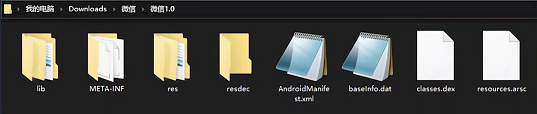
Why did wechat change from "small and beautiful" to "big and fat" when it expanded 575 times in 11 years?
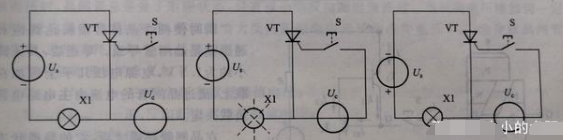
Structure and working principle of thyristor

Three minutes to understand, come to new media

Today in history: Microsoft acquires qdos; Model testing pioneer birth; The first laser typesetting Chinese newspaper

Introduction and advanced level of MySQL (I)

AI has changed thousands of industries. How can developers devote themselves to the new "sound" state of AI voice

What kind of knowledge payment system functions are more conducive to the development of the platform and lecturers?

QT & OpenGL lighting
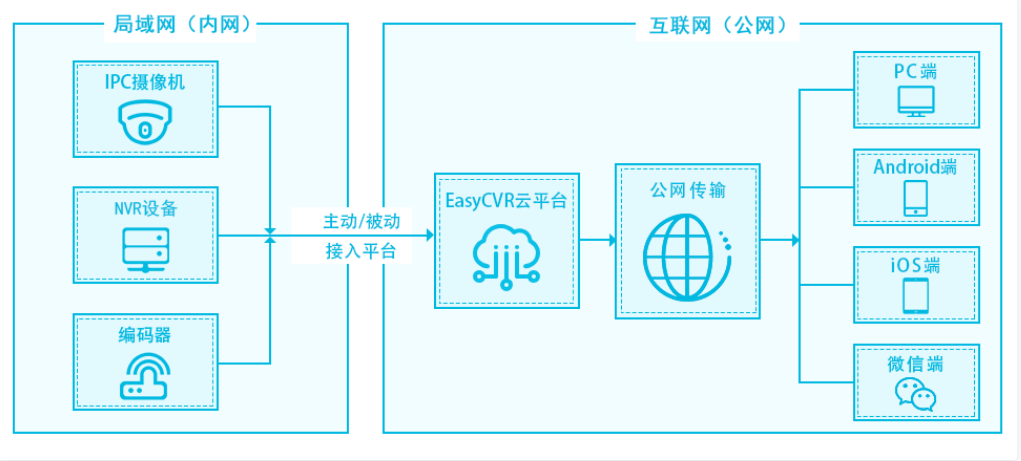
How to solve the problem that easycvr device cannot be online again after offline?

From Bayesian filter to Kalman filter (I)
随机推荐
[machine learning] support vector machine classification
GC garbage collector details
Why did wechat change from "small and beautiful" to "big and fat" when it expanded 575 times in 11 years?
Introduction and advanced MySQL (III)
The login interface of modern personal blog system modstartblog v5.4.0 has been revised and the contact information has been added
QT with line encoding output cout
SwiftUI Swift 之正向地理编码与反向地理编码(教程含源码)
真正的 HTAP 对用户和开发者意味着什么?
湖上建仓全解析:如何打造湖仓一体数据平台 | DEEPNOVA技术荟系列公开课第四期
Redis advantages and data structure related knowledge
How to solve the problem that easycvr device cannot be online again after offline?
Why app uses JSON protocol to interact with server: serialization related knowledge
服务器正文21:不同编译器对预编译的处理(简单介绍msvc和gcc)
QT - CPP database operation
From Bayesian filter to Kalman filter (zero)
QT running image
C language (high-level) character function and string function + Exercise
JVM four reference types
Haproxy implements proxy configuration
Is it easy to learn the zero foundation of software testing?