当前位置:网站首页>Windows 安装 MySQL 5.7详细步骤
Windows 安装 MySQL 5.7详细步骤
2022-07-29 08:11:00 【Bejpse】
文章目录
本文主要介绍了 Windows 系统中安装 MySQL 5.7 的详细步骤,以及环境变量配置和文件配置。
下载
MySQL :: Download MySQL Community Server (Archived Versions)
https://downloads.mysql.com/archives/community/
选择 5.7.* 版本,然后选择 zip 文件进行下载
解压
将下载的文件解压到自己安装软件的目录,我这里是C:Softwaremysql-5.7.28
设置环境变量
依次点击 此电脑 — 属性 — 高级系统设置 — 环境变量,然后新建系统变量
MYSQL_HOME
C:Softwaremysql-5.7.28
在 “Path”变量中添加%MYSQL_HOME%in
创建数据目录
在C:Softwaremysql-5.7.28目录中分别创建data和uploads文件夹,分别存放MySQL数据和导入导出文件。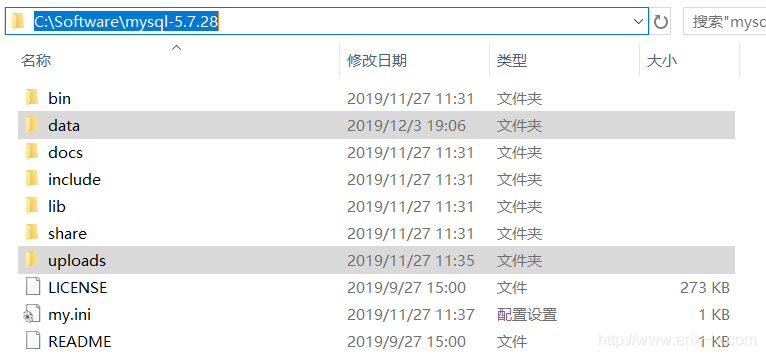
创建配置文件
在C:Softwaremysql-5.7.28目录中创建my.ini文件,涉及到目录文件的跟进自己情况做修改。
[mysqld]
port=3306
character_set_server=utf8
basedir=C:Softwaremysql-5.7.28
datadir=C:Softwaremysql-5.7.28data
server-id=1
sql_mode=NO_AUTO_CREATE_USER,NO_ENGINE_SUBSTITUTION
lower_case_table_names=1
innodb_file_per_table = 1
log_timestamps=SYSTEM

log-error   = error.log
slow_query_log = 1
slow_query_log_file = slow.log
long_query_time = 5
log-bin = binlog
binlog_format = row
expire_logs_days = 15
log_bin_trust_function_creators = 1
secure-file-priv=C:Softwaremysql-5.7.28uploads

[client]
default-character-set=utf8
整体目录结构为
初始化数据库
以管理员的身份运行 CMD
切换到 MySQL 的HOME 目录,然后执行mysqld --initialize-insecure
cd c:Softwaremysql-5.7.28
mysqld --initialize-insecure
安装并启动
切换到bin目录中,执行mysqld –install MySQL57安装,然后再执行net start MySQL57启动 MySQL
cd bin
mysqld –install MySQL57
net start MySQL57
设置登录密码
先使用mysql -uroot登录 MySQL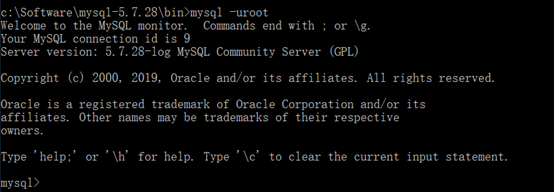
设置本地登录密码为“Root-123”和远程登录密码“Root-123456”
mysql -uroot
SET PASSWORD FOR 'root'@'localhost'= "Root-123";
GRANT ALL PRIVILEGES ON *.* TO 'root'@'%' IDENTIFIED BY 'Root-123456' WITH GRANT OPTION;
FLUSH PRIVILEGES;
参考资料
Windows安装MySQL5.7教程 - 简书
https://www.jianshu.com/p/a41d45890ab2
注:本文首发于个人博客网站: http://www.erik-ly.com/
边栏推荐
- Convert source package to RPM package
- [paper reading | cryoelectron microscope] interpretation of the new subtomogram averaging method in relion 4.0
- BiSeNet v2
- TCP——滑动窗口
- (视频+图文)机器学习入门系列-第5章 机器学习实践
- Qt/pyqt window type and window flag
- STM32 detection signal frequency
- Detailed explanation of the find command (the most common operation of operation and maintenance at the end of the article)
- 产品推广的渠道和策略,化妆品品牌推广方法及步骤
- Cyberpunk special effect shader
猜你喜欢

Inclination sensor is used for long-term monitoring of communication tower and high-voltage tower

Data unit: bit, byte, word, word length

Tb6600+stm32f407 test

数仓分层设计及数据同步问题,,220728,,,,
![[beauty of software engineering - column notes] 30 | make good use of source code management tools to make your collaboration more efficient](/img/d1/5b980d8b9580b9808b2b3f51d5b9c6.png)
[beauty of software engineering - column notes] 30 | make good use of source code management tools to make your collaboration more efficient

Unity beginner 3 - enemy movement control and setting of blood loss area (2D)

What is Amazon self support number and what should sellers do?

STM32 MDK (keil5) contents mismatch error summary

Official tutorial redshift 01 basic theoretical knowledge and basic characteristics learning

Some thoughts on growing into an architect
随机推荐
Dynamic Thresholds Buffer Management in a Shared Buffer Packet Switch论文总结
[freeze electron microscope] analysis of the source code of the subtomogram alignment function of relion4.0 (for self use)
Simple calculator wechat applet project source code
Use the cloud code to crack the problem of authentication code encountered during login
Some thoughts on growing into an architect
The software package is set to - > Yum source
Ue4/ue5 C disk enlargement processing
Internet worm
BiSeNet v2
Qt/pyqt window type and window flag
Explanation and closing method of server 135, 137, 138, 139, 445 and other ports
Network Security Learning chapter
"Swiss Army Knife" -nc in network tools
Qt/PyQt 窗口类型与窗口标志
C language problems
[robomaster] a board receives jy-me01 angle sensor data -- Modbus Protocol & CRC software verification
分段分页以及段页结合
Rotation in model space and rotation in world space
Dp1332e multi protocol highly integrated contactless read-write chip
Beautiful girls