当前位置:网站首页>Logging learning final edition - configured different levels of log printing colors
Logging learning final edition - configured different levels of log printing colors
2022-07-26 10:56:00 【Yasso won't blow】
import logging
# Set the package of log color
import colorlog
import datetime


''' Loggers: Recorder , Provide interfaces that can be directly used by application code ; Handlers: processor , Send logs generated by the recorder to the destination ; Filters: filter , Provide better granularity control , Decide which logs will be output ; Formatters: formatter , Set composition structure and message field of log content . %(name)s Logger Name  # That's one of them .getLogger The path in , Or we can use his file name to see what we fill in  %(levelno)s  Log level in digital form  # The level of the printed objects in the log  %(levelname)s  Log level in text form  # The name of the level  %(pathname)s  The full pathname of the module calling the log output function , There may be no  %(filename)s  The file name of the module calling the log output function  %(module)s  The module name that calls the log output function  %(funcName)s  Call the function name of the log output function  %(lineno)d  The line of code that calls the log output function  %(created)f  current time , use UNIX The standard means the float of time   The number of points indicates  %(relativeCreated)d  When outputting log information , since Logger Create to   Milliseconds from  %(asctime)s  Current time in string form . The default format is  “2003-07-08 16:49:45,896”. After the comma is milliseconds  %(thread)d  Threads ID. There may be no  %(threadName)s  The thread of . There may be no  %(process)d  process ID. There may be no  %(message)s User output message  '''


''' Log color configuration '''
log_colors_config = {

    # Color support  blue blue ,green green ,red Red ,yellow yellow ,cyan Cyan
    'DEBUG': 'cyan',
    'INFO': 'green',
    'WARNING': 'yellow',
    'ERROR': 'red',
    'CRITICAL': 'bold_red',
}

''' establish logger Recorder '''
logger = logging.getLogger('test')

#  Output to console
console_handler = logging.StreamHandler()
#  output to a file
path = "./log"
''' Get the current date as the log file name '''
fileName = str(datetime.datetime.now().year) + '-' + str(datetime.datetime.now().month) + '-' + str(
    datetime.datetime.now().day) + '.log'
file_handler = logging.FileHandler(filename=path+'\\'+fileName, mode='a', encoding='utf8')


''' Log level settings '''
#logger Controls the lowest level of log output ( The highest priority )
logger.setLevel(logging.DEBUG)
#console_handler Set the console minimum output level log
console_handler.setLevel(logging.DEBUG)
#console_handler Set the minimum output level log saved to the file
file_handler.setLevel(logging.INFO)

#  Log output format
# Save the log format of the file
file_formatter = logging.Formatter(
    fmt='[%(asctime)s] %(filename)s -> %(funcName)s line:%(lineno)d [%(levelname)s] : %(message)s',
    datefmt='%Y-%m-%d %H:%M:%S'
)
# Console log format
console_formatter = colorlog.ColoredFormatter(
    # Output that information , Time , file name , Function name and so on
    fmt='%(log_color)s[%(asctime)s] %(filename)s -> %(funcName)s line:%(lineno)d [%(levelname)s] : %(message)s',
    # Time format
    datefmt='%Y-%m-%d %H:%M:%S',
    log_colors=log_colors_config
)
console_handler.setFormatter(console_formatter)
file_handler.setFormatter(file_formatter)

#  Duplicate log problem :
#  Here's the judgment , If logger.handlers The list is empty. , Then add , otherwise , Write a log directly , Solve the problem of repeated printing
if not logger.handlers:
    logger.addHandler(console_handler)
    logger.addHandler(file_handler)

console_handler.close()
file_handler.close()


if __name__ == '__main__':
    logger.debug(' Color ')
    logger.info(' Green test log saving path {}'.format(path+fileName))
    logger.warning(' Color ')
    logger.error('error')
    logger.critical('critical')
边栏推荐
- Bash shell learning notes (6)
- Software Testing Overview: the background, essence and process of software testing
- Sword finger offer (8): jump the steps
- WinPcap packet capturing function pcap_ Loop (), stop the problem
- Pytest case execution sequence
- Fragment 懒加载
- Bash shell learning notes (V)
- Simple use of MFC multithreading
- Bash shell learning notes (VII)
- Pengge C language lesson 4 (3)
猜你喜欢

RT thread learning notes (VI) -- start the elmfat file system based on SPI flash (Part 1)
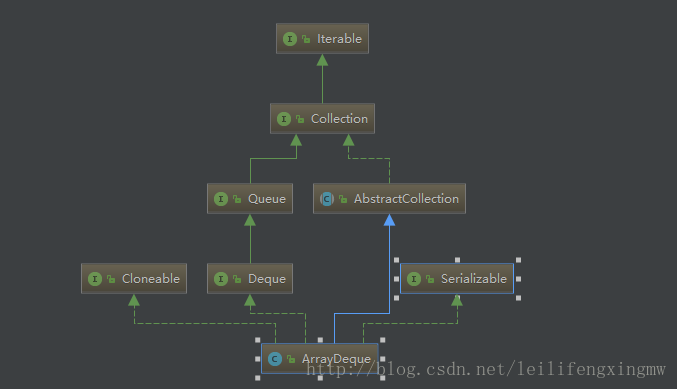
Newbie sees the source code arraydeque
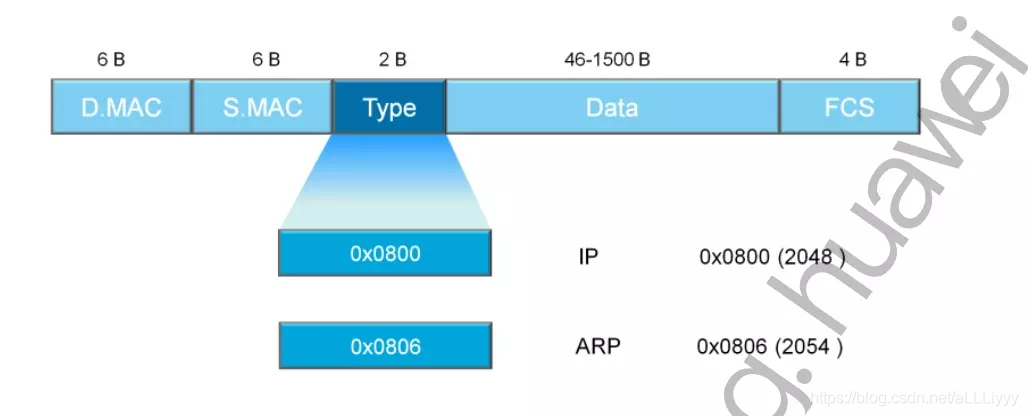
Wireshark basic tutorial Ethernet frame analysis.
菜鸟看源码之ArrayDeque

344.反转字符串

企鹅龙(DRBL)无盘启动+再生龙(clonezilla)网络备份与还原系统

232. Implement queue with stack

Why do I need automated testing? Software testers take you to evaluate different software testing tools

pytest 执行规则_基本用法_常用插件_常用断言_常用参数

菜鸟看源码之LinkedBlockingQueue
随机推荐
pytest conftest.py和fixture的配合使用
MultipartFil转为File
Pengge C language 20210811 program structure operation
BLE之ATT请求
104.二叉树的最大深度
公司项目中的biz层和manager层是干啥的
logging基本使用
nmap弱点扫描结果可视化转换
MFC picture control
Sql Server之查询总结
SparkSQL的UDF及分析案例,220725,
Sword finger offer (twenty): stack containing min function
349. Intersection of two arrays
Sword finger offer (twenty): stack containing min function
WIRESHARK基础教程以太帧的分析。
1748.唯一元素的和
C#委托与匿名方法浅析
Simple use of MFC multithreading
Shell script fails to execute repeatedly automatically
Sql Server 数据库之数据类型