当前位置:网站首页>Volatility memory forensics - command shows
Volatility memory forensics - command shows
2022-07-30 06:38:00 【[email protected]】
Introduction: The proportion of forensic questions in ctf is getting bigger and bigger. As a new ctf entrant, I have forensic questions almost every time I play a few ctf games. The previous games were also helpless, and I finally calmed down and got seriousA problem has been reproduced.
Installation of Volatility
The previous old version of kali has its own volatility, so it can be used directly, but the current version basically needs to be downloaded and installed by itself, mainly depends on the python environment installation, requires some libraries, it is recommended to use python3
Download link: https://www.volatilityfoundation.org/releases
After downloading, go to the root directory and run vol.py directly!
Title link:https://buuoj.cn/match/matches/3/challenges
Command
1. Query mirror information
python vol.py -f mem.raw imageinfo
2. View the mirroring process
python vol.py -f mem.raw --profile=Win7SP1x86 pslist 
You can view some suspicious processes here, there are three suspicious processes in this question
3. Example of dumping one of the processes
python vol.py -f mem.raw --profile=Win7SP1x86 memdump -p 3364 -D 
The process of dumping can be analyzed in detail
4. Check the dumped process for the existence of key, password, etc.
Example:
python vol.py -f mem.raw --profile=Win7SP1x86 pslist | find "mspaint.exe"5. Common process names of windows
TrueCrypt.exe Disk encryption tool notepad.exe Comes with notepad mspaint.exe Comes with drawing tool iexplore.exe IE browser DumpIt.exe Memory image extraction tool6. List the process table
python vol.py -f mem.raw --profile=Win7SP1x86 hivelist
7. Extract registry information
python3 vol.py -f mem.raw --profile=Win7SP1x86 hivedump -o 0x82a9fb388. Get IE browser history
python vol.py -f mem.raw --profile=Win7SP1x86 iehistory
9. List username and password
python vol.py -f mem.raw --profile=Win7SP1x86 printkey -K "SAM\Domains\Account\Users\Names"
10. Get the username and password of the last logged-in user
python vol.py -f mem.raw --profile=Win7SP1x86 printkey -K "SOFTWARE\Microsoft\Windows Nt\CurrentVersion\Winlogon"
11. View cmd command
python vol.py -f mem.raw --profile=Win7SP1x86 cmdscan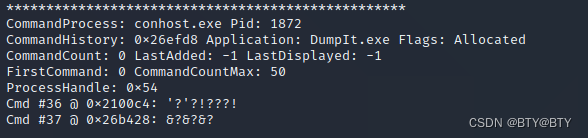
12. View cmd details
python vol.py -f mem.raw --profile=Win7SP1x86 cmdline13. Copy, cut version
python vol.py -f mem.raw --profile=Win7SP1x86 clipboardpython vol.py -f mem.raw --profile=Win7SP1x86 dlllist -p 3820Note: If there are other commands in the future, it will continue to be updated
版权声明
本文为[[email protected]]所创,转载请带上原文链接,感谢
https://yzsam.com/2022/211/202207300539173294.html
边栏推荐
猜你喜欢


![[Net Ding Cup 2020 Qinglong Group] AreUSerialz](/img/f2/9aef8b8317eff31af2979b3a45b54c.png)




随机推荐
torch分布式训练
Misc of CTF-image steganography
Extraction of BaseDAO
POI工具类
vulnhub-XXE ctf security question
P3 元宝第三天的笔记
简述SSRF
sqli-labs靶场 SQL注入学习 Less-1
npm安装和npm安装——保存
npm run serve starts error npm ERR Missing script "serve"
PHP-fpm
2022CISCNmisc
浏览器缓存
kali is an essential artifact for information security
jsx的实现
【SQL】first_value 应用场景 - 首单 or 复购
Dcat Admin 安装
art-template模板引擎过滤器的使用【入门简单使用篇】
jsonpath
vulnhub-XXE ctf安全真题