当前位置:网站首页>Linux Installation of Damon database /dm8 (with client tool installation full version)
Linux Installation of Damon database /dm8 (with client tool installation full version)
2022-06-21 08:10:00 【laizhenghua】
Damon database installation
1、 Environment preparation before installation
1.1、 Create installed and running Linux user
The official also made it clear that , In order to reduce the impact on the operating system ,Linux User should not have root Users and default user groups to install and run the Damon database , Should be DM Create a dedicated user group and system users . for example :
# 1. Create an installation user group  dmsys
[[email protected] /]# groupadd dmsys

# 2. Create installation users  dmdba
[[email protected] /]# useradd -g dmsys -m -d /home/dmdba -s /bin/bash dmdba

# 3. initialization  dmdba  User password
[[email protected] /]# passwd dmdba
#  Set the password according to the system prompt

# 3. View users and user groups ID
[[email protected]hua /]# id dmdba
uid=1000(dmdba) gid=1000(dmsys) groups=1000(dmsys)

# 4. Switch to  dmdba
[[email protected] home]# su dmdba
1.2、 Operating system resource limit check
This is also an official reminder , stay Linux In the system , because ulimit The existence of command , Will limit the program's use of operating system resources , In order to make the database server of Dameng run normally , To properly adjust the current installation user's ulimit Parameters . have access to ulimit -a Command check , Such as :
[[email protected] home]$ ulimit -a
core file size          (blocks, -c) 0
data seg size           (kbytes, -d) unlimited
scheduling priority             (-e) 0
file size               (blocks, -f) unlimited
pending signals                 (-i) 7699
max locked memory       (kbytes, -l) 64
max memory size         (kbytes, -m) unlimited
open files                      (-n) 65535
pipe size            (512 bytes, -p) 8
POSIX message queues     (bytes, -q) 819200
real-time priority              (-r) 0
stack size              (kbytes, -s) 8192
cpu time               (seconds, -t) unlimited
max user processes              (-u) 4096
virtual memory          (kbytes, -v) unlimited
file locks                      (-x) unlimited
We mainly look at the following configuration items :
data seg size: It is recommended that the user set it to 1048576 ( namely 1GB) Above orunlimited( unlimited ), This parameter is too small to lead to
Cause database startup failurefile size: It is recommended that the user set it tounlimited( unlimited ), If this parameter is too small, the database installation or initialization will failopen files: It is recommended that the user set it to 65536 Above orunlimited( unlimited )virtual memory: It is recommended that the user set it to 1048576 ( namely 1GB) Above orunlimited( unlimited ), This parameter is too small to lead to
Cause database startup failure
If these parameters do not meet , How to modify ?
[[email protected] /]$ vim etc/security/limits.conf
@dmsys hard nofile 65536
@dmsys soft nofile 65536
There are many online tutorials for modification methods , When it needs to be modified , Just search .
1.3、 Memory and disk space check
If Linux Enough memory and disk space , Skip this step .
1、free -h Command check memory . In order to ensure that Dameng database can be installed and run correctly , Try to ensure that the server has at least 1G Available memory for , If there is too little available memory , It may cause installation failure or startup failure .
[[email protected] /]$ free -h
              total        used        free      shared  buff/cache   available
Mem:           1.9G         87M        1.5G        440K        334M        1.7G
Swap:            0B          0B          0B
2、 Check storage space . The complete installation of Damon database also requires 1G Disk storage space , Users need to plan the installation directory in advance . That is, reserve enough storage space for the database instance and plan the data storage path and backup path .
You need to plan these installation directories ( Of course, here we mainly focus on learning and testing , It's not a production environment , The space will not be that big )

Deployment path settings ( That is, planning the path )
# 1. To configure /db/dmdbms
[[email protected] /]# mkdir -p /db/dmdbms

[[email protected] /]# df -h /db/dmdbms
Filesystem      Size  Used Avail Use% Mounted on
/dev/vda1        40G   18G   20G  48% /

# 2. Grant Damon users read and write permission
[[email protected] /]# chown -R dmdba:dmsys /db/dmdbms

# 3. Create the path of the data file and empower , Be careful test Is the database name
[[email protected] /]# mkdir -p /dbdata/test
[[email protected] /]# chown -R dmdba:dmsys /dbdata/test

# 4. Create archive log paths and empower
[[email protected] /]# mkdir -p /arch/test
[[email protected] /]# chown -R dmdba:dmsys /arch/test

# 5. Create the path of the database backup file and assign permissions to the Dameng user
[[email protected] /]# mkdir -p /dbback/test
[[email protected] /]# chown -R dmdba:dmsys /dbback/test
3、 Check /tmp Storage space . The Damon database will generate temporary files during installation , Temporary files need 1G Storage space , The default directory for temporary files is /tmp, We can also specify a temporary path
[[email protected] /]# mkdir -p /db/tmp
[[email protected] /]# chown -R dmdba:dmsys /db/tmp

[[email protected] /]# df -h /db/tmp
Filesystem      Size  Used Avail Use% Mounted on
/dev/vda1        40G   18G   20G  48% /
4、 modify dmdba The user's environment variables
[[email protected] /]# vim /home/dmdba/.bash_profile

export DM_INSTALL_TMPDIR=/db/tmp
export DM_HOME=/db/dmdbms
export PATH=$PATH:$DM_HOME/bin
export LD_LIBRARY_PATH=$LD_LIBRARY_PATH:$DM_HOME/bin
2、 Install Damon database
2.1、 Installation package download
Installation package download address :https://eco.dameng.com/download/

Download the package and unzip it , Get one .iso file . find DMInstall.bin file , And then upload it to the server 
for example :
[[email protected] soft]# ls
DMInstall.bin
2.2、 install
Switch to dmdba user , Start installation
[[email protected] /]# su - dmdba
Last login: Sun Jun 19 13:26:42 CST 2022 on pts/0

[[email protected] ~]$ cd /opt/soft
#  You may not have enough permissions. Remember to use root The user empowers the file  chmod 775 DMInstall.bin
[[email protected] soft]$ ./DMInstall.bin -i
# 1. The installation language is Chinese
# 2. Input  key  File path is not selected , Will not have an impact on the follow-up
# 3. Set the time zone to select the East  8  Can then
# 4. The installation type is server installation
'''  Typical installations include : The server 、 client 、 drive 、 User's Manual 、 Database services .  Server installation includes : The server 、 drive 、 User's Manual 、 Database services .  Client installation includes : client 、 drive 、 User's Manual .  Custom installations include : Check components according to user needs , It could be a server 、 client 、 drive 、 User's Manual 、 Any combination of database services . '''
# 5. Select the specified path for the installation directory  /db/dmdbms
# 6. Whether to confirm the installation selection y that will do
After installation , Use root Execute the following command , After execution, the service registration can be completed
/db/dmdbms/script/root/root_installer.sh
2.3、 Initialize database instance
The logical structure and Oracle equally , The concept of database is different from other databases , Only instances 、 user 、 surface 、 Such concepts as table space . In the above process, we have only completed the installation of the database , You also need to initialize the Dameng database instance .
[[email protected] ~]$ cd /db/dmdbms/bin
[[email protected] bin]$ ./dminit path=/dbdata db_name=test BLANK_PAD_MODE=1
initdb V8
db version: 0x7000c
file dm.key not found, use default license!
License will expire on 2023-05-25
Normal of FAST
Normal of DEFAULT
Normal of RECYCLE
Normal of KEEP
Normal of ROLL

 log file path: /dbdata/test/test01.log


 log file path: /dbdata/test/test02.log

write to dir [/dbdata/test].
create dm database success. 2022-06-19 20:13:34
See the above command for the method of initializing the database instance . We only use a few initialization parameters , We can add other parameters as needed , For example, the common initialization parameters are :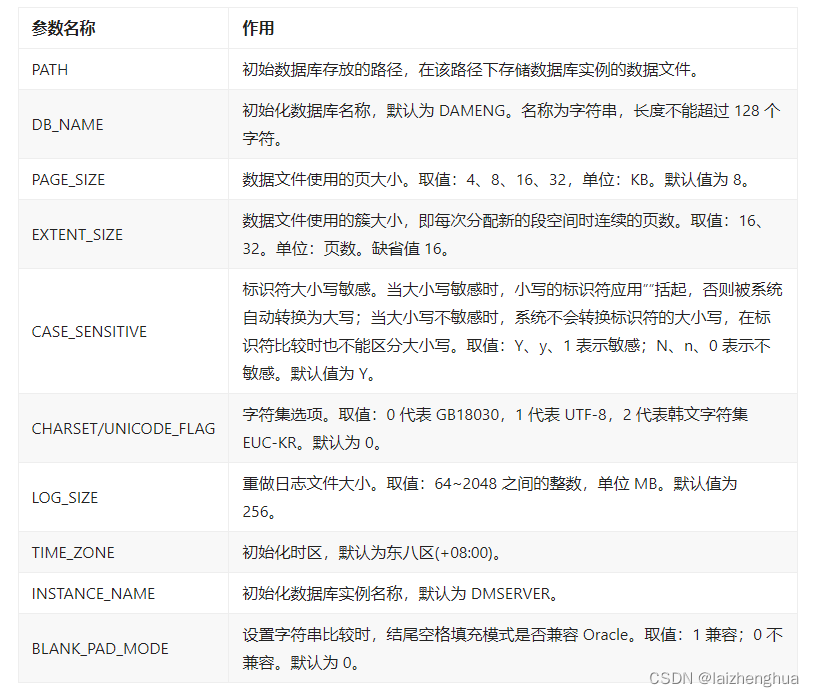
2.4、 Connect to Damon database
# 1. Start the database instance in command line mode
# su - dmdba
[[email protected] /]$ cd /db/dmdbms/bin
[[email protected] bin]$ ./dmserver /dbdata/test/dm.ini

# 2. Register the operating system service and start the database instance
END
THANKS
边栏推荐
- Ansa secondary development - external programs use socket to communicate with ansa
- Huasan IPSec
- [redis]-[redis underlying data structure]-sds
- CTF show WEB10
- Mongodb installation (Graphic tutorial)
- The market value of Jinshan office fell below 100 billion yuan: the shareholder Qiwen n-dimensional cash out exceeded 1.2 billion yuan
- JVM memory model concepts
- [Blue Bridge Cup monolithic unit] serial port communication
- CTF show WEB10
- An improvement of the code in the article "Walkthrough: creating paged data access using web form pages" in MSDN
猜你喜欢

Zhongyi Antu submitted for registration: proposed to raise 600million yuan, with annual revenue of nearly 1.2 billion yuan

JVM memory model concepts

Illustration Google V8 14: bytecode (2): how does the interpreter interpret and execute bytecode?

Le Code est correct, mais les données de la base de données ne sont pas affichées.

Upgrade Jenkins steps and problems encountered

【元宇宙3d大赛】

群晖DSM7添加套件源
![[UML modeling] (4) sequence diagram of UML modeling](/img/e6/0fd15bca49e7894ce039d97f3798c3.jpg)
[UML modeling] (4) sequence diagram of UML modeling

图解 Google V8 # 16:V8是怎么通过内联缓存来提升函数执行效率的?

Practical application cases of digital Twins - coal mine
随机推荐
Yyds dry goods inventory rapid establishment of CEPH cluster
JVM内存模型概念
(for line breaks) differences between gets and fgets, and between puts and fputs
运算符优先级与结合顺序
An improvement of the code in the article "Walkthrough: creating paged data access using web form pages" in MSDN
Rdkit | topological polarity surface area (TPSA)
[untitled]
数字孪生实际应用案例-煤矿篇
Practical application cases of digital Twins - coal mine
图解 Google V8 # 16:V8是怎么通过内联缓存来提升函数执行效率的?
解决Jenkins升级后不能保存配置的问题
showCTF Web入门题系列
Illustration of Google V8 16: how does V8 improve function execution efficiency through inline caching?
Permission management
1005 Spell It Right (20 分)(测试点3)
[kotlin] premier jour
群晖DSM7添加套件源
2021-06-16 STM32F103 exti interrupt identification using firmware library
[putty] a free SSH and telnet client
Vision_ Transformer code exercise