当前位置:网站首页>Scrape crawler framework
Scrape crawler framework
2022-07-29 10:25:00 【Star and Dream Star_ dream】
1. Create a project
scrapy startproject project nameD:.
│ scrapy.cfg
│
└─firstSpider
│ items.py
│ middlewares.py
│ pipelines.py
│ settings.py
│ __init__.py
│
└─spiders
__init__.py( Blue is folder , Green is file )
The role of each major document :( Can't delete !!)
- scrapy.cfg The configuration file for the project
- firstSpider Project Python modular , The code will be referenced from here
- items.py The project's target file
- pipelines.py Pipeline files for the project
- settings.py The setup file for the project
- spiders Store crawler code directory
- __init__.py Project initialization file
2. Define the fields of the target data
stay items.py Write code in the file
Get into firstSpider In file , find items.py file , Enter the following 2 Line code :( Field name self fetching )
import scrapy

#  Define the fields of the target data
class FirstspiderItem(scrapy.Item):
    title = scrapy.Field()  #  Chapter name
    link = scrapy.Field() #  Links to chapters
3. Write crawler code
In the project root directory ( Which contains firstSpider Folder 、scrapy.cfg file ) Next , stay cmd window Enter the following command , Create crawler file .
scrapy genspider file name The host address of the web page to be crawledsuch as :scrapy genspider novelSpider www.shucw.com
In your spiders A crawler file will be added to the directory
The contents of the document :
import scrapy


class novelSpider(scrapy.Spider):
    name = 'novelSpider' #  Reptile name
    allowed_domains = ['www.shucw.com'] #  The host name of the web page to be crawled
    start_urls = ['http://www.shucw.com/'] #  Page to crawl 【 You can modify 】

    def parse(self, response):
        pass


4. In crawler files novelSpider Write the crawler code in the file
The crawler code : It's just parse Method Write in
import scrapy
from bs4 import BeautifulSoup
from firstSpider.items import FirstspiderItem # Guide pack

#  All adopt Tap Key indent

class NovelspiderSpider(scrapy.Spider):
	name = 'novelSpider' #  Crawl identification name
	allowed_domains = ['www.shucw.com'] #  Crawl the page range
	start_urls = ['http://www.shucw.com/html/13/13889/'] # start url

	def parse(self, response):

		soup = BeautifulSoup(response.body,'lxml')

		titles = [] #  Used to save chapter titles ( use list preservation )
		for i in soup.select('dd a'):
			titles.append(i.get_text()) #  Add into titles in

		links = [] #  Links to save chapters
		for i in soup.select('dd a'):
			link = "http://www.shucw.com" + i.attrs['href']
			links.append(link)

		for i in range(0,len(titles)):
			item = FirstspiderItem()
			item["title"] = titles[i]
			item["link"] = links[i]

			yield item #  Return every time item
5. stay pipelines.py Every one in the file item Save to local
from itemadapter import ItemAdapter

# All adopt Tab key , Prevent spaces and Tab Bond hybrid

#	 Pipeline files , be responsible for item Post processing or preservation of
class FirstspiderPipeline:
	#  Define some parameters that need to be initialized
	def __init__(self):
        #  The file address written here : It's in the root directory article Folder 【 You need to create... Manually 】
		self.file = open("article/novel.txt","a")

	#	 Every time the pipe receives item Post execution method
	def process_item(self, item, spider):
		content = str(item) + "\n"
		self.file.write(content)	# Write data to local
		return item

	#	 Method executed when crawling is over
	def close_spider(self,spider):
		self.file.close()
Not only in the pipeline pipelines.py Write code in file , And in settings.py Set in the code
Open pipeline priority 【0-1000】【 The smaller the number is. , The higher the priority 】

6. Run the crawler
In the project root directory Next , stay cmd window Enter the following command , Create crawler file .
scrapy crawl Crawler file namesuch as :scrapy crawl novelSpider
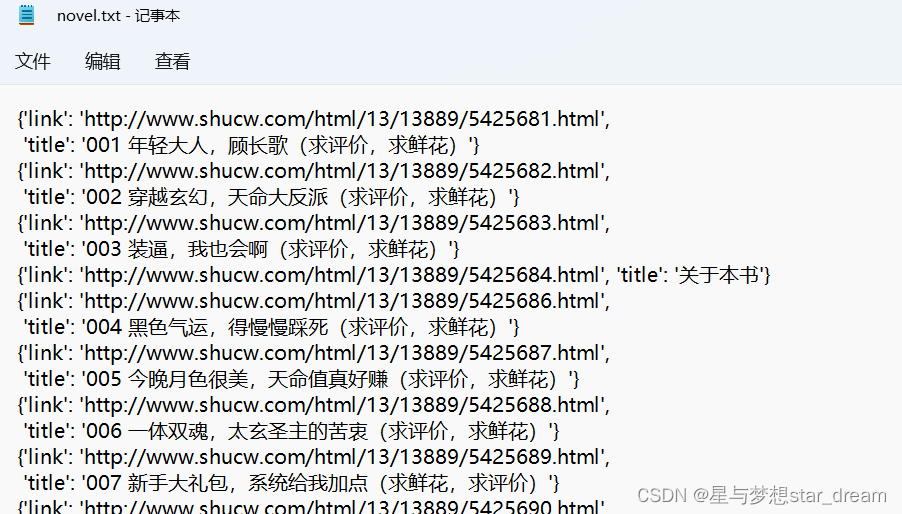
We go back to root directory , Get into article Folder , open novel.txt, We get the information of the crawler
7. How to do post Request and add request headers
stay Crawler file (youdaoSpider.py) Enter the following code in 【 This is another project 】
import scrapy
import random


class TranslateSpider(scrapy.Spider):
	name = 'translate'
	allowed_domains = ['fanyi.youdao.com']
	# start_urls = ['http://fanyi.youdao.com/']

	agent1 = "Mozilla/5.0 (iPhone; CPU iPhone OS 6_0 like Mac OS X) AppleWebKit/536.26 (KHTML, like Gecko) Version/6.0 " \
		 "Mobile/10A5376e Safari/8536.25 "
	agent2 = "Mozilla/5.0 (Windows NT 5.2) AppleWebKit/534.30 (KHTML, like Gecko) Chrome/12.0.742.122 Safari/534.30"
	agent3 = "Mozilla/5.0 (Linux; Android 9; LON-AL00 Build/HUAWEILON-AL00; wv) AppleWebKit/537.36 (KHTML, like Gecko) " \
			 "Version/4.0 Chrome/76.0.3809.89 Mobile Safari/537.36 T7/11.25 SP-engine/2.17.0 flyflow/4.21.5.31 lite " \
			 "baiduboxapp/4.21.5.31 (Baidu; P1 9) "
	agent4 = "Mozilla/5.0 (Linux; Android 10; MIX 2S Build/QKQ1.190828.002; wv) AppleWebKit/537.36 (KHTML, like Gecko) " \
			 "Version/4.0 Chrome/76.0.3809.89 Mobile Safari/537.36 T7/12.5 SP-engine/2.26.0 baiduboxapp/12.5.1.10 (Baidu; " \
			 "P1 10) NABar/1.0 "
	agent5 = "Mozilla/5.0 (Linux; U; Android 10; zh-CN; TNY-AL00 Build/HUAWEITNY-AL00) AppleWebKit/537.36 (KHTML, " \
			 "like Gecko) Version/4.0 Chrome/78.0.3904.108 UCBrowser/13.2.0.1100 Mobile Safari/537.36 "
	agent6 = "Mozilla/5.0 (Windows; U; Windows NT 5.1; zh-CN) AppleWebKit/533.21.1 (KHTML, like Gecko) Version/5.0.5 " \
			 "Safari/533.21.1 "

	agent_list = [agent1, agent2, agent3, agent4, agent5, agent6]

	header = {
		"User-Agent":random.choice(agent_list)
	}

	def start_requests(self):
		url = "https://fanyi.youdao.com/translate_o?smartresult=dict&smartresult=rule"

		#  Add a with form information to the queue post request
		yield scrapy.FormRequest(
			url = url,
			formdata={
				"i": key,
				"from": "AUTO",
				"to": "AUTO",
				"smartresult": "dict",
				"client": " fanyideskweb",
				"salt": "16568305467837",
				"sign": "684b7fc03a39eebebf045749a7759621",
				"lts": "1656830546783",
				"bv": "38d2f7b6370a18835effaf2745b8cc28",
				"doctype": "json",
				"version": "2.1",
				"keyfrom": "fanyi.web",
				"action": "FY_BY_REALTlME"
			},
			headers=header,
			callback=self.parse
		)

	def parse(self, response):
		pass
The egg part of this article :
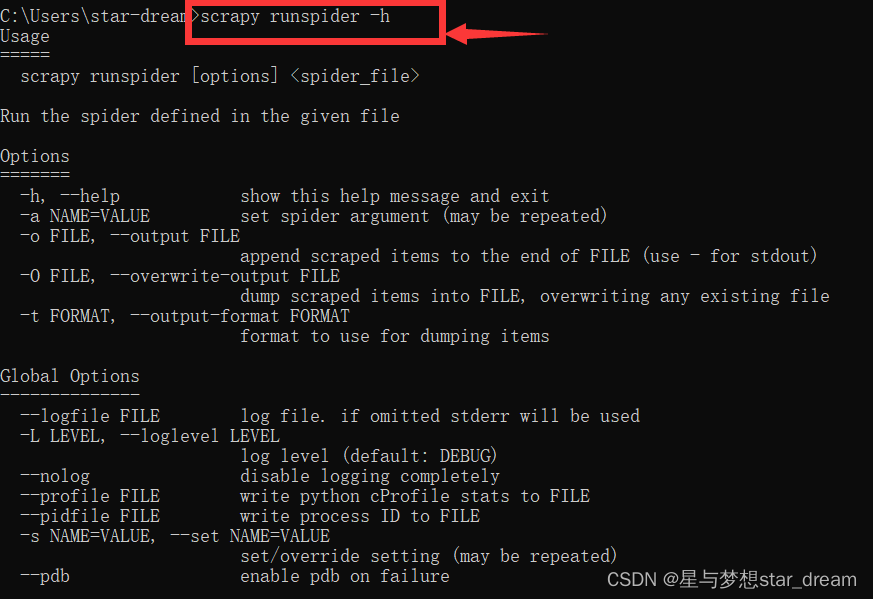
stay cmd Input in scrapy, You can understand various commands
If you don't know the meaning of these commands , You can add -h, Get details
Like :scrapy runspider -h

End
边栏推荐
- Function - (C travel notes)
- 服务器
- 【论文阅读】I-BERT: Integer-only BERT Quantization
- What is "enterprise level" low code? Five abilities that must be possessed to become enterprise level low code
- TCP failure model
- MySQL logging system: binlog, redo log and undo log
- Method of cocos2d-x sprite moving
- Follow teacher Wu to learn advanced numbers - function, limit and continuity (continuous update)
- Geeer's happiness | is for the white whoring image! Analysis and mining, NDVI, unsupervised classification, etc
- 转转push的演化之路
猜你喜欢

这是一份不完整的数据竞赛年鉴!
![[paper reading] q-bert: Hessian based ultra low precision quantification of Bert](/img/2d/3b9691c16d89dff1a8ac79105172d4.png)
[paper reading] q-bert: Hessian based ultra low precision quantification of Bert
After eating Alibaba's core notes of highly concurrent programming, the backhand rose 5K

MySQL 8 of relational database -- deepening and comprehensive learning from the inside out

HMS Core Discovery第16期回顾|与虎墩一起,玩转AI新“声”态
![[FPGA tutorial case 18] develop low delay open root calculation through ROM](/img/c3/02ce62fafb662d6b13aedde79e21fb.png)
[FPGA tutorial case 18] develop low delay open root calculation through ROM

Comprehensively design an oppe home page -- the bottom of the page
![[ts]typescript learning record pit collection](/img/4c/14991ea612de8d5c94b758174a1c26.png)
[ts]typescript learning record pit collection

Easy to understand and explain the gradient descent method!
![[HFCTF 2021 Final]easyflask](/img/58/8113cafae8aeafcb1c9ad09eefd30f.jpg)
[HFCTF 2021 Final]easyflask
随机推荐
ECCV 2022 | CMU提出在视觉Transformer上进行递归,不增参数,计算量还少
A sharp tool for data visualization Seaborn easy to get started
Be tolerant and generous
皕杰报表之文本附件属件
How to integrate Google APIs with Google's application system (3) -- call the restful service of Google discovery API
Function - (C travel notes)
Attachment of text of chenjie Report
Read Plato farm's eplato and the reason for its high premium
After eating Alibaba's core notes of highly concurrent programming, the backhand rose 5K
Network picture to local picture - default value or shortcut key
不堆概念、换个角度聊多线程并发编程
Two MySQL tables with different codes (utf8, utf8mb4) are joined, resulting in index failure
SkiaSharp 之 WPF 自绘 弹动小球(案例版)
On memory computing integrated chip technology
Docker安装Redis、配置及远程连接
Shell笔记(超级完整)
"Focus on machines": Zhu Songchun's team built a two-way value alignment system between people and robots to solve major challenges in the field of human-computer cooperation
Soft exam summary
This is the right way for developers to open artifacts
This developer, who has been on the list for four consecutive weeks, has lived like a contemporary college student